Uncategorized

Minnesota governor wants universal pre-K, but does it work?

To think that a state with a budget surplus of nearly $2 billion is on the brink of a government shutdown is ludicrous. That seems to be the case in Minnesota as Governor Mark Dayton has vetoed a number of bills that may preclude to a partial shutdown of the state’s government.

Just a few days ago, Dayton vetoed the education bill because it didn’t include a plan for universal pre-K.

Speaking to reporters, Dayton slammed lawmakers, saying that some of the Republican politicians “hate the public schools.”

Due to his veto, legislators will be called back for a special session to work out a new education budget that will likely have to include more education spending or Dayton’s plan for universal pre-K.

Dayton believes that providing pre-K to young students will contribute to a child’s overall success. But the research is mixed on what pre-K actually affords for students.

Brookings provides information on two studies that produce varied results. One shows that pre-K in New Jersey works extremely well while another conducted in by the National Head Start Impact Study “found no differences in elementary school outcomes between children who had vs. had not attended Head Start as four-year olds.”

Dayton’s plan seems to be fully paid for since the state has a pretty healthy budget surplus. But even if the results vary by state, offering free education to four-year olds before they head to kindergarten doesn’t seem like a bad idea.

It will at least give some of them the needed attention and skills prior to heading to elementary school.

How to use the Delta Model in higher education

**The Edvocate is pleased to publish guest posts as way to fuel important conversations surrounding P-20 education in America. The opinions contained within guest posts are those of the authors and do not necessarily reflect the official opinion of The Edvocate or Dr. Matthew Lynch.**

A guest post by Enrique Suarez

If Educational Institutions are to achieve success in the marketplace, they must begin to think about their business strategy in new ways. Traditional competitive approaches that rely on product differentiation do not produce optimal results, nor do they take advantage of new sources of profitability that the connectivity of a networked economy offers. Too often, they focus the attention in the wrong place.

To survive and prosper today, Educational Institutions must shift their attention from products to customers and create a business plan based on:

  • The innovative restructuring of your customer relationships
  • Segmenting your customers more creatively
  • Delivering a value proposition that places the customer at the center of your strategy

The research at the MIT Sloan School of Management, has given rise to a powerful business model that reflects the many new ways to compete in the current economy. Called the Delta Model, it was designed to offer senior managers a fresh and pragmatic approach to critical strategic business thinking. This new, integrative, strategic framework presented by Enrique Suarez, allows educational managers to identify new sources of profitability, develop new strategic approaches, establish new directions for their educational institutions, and implement an enhanced strategic agenda.

This strategic framework will also allow Educational Institutions to gain pragmatic insights on how to:

  • Begin to change from a product-driven orientation to a customer-driven orientation
  • Utilize “complementors” to extend your enterprise network
  • “Decommoditize” the way you do business by strengthening your customer relationships

The First Task: Positioning The Foundations of Management Strategy

In the conventional, best product positioning approach to business strategy, the way to attract, satisfy, and retain the customer is through the inherent characteristics of the product itself. Managers are guided by product economics and measure their success in terms of product share. In contrast, MIT has developed a different model of business strategy based on customer economics. Called the Delta Model it was designed to identify better ways to compete in a networked economy and advocates an innovative, customer-centric approach to business strategy. I’ll examine the current state of critical business thinking at institutions of higher education and the Delta Model’s triangle of strategic options that make it possible for educational managers to craft more creative and effective business plans. These three options include:

System Lock-In – a broad-scope strategy that relies on a full network of meaningful contributors to create both customer lock-in and competitor lock-out and achieve the highest level of customer bonding. Those who are successful in reaching this position gain a de facto dominance of the market.

Total Customer Solutions – which emphasizes customer bonding through a portfolio of customized products and services that represent a unique and comprehensive value proposition to individualized customers. It is a 180 degree departure from Best Product positioning (see below) and requires a very different mindset.

Best Product – a more narrow option built on classic forms of competition and centered on the intrinsic superiority of a product or service, being first to market, or the differentiation of a so-called dominant design. Most companies are positioned here, with limited opportunities for customer bonding. System Lock-in, Total Customer Solutions, and Best Product are alternative options for achieving customer bonding and can be pursued simultaneously.

You can download the entire presentation in the following link:

https://www.academia.edu/8227956/How_to_use_the_Delta_Model_in_Higher_Educ

_____

Enrique Suarez has a Master’s of Education & International Development from Harvard University. Read more at http://www.com/suarezenrique/delta and contact him at [email protected].

Beyond the shine : Finding the technology in the standard

**The Edvocate is pleased to publish guest posts as way to fuel important conversations surrounding P-20 education in America. The opinions contained within guest posts are those of the authors and do not necessarily reflect the official opinion of The Edvocate or Dr. Matthew Lynch.**

A guest post by Mike Gorman

I remember when I first started using digital  technology in the classroom. I was in awe of the amazing Apple Classic and programs such as Claris Works and Hyper Card. In fact, I tried to find anyway I could to make this new technology fit the curriculum. Students were so engaged with programs such as Oregon Trail and Lemonade Stand that teachers found ways to make them fit, regardless of the standards. It was 1980 something and computers had finally entered the classroom. Many times it was one computer and thirty-five students, and everyone was being mesmerized by the shine of new technology. I may have forgotten a standard or two, possible even over taught the technology at the expense of some content. It may have even been science class, but somehow we were all on the Oregon Trail… after all there must have been some wildflowers along the way!  The lure and brightness of the Apple Classic  Computer was just to captivating. I was caught in the shine of an amazing new device.

Fast forward to 2015 and one will find many schools replacing their analog tools of the past with a new digital device. Many times this takes on the focus of a “one to one” program. Visions are acquired and missions are written describing how this amazing new device will change the classroom. There is always a great deal of focus on the programs and applications that will change learning. An image is created of students learning and engaging with this new technology throughout the school day. The excitement grows and the shine becomes brighter until it is soon discovered that this amazing new tool is really only… a device. What comes next? Perhaps the most exciting stage, exploring the real possibilities that technology can bring to learning. Let’s call it the pedagogy, or process that allows classrooms to go beyond the shine.

In this post I would like to investigate how examining the curricular standards helps teachers investigate ways to integrate technology in order to facilitate student understanding of curricular content. It all really begins with something that has been around for quite awhile. You probably know them as the curriculum standards.

A portion or foundation of a curriculum is the standards. Standards make up the general knowledge of what educators want students to know. Standards are a great starting point and through careful examination, exact content and skills can be aligned with technology integration. Simply stated, examining or unpacking a standard allows a teacher to see what a child will know and be able to do. It can also help educators determine what digital resources may work best to help support learning. Now, the phrase “unpacking the standards’ may not bring out the smile you want from teachers. For this reason I will refer to it as finding the technology in the standard. Let’s take a look!

Finding the Technology in the Standard

I have actually broken it down into five tasks or steps. You may even wish to practice by applying each step below  using a standard from your curriculum.  As you go through the process it is important to keep focused on the task of “finding the technology and examining” … there will be ample opportunity later to think about specific lessons, activities, and resources.

Five Tasks (steps)… 

  1. Identify the standard (sometimes referred to as a Power Standard which would be broken down to specific grade level)
  2. Reflect on the standard… if possible collaborate with others (What does the standards mean, why are we teaching this, what should students know, what should students be able to do, how does it apply to students at my grade level, where might it stand on a Depth of Knowledge Chart or Bloom’s Taxonomy)
  3. Determine the content by reviewing the standard and circling the appropriate nouns.(This will help you determine content and allow you to determine what is appropriate for your level of students. Later we will examine digital resources that will align with these nouns or content.)
  4. Investigate the skills by reviewing the standard and circling the appropriate verbs. (This will allow you to determine the appropriate skills  to be practiced by students. This can be aligned to Depth of Knowledge, Blooms, and/or 21st century 4 C’s. Later we will be able to explore interactive technology that will help students learn and also demonstrate knowledge as seen in these verbs.)
  5. Create Learning Targets demonstrating what students will be able to do. (This is done through reflection and listing of verbs and nouns. The nouns allow us to state what students will know, and the verbs allow us to see what students will be able to perform or do. Digital applications and resources will blend together wonderful classroom opportunities that use these nouns and verbs to reveal the standards.)

Let me provide an example below…. note the standards

  • Students will be able to research and record key facts involving the planets of the solar system.
  • Students will explain orbit, gravity, and gravitational pull.
  • Students will be able to collaborate on a presentation that provides what they have learned in their own words

Relevant Nouns –  research,  planets, solar system. orbit, gravity, and gravitational pull

Relevant Verbs – explain , collaborate , presentation

Learning Targets for students:

  • I can research and explain my findings on planets and their relationship to the solar system
  • I can collaborate with others to create a presentation
  • I can present with others to demonstrate our our learning and understanding

At this stage it is important to look at the nouns, verbs, and learning targets in order to determine where the technology aligns. The nouns could point to numerous OER (Open Educational Resource) sites available on the internet. The verbs may point to numerous Web 2.0 tools and apps. Looking at the standards and applying this “find the tech” filter allows technology to integrate with the expected learning, rather than possibly just shine right through the learning. In the upcoming articles in this series I will focus on wonderful internet content resource sites that you should to get to know as you identify and apply the nouns. I will also  point out collections of apps and Web 2.0 tools that help support the verbs. You will also discover great lesson plans collections that can be used to accomplish some of those learning targets. I do hope this provides you a reason to return and be part of the 21centuryedtech Learning Community.  Please remember that the best way to avoid the technology shine is to focus on standards while you put students, not devices, at the center of learning. As you emphasize standards and students you will find there are so many amazing opportunities for learning….  beyond the Oregon Trail!

This post originally appeared on 21st Century Educational Technology and Learning and was republished with permission.

Read all of our posts about EdTech and Innovation by clicking here. 

____

This is one of a series of posts that are dedicated to going beyond the shine of technology by examining ways to use digital tools to engage students in real learning. You can read the rest on Mike’s website, https://21centuryedtech.wordpress.com. You can also follow him on Twitter: @mjgormans. Please give this post a retweet and pass it on. Have a great week – Michael Gorman (21centuryedtech)


The power of the iPad in Kindergarten

**The Edvocate is pleased to publish guest posts as way to fuel important conversations surrounding P-20 education in America. The opinions contained within guest posts are those of the authors and do not necessarily reflect the official opinion of The Edvocate or Dr. Matthew Lynch.**

By Kristi Meeuwse, ADE

Technology won’t replace teachers, but teachers who don’t teach with technology will be replaced. -unknown

Last week, our school iPads were replaced.  We were very excited to exchange our iPad 2’s for the new iPad Air.  Our old iPads served us well but were suffering from frequent app crashes. The replacement took about a week…no small feat when you are talking about over 800 iPads. The excitement over the idea of new iPads was suddenly replaced with the knowledge that we would be without iPads for a few days. My kids quickly realized this and asked, “Um, how will we do our work with no iPads?”  I responded, “I’m not sure…maybe we will do some worksheets.” Puzzled, the kids responded with, “What are worksheets?” You see, they had never completed one before.

It was definitely like going back in time and I’m certain I don’t ever want to teach again without having those devices. My students were used to having choices about their day and about demonstrating their learning. I was used to personalizing their learning and serving as a facilitator while they directed themselves. Student-centered and student-directed learning is one of the keys to educational change.

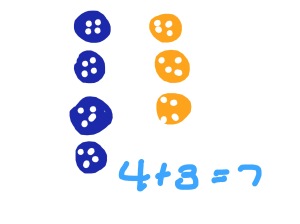
So, now we have our beautiful new devices and the kids immediately went to work. Their work. We have been working on number stories in their math journals. Even though I’m providing the number stories, there is still choice. For example, Sam had 7 buttons.  Some were blue and some were yellow.  How many of each were there?

Here are a couple of samples from my kids:

IMG_0003

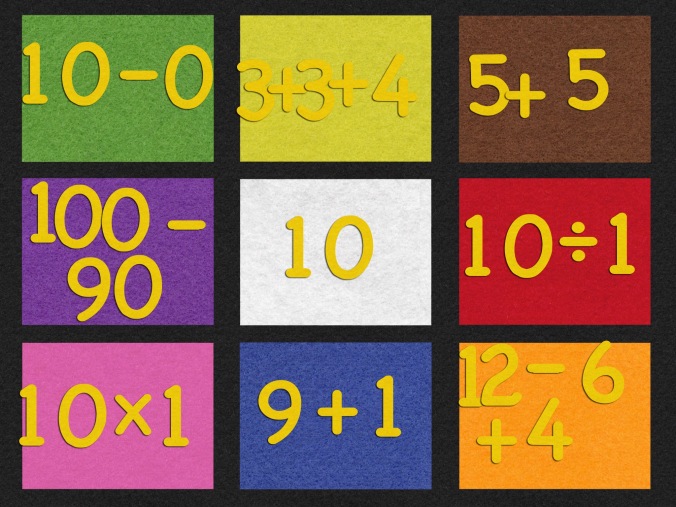
IMG_0004One was being a wise-guy, but still got the right number of buttons. By making these number stories open-ended, students have the ability to use multiple pathways to get to the answer. Another student and a partner, worked together to create what we call an “incredible equation”. One of the students was stronger in math (clearly, as he is able to multiply and divide at age 5) and the other was working on grade level. Together they made this:


IMG_0005

By letting my students work where they are, and not where a worksheet forces them to be, the sky is the limit. The iPads give my students the freedom to move on, to move up, and to be in charge of their learning.

So, yes, I am thrilled to have our iPads back. We saw first hand the power of the iPad in our classroom. Even though we have only 22 school days remaining, we are going strong to the end!

Today we will do exciting new things. Let’s get to it!

Read all of our posts about EdTech and Innovation by clicking here. 


Kristi Meeuwse teaches kindergarten in Charleston, South Carolina. In January, 2011, her kindergarten class started a 1:1 iPad pilot for the school district and the results so far have been very successful. You can read more about it on her blog iteachwithipads.net.

Former Florida district Superintendent named New York education commissioner

One state’s loss is another’s gain. Former Hillsborough County Florida Superintendent, MaryEllen Elia, has been named education commissioner for the state of New York.

Elia led Hillsborough County schools for 10 years but was ousted earlier this year.

Heading to New York, Elia will oversee a much smaller administration according to Tampabay.com. Hillsborough County Public Schools represent the ninth largest school district in the nation. But because she now controls the education policy for an entire state, her area of responsibility is obviously much larger.

She will serve as president of the University of the State of New York, not to be confused with New York University, and will oversee “700 school districts, public colleges, libraries, museums and broadcasting stations, and provides licenses for 52 professions.”

While New York is thrilled to have Elia, some in Hillsborough weren’t sad to see her go. By way of the Washington Post, Elia was accused of being too partisan at times and entered into a partnership with the Bill and Melinda Gates Foundation regarding teacher evaluation.

But even with the light jabs, Elia’s tenure went six years beyond the average time that most superintendents spendon the job. She was rewarded with salary increases and, again, remained on the job for 10 years until a new school board decided to vote her out.

Elia’s time in New York will likely be judged by how well she works with teachers’ unions and how she navigates an ever increasing anti-testing climate.

Her experience as an educator and as head of one of the nation’s largest school districts in the country will certainly come in handy when she takes her new post beginning July 6th.

Using the free classes on iTunes U

**The Edvocate is pleased to publish guest posts as way to fuel important conversations surrounding P-20 education in America. The opinions contained within guest posts are those of the authors and do not necessarily reflect the official opinion of The Edvocate or Dr. Matthew Lynch.**

A guest post by Kristi Meeuwse, ADE

The function of education is to teach one to think intensively and to think critically. Intelligence plus character – that is the goal of true education. -Martin Luther King

Thinking critically and intensively is not reserved for older students. We work diligently to create learning experiences in kindergarten that allow our young students to think deeply about various topics. Having iPads allows us to enrich learning experiences in a way that wasn’t possible before. One of the iPad tools that is often overlooked is iTunes U. Why iTunes U?

  • It is a free repository of classes and educational content
  • Students have access to content anytime and anywhere
  • Content is easily updated and changed
  • Discussion feature allows rich conversation between students

While there are a large number of free classes available on iTunes U, perhaps you should consider creating your own. With the end of the school year only a few weeks away, it seems odd to be thinking of adding new things to your teaching bag of tricks, but this is the perfect time to do so. You can use some of your summer to create your own courses. It is easy to do. Simply log into the iTunes U course manager using your Apple ID and add your content. What are the benefits to creating your own course?

  • Content is more meaningful to students
  • Content can be customized
  • Easy to create, easy to update
  • All resources are in one place: books, documents, videos, images, web links and apps

Here is the link to a Spiders course I created for my kindergarten students as well as one for teachers on Personalized Learning and another course created by a 4th grade colleague about my school and how we innovate instruction using iPads.

iTunes U allows you to customize the learning experience for your students, even the youngest ones. It is also a great way to create a learning portfolio for students. Up to 5 people can collaborate on a course so you and your colleagues can work together and share the wealth. If you aren’t comfortable creating a full course initially, create a chapter and keep adding. It is easy to update any time.

If you aren’t already using iTunes U, consider giving it a try. It will open a whole new world to your students for learning and engaging in content.

Today we will do exciting new things. Let’s get to it.

This post originally appeared on iteachwithipads.net and has been republished with permission. 

Read all of our posts about EdTech and Innovation by clicking here. 

__________________

Kristi Meeuwse teaches kindergarten in Charleston, South Carolina. In January, 2011, her kindergarten class started a 1:1 iPad pilot for the school district and the results so far have been very successful. You can read more about it on her blog iteachwithipads.net.

10 ways to use Skype in the classroom

**The Edvocate is pleased to publish guest posts as way to fuel important conversations surrounding P-20 education in America. The opinions contained within guest posts are those of the authors and do not necessarily reflect the official opinion of The Edvocate or Dr. Matthew Lynch.**

A guest post by Bevin Reinen

Skype is an instructional tool that provides boundlessopportunities for authentic teaching and learning.  It allows us to explore beyond the four walls of our classrooms.  As elementary teachers, we sometimes battle to hold our students’ short attention spans. Integrating Skype lessons brings the curriculum to life in ways never before possible.  You know that special moment when you announce a class activity, and it’s greeted with claps, screams, and cheers?  That’s Skype.  It brings pure joy, wonder, and intrigue to your students.

Here’s a list of ten ways to utilize it in the elementary setting, followed by some logistical tips for success.

1)  Take a Virtual Field Trip:  Is there some place you’d like your class to visit, but can’t swing the funds or it’s just not geographically possible?  Find a guide to ‘take’ you there by visiting a historical landmark, museum, zoo, etc.

2)  Invite an Author:  Set up a Skype session with an author you’ve been studying to discuss a book.  Or, set one up with any author so that your students can learn about the steps of the writing process.  No, real authors do NOT write one and done!  Here’s an awesome list of Authors Who Skype With Classes and Book Clubs for Free.

3)  Share a Project:  Have your students been working on some kind of a special project? Give them the chance to show/share it with a distant class.  This provides motivation and will help them develop confidence in the value of their work.

4)  Put on a Performance:  Is there a poem, song, skit, or reader’s theater script your students need to present?  Give them the opportunity to perform to a unique audience via Skype!

5)  Interview an Expert:  Invite an expert to speak with your class on a current topic of study.  Conduct a Q and A session.  This is definitely a step up from the basic Google search!

6) Cultural Exchange:  Learn about various cultures by connecting with a class from abroad. Check out the site ePals, which allows educators interested in Skyping or using other web-based tools to connect globally.

7) Meet Pen Pals:  To encourage meaningful writing opportunities, write back and forth with pen pals throughout the year.  Set up a culminating Skype chat so that students can finally meet their pen pals ‘face to face’.

8) Mystery Skype:  If you register for Skype in the Classroom (instead of regular Skype), you can play Mystery Skype.  Mystery Skype is an educational game that allows two classes to guess each other’s locations via questioning.

9) Including Students with Medical Issues:  If a student has to miss school for an extended amount of time, Skype is the perfect way for the class to connect with their classmate.  While not all class activities are workable on Skype, including the student in some key lessons will help prevent him/her from falling behind.

10) Share Travel Experiences:  If you have a special trip to attend during the school year, have your substitute connect with you on Skype to touch base, allow you to do a mini-lesson, or show/share about your location.

Tips:

1)  Install Skype on your computer.

2)  You’ll need a webcam, speakers, and microphone also.

3)  Be sure you and your person both add each other as Skype contacts.

4)  Run a test call to ensure everything is working properly.

5)  Outline a plan and discuss logistics with your Skype contact.

6)  Walk through expectations/procedures with your students beforehand.

*Remember, time is of the essence when working with little ones.  Make sure all kinks are worked out prior to the chat to maximize engagement.

Here are a few photos of my class chatting with our pen pals/digital learning buddies from a nearby school.  To launch our science unit on animals, we had each student bring in a stuffed animal and fact to show/share. Afterwards, I assigned her class to research and observe penguins on Monterey Bay Aquarium’s Live Web Cams, while she assigned my class to do the same for giraffes using Houston Zoo’s Live Web Cams.  This generated excitement and motivated students for the next fact/opinion pen pal writing to come!

This post originally appeared on teachtrainlove.com and has been republished with permission. 

Read all of our posts about EdTech and Innovation by clicking here. 

______________________

Bevin is Nationally Board Certified as an Early Childhood Generalist.  She considers herself a teacher by day, writer by night.  Some of her work has appeared in national publications including Chicken Soup for the Soul; Married Life, Hallmark’s Thank You, Mom book, and Boys’ Quest magazine for kids.

Effort affects everything

**The Edvocate is pleased to publish guest posts as way to fuel important conversations surrounding P-20 education in America. The opinions contained within guest posts are those of the authors and do not necessarily reflect the official opinion of The Edvocate or Dr. Matthew Lynch.**

A guest post by Suzy Brooks

Tomorrow morning both my @FourthGraders and my 16 year old son will take the state Common Core assessment.  Like the swallows to Capistrano, these tests come around faithfully each spring.  Though the swallows are welcomed with fiestas and cheering crowds, our requisite tests are not met with the same level of joy and wonder.

Though, there are things we wonder about….  There are many “sides” to the standardized testing conversation. A quick search on Google allows readers to experience the opinions of those who are anti-test, and those who are pro-test…   ;)     There are plenty of opinions inside and outside the world of education to fill in gaps in between.  I have never written about my personal opinion regarding these tests.  First of all, our classroom blog is no place for controversy, and secondly I could not choose a side.

Today? I finally choose a side.  I choose Effort.  I support Best Effort in all areas of the curriculum. I support Best Effort inside and outside the classroom. I support Best Effort 180 days a year as a teacher and I strive for Best Effort 365 days a year as a human being (though laundry piles and dusty shelves are a testament to my falling short sometimes ha ha!).

This afternoon, I chatted on the rug with my students to go over the logistics for testing tomorrow and to clear up any last-minute concerns. They were thrilled to hear there would be no homework this week. Whoop!! They asked if they should go to bed early.  They spoke of what snacks they would bring to fuel their pre-test brains.  They asked (again) about how long it would be.  They asked (again) about what to do if they have technical glitches.  They asked (again) whether we were taking the Math or ELA test tomorrow.

Then it happened – they shared what they have heard about The Test.  This year, “The Question” was asked quite respectfully  (most years, it is asked by a student in a way that isn’t so kind). When the student said “I was told the test only measures teachers and whether they do a good job. Is that true?”, there was a small sea of bobbing heads.  They have heard the same thing. Oftentimes, students are told the test is not testing them, it is testing their teacher.  Though I understand the rationale to reassure young students, hearing the question always makes me sad.

To answer the question, I was honest and true to my own feelings.  The test gives us a small picture of how we are all doing.  It might show whether or not our curriculum meets the standards. It might show whether or not my methods are improving each year. It might show students their performance over time.  It leaves out many vital, important facets of teaching and learning.  It is by no means a bottom-line measurement of who we are as teachers, as students or as parents. It is a blurry snapshot at best.

But I reminded them only ONE thing matters to me every year.  Only one thing matters to me every day.  Only one thing will make a difference in their lives as they move forward.

Effort Affects Everything.

Whether I am working with students on the first day of school, the 40th day of school, the day before a vacation, the day of a test, or the final day I spend with them before I hug them goodbye, I share the same message:  Effort Affects EVERYTHING. They hear me say it when I am praising them. They hear me say it when I am encouraging them.  They hear me say it when I am testing them. They even hear me say it when I am reprimanding them. Though they are still learning to do so, I expect my students to try their best each and every day.  I expect the same of myself. I know my inner middle-aged Pollyanna is speaking for me when I say it doesn’t matter what we are doing – we should always try our best.  Students in my classroom hear this, read this, see this, and know it to be true; it is the foundation of our classroom culture.

Effort Affects Everything.

I told my fourth grade students I expect them to treat tomorrow like every other day of the school year. I expect them to try their best. To read carefully. To employ strategies. To write thoughtfully. To be genuine, hard workers because THAT is what I expect of them every day.   Adults know there is pride in a hard day’s work; my young students are discovering it for themselves.

This post originally appeared on blogs.falmouth.k12.ma.us and has been republished with permission. 

_____________________

Suzy received her undergraduate degree in Elementary Ed. and Sociology and her graduate degree in Instructional Technology.  Currently, she is serving on the Board of Directors for MASCD (Massachusetts Association for Supervision and Curriculum and Development). Suzy also recently became a Teacher Ambassador for FableVision, an amazing, innovative company that encourages creativity and individuality in schools.

Should sex ed start in kindergarten?

Talking about sex to a classroom full of five-year-old kids is likely to make some teachers and parents uncomfortable. But that is the approach that the Netherlands is taking and it is working. This week marks the start of “Spring Fever” week in the Netherlands where primary school students learn about sex education.

According to studies by the Word Health Organization and the World Bank by way of pbs.org, the dutch have “one of the lowest” teen pregnancy rates in the word and “nine out of ten Dutch adolescents used contraceptives the first time” they chose to have sex.

The information given to young students isn’t the typical data presented by your high school football coach who’s stuck leading the health class’s discussion on sex ed. Students learn about “sexual diversity and sexual assertiveness” and the aim is to create a healthy environment that will encourage students to know that “sexual development is a normal process.”

One key component of the curriculum is for students to feel comfortable with themselves and that “sexuality also has to do with respect, intimacy, and safety.”

This, obviously, is a variation from what we see in America. Sex is still a taboo topic for many as the subject isn’t a school requirement as it is in the Netherlands. PBS‘ story regarding sex ed shows data from the Public Religion Research Institute that “nearly four in 10 American Millennials report that the sex education they received was not helpful.”

Some states still teach abstinence as the only form of sexual education and it has not helped in lowering America’s teen pregnancy rate or reign in the growth of STD’s among teenagers.

While this type of liberal approach may not immediately work in America, it is definitely worth exploring. Teaching kids the importance of self worth through sexual education will increase their confidence and aid them in making better decisions as they mature.

Continuing the closed minded approach about sexual education works to the detriment of our students and we will continue to reap the benefits of the bad educational decisions we’ve made, which may be an increase rates of teen pregnancy and STDs.

Using twitter in the classroom – from the perspective of students

**The Edvocate is pleased to publish guest posts as way to fuel important conversations surrounding P-20 education in America. The opinions contained within guest posts are those of the authors and do not necessarily reflect the official opinion of The Edvocate or Dr. Matthew Lynch.**

A guest post by Craig Kemp

This year as I reflect on 4 terms of amazing learning within my school here in Singapore I asked the students about their highlights. Using twitter in the classroom was one of those.

This year we trialled the use of Twitter as a tool to support student learning in the classroom. One major impact was its use in the development of a new modern learning environment that is currently being implemented ready for the 2015 school year.

I asked the students involved a little bit about their use of Twitter to dig a little deeper into what makes them tick when learning through Social Media. Here are some of their responses:

  • I remember the thrill of getting instant replies
  • I loved the ideas that we got from people from all over the world
  • The ideas we got from other students and teachers were amazing because we didn’t think of them but they were so great and we are using them in the design of our learning environment
  • It was a great way to see other people’s opinions
  • It felt a little strange at first because we didn’t know who we were talking to, but once we read their profiles we felt more comfortable
  • It was really exciting because there were so many different ideas and opinions to choose from
  • People that replied to our questions were friendly and kind
  • Everyone was willing to help
  • Within an hour we got to ask more than 15 questions and get answers to all of them
  • We got several links, videos and articles to help us with our research in a 1 hour lesson
  • It was amazing to connect with other students and teachers who have been through the same situation as us
  • We made some connections that wouldn’t have been possible if we hadn’t used Social Media
  • We discussed ideas with a designer that we ended up connecting with via Google Hangouts
All in all this was an incredible experience that I highly recommend to all educators. WIth the support of my school and utilising the excellent digital citizenship skills of my students we were able to master Social Media use. Bring on 2015 and the successful use of social media to support a more diverse range of learning.

This post originally appeared on Mr. Kemp’s blog, and was republished with permission.

Read all of our posts about EdTech and Innovation by clicking here. 

__________________________

Craig is a New Zealand born educator with over 10 years experience both in the classroom and in leadership. He is an enthusiastic, 21st century change agent that is passionate about every aspect of education and making a difference.