Technology changes so rapidly that it can be hard for schools to keep up. Is your school riding the wave of change or is it drowning?
Here are the ten habits of tech-savvy schools so you can see how yours measures up.
They make ongoing professional development a priority. When it comes to technology, last year’s hot new trend is this year’s old news. Successful schools provide ongoing, quality training to help educators keep up.
They invest in the right equipment. Tech-savvy schools make solid investments in equipment that meets their needs, whether it be interactive whiteboards, tablets, and/or a Chromebook for every student. Funds are allocated thoughtfully and wisely.
Technology use is frequent and widespread. When you visit the classrooms in a tech-savvy school, you see that almost everyone is using technology in some form, whether it be the middle-school Social Studies teacher giving a PowerPoint presentation or a third-grader using an app to predict the weather.
They have a clear plan. Tech-savvy schools plan ahead, taking into account projected changes in budget, infrastructure, and student population. They plan carefully so that technology integration is purposeful.
They involve all stakeholders. Successful schools not only keep parents informed, but also invite them to serve on committees that evaluate technology needs along with teachers, administrators, and maybe even students.
They have a web presence. Teachers maintain class websites which are frequently updated so that parents can routinely check them for relevant information. The school also has a presence on popular social media platforms which may be used to inform parents and educate the community.
They have an adequate support staff. Experts are available as needed for troubleshooting and repair. Such repairs are made in a timely manner so that technical glitches never cause much of an interruption in the day-to-day life of the school
They teach students about online safety and digital citizenship. The challenges that students face online change dramatically on a month-to-month basis. Tech-savvy schools implement an ongoing dialogue with students about safety, etiquette, and the potential far-reaching consequences of misguided sharing.
Teachers use technology for collaboration and learning. Instead of losing classroom time to attend a conference, teachers engage in online coursework or join communities of like-minded educators on social media.
Communication occurs via nontraditional formats. Important announcements are made over email instead of via the PA system. Members of the same department may use a blog or other platform to communicate instead of holding traditional meetings.
If you meet all these criteria, then congratulations! Keep up the good work educating children to meet their futures.
When top management turns over in a school district, your company empire can topple, unless you are prepared to weather the possibly rough transition.
School superintendents have one of the highest turnover rates of any position in the school district. In fact, the average length of time a superintendent stays in a place is five years.
Transitioning from one district leader to another can be a costly experience for school communities, especially if the district has to buyout an ex-superintendent’s contract while bringing onboard the new superintendent.
That can leave you in limbo when wondering whether your vendor contract will be renewed next year. Instead, you can persevere through superintendent turnover with these strategies.
Have a Contract in Place
A contract assures the school district that you will deliver on your promises, and this same contract assures you that the district will continue to be your customer throughout the life of the contract. A new superintendent cannot alter that agreement on his or her own because the school board authorized the contract at a specially called meeting. The superintendent recommended the contract agreement for services, but the school board approved it.
You have until the time you reach the end of the contract period to show the new leadership that your contract should be continued.
Develop Strong Networks
While under contract with the district, your company representatives are the link between your product and district administrators who can lend influence to the decision-making process. Next to the superintendent, the three positions you must know are the directors of finance, human resources, and curriculum & instruction.
Find out how well your costs and billing practices meet district expectations; if teachers are satisfied with the training you provide; and how well your product is helping teachers improve student achievement. These key leaders can help you stay the course during superintendent turnover.
Gather the Data
Finally, you’ll have to prove your value by showing the district they are getting a return on investment. Educators are well aware that edtech is collecting a tremendous amount of data on students. What they need to know is how to access it quickly, analyze it, and use the results to drive instruction further.
Data can be highly persuasive when the school board decides to renew your vendor contract with the school district – or not.
If you have a contract, strong networks, and quality data, you’ll be able to persevere through superintendent turnover.
School leaders and teachers struggle to find the right education technology to suit their needs. Education technology makers can’t figure out exactly what schools need – or if their products can work as intended.
LEAP Innovations, a Chicago-based nonprofit organization, works on both sides of the equation, providing a pilot network program that links schools and education technology companies. Schools say what they need and then get to test-drive programs for free. Companies get a real-life run and meaningful feedback on their offerings.
This symbiosis helps schools cut through the clutter to find solutions that actually work as intended.
“It is kind of a free-for-all out there,” said Phyllis Lockett, the CEO of LEAP Innovations. “It’s the wild West. Schools don’t know where to start.”
Here’s how it works: Four to six teachers and a principal participate in the program. They review pitches from education technology companies that want to work with them. The educators pick one program to try for a school year, and then are trained in how to use it. The company provides a license to the program for free. Staffers at LEAP Innovations provide feedback on how the education technology works in the school. About 80 percent of the schools decide to keep the program after the test drive, Lockett said.
Testing education technology to find out what works is a difficult endeavor. A recent example highlights one of the most pressing challenges for traditional studies: timeliness. The U.S. Department of Education’s What Works Clearinghouse published in January the results of a review of research on an education technology program called Odyssey Math. The clearinghouse determined the program showed promise. But schools can’t buy Odyssey Math anymore. It was purchased by another company, and parts of it were woven into other educational programs. As a result, the new study is already obsolete.
“Those programs are different than Odyssey Math and therefore are not within the scope of this [What Works Clearinghouse] review,” the study states.
Technology changes rapidly, making it necessary for educators and researchers to be nimble.
In Boston, LearnLaunch, a nonprofit organization, runs a variety of initiatives meant to provide technical assistance to schools and start-up companies. It has worked with 100 teachers in Boston Public Schools as they have moved to use more blended and personalized learning – approaches that combine technology and in-person in instruction.
LearnLaunch also facilitates a program that helps schools and districts ensure they pick the right technology to solve their particular problems. As with the LEAP Innovations program, teams of teachers and a principal must agree to work together. Teachers act as researchers as they try out, refine and publish the results of their work. Many of the Boston educators are choosing to work with adaptive learning programs that help custom-fit lessons to the needs of students.
“We happen to believe that great digital technology can support teaching and learning,” said Eileen Rudden, co-founder and a board member at LearnLaunch. “It’s the way education will change. But it’s always going to be about the teacher.”
This story was produced by The Hechinger Report, a nonprofit, independent news organization focused on inequality and innovation in education. Read more about Blended Learning.
Putting a Google Chromebook in the hands of a middle school student isn’t enough to take your classroom into this century. Using technology smartly — to complement and foster learning — has to be taught.
That’s what a few of the more than 400 teachers, librarians, and administrators who descended Thursday on Wayne Township’s Chapel Hill 7th and 8th Grade Center for Google Ed Camp said today. They spent the day asking each other technology questions, getting ideas for lesson plans and learning from each other.
While they were at it, Chalkbeat asked teachers from around Indiana the most surprising ways technology has changed the way they teach. See their responses here.
PHOTO: Hayleigh Colombo
1. Kathy Hicks-Brooks, Ben Davis High School librarian
“I had heard that maker spaces (areas where people are encouraged to collaborate and use new technology to work on projects) were the way that public and school libraries were heading. Adding a maker space changed the whole library. Kids who never knocked on my door are now in here and they’re creating. During lunchtime, instead of everybody hanging out, they’re making things. A lot of the puzzles are tied to the curriculum. It really took off.”
PHOTO: Hayleigh Colombo
2. Zach Meyer, special education teacher at Shelbyville Southwestern High School
“It gives me the ability to differentiate. I know right away which kids are getting it and which kids aren’t. It’s instant data collection. Data drives everything. It’s something we used to have to do using a gut feeling.”
PHOTO: Hayleigh Colombo
3. Leslie Preddy, librarian at Perry Meridian High School
“The biggest change I have seen is our kids actually need more help. It’s overwhelming and you want to believe everything that’s in print. The kids are reading and don’t understand how to interpret and evaluate and analyze what they’re reading. It’s a challenge.”
PHOTO: Hayleigh Colombo
4. Pete Just, Wayne Township Chief Technology Officer
“Ten years ago I was frustrated. We were putting devices in classrooms. We knew they had power but we didn’t know how to harness it. It’s starting to change the way students learn, and how teachers are looking at their roles. They’re looking at their role as a facilitator which allows for more differentiated learning.”
PHOTO: Hayleigh Colombo
5. Katherine Russo, 8th grade science teacher at Lawrence Township
“It’s getting kids to want to read. I found they’re a lot more likely to read on the computer than in a book, which is weird. They’re more likely to write you a complete thought. Anything you can do to take something off their hands is something they enjoy.”
PHOTO: Hayleigh Colombo
6. Martin Van Zant, Ben Davis High School graphic arts teacher
“You’ve got to be ahead of the kids and they’re super fast. The challenge is teaching them how to use the devices responsibly. They’ve grown up with technology but they’ve never been shown how to use it properly.”
PHOTO: Hayleigh Colombo
7. Fay Miller, business teacher at Royal Center schools
“When I look at the kids, this is their wheelhouse. I learn from them. Feedback is quicker. You can send a message to the kids. We communicate that way.”
PHOTO: Hayleigh Colombo
8. Nathan Davidson, former technology manager at Wayne Township schools
“I’m surprised that it hasn’t caught on quicker than this. It’s hard to change a mindset and understand that technology is important. We’ve got fantastic tools available. The exciting thing is the opportunities that are ahead.”
PHOTO: Hayleigh Colombo
9. Andrea Milender, teacher at Mill Creek East in Clayton
“What amazes me the most is watching the kids’ adaptability with it all. Adults struggle with change. Kids are ready to dive in and do it. They amaze me with how much they teach each other.”
PHOTO: Hayleigh Colombo
1. Kathy Hicks-Brooks, Ben Davis High School librarian
“I had heard that maker spaces (areas where people are encouraged to collaborate and use new technology to work on projects) were the way that public and school libraries were heading. Adding a maker space changed the whole library. Kids who never knocked on my door are now in here and they’re creating. During lunchtime, instead of everybody hanging out, they’re making things. A lot of the puzzles are tied to the curriculum. It really took off.”
PHOTO: Hayleigh Colombo
2. Zach Meyer, special education teacher at Shelbyville Southwestern High School
“It gives me the ability to differentiate. I know right away which kids are getting it and which kids aren’t. It’s instant data collection. Data drives everything. It’s something we used to have to do using a gut feeling.”
PHOTO: Hayleigh Colombo
3. Leslie Preddy, librarian at Perry Meridian High School
“The biggest change I have seen is our kids actually need more help. It’s overwhelming and you want to believe everything that’s in print. The kids are reading and don’t understand how to interpret and evaluate and analyze what they’re reading. It’s a challenge.”
PHOTO: Hayleigh Colombo
4. Pete Just, Wayne Township Chief Technology Officer
“Ten years ago I was frustrated. We were putting devices in classrooms. We knew they had power but we didn’t know how to harness it. It’s starting to change the way students learn, and how teachers are looking at their roles. They’re looking at their role as a facilitator which allows for more differentiated learning.”
PHOTO: Hayleigh Colombo
5. Katherine Russo, 8th grade science teacher at Lawrence Township
“It’s getting kids to want to read. I found they’re a lot more likely to read on the computer than in a book, which is weird. They’re more likely to write you a complete thought. Anything you can do to take something off their hands is something they enjoy.”
PHOTO: Hayleigh Colombo
6. Martin Van Zant, Ben Davis High School graphic arts teacher
“You’ve got to be ahead of the kids and they’re super fast. The challenge is teaching them how to use the devices responsibly. They’ve grown up with technology but they’ve never been shown how to use it properly.”
PHOTO: Hayleigh Colombo
7. Fay Miller, business teacher at Royal Center schools
“When I look at the kids, this is their wheelhouse. I learn from them. Feedback is quicker. You can send a message to the kids. We communicate that way.”
PHOTO: Hayleigh Colombo
8. Nathan Davidson, former technology manager at Wayne Township schools
“I’m surprised that it hasn’t caught on quicker than this. It’s hard to change a mindset and understand that technology is important. We’ve got fantastic tools available. The exciting thing is the opportunities that are ahead.”
PHOTO: Hayleigh Colombo
9. Andrea Milender, teacher at Mill Creek East in Clayton
“What amazes me the most is watching the kids’ adaptability with it all. Adults struggle with change. Kids are ready to dive in and do it. They amaze me with how much they teach each other.”
Chalkbeat is a nonprofit news site covering educational change in public schools.
Looking to step up your technology game in the classroom, teachers?
Check out all the cool apps and software Carolyn Jordan, a teacher at Normandy Elementary in Littleton, uses in hers. (Tease: One involves a camera phone, math and parents).
Jordan was among a group of educators recently honored as part of the Presidential Awards for Excellence in Mathematics and Science Teaching. Along with receiving $10,000, she was given the opportunity to fill out our new How I Teach questionnaire. Here’s what she had to say …
School: Normandy Elementary
Current subject/grade: 4th grade, including an Advanced Math class
One word or short phrase you use to describe your teaching style: Engaging, multi-sensory story-teller
What’s your morning routine like when you first arrive at school?
I review the learning objectives for the day and think, ‘How will my students learn what is presented? What is the best way for them to receive the information, practice it, and share out what they have learned?’ This is done for each subject, so no lesson goes by without a pause, or reflection, before it is implemented. Being prepared for your lesson is key. Then the fun begins when the students take it further than you imagined and you allow them the time to investigate more.
What does your classroom look like?
My classroom has calm colors, superhero decorations (because we all have our unique super powers), areas for partner works, a quiet reading corner, and is visually engaging with sentence starters and helpful tips. There are tall desks for kids who like to wiggle, pillows for floor choice, stools for others and rocking chairs as needed. There are five computers, students’ weekly jobs and independence to move in the room as needed.
What apps/software/tools can’t you teach without? Why?
My Smart Board (an interactive whiteboard) and Doc Camera (a fancy overhead projector) are used for almost every lesson. Zooming in and showing big-size is important, and interacting with Smartboard lessons allows students to be engaged. I love SeeSaw.me. This allows me to take photos and video of students in class, and send them to their parents in a secure way. Parents are only able to see what is specifically linked to their child, and they can comment and praise their child. I shift the role of photographer/videographer to the students, and they are in control of showing their parents how they solve a math problem, or read to the camera their latest narrative story. The parents love this. I use MobyMax, SpellingCity, xtramath.org for skills practice. And often go to Plickers and Kahoot! for quick class check-ins.
How do you plan your lessons?
It is a process. I take notes on what learning objectives need to be covered, then I brainstorm resources to implement the lessons. Sometimes it’s manipulatives for math, or a sorting activity for spelling. It can also be small group work on brainstorming how to approach a problem-solving activity. Knowing the desired outcome is the first step, and then backwards plan to meet the goal of mastery.
What qualities make an ideal lesson?
I was taught the Madeline Hunter Method of lesson planning. It is still very similar 23 years later. You need to start and present the “What they are learning,” the “Why it is important,” and “How you know you will have learned it.” The modeling and check for understanding can be done by the teacher or student. Having the students talk is so important, so by sharing with each other what they already know, it lets the experts in the room already share their knowledge. The lesson also needs to be engaging. Kids need to participate in the learning, not just be receivers of information. Games, acting, drawing, watching, moving, elbow-partner sharing….all need to be involved. Students are not cookie-cutter images. They all have different needs and ways to learn. So during your school day, have you taught in a variety of ways so that each child is reached?
How do you respond when a student doesn’t understand your lesson?
I love when kids ask questions. When they are needing support, that clues me in that I need to share the information differently so that child can access the information in “their language.” Having another student re-teach the info, or share it in their own words, is more effective than my broken record playing over and over again. Using drawings and concept maps really help cement the concepts
What is your go-to trick to re-engage a student who has lost focus?
I will walk near them, place my hand on their shoulder, or come by and tap on their desk. I find that my voice is not effective. They easily tune me out, so I need to be creative. I tend to sing, chant, clap, or interrupt the class with a brain break, if I need to get students back on track.
How do you maintain communication with the parents?
I love sharing information with my parents. I use email, my website, and the SeeSaw app. I also write notes in the student planners, which parents sign nightly. Communication with parents includes due dates, and homework, but more importantly, it is about what learning is happening in our room and the emotional well-being of the class as a whole.
What hacks or tricks do you use to grade papers?
I try to narrow the focus to one or two items to grade. For example, with writing, I ask the students to puts a star next to the paragraph they want me to grade. This way, I can quickly give feedback on one item, instead of needing to provide feedback for the entire piece of writing.
What are you reading for enjoyment?
I am re-reading the Outlander series, by Diana Gabaldon. Since STARZ has a TV series mirroring the books, it is great to dive back into the stories.
What’s the best advice you ever received?
Praise openly and often. Discipline privately. And love them up like you would if they were your own.
Chalkbeat is a nonprofit news site covering educational change in public schools.
Some have argued this is because women are entering male-dominated spaces that are full of misogynists.
But in a study that we just published, we show that the cause could be something much simpler: the negative and sexist comments expressed by some men are really just a form of bullying, motivated by the fact that they are perceived as being lower in the pecking order.
Bullying tends to remain a viable strategy when hierarchies exist because it allows individuals to increase their status thereby preventing others from rising above them.
If we look at misogyny from another perspective, could it be a form of inter-sexual bullying that arises when women compete against men? Men who are afraid of losing their position in a hierarchy to a woman may be lashing out, leaning on the most stereotypical traits because they have the effect of reducing a woman’s power.
We set out to explore this idea – using video games.
Playing for the answer
Video games can be a bastion of sexist imagery and aggressive posturing. But unlike most inter-sexual competitive scenarios, in video games it doesn’t matter how physically big and strong you are. All that matters is how well you play.
This make them a perfect place to ask what role hierarchies and perceived status play in inter-sexual aggression.
To do this, we used Halo 3, a futuristic shooter where teams of four players compete against one another in an attempt to kill their opponents as often as possible.
The game records exactly how many kills each player achieves and how often they die. If they’re playing very well, it means they’re likely outperforming others and helping their team. On the other hand, if they’re performing poorly, not only are they likely to be at the bottom of the leaderboard, but they’re also dragging down their team.
Additionally, an algorithm determined by the game’s developers, Bungee, calculates a measure of player skill determined by their long-term performance – analogous to social status in this context.
Since we can record everything that each teammate says during a game, we can also correlate the frequency of positive and negative statements players make towards teammates.
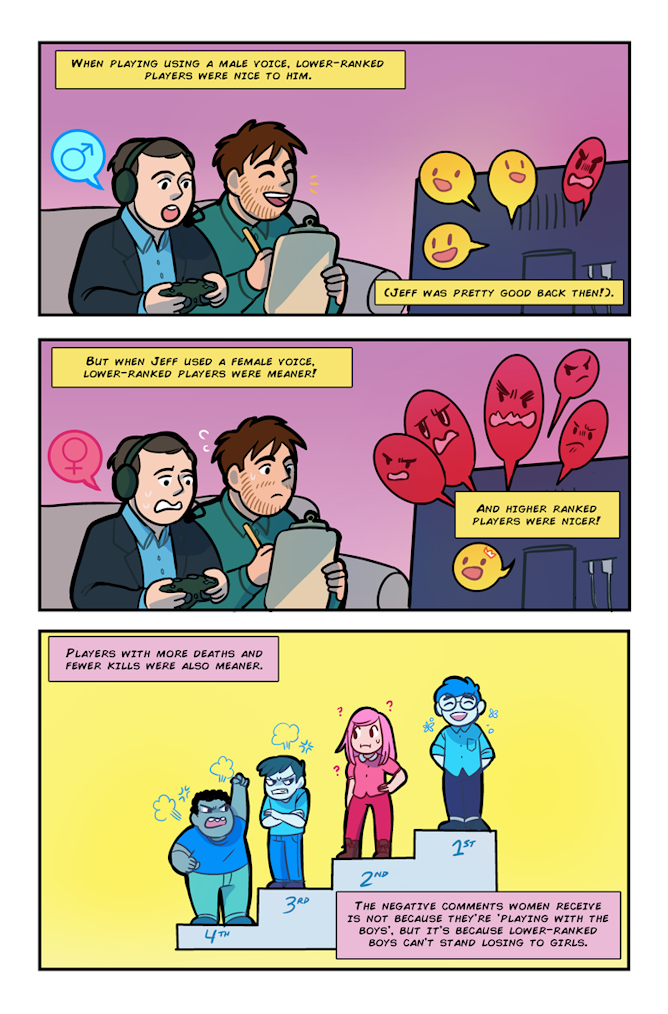
Next comes the fun part. By using a recorded male or female voice, we can see how players respond to teammates of each sex based on their own performance. Jeff played 126 games of Halo 3 using this structure. All the other speaking players on his team were men.
Gaming isn’t always relaxing, and sometimes that tension can spill over into harassment of other gamers. Maryam Abdulghaffar/Flickr, CC BY
What’s in a voice?
What we found was that Jeff’s teammates who died more often generally made more positive comments towards Jeff. And their performance, good or bad, had no effect on the number of negative comments they directed towards him.
In contrast, when Jeff used a female voice, he received many more negative comments, particularly from players who were performing poorly.
This suggests that men behaved according to a social hierarchy. When they were performing poorly – i.e. they were lower status – they did not challenge a male-voiced teammate, but they did challenge a female-voiced one.
This was supported by our results exploring skill level –- our proxy for an individual’s position in the hierarchy. Skill level didn’t affect how men behaved towards another man, but men lower in skill were less positive in the female-voiced treatment.
Interestingly, higher-skilled men were more positive towards women, but not men.
The predicted relationship of the number of negative comments male players made towards a female- or male-voiced teammate as a function of their skill level.
Who wants a beta male anyway?
The take-home seems to be that, just like bullies, the men most likely to have their position in a hierarchy usurped by a woman turned out to be meaner.
When you look at this situation from an evolutionary perspective, some of the reasoning becomes more clear. Since a man’s mating chances are better determined by his status than his looks, if a woman is usurping a man’s status by outperforming him, it means that he is less likely to be attractive to a potential mate, especially one that is higher than him in the hierarchy.
Although it’s unlikely that men are thinking about mate attraction when playing Halo 3, we think the increased negativity directed towards higher status women by some men is an unconscious response to having their masculinity challenged by a woman. “Losing to a girl” is still deemed unacceptable by many men as it can reduce their status in the eyes of others – both men and women.
The hostile aspects of gaming culture could thus be explained as the search for, and maintenance of, status. One way to ensure that a man doesn’t lose to a woman is to keep women from competing by making them feel unwanted in that environment.
Perhaps this perspective may also help explain the misogyny we see when women enter some male-dominated fields. The aggression may come from lower status men that are trying to keep women out by employing sexist bullying in order to ensure they don’t lose status in the presence of their male colleagues.
The one thing that is still quite intriguing is the result that the highly skilled men were more supportive towards women than men.
Are these nice guys behaving this way because they have nothing to fear and are applauding a woman’s entry into the field? Or is it because they have nothing to fear, for now. Would they become more aggressive if they felt threatened? Or are they comfortable in their ability that losing to a woman wouldn’t bother them.
These are questions we don’t know the answer to yet, but we’re willing to play a few thousand games online to find out.
Interested in reading the study in a different format? Then take a look at the comic below! Click on the preview to see the full page. Art by Savanna Ganucheau.
Michael and Jeff will be on hand for an Author Q&A between 10 and 11am AEST on Friday, July 17. Post your questions in the comments section below.
_This article is a part of The Conversation’s series on unique courses. For other articles in this series, read here and here. _
Today’s college students may benefit from an exciting array of subjects to study. But they seem to miss the most important education of all: how to relate their specialization to others in an increasingly interconnected world.
The National Academy of Engineering has categorically stated that today’s engineers need to be more than individuals who simply “like math and science.” They must be “creative problem-solvers” who help “shape our future” by improving our “health, happiness, and safety.”
And in 2001, the engineering accreditation body ABET added a new criterion so as to ensure that students get “the broad education necessary to understand the impact of engineering solutions in a global, economic, environmental, and societal context.”
The point is that the connections between humanities and science have been lost in today’s separation of disciplines. Indeed, a recent report by the American Academy of Arts and Sciences discovered that humanities and STEM (Science, Technology, Engineering and Mathematics) training majors largely dwell in different silos.
So, where and how did we lose our way? And how can educators and institutions change things?
If the interdependence of science and the humanities were more generally understood, men would be more likely to become masters of their technology and not its unthinking servants.
These founders, hailing from leading universities as well as the US Atomic Energy Commission, IBM Corp and New York Life Insurance, knew that connecting the humanities and sciences helps us make informed judgments about our control of nature, ourselves and our destiny.
Connecting the humanities and science helps us make informed decisions. Phillip Barron, CC BY-NC
But, since the 1980s, political rhetoric has emphasized the need for less humanities and more STEM education. STEM is painted as a more profitable investment, in terms of job creation and research dollars generated.
A notable example is the Obama administration’s “Race to the Top” initiative, which both isolates and prioritizes the STEM disciplines from the humanities, arts and social sciences.
This rhetoric is also evident in the creation of separate political education organizations such as the bipartisan STEM Education Caucus founded several years ago by congressional representatives to strengthen STEM education from kindergarten to the workforce.
This separation of disciplines actually hurts education, and it also hurts our ability to innovate and solve big problems.
Connecting STEM with humanities doesn’t just provide the well-rounded education today’s employers want. As the American Academy of Arts and Science’s 2013 “The Heart of the Matter” report observes, connecting these fields is necessary to solve the world’s biggest problems such as “the provision of clean air and water, food, health, energy, universal education, human rights, and the assurance of physical safety.”
So, separating and prioritizing STEM from humanities ignores the fact that we live in a complex social and cultural world. And many different disciplines must combine to address this world’s needs and challenges.
Bringing the disciplines together
To address this gap, four years ago the faculty from materials engineering and liberal arts at the University of Florida began working with the Materials Research Society. We wanted to put together a new course on “materials.”
Why did we choose materials? Because everything is made of them, every discipline studies them and they are tangible (quite literally) to the average freshman.
An interdisciplinary course on materials prepares students for the challenges of the future. Internet Archive Book Images
After all, grade school students still learn about the Stone, Bronze, and Iron ages. The Industrial and Information revolutions revolved around new uses for steel, aluminum and silicon. The human past has been shaped by harnessing and consuming materials and energy.
Materials will be important for our collective future as well. So, we thought, this is the future for which we should be preparing students.
And thus our course, The Impact of Materials on Society (IMOS), was born. Taught by a team of nine faculty from engineering, humanities and social sciences, the course explores the close connection between the “stuff” in our lives and our experiences as social beings.
Students discuss how materials benefit global trade and communication but also risk resource exploitation and political conflict. For example, we depend upon rare earths for our cellphones, iPads and wind farms, but accessing these rare earths from limited sources is not sustainable.
So, some of the questions that the course raises are: what materials do we depend upon in our daily lives? Does this dependence have social consequences? What social relationships form around the production and use of these materials? And how do our current uses of materials affect our ability to discover new uses for them?
Students also discuss the ethical and social aspects of using certain materials. college.library, CC BY
Students are also asked to consider how our values shape our willingness to adopt new technologies. For example, Earl Tupper may have invented Tupperware, but it was Brownie Wise and her home parties with other women who first made his polymer famous!
Each week covers a different material (eg, clay, glass, gold, plastic), its scientific properties, demonstrations, and its past and present impacts.
Working together in multidisciplinary groups, students then contemplate the development of future materials. These include flexible electronic materials that can be used to create wearable sensors that can transmit important information, such as body hydration levels during athletic training. New polymer (plastic) materials made from renewable sources instead of petroleum may have fewer health risks and are more sustainable than today’s plastic cups and bottles.
At the same time, they discuss the ethical and social considerations that might affect the successful production and adoption of these new materials in different contexts.
Gap in education
The course is different from other freshman-oriented courses. It is not a “history course for engineers.” And it is not an “engineering course for humanists.”
It is an interdisciplinary course that uses multiple perspectives to understand materials innovation. A wide range of departments including engineering, anthropology, classics, history, English, sociology and philosophy participate in its teaching.
Students refer to IMOS as a “bridge course” that provides the “connecting dots” between different classes.
And the responses come from students across the different majors. For instance, one engineering major noted, “This class just further proves that you have to understand different aspects of how our world works and not just engineering to be a great engineer.”
Meanwhile a history major observed, “This class gives me a leg up in my other history courses because it reminds me to think about the properties of materials and how they shape our lives.”
These experiences point to a gaping hole in modern education: discipline-specific and general education courses provide important knowledge, but “bridging courses” are needed for students to capitalize upon that knowledge.
To engineer useful technologies, we need to connect scientific study with the cultural competencies of the humanities and social sciences.
Challenges of 21st-century learning
The “Renaissance” ideal was to produce elite men whose broad training prepared them for any endeavor. Thankfully, 21st-century education is more inclusive.
But it still requires intellectual and cognitive flexibility to harness large amounts of data.
This doesn’t mean simply knowing everything, even though we live in the “Age of Google.” Today, students need the ability to make connections across disciplines.
Celebrated innovators such as Einstein, Ada Lovelace and Steve Jobs credit the intersection of disciplines for their inventive thinking.
More boundary-crossing opportunities in higher education can break open the disciplinary silos. And that alone will unleash critical thinking and innovation.
Additional contributors to this article are University of Florida faculty Sean Adams, Marsha Bryant, Florin Curta, Mary Ann Eaverly, Bonnie Effros and Ken Sassaman, and Materials Research Society Outreach Coordinator Pamela Hupp.
Fully 92 percent of American teenagers go online daily. More than half of them do so several times a day and a quarter are online “almost constantly.”
I’m a mother of two teenagers who fall into that latter category. And as a parent and a teacher educator, I work on ways in which we might capitalize on teens’ social nature and fondness for technology to promote something positive.
A question I wrestle with is: can social media help students learn? Or is it just wishful thinking?
Over the past decade, my colleagues and I at the Tarrant Institute for Innovative Education have worked with hundreds of middle school teachers to integrate technology with meaningful learning. Our research suggests that a one-to-one computing environment, where every student has access to an Internet-accessible device such as a tablet, netbook or laptop, can be a powerful complement to middle-grades teaching practices.
So, recently, one of our partner teachers explored the potential of social media to promote learning. Ryan Becker, a teacher at a public middle school, wondered if Twitter might be an effective way to extend classroom learning and to link students to “real world” science.
Working with 128 eighth graders over two years in his physical science classes, Becker first helped each of his students establish a Twitter account specifically for their science learning.
He provided them with a starter list of accounts to follow, such as the National Aeronautics and Space Administration (e.g., @NASA, @SpaceStation, @MarsCuriosity); the radio program Science Friday (@SciFri); Emily Lakdawalla, a science writer and blogger; and @realscientists, a Twitter account that rotates weekly among scientists from diverse branches of science who share interesting details about their lives and their work. He also encouraged students to expand the list of accounts based on their own science-related interests.
Next, students got down to some real work. Both during class and for homework, students were asked to read and tweet regularly about science. They posted pictures and videos to illustrate scientific concepts, such as “acceleration” or “friction.”
They tweeted about their learning, posting personal examples of Newton’s First Law and summarizing chemistry in a mere 140 characters. They tweeted about class projects in order to generate ideas or update others on their progress. And they used Twitter to inspire each other, such as posting videos of successful Rube Goldberg machines, a device that performs a simple task in a complicated fashion, when they were building similar machines in class and sharing their own personal connections and observations.
Based on this Twitter project with middle schoolers and Becker’s subsequent doctoral research with high school students, we found students learned through Twitter in multiple ways.
How Twitter helped students
First, selecting whom to follow based on their own interests helped to personalize the curriculum for students – an approach that is gaining rapid momentum through recent philanthropic and federal funding efforts.
Second, by tweeting about their daily science learning, students found an immediate and potentially unlimited audience for their tweets. Students who were interested in space, for example, could be followed by classmates or an astronomer. They could tweet questions directly to accounts covering missions throughout our solar system.
In almost all cases, the tweets reached a larger audience than was otherwise possible in a classroom.
Third, using Twitter expanded students’ literacy opportunities. For example, most of the tweets students encountered included links to science-related, informational text, such as blogs and research studies, all of which were related to students’ self-identified interests.
Having to distill their own learning into tweets also called for students to use concise language to convey complex ideas, a challenging skill for many. They even integrated different writing genres into their work, such as these sci-kus (haikus that are science-related).
Because tweets are sent and received instantaneously, students’ thoughts and questions could be viewed in real time. Learning how well students were understanding the latest science concepts in turn helped their teacher adjust how and what he taught next.
An earlier study by California State University researcher Carol VanVooren and middle school teacher Corey Bess showed that the use of Twitter helps improve student learning. In that study the researchers found that when teachers used Twitter to reinforce classroom instruction, students performed better on standardized tests.
Challenges of Twitter-based learning
Despite this promising evidence, our research on using Twitter with middle and high school students revealed a number of challenges.
For example, most students in Becker’s classroom did not have Twitter accounts, which was not surprising given that most teens favor Facebook, Instagram and Snapchat as their top social media platforms. Students needed guidance on how to structure a tweet and how to assess the reliability of content – both tasks that took time during the school day. Valuable learning time was also eaten up by the undependable nature of technology, such as inconsistent Wi-Fi and inadequate bandwidth.
Overall, however, our research found the benefits of Twitter far outweighed the drawbacks. Embracing Twitter as part of class – as opposed to teaching the type of stand-alone social media unit so often found in schools – helped students grapple with many of these issues in an authentic way.
Two years of survey data from the 128 eighth graders revealed that over 90 percent of students felt Twitter enabled them to follow real science in real time and to interact with others outside of class. This also helped them to make connections between science and their lives and personal interests.
Clearly, we need a lot more research on the use of social media in middle and high schools to better understand its ultimate potential for promoting learning. But in the meantime, in this media-saturated era, teens can benefit from the opportunity to experience the power of promising digital technologies alongside knowledgeable adults.
Transitioning into any sort of technology-based curriculum can trigger concern in parents for a number of reasons. Change is frightening, and watching your own children experience the world much differently than previous generations – through the lens of a smartphone camera and behind the screens of portable tablets – can be unnerving.
If and when parents come to you with questions about classroom technology, the best thing you can do is address their concerns and explain the reasoning behind your selections. Times are changing, and educators are finding value in technology’s ability to meet individualized needs. It’s important to stress that every EBook and computer lab and online lesson plan is meant to solve problems, not create new barriers.
Here are some of the most common questions parents ask about edtech along with the answers that help you control the conversation.
What’s the point? This is a loaded question. And it’s likely that a few blunt parents will ask you this directly and expect a logical response. Of course, like many questions below, the answer to this question depends on what edtech you’re implementing and the reason you’ve chosen a particular program. If you’ve noticed several students are struggling with long division, introducing a math program with AI-based software can help isolate exactly where students get lost. If kids are shy or uncomfortable asking questions, the software can help teachers get answers that their students just won’t give. It’s also important to remind parents that digital citizenship is more important now than ever before and instilling media literacy will help students thrive in an ever-expanding technological world.
Isn’t it just another distraction? Luckily, most edtech comes with filtering software to prevent kids from accessing social media and entertainment sites. Using iPads in a classroom setting feels counterproductive, but when students who’ve grown up with smartphones and laptops interact with them in school, they’re more likely to remain engaged for longer periods of time.
Can I monitor my child’s activity? Many edtech options come with features that allow parents to track progress as well as teachers. The software may include a teacher dashboard that parents can log in to while some programs are built on maintaining parent-student-teacher communication. If it doesn’t feel like there’s a clear option that allows parents to monitor their child’s online work, create a customized solution so that whatever you’re seeing as the instructor can be conveyed to every attentive parent.
Is privacy considered? Unfortunately, not all edtech is created equal. Before allowing students access to anything, ensure that the software they’re exposed to doesn’t have over-complicated privacy policies that request non-essential information or collect student data for commercial Educate yourself on security-related details so that when parents ask, you can acknowledge their concerns and explain every safety measure taken.
How much time per day is my child spending with tech? It’s important to stress that just because one aspect of the curriculum is technology based, that doesn’t mean kids are spending all day behind a screen. Technology in the classroom will always support the curriculum and shouldn’t interfere with kids speaking to educators and peers in-person.
Can kids access tech from home/will they need to buy devices? Sometimes tech is used solely in the classroom, at times only one device is required, and sometimes students need access to specific devices with multiple accounts from school and Whatever the curriculum, it’s likely yourself, and fellow administrators have taken district demographics into consideration to select an appropriate course of action. If parents are concerned that they don’t have the tools at home necessary to complete assignments, stress that resources will be provided or assignments will be altered for the student at hand. Technology in the classroom is meant to convenience and include students, not hinder or exclude learners based on their access to laptops and iPads.
Are kids trained properly? Yes! Teachers are trained on edtech tools beforehand, and with today’s generation of tech savvy Kindergarteners, it’s unlikely students will have difficulty picking up. Most edtech is specially designed for young kids and easy use.
What is the role of a teacher once edtech is implemented? It’s important to ensure parents that new programs are meant to enhance the lesson plans you’ve already implemented, not replace your job as an educator.
How will the school/you communicate with me? The great thing about most edtech software is that it includes ways for parents, students, and teachers all to communicate quickly and easily. Whether it’s a software that sends messages via text, an online discussion board or an automatic email debriefing a child’s progress, open communication will be easier and more transparent than ever before.
Will students still be writing by hand? Yes, students will still be taught to write and still have access to human It’s not 2084 just yet.
What tools will students be using? Edtech refers to a range of different possible activities and software systems. Because of this, provide students and parents with a comprehensive list and be prepared to speak about each tool’s benefits and basic structure. Refer parents to online tutorials and reference materials from the edtech distributor directly.
What is ‘adaptive learning’? Adaptive learning is one of the most remarkable benefits of implementing edtech. If a software system utilizes adaptive learning, the program changes instruction based on the student’s performance, customizing each child’s educational experience based on their particular strengths, weaknesses, and learning preferences. An issue many teachers and parents grapple with is ensuring that students who pick up quickly are challenged while students who need extra help are getting that extra help. AI-based edtech allows students to learn at an appropriate pace, maximizing each child’s growth.
If a tech tool has recently taken over your classroom, there will be parents with questions and concerns. It’s normal for parents to insist on knowing every detail of a new classroom initiative and it’s important to keep in mind that an attentive parent is better than one who doesn’t care about their child’s academic progress.
Embrace every question and stress that every classroom decision is made with each individual student in mind. Before you know it, parents will be signing up for online tutorials themselves. And getting off your back long enough to do so!
Digital transformation in our schools is no longer just something it would be nice to have in the future. The rapid changes in the world around us make it a necessity here in the present. If your school or district has not yet undertaken the task, there is a good chance your students are leaving school unprepared for the challenges they will face in the 21st century.
But the process is far from easy. When you take into consideration concerns about the budget, infrastructure, and training, it can seem impossible.
Here are the steps to driving a successful digital transformation.
Implement meaningful professional development for teachers and administrators. Educators are in drastically different places when it comes to technology use. Quality professional development must be flexible to meet the needs of the digital native as well as the digital novice. Mentorship and collaboration should be built into the professional development structure so that teachers can learn from each other. Administrators also need to be thoroughly trained in technology initiatives so that they can better support their teachers.
Be realistic in assessing the strengths and needs of students. It’s a fact that most students are more tech-savvy than their teachers. But you should never assume that your techie students know how to harness technology for the specific purpose of supporting their learning. Students need to be taught how to do this. Many times, teachers assume that a student’s distractibility when using technology reveals a lack of motivation; but it just means that students need more direction. Encourage a mutually supportive environment in which teachers and students can learn from each other.
Spend money wisely. Well-intentioned school planners waste thousands of dollars every year on the next great technology initiative without considering what the ultimate outcome will be. For example, they may simply purchase a device for every student without articulating exactly what they are going to learn or achieve by having and using this device. Tie every expenditure to specific learning goals.
Document evidence of learning outcomes. Keep track of data or student work that shows improvement as a result of the use of technology. Test scores, classroom observations, and student portfolios can all be used to document success and growth. Reflect on how new technology may or may not have impacted these results.
As cumbersome as it appears, a digital transformation that is undertaken and planned with care empowers you to prepare students for their world…instead of ours.




 Michael and Jeff will be on hand for an Author Q&A between 10 and 11am AEST on Friday, July 17. Post your questions in the comments section below.


 Additional contributors to this article are University of Florida faculty Sean Adams, Marsha Bryant, Florin Curta, Mary Ann Eaverly, Bonnie Effros and Ken Sassaman, and Materials Research Society Outreach Coordinator Pamela Hupp.


 Clearly, we need a lot more research on the use of social media in middle and high schools to better understand its ultimate potential for promoting learning. But in the meantime, in this media-saturated era, teens can benefit from the opportunity to experience the power of promising digital technologies alongside knowledgeable adults.
