Uncategorized

Reduce chronic absenteeism with identification and prevention

It doesn’t matter how much time you put into planning a well-orchestrated lesson if your students are absent. Students who aren’t present aren’t learning. Their absences can have a significant impact on their future.

Occasional school absences are inevitable. Chronic absences, defined as missing more than fifteen days of school in one school year, are far more serious than one or two missed days. They can and should be prevented.

The problem

Students who chronically miss school are in danger of dropping out of school and limiting their potential.

While chronic absenteeism is cause for concern at any grade, it is particularly worrisome for middle school students. That’s because patterns of frequent absences set the stage for high school absenteeism and dropping out of high school. Chronic absences among ninth graders predict the likelihood of dropping out more accurately than student achievement scores.

Chronic absenteeism affects more than secondary level students. It happens in elementary school, too, and it’s just as harmful to student learning.

To break deeply entrenched attendance habits, educators should identify attendance problems and prevent them.

Identification

School policies and state reporting requirements can mask attendance issues. Excused absences are documented but not reported, yet they can lead to chronic absenteeism if left unchecked.

Students may be present for an attendance reporting period, but gone the rest of the day, especially if parents schedule doctor and dentist appointments during school hours. Also, students may seek out ways to leave class. They may try to see the counselor or nurse, or they may linger in the restrooms and hallways instead of being in the classroom.

Class avoidance in any form is absenteeism.

To monitor student attendance, make notes about the time students spend away from the classroom, whether excused or unexcused. Look for patterns that might reveal an underlying issue.

Prevention

Educators must address attendance issues head-on. To reduce or prevent chronic absenteeism, try taking these steps:

  • Talk to families. Explain the importance of school attendance. Help parents establish routines that will help them get everyone to school and work on time.
  • Find out what the real issue is. Principal Akbar Cook in Newark, New Jersey installed a laundromat in his high school because his students didn’t have clean clothes to wear to school.
  • Make school a positive experience and learning fun. Kids who are excited about what they’ll be doing next will make an effort to be in school.
  • Establish an attendance team. Team members collect and analyze attendance data with a laser-like focus. They address absences on a daily basis.  Next, they call parents with early notifications and taking notes about the conversations for later follow up if necessary.
  • Recognize good attendance with celebrations. Show students that you notice when they are present and that their efforts will not go unrecognized. As a bonus, they’ll likely see an improvement in their grades, too. Then you can celebrate those successes.

Experts consistently advise that the best prevention of chronic absenteeism is early identification. You can’t solve a problem unless you know it exists.

By encouraging good attendance, you’re helping your students learn, graduate, and go on to achieve success after high school.


5 Features That Make Phones Great For Kids

Your kid is getting bigger, smarter, and more independent every day. And maybe they’re starting to ask you for a cell phone. If so, you’re not alone. By the time they turn 10, over 70 percent of kids have already asked their parents for a cell phone, and almost half of kids, at 49 percent, have asked by the time they turn six.¹ So should your elementary-schooler have a phone of their own, let alone a smartphone? What “extra features” will come along with your newfound ability to keep in touch with your child? For those still mulling it over, these are the 5 features that can make a phone a good – or not so good – choice for your child.

1. Safety features

Being able to contact your kid is great for peace of mind. They can call you if they need help, if they need to get picked up from practice early, or if they just want to say hi. Many phones, both smartphones and newer kids phones, also have GPS tracking features so you can always keep an eye on where your child is. With a phone or kids phone, you can feel better about your independent child venturing a little further. But some types of phones come with a few safety pitfalls: looking at you, smartphones!

When we think about kids’ safety and smartphones, we’re not only talking about kids receiving robocalls, spam, and calls from strangers. We have to think about kids privacy and safety on the internet, a rising concern in a time where the internet is more portable than ever. With the internet in their pocket, not only could kids stumble upon content they aren’t ready to handle, but they will also be targeted by ads and could be sent messages from strangers across multiple platforms. To maximize your kid’s safety, look for a phone that doesn’t have internet access or make sure to setup advanced parental controls.

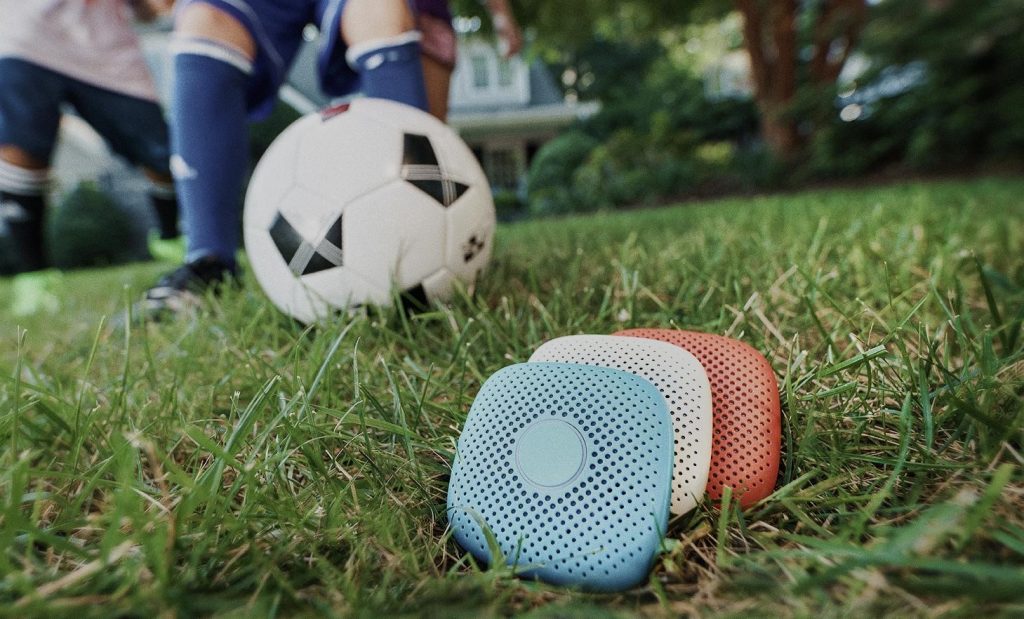
Courtesy of Relay

2. Distraction-free design

If the internet is the cell phone pitfall that endangers kids safety, the screen is the pitfall that can affect their health. In this day and age, screen time is a hot topic among parents with young kids. How old should a kid be to get their first smartphone? How much screen time is too much? Even setting aside the correlations between screen time and obesity, eye strain, and sleep problems—screens are distracting. While TV and computer screens are pretty much unavoidable as your kid goes to school and through their day, giving them a portable screen of their very own can prevent them from wanting to engage in active play and distract them from the people around them.

You can reduce screen time worries by limiting screen access a couple hours before bedtime and putting phones away during meals and family time. Alternatively, some kids phones have very basic non-touch screens—or no screen at all—so your child can get all the benefits of a phone without any of the distractions. This lets your kid develop good screen time habits at their own pace without compromising their ability to get in touch with you. Read more about how to teach kids good screen time habits in this article.

3. Simple interface

Generally, we want our kids to be able to get in touch with us as fast as possible. For grown-ups, using a smartphone to make a call is easy, but making a call takes a surprising amount of steps: wake your phone screen, unlock your phone, tap the phone app, tap contacts, scroll to the contact you want to call, tap the contact, tap the call button. That’s at least 7 interactions with your screen to make one call.

Most phones are built for grown ups, and when choosing a phone for your kid, it can be good to take a look at whether your kid’s phone is really built for kids. Some phones for youngsters are stripped-down versions of phones for adults and still require a good deal of interaction to get in touch with anybody. Others can be far simpler. Relay, for example, lets kids talk with a single press of a button. Then you and your kid can speak walkie talkie style through an app on your phone, no matter the distance.

Courtesy of Relay

4. Fun to use

When your kid asks you for a phone, chances are that it’s not because they’re trying to call you all the time. Many kids want a phone because phones are fun and it’s cool to have one. For tweens and teens, this “coolness factor” can be pretty important. But if you have a “Big Kid” (age 6-11,) you don’t have to worry quite as much about what kids at school will say or that they’ll be embarrassed to carry around a kids phone. However, fun is mandatory.

If your kid’s phone isn’t fun, they won’t want to carry it around. To them, it’ll feel like you’re making them wear an ankle monitor—and we don’t want our kids feeling like prisoners, we want them to feel independent and empowered! When shopping, look for features your kid would like that don’t cross the line into distracting territory. Voice-first games, music, and silly sounds are great options for Big Kids.

5. Durable construction

If you’re going to buy it, make sure you only have to buy it once. If you’re spending your cash on a piece of technology for your kid, you don’t want it to break in the course of a normal day’s play. Look for water resistant products and phones that can take a tumble without breaking or shattering. (If you needed another reason to avoid a phone with a screen, this is it!)

For extra security, some kids phones have accessories that keep your kid’s device from getting lost or escaping from their little pockets. Make sure these are comfortable and easy to use—many watch band accessories are a little bit big for younger kids’ wrists and tend to chafe. A clip accessory is great for little kids. It can attach to their belt loop, the handlebars of their bike, to their backpack, or even to a lanyard!

If you keep these five things in mind, you can find a phone to keep your kid safe and connected without the pitfalls of distraction, inappropriate content, and product damage—no tradeoffs required.

1 Nationally representative online survey of 1,403 U.S. parents of children aged 6-11 conducted by Republic Wireless; May 2018


The Edvocate Podcast, Episode 7: How Digital Age Teachers Can Win Over Parents

Education is a collaborative process, as it takes many stakeholders working in unison to help students succeed academically. One of the most integral parts of this collaborative team is parents, as teachers know all so well. So, if you are a teacher struggling to increase parental engagement, how do you fix this issue? In this episode, we will discuss 7 ways that digital age teachers win over parents.

The Edvocate Podcast, Episode 8: How Digital Age Teachers Can Win Over Students

Education is a collaborative process, as it takes many stakeholders working in unison to help students succeed academically. Students themselves are at the center of this collaborative team, as teachers know all so well. So, if you are a teacher struggling to increase student engagement, how do you fix this issue? In this episode, we will discuss ways that digital age teachers win over their students.

The Edvocate Podcast, Episode 9: How Digital Age Teachers Can Win Over Their Colleagues

Education is a collaborative process, as it takes many stakeholders working in unison to help students succeed academically. One of the most integral parts of this collaborative team are your peers, as teachers know all so well. So, if you are a teacher struggling to increase peer engagement, how do you fix this issue? In this episode, we will discuss ways that digital age teachers win over their colleagues.

The Edvocate Podcast, Episode 11: Ways That Digital Age Teachers Model Digital Literacy and Leadership

In this technology-immersed world, students need to know how to navigate the digital environment safely. From discerning real news from propaganda to managing their reputation online, so much of their future is dependent on possessing digital literacy skills. Teachers have to step up to the plate and integrate digital literacy into the curriculum and model it through their actions. In this episode, we will discuss ways that digital age teachers model digital literacy and leadership.

Vivi Empowers Personalized Learning, Classroom Productivity with U.S. Launch

By freeing teachers to roam the classroom and empowering learners to instantly share their screens, Vivi inspires a personalized learning environment

(MELBOURNE, Australia) September 18, 2018 — Vivi, the wireless screen mirroring solution designed exclusively for the classroom, today announced its entry into the U.S. edtech market. Vivi has been successfully supporting personalized learning environments and schoolwide communication in Australia for years, and now brings American teachers the technology to foster collaborative, student-centered learning.

Designed with the collaboration of educators, Vivi’s classroom management solution system sets teachers free to roam the classroom and interact with students, allowing for immediate teacher and peer feedback. In addition to its core functionality of screen mirroring and video streaming, Vivi brings a slew of additional educational features under the control of a single, easy-to-use app and institutional management through an admin portal.

“We created Vivi to offer educators a seamless, affordable solution for collaborative classroom presentations,” said Dr. Lior Rauchberger, the founder of Vivi. “Education is evolving at a breakneck pace, and Vivi is the foundation that allows teachers to implement personalized learning without worrying how they’ll make it work.”

Vivi is compatible with all devices and operating systems. Its ease of use improves productivity and reduces teacher time spent on managing technology and giving students control of the screen by up to 12 percent and helpdesk claims by up to 4 percent because educators can walk into any Vivi-enabled classroom and instantly connect.

The intuitive Vivi app gives teachers total control when students are allowed to share their screens, and enables students to capture what’s being presented on the screen, and annotate using built-in tools then save for future reference. Teachers can also play high-quality videos straight from the Vivi Receiver so that the video streams directly from the hard-wired internet rather than slowing down a WiFi network or disrupting learning due to buffering. Vivi’s analytics and reporting dashboard deliver information on teacher and student participation and engagement across the school.

The system also powers school-wide communication with digital signage and emergency broadcasting. In a dangerous situation, teachers are able to instantly communicate the need for a lockdown, evacuation, or other safety measures across all screens and devices with active Vivi connections.

“We have just put Vivi in all 100 classrooms and presentation spaces and have been super happy,” said Gary Hastings, director of ICT at Oakhill College. “Teachers love them to the point that we’ve taken back all HDMI cables and dongles (hooray) and haven’t needed to re-issue one yet.”

To request a demo, visit Vivi.io.

About Vivi
Vivi is a global technology company, headquartered in Melbourne with satellite offices in the United States, Canada, and the United Kingdom. It was founded with the aim of creating the simplest, most intuitive screen mirroring solution in the world. The Vivi product is delivered as a hardware-enabled cloud solution, specifically developed for use in schools and universities. It comes with additional features that broaden the use of Vivi beyond screen mirroring, and customer feedback is used to inform ongoing feature and product development. For more information, please visit Vivi.io.

Press Contact

Kristen Plemon
PR with Panache!
[email protected]
616-994-2869

Jim Staples
Vivi
[email protected]
(770) 314-3505

Differentiated Instruction for Digital Learners

For generations, teachers have taught to the average, or perhaps slightly below average, student. This seemed to be the best approach, given that to do anything else would mean leaving the majority of the class behind. Of course, no student is perfectly average, and most students were receiving instruction at a rate too fast or too slow for their unique needs. Differentiated instruction offers a better model: it involves providing instructional materials that are aimed at the specific needs of each student. If that sounds like an impossible goal given the realities of large classes and limited time, you may want to rethink because there are some edtech tools that make it possible to differentiate even the largest class.

For example, teachers can use hyperdocs to create virtual “playlists” of instructional materials. There are two ways to use hyperdocs to differentiate learning: teachers can either create unique playlists for each student, or one playlist can offer options for students based on their performance. So a hyperdoc could begin with a formative assessment. Then, depending on which problems students got right, which they got wrong, and what kinds of errors they are making, the hyperdoc can direct students to different learning activities that are targeted for their individual needs.

Another excellent resource is Newsela. It provides articles on current events as well as on other topics of interest. Its most impressive feature is that the articles can be scaled by reading level. This means that a teacher can assign the entire class to read an article about, say, climate change—but each student will receive an article that is appropriate for his or her reading ability. Then, the class can discuss the articles together. This is an excellent way to differentiate instruction while still creating opportunities for the class to work and think together.

Teachers can also find a variety of lessons, curricular units, videos, and worksheets from websites such as CK12.org, Khan Academy, and others. This makes it possible for teachers to provide additional instruction for students who need more practice and review. While the task of organizing different assignments for different students might seem daunting, using one portal, such as Google Classrooms, makes it possible for teachers to keep materials organized.

Obviously, a shift toward differentiated instruction will require a substantial investment of time and energy to re-think instructional approaches. But students benefit when they learn at precisely their own level. A variety of digital tools makes this a realistic prospect for today’s teachers.