
Uncategorized

The power of the iPad in Kindergarten

**The Edvocate is pleased to publish guest posts as way to fuel important conversations surrounding P-20 education in America. The opinions contained within guest posts are those of the authors and do not necessarily reflect the official opinion of The Edvocate or Dr. Matthew Lynch.**

By Kristi Meeuwse, ADE

Technology won’t replace teachers, but teachers who don’t teach with technology will be replaced. -unknown

Last week, our school iPads were replaced.  We were very excited to exchange our iPad 2’s for the new iPad Air.  Our old iPads served us well but were suffering from frequent app crashes. The replacement took about a week…no small feat when you are talking about over 800 iPads. The excitement over the idea of new iPads was suddenly replaced with the knowledge that we would be without iPads for a few days. My kids quickly realized this and asked, “Um, how will we do our work with no iPads?”  I responded, “I’m not sure…maybe we will do some worksheets.” Puzzled, the kids responded with, “What are worksheets?” You see, they had never completed one before.

It was definitely like going back in time and I’m certain I don’t ever want to teach again without having those devices. My students were used to having choices about their day and about demonstrating their learning. I was used to personalizing their learning and serving as a facilitator while they directed themselves. Student-centered and student-directed learning is one of the keys to educational change.

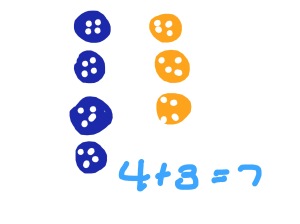
So, now we have our beautiful new devices and the kids immediately went to work. Their work. We have been working on number stories in their math journals. Even though I’m providing the number stories, there is still choice. For example, Sam had 7 buttons.  Some were blue and some were yellow.  How many of each were there?

Here are a couple of samples from my kids:
IMG_0003

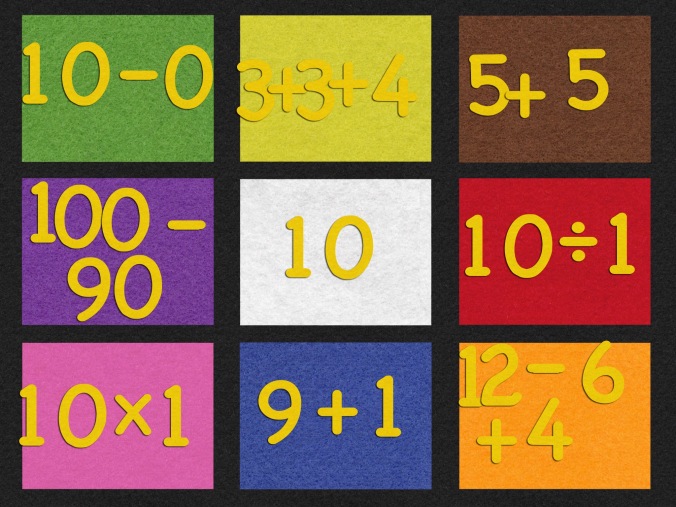
IMG_0004One was being a wise-guy, but still got the right number of buttons. By making these number stories open-ended, students have the ability to use multiple pathways to get to the answer. Another student and a partner, worked together to create what we call an “incredible equation”. One of the students was stronger in math (clearly, as he is able to multiply and divide at age 5) and the other was working on grade level. Together they made this:
 

IMG_0005

By letting my students work where they are, and not where a worksheet forces them to be, the sky is the limit. The iPads give my students the freedom to move on, to move up, and to be in charge of their learning.

So, yes, I am thrilled to have our iPads back. We saw first hand the power of the iPad in our classroom. Even though we have only 22 school days remaining, we are going strong to the end!

Today we will do exciting new things. Let’s get to it!

Read all of our posts about EdTech and Innovation by clicking here. 


Kristi Meeuwse teaches kindergarten in Charleston, South Carolina. In January, 2011, her kindergarten class started a 1:1 iPad pilot for the school district and the results so far have been very successful. You can read more about it on her blog iteachwithipads.net.


Using the free classes on iTunes U

**The Edvocate is pleased to publish guest posts as way to fuel important conversations surrounding P-20 education in America. The opinions contained within guest posts are those of the authors and do not necessarily reflect the official opinion of The Edvocate or Dr. Matthew Lynch.**

A guest post by Kristi Meeuwse, ADE

The function of education is to teach one to think intensively and to think critically. Intelligence plus character – that is the goal of true education. -Martin Luther King

Thinking critically and intensively is not reserved for older students. We work diligently to create learning experiences in kindergarten that allow our young students to think deeply about various topics. Having iPads allows us to enrich learning experiences in a way that wasn’t possible before. One of the iPad tools that is often overlooked is iTunes U. Why iTunes U?

  • It is a free repository of classes and educational content
  • Students have access to content anytime and anywhere
  • Content is easily updated and changed
  • Discussion feature allows rich conversation between students

While there are a large number of free classes available on iTunes U, perhaps you should consider creating your own. With the end of the school year only a few weeks away, it seems odd to be thinking of adding new things to your teaching bag of tricks, but this is the perfect time to do so. You can use some of your summer to create your own courses. It is easy to do. Simply log into the iTunes U course manager using your Apple ID and add your content. What are the benefits to creating your own course?

  • Content is more meaningful to students
  • Content can be customized
  • Easy to create, easy to update
  • All resources are in one place: books, documents, videos, images, web links and apps

Here is the link to a Spiders course I created for my kindergarten students as well as one for teachers on Personalized Learning and another course created by a 4th grade colleague about my school and how we innovate instruction using iPads.

iTunes U allows you to customize the learning experience for your students, even the youngest ones. It is also a great way to create a learning portfolio for students. Up to 5 people can collaborate on a course so you and your colleagues can work together and share the wealth. If you aren’t comfortable creating a full course initially, create a chapter and keep adding. It is easy to update any time.

If you aren’t already using iTunes U, consider giving it a try. It will open a whole new world to your students for learning and engaging in content.

Today we will do exciting new things. Let’s get to it.

This post originally appeared on iteachwithipads.net and has been republished with permission. 

Read all of our posts about EdTech and Innovation by clicking here. 

__________________

Kristi Meeuwse teaches kindergarten in Charleston, South Carolina. In January, 2011, her kindergarten class started a 1:1 iPad pilot for the school district and the results so far have been very successful. You can read more about it on her blog iteachwithipads.net.

10 ways to use Skype in the classroom

**The Edvocate is pleased to publish guest posts as way to fuel important conversations surrounding P-20 education in America. The opinions contained within guest posts are those of the authors and do not necessarily reflect the official opinion of The Edvocate or Dr. Matthew Lynch.**

A guest post by Bevin Reinen

Skype is an instructional tool that provides boundlessopportunities for authentic teaching and learning.  It allows us to explore beyond the four walls of our classrooms.  As elementary teachers, we sometimes battle to hold our students’ short attention spans. Integrating Skype lessons brings the curriculum to life in ways never before possible.  You know that special moment when you announce a class activity, and it’s greeted with claps, screams, and cheers?  That’s Skype.  It brings pure joy, wonder, and intrigue to your students.

Here’s a list of ten ways to utilize it in the elementary setting, followed by some logistical tips for success.

1)  Take a Virtual Field Trip:  Is there some place you’d like your class to visit, but can’t swing the funds or it’s just not geographically possible?  Find a guide to ‘take’ you there by visiting a historical landmark, museum, zoo, etc.

2)  Invite an Author:  Set up a Skype session with an author you’ve been studying to discuss a book.  Or, set one up with any author so that your students can learn about the steps of the writing process.  No, real authors do NOT write one and done!  Here’s an awesome list of Authors Who Skype With Classes and Book Clubs for Free.

3)  Share a Project:  Have your students been working on some kind of a special project? Give them the chance to show/share it with a distant class.  This provides motivation and will help them develop confidence in the value of their work.

4)  Put on a Performance:  Is there a poem, song, skit, or reader’s theater script your students need to present?  Give them the opportunity to perform to a unique audience via Skype!

5)  Interview an Expert:  Invite an expert to speak with your class on a current topic of study.  Conduct a Q and A session.  This is definitely a step up from the basic Google search!

6) Cultural Exchange:  Learn about various cultures by connecting with a class from abroad. Check out the site ePals, which allows educators interested in Skyping or using other web-based tools to connect globally.

7) Meet Pen Pals:  To encourage meaningful writing opportunities, write back and forth with pen pals throughout the year.  Set up a culminating Skype chat so that students can finally meet their pen pals ‘face to face’.

8) Mystery Skype:  If you register for Skype in the Classroom (instead of regular Skype), you can play Mystery Skype.  Mystery Skype is an educational game that allows two classes to guess each other’s locations via questioning.

9) Including Students with Medical Issues:  If a student has to miss school for an extended amount of time, Skype is the perfect way for the class to connect with their classmate.  While not all class activities are workable on Skype, including the student in some key lessons will help prevent him/her from falling behind.

10) Share Travel Experiences:  If you have a special trip to attend during the school year, have your substitute connect with you on Skype to touch base, allow you to do a mini-lesson, or show/share about your location.

Tips:

1)  Install Skype on your computer.

2)  You’ll need a webcam, speakers, and microphone also.

3)  Be sure you and your person both add each other as Skype contacts.

4)  Run a test call to ensure everything is working properly.

5)  Outline a plan and discuss logistics with your Skype contact.

6)  Walk through expectations/procedures with your students beforehand.

*Remember, time is of the essence when working with little ones.  Make sure all kinks are worked out prior to the chat to maximize engagement.

Here are a few photos of my class chatting with our pen pals/digital learning buddies from a nearby school.  To launch our science unit on animals, we had each student bring in a stuffed animal and fact to show/share. Afterwards, I assigned her class to research and observe penguins on Monterey Bay Aquarium’s Live Web Cams, while she assigned my class to do the same for giraffes using Houston Zoo’s Live Web Cams.  This generated excitement and motivated students for the next fact/opinion pen pal writing to come!

This post originally appeared on teachtrainlove.com and has been republished with permission. 

Read all of our posts about EdTech and Innovation by clicking here. 

______________________

Bevin is Nationally Board Certified as an Early Childhood Generalist.  She considers herself a teacher by day, writer by night.  Some of her work has appeared in national publications including Chicken Soup for the Soul; Married Life, Hallmark’s Thank You, Mom book, and Boys’ Quest magazine for kids.

Why we should teach our students digital marketing skills

**The Edvocate is pleased to publish guest posts as way to fuel important conversations surrounding P-20 education in America. The opinions contained within guest posts are those of the authors and do not necessarily reflect the official opinion of The Edvocate or Dr. Matthew Lynch.**

A guest post by David Cutler

“It is time for schools to stop blocking Facebook, Twitter, Instagram, and other social networks that students love and already use daily outside of school.”

So writes Mark Barnes in his book, Teaching the iStudent: A Quick Guide to Using Mobile Devices and Social Media in the K-12 Classroom. Ad nauseam, schools advertise how they use technology to prepare kids to excel in an increasingly global 21st century, as if no other school is doing the same thing. Meanwhile, too few schools teach students how to make effective use of not just Facebook and Twitter, but also other popular online tools, instead preferring teacher-friendly alternatives that few use in the real world.

It may be true that plenty of students know how to create digital media, but too few know how to produce high-quality content, the kind that makes them stick out to not only college admission officers, but also potential employers. If you think “marketing” is a dirty word, and that educators have no business teaching students how to do this, you need to reconsider your role. We need to teach and encourage students to post original, quality content to brand their unique identities in a sea of increasingly indistinguishable resumes—which are going the way of the typewriter.

In fact, right now I’m teaching my freshman European history students how to create and maintain a WordPress site. Throughout the year, they will post their thoughts and creative responses. Moreover, students will learn to feel more comfortable sharing their work, crucial for successful collaboration in the digital age. As a next step, students will register for a Twitter handle, to be used for sharing and discussing topics related to European history. If they choose, Tweets can be embedded on their sites.

When it comes down to it, I do more than just teach history. I encourage students to use evolving digital skills to explore, develop, and express their own passions and interests. Of course, I’m fortunate to work at a wonderful school, whose ace technology department allows and fosters digital creativity.

I recently spoke with Barnes, curious to hear his thoughts. Not surprisingly, he agrees, adding that WordPress is the most powerful blogging platform in the world. “I always say…make sure that you give them the opportunity to do some niche-blogging, too, because ultimately, that’s what they’re going to do,” Barnes says. “That’s what we do. Our niche is education—we tend to write about education. Who knows what theirs is going to be, but they’re going to be creating content that’s going to be really important. I think teaching them at a young age how to do that effectively is really important.”

For the most part, I’ve found that when students share their work online, the quality of that work improves. I noticed as much in 2011, when I helped students launch The Falconer, the student news site of Palmer Trinity, a terrific private school in Palmetto Bay, Florida. Before submitting stories to me, students carefully reviewed each other’s work. Once their stories were posted, students felt even more excited about receiving feedback, not just from the class, but also from the wider school community.

More than anything else, I think, student excitement for online sharing stems from wanting to make a difference and having their voices heard. Nothing fulfills that yearning quite like the Internet, which allows students to use not just writing, but also photographs, audio, and video to tell stories that can elicit an immediate response and make an immediate impact.

Barnes tells me of one former student who blogged about Google Glass before the invention took off. “Here’s a kid, 12- or 13-years-old, and he writes this amazing post and does his own review of it, and includes pictures and outside links. It was just, you can comment on anything you want,” he says. “He wound up getting…150 or 170 comments on this one post. People were coming to him like he was the expert. It was such a great opportunity to share that with kids across all my classes and just say, ‘This is what writing and curating content is really about. You become an expert at something, and people come to you.’”

Last week, I also spoke with Eric Sheninger, whose courageous book, Digital Leadership: Changing Paradigms for Changing Times, echoes much of what Barnes and I believe so strongly in promoting. I asked Sheninger how best to serve students in the digital age, and his response leaves little to the imagination. “Adapting and evolving with the times and worrying more about learning than numbers,” he says. “When you focus more on learning, everything else falls into place.”

In that vein, more schools must develop the courage to teach how to leave behind a positive digital footprint.

This post originally appeared on spin.edu, and was republished with permission.

Read all of our posts about EdTech and Innovation by clicking here. 

____________________

David Cutler is a coach, history and journalism teacher at Brimmer and May, an independent school in Chestnut Hill, Massachusetts. He is the founder of Spin Education.

How do we give rural students more educational opportunities?

**The Edvocate is pleased to publish guest posts as way to fuel important conversations surrounding a P-20 education in America. The opinions contained within guest posts are those of the authors and do not necessarily reflect the official opinion of The Edvocate or Dr. Matthew Lynch.**

A guest post by Sam Chaltain

In the small town of Hartsville, South Carolina, which sits just about two hours from anywhere you’ve ever heard of, Monay Parran and her two young sons – eight-year-old Ja’quez, and eleven-year-old Rashon – begin each day in the darkness of the pre-dawn hours.

Parran, a single parent who works two minimum-wage jobs in two towns that are almost an hour apart, must drop her boys off at the bus stop early enough to make it to her first job on time. By the time she sees her sons again, after her second shift wraps up, it will be almost midnight.

This is the daily cycle for scores of families, who must make ends meet while living below the poverty line. It’s a cycle that results in young people who are often overtired and undernourished. It’s also a widespread reality that is largely invisible to most Americans, and made more complex by the distances rural families must traverse to access foundational resources like a school, a hospital – or even a minimum-wage job.

The particular struggles – and successes – of families like Ms. Parran’s are given close attention via a new PBS documentary film, 180 Days: Hartsville (I am one of its producers), a project that was funded by the Corporation for Public Broadcasting’s American Graduate: Let’s Make it Happen initiative. Viewers will experience a year in the life of one small Southern town, two schools that work primarily with low-income children, and one family’s efforts to break the generational cycle of poverty.

What the film will also make visible, albeit indirectly, is our national preoccupation with the needs of cities, and the extent to which many of our most hotly debated national strategies for school reform – from charter schools to online learning – simply aren’t viable in towns like Hartsville, where transportation costs alone circumscribe the choices many rural families can make, and where many residents still have no Internet access. In places like these, if you want to transform the schools, you are going to have to do it from within the traditional systems and structures – from neighborhood schools to school boards to local politicians angling for re-election — no matter how change-averse those actors and institutions tend to be.

At this moment of intense national interest in public education, you would think that figuring out how to improve the systems we already have would matter a lot more than it does, if for no other reason than because renovating a house is more cost-efficient than razing it and starting from scratch. But the particular challenges and opportunities associated with reform in rural schools matter for another reason – those schools house nearly ten million American students, or slightly more than 20% of the nation’s total enrollment. And yet, as a recent report of the Rural School and Community Trust made clear, “the invisibility of rural education persists in many states. Many rural students are largely invisible to state policy makers because they live in states where education policy is dominated by highly visible urban problems.”

Consequently, it’s my hope that films like 180 Days: Hartsville can elevate the particular circumstances and needs of rural communities, poor families, and public school educators. After all, we can’t begin to reimagine American schools for the modern era if we remain fixed on merely one type of American school. And we can’t identify solutions that will work in the majority of American communities if we continue to disproportionately share the success stories of individual schools of choice.

The questions before us have wide-ranging implications: can a community like Hartsville really change the fortunes of a generation by doubling down on its neighborhood schools? Does the stark reality of the 21st century global economy outweigh the impact of one rural town’s efforts to prepare its children to compete in that economy?

I hope you’ll tune in to find out, and help us all widen the lens through which we see American public education.

This post originally appeared on Sam Chaltain’s personal blog, and was republished with permission.

_______________

Sam Chaltain (@samchaltain) is a DC-based writer, filmmaker, and strategic communications consultant. His work focuses on the changing nature of teaching and learning in America, and on how individuals and organizations can find and tell stories that capture the emotional center of an idea; build and sustain an audience of supporters over time (as opposed to merely generating awareness); and leverage both traditional and new media in order to expand an ideological base of support.

How to use safe and private messaging for your school community

**The Edvocate is pleased to publish guest posts as way to fuel important conversations surrounding P-20 education in America. The opinions contained within guest posts are those of the authors and do not necessarily reflect the official opinion of The Edvocate or Dr. Matthew Lynch.**

A guest post by Nick Grantham

Overview

Remind (formerly Remind101) is a one-way messaging service created specifically to help teachers communicate with their school community as simply and safely as possible. Allowing students and parents to sign up via text, email or online using a unique class code, the service keeps phone numbers completely hidden so teacher-student-parent communication is 100% private and secure.

Name: Remind  – www.remind.com
Pricing: Free
Compatibility: Desktop / iOS / Android
Access: Email / Google signup
Privacy: Private (privacy policy)

How teachers can use it

1. Broadcasting your message

As the main purpose of the Remind platform and app, simple and secure messaging is the primary use for most educators. This could be an alert to students when work is due, a reminder to parents to fill in permission slips, weather information, school closures or even just a motivational quote or message for the day.

2. Send more than words

One of the huge advantages Remind has over conventional SMS is the ability to attach files to messages. As long as the attachment is less than 10MB in size, any file type can be used. Try sending an end of week happy snap of your class to parents each Friday to keep them feeling connected. Attach a map or flyer if you are messaging about an event. Even attach a pdf copy of the homework, just so parents know exactly their children are working on.

3. Archiving message history

One key safety feature of Remind is that you cannot delete messages once they are sent. This ensures there is always a clear record and trail of your messages and allows you to stand over every interaction you have made. What is particularly useful is that the system also allows you to easily download a PDF copy of every message you have made. This is extremely useful for archiving, potential legal requirements and any administrative requests.

4. Send messages from the future

Remind lets you schedule messages to be sent at any time in the future (unfortunately the past is not yet possible…). This works extremely well for setting project deadlines or dates for upcoming tests. This way messages can be created when you think of them rather than at awkward times or when you may not have the capacity to craft the message carefully.

5. One way conversation

Make sure to remember when using Remind that it is a one way communication channel. If you need to have a discussion or require feedback from parents or students, email, phone or face to face conversation may be a better option. Over time you will find that certain individuals react better to certain communication mediums, so although Remind may not allow replies, you can use it as a trigger speak or mail on a subject further.

This post originally appeared on Fractus Learning, and was republished with permission.

Read all of our posts about EdTech and Innovation by clicking here. 

_______________

The founder of Fractus Learning, Nick Grantham is an Australian educator living and working in Dublin, Ireland. With a background in education, engineering and digital product development, Nick launched Fractus Learning in 2011 to connect people with a shared passion for technology and how it can bring education to life.

Why "anti-tech" teachers irk me

**The Edvocate is pleased to publish guest posts as way to fuel important conversations surrounding P-20 education in America. The opinions contained within guest posts are those of the authors and do not necessarily reflect the official opinion of The Edvocate or Dr. Matthew Lynch.**

A guest post by Lisa Mims

The conversation went something like this:

Teacher: Do you know he suggested using Tagxedo at Reading Night?
Me: What a wonderful idea!
Teacher: I don’t see why they want to use technology. (said with disdain)
Me: Why not? The kids and parents would have a good time.
Teacher: What if it doesn’t work? What if it doesn’t print? Then what are we supposed to do?
Me: What do you mean doesn’t work? It’s really easy to use.
And the conversation continued...

“Technology” is not something you can pick up or put down, it’s not a solid object. That is what frustrates me so much about people who are “anti-tech”. It makes me want to scream at the top of my lungs every time someone says to me, “See, I used the Smartboard today, I used technology.”

Or, after typing an entire paragraph on a web page, it’s deleted, and the person yells, “See, that’s why I don’t use technology!”

Technology is not a subject!!!  It is a tool that is not going away. It’s not something extra that you add to a lesson, it’s just part of your lesson. You know, the way you use the textbook. I had a hard time wrapping my mind around the question, “What if it doesn’t work?” So does that mean that we shouldn’t use it? What isn’t going to work? The Internet? The computers? Tagxedo?

Yes, there is a chance any one of those things might not work, but there is a greater chance they might. And what an experience that would be for those who use it! It reminds me of when my principal, who asked us to think outside of the box after a tech conference, asked me to put my Sliderocket presentation on a flash drive because the “Internet” might not work that day.The “Internet” worked just fine.

When I was thinking of a way for my kids to creatively describe themselves, I chose Tagxedo as a way to do that. While planning my lesson, I did not begin with, “How can I use Tagxedo today?” When I want to connect with students in another state or country, I use Wallwisher, Edmodo, Twitter, etc… because it’s a way to connect beside pen and paper.  When I want my students to share their thoughts simultaneously about the novel I am reading aloud, “Today’s Meet” is a wonderful tool. And, I don’t only use the Smartboard during observations, just to prove that I am using “technology”, because that’s what “they” want to see.

All the wonderful things I do with my class is not done to “show off”. It’s because it engages my students and makes teaching enjoyable. And yes, I do have a life. There are so many great ideas I get from so many different people in my PLN, so there’s no need to spend every waking hour trying to find them on my own.

We have to let go of this fear of the unknown , the fear of change. We have to remember that we should be lifelong learners, and not be scared to share our knowledge, even in a way that might not be comfortable for us!

This post originally appeared on Diary of a Public School Teacher, and was republished with permission.

Read all of our posts about EdTech and Innovation by clicking here. 

_______________

Diary of a Public School Teacher is a blog where Lisa Mims shares her  thoughts about any aspect of the teaching profession. She is a DEN (Discovery Education Network) STAR Educator! She loves writing and I has contributed posts to Free Technology for Teachers, Edudemic, TeachHub, GoAnimate, Edutopia, etc.

How to create a collaborative learning environment with technology

**The Edvocate is pleased to publish guest posts as way to fuel important conversations surrounding P-20 education in America. The opinions contained within guest posts are those of the authors and do not necessarily reflect the official opinion of The Edvocate or Dr. Matthew Lynch.**

A guest post by Meghan Zigmund

After two years of having iPads in our first grade classroom, I’ve found a few strategies that work to set up a successful and collaborative learning environment. We use our set of iPads to connect, create, share, and much more. However, without a few expectations and procedures our room would be chaos! So here are a few strategies for successful collaboration that can be applied to just about any technology in your classroom.

1 – Visual Expectations

We use Popplet to set up expectations for iPad procedures. Students generate the expectations, with some teacher guidance to make sure a few key issues are included. Students usually end up thinking of things that I haven’t even considered! Next, we take pictures to represent each expectation, and add them to a web in Popplet. This is usually done on one iPad, displayed through an Apple TV so everyone can see what we’re creating. Then, we print it out and post it around the room. The student’s love seeing themselves, and the visual reminders are really effective. Having these expectations makes creating and collaborating together much smoother.

2 – Time to Explore

Our students arrive with all different types of experiences and ability levels for all subjects, including technology. However, there is no need to “teach” students the ins and outs of every app you want them to use all year. Don’t be afraid to just let them discover and explore, especially together. Demonstrate and app or two, show them something you think they’ll be excited about, or better yet, let a student demonstrate what they know. Then give them some time on their own to just play. It doesn’t have to be a huge amount of time, but you’d be amazed at what they discover. You don’t even have to have a device for each student. Let them share and learn from each other.

Students are naturally going to take some time to explore anyway, why not give them some time upfront? They’ll end up being more productive and creative in the end. Time to explore is one of the most powerful strategies I use all year. Be sure you also include time to share their experiences after exploration. It’s well worth it!

3 – Community of Experts

Teachers can’t be the only expert anymore. We must foster a community of experts in our classrooms. Doing this helps students to feel empowered, and encourages ownership in learning. Who doesn’t want to feel like an expert at something? As students explore and discover we add their name and skill to our “Expert List”. If you’re looking for someone to help you record in ChatterPix, edit your photo, or find just the right image in Haiku Deck, then we have an expert for you! No need to ask the teacher, just check out who can help.

We do, however, enforce the rule above. Even though a student might be getting some help, I still want them experiencing the process and learning.

4 – Tweets

Oh, the amazing power of Twitter. If you don’t have a class account yet, get one A.S.A.P. Besides the amazing power to connect, learn and collaborate with others around the globe, Twitter encourages our class to work together. When we post class Tweets, everyone works together to decide what to post, helps edit, and feels ownership in what we’ve shared. There is almost always a discussion about what we want to share, and why.

To help my young learners become ready to Tweet their projects and thinking, we”ll start our year off having a “Tweeter of the Day” so that students gain experience and guide each other on what it means to Tweet and be a responsible, respectful citizen. We’ll collaborate on a set of visual rules to help, and learn to work together as a community in the process.


I’m so excited to begin building a new collaborative community of learners in just a few short weeks. What steps will you take to foster a collaborative learning environment this year?

This post originally appeared on Fractus Learning and zigzagstech, and was republished here with permission.

Read all of our posts about EdTech and Innovation by clicking here. 

______________

Meghan is a first grade teacher with a passion for inspiring student creativity and deepening their thinking through technology. She loves learning and creating with her students and hopes to inspire others to do the same.

Automaticity: How can it be sometimes bad, sometimes good?

**The Edvocate is pleased to publish guest posts as way to fuel important conversations surrounding P-20 education in America. The opinions contained within guest posts are those of the authors and do not necessarily reflect the official opinion of The Edvocate or Dr. Matthew Lynch.**

A guest post by Bruce Deitrick Price

Automaticity means that you recognize something instantly. You see a neighbor’s dog and in a split-second you say, “Bucky!” That’s automaticity.

Curiously enough, the Education Establishment thinks that automaticity is sometimes evil, sometimes ideal. This strange paradox reveals a great deal about the intellectual chaos and corruption in our K-12 system.

This paradox is even more extreme and perverse than you may at first imagine. When automaticity is helpful, our experts say it’s bad. When automaticity is destructive, our experts say it’s good. That’s what ideology and secret agenda have done to the field of education.

Historically, children were expected to learn simple addition problems and the multiplication tables. You knew automatically that 7 times 8 is 56. You knew that 7+12 is 19. With just a small amount of such information, a person can readily solve the common math that we  encounter in everyday situations. Remarkably, all the so-called “reform” programs of the last 60 years specifically crusaded against this capability. New Math, circa 1965, emphasized all sorts of high-falutin activities (Boolean algebra, statistics, algebraic matrices) but denigrated any tendency toward memorizing arithmetic facts so you would have them as standard intellectual equipment.

Reform Math circa 1985, specifically forbade children to learn basic math facts. An early reliance on calculators was encouraged! Then we come to Common Core Math, which  brags that children will engage in higher-level thinking and creative problem-solving but doesn’t want them to know the multiplication tables. The pattern is relentless. Automaticity, with regard to numbers and doing arithmetic, is constantly denigrated.

Clearly, everything that was ordinary and desirable in all cultures for thousands of years has been deemed unacceptable by our Education Establishment. If you look at only this part of the story, you know that these people have a perverse love for whatever is inefficient. Why? Most likely, they are addicted to collectivist thinking. The worst possible outcome for these people (people like Bill Ayers) is that some children master math quickly and sprint ahead of their classmates. So our progressives use any trick to block that possibility. Leveling is the goal. Ergo, no automaticity in math classrooms.

Now let’s look at a situation where automaticity can be destructive.  That’s the process of learning to read. Public schools for 80 years have ordered children to seek automaticity in the memorization of sight-words. The essence of Whole Word reading instruction is that children are told to memorize entire words as graphic units. This  fundamentally absurd approach has a dozen different names (sight-words, high frequency words, Dolch words, look-say; don’t be confused by the interchangeable aliases). The basic idea is that children look at a word (for example xgfh) and they memorize it as a design. You might object that xgfhis not a real word. But a first-grade child would not know that or guess that. All the designs look the same to children (that is, they look bizarre and unfriendly just as xgfh now looks to you).

Children DO need to memorize the smallest units with automaticity, that is, the individual letters. Then they need to memorize the sounds represented by these letters with automaticity. That is the correct way to proceed (it’s known as phonics). But this approach is precisely forbidden in our elementary schools. Instead the children are told to memorize larger, more complex units than the brain can easily handle, i.e., whole words such as xgfh.

Please note, for the brain any memorization is essentially the same task. You look at an airplane in the sky and you say that’s a 757. You look at a  coin and you know it’s a nickel. No big deal, especially in the case of arithmetic  where there are only so many scores of helpful facts. On the other hand, memorizing many hundreds of sight-words is extremely difficult.

The more objects there are and the more similar they are,  the more quickly the project becomes hopeless. Imagine somebody put together a collection of 100 coins from around the world, all of them more or less silvery and all of them the size of our nickel and dime. Naming these coins with automaticity would be very similar to naming English sight-words with automaticity. Now imagine the teacher says you have to move up to 300, and then 500. That’s what learning to read with sight-words is like for  kids in elementary school. A nightmare. Not only is automaticity virtually impossible to achieve, but trying to do so is destructive to the child’s mind. The brain is asked to switch back and forth from phonetic reading to sight-word reading—two completely different mental operations.

The bottom line here is that  our elite educators are social engineers with ideological goals. They want an undifferentiated society. They don’t want educational excellence. So they pick the worst ways to do everything.

If  a child needs automaticity to be good at arithmetic, our commissars will forbid automaticity.

If automaticity with sight-words is the worst thing that could happen to a child,  the same commissars will demand automaticity.

Anybody even a bit fond of common sense has to be appalled by this. Anyone who has a heart has to be appalled by this.

We have millions of high school graduates arriving in college who’ve never been asked to memorize much of anything— arithmetic, science, history, geography, dates, presidents—because memorization is bad. The Education Establishment will tell you that there’s nothing more evil than rote memorization. They will tell you that again and again.

Meanwhile, these same students starting in K will be required to memorize sight-words. So we have a wonderfully screwed up society now where many people don’t know much of anything, and one main thing they don’t know is how to read.

With regard to Common Core, there is a lot of new verbiage and jargon, but this massive retooling of American public schools seems to have accommodated all the worst things from the past. The Education Establishment insists that this is a wonderful new reform. That’s what they always say.


—-

Bruce Deitrick Price explains education theories and methods on his site Improve-Education.org


Why abstinence-only sex ed simply doesn’t work

By Matthew Lynch

When I first saw the headline, I thought it was too ironic to be true: Texas school teaching abstinence-only sex ed suffers chlamydia outbreak.

I would’ve probably even laughed if I hadn’t realized quickly that it was not only true, but that it meant dozens of kids now had to deal with the discomfort and potential long-term harm of a sexually transmitted disease. These are kids that were clearly not practicing abstinence and were ill-prepared for real-life sexual encounters. It isn’t the fault of these kids, either.

It is irresponsible of school systems to teach abstinence-only sexual education and it should be illegal in public schools.

Should abstinence be taught as the only sure way to avoid things like unplanned pregnancies and STDs? Of course it should because it IS the only absolute way. But that abstinence extends beyond basic sexual intercourse. Students need to understand exactly all the ways they can be harmed by unprotected sex and then given the power to protect themselves.

The argument that parents should be the only ones to talk to their kids about sexual options just doesn’t cut it because it is elitist. It only works for students whose parents have the time or concern to actually sit down with their kids and have that talk. It leaves out the many students whose parents won’t actually have this talk with their kids or the ones who will preach abstinence-only. Schools have the responsibility to educate to their best of their abilities, and let’s face it: abstinence-only sex ed fails that mantra miserably.

What do you think? Should public schools be required to teach safe sex practices?