
Introduction:
The gaming community is gearing up for the next generation of console gaming with the release of the PlayStation 5 (PS5) and Xbox Series X or S consoles. As these devices hit the market and fascinate gamers all around the world, one question arises for passionate gamers – can you use a PS5 controller on Xbox Series X or S? While this might seem an unusual combination, this comprehensive guide explores how to make it work.
Step 1: Update your Console and DualSense Controller Firmware
Ensure that your Xbox Series X|S and PS5 DualSense controller have their firmware updated to their latest versions. Keeping your devices up-to-date will help avoid compatibility issues.
Step 2: Acquire a Cronus Zen or Titan Two Adapter
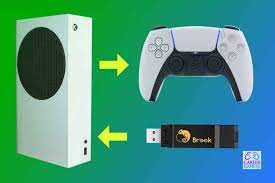
To connect your PS5 DualSense controller to your Xbox, you’ll need an adapter like Cronus Zen or Titan Two. These adapters act as a bridge between several controllers and consoles, making it possible to use them interchangeably.
Step 3: Connect the Adapter to Your PC
To set up the adapter, connect it to your PC using a micro-USB cable. Ensure that both your computer and controller are turned off before connecting them.
Step 4: Run Software for Adapter Configuration
Once you have the adapter connected to your PC, download and install its corresponding software from the adapter’s official website. This software allows you to configure your controller’s settings for use on various gaming platforms, including Xbox.
Step 5: Configure Your DualSense Controller
Using the adapter’s software, assign your DualSense controller to be used with your Xbox Series X|S console. Follow the instructions provided by the software regarding device recognition and configuration settings.
Step 6: Connect Adapter and Controller to Your Xbox Series X|S
Disconnect the adapter from your PC once you’ve successfully configured your controller. Now, connect the PS5 DualSense controller to the adapter using a USB-C cable and the adapter to your Xbox Series X|S via the micro-USB port.
Step 7: Test Controller Compatibility
Once everything is connected, boot up your Xbox Series X|S console and verify whether the DualSense controller is working correctly. Try navigating through menus and launching games to ensure the mappings are appropriately configured.
Conclusion:
Using a PS5 DualSense controller on an Xbox Series X or S might not be a conventional combination, but it is possible with the help of an adapter like the Cronus Zen or Titan Two. By following these simple steps, you’ll be able to enjoy your favorite Xbox games using a PS5 controller in no time!