
Introduction:
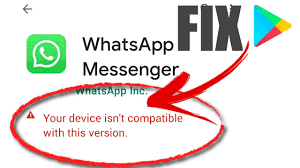
At times, when trying to download an app from the Google Play Store, you might encounter the error message “Your device isn’t compatible with this version.” This issue could arise due to various reasons – your device might be running an outdated version of Android, or the app simply may not be designed for your device. However, there are several methods you can try to resolve the problem and successfully install the app. In this article, we will discuss the top five ways to fix “Your device isn’t compatible with this version” on Android.
1. Update Your Device’s Software
One of the primary reasons for the compatibility error message is outdated software on your Android device.
– Go to Settings > System (or About Phone) > Software Update.
– Check if any updates are available and install them.
– Reboot your device after installation and try downloading the app again.
2. Clear Google Play Store Cache & Data
Sometimes, residual data and cache in Google Play Store could be responsible for generating the error message.
– Navigate to Settings > Apps (or Application Manager) > Google Play Store.
– Tap Storage and then Clear Cache & Clear Data.
– Restart your device and open Google Play Store to download the app again.
3. Use an Alternative App Store or APK
If you still encounter compatibility issues, consider using an alternative app store like Amazon Appstore or APKPure, which could offer different versions of the same app.
Alternatively, you could download an APK (Android Package Kit) file from a reliable source like APKMirror. Make sure to enable installation from unknown sources in Settings > Security > Unknown Sources before proceeding with APK installation.
4. Install a Custom ROM
Another possible solution is installing a custom ROM compatible with your device and offering more freedom concerning software updates and app downloads.
It is crucial to research and choose a reputable custom ROM, like LineageOS or Paranoid Android. Remember that installing custom ROMs might void your warranty and may involve risks, such as bricking your device.
5. Contact the App Developer
If none of the above methods work, try contacting the app developer through their support channels. They might be able to assist you with a compatible version or troubleshooting steps to resolve the issue.
Conclusion:
Encountering the “Your device isn’t compatible with this version” error on Android can be frustrating. However, through these five methods – updating your device’s software, clearing Google Play Store cache and data, using alternative app stores or APKs, installing a custom ROM, or contacting the app developer – you should be able to resolve the issue and install your desired app successfully. It is essential to always prioritize device security and only download apps from trusted sources to avoid potential risks and malware infections.