Uncategorized

Teachers: How to Use Google Drive

By Catlin Tucker

For teachers who are just getting started with Google, Google Drive can be intimidating! In preparation for a Google training, I’ve put together a short explanation of Google Drive and its basic features. Although an increasing number of people have a Gmail account, I run into teachers all the time who are not sure what Google Drive is or how it works.

Google Drive is like a big virtual bucket! It’s where everything you create with Google apps–documents, forms, sheets, slides, drawing–are stored. And unlike a traditional word processing document, you never need to click “Save”…EVER.  Your work is automatically saved every 5 seconds (or so).

Google Drive comes with 15 GB of free storage, so you can save files, photos, and videos. You can access any file in your Google Drive from any device as long as you have internet access. This means you are no longer tethered to a piece of hardware. You can open, edit and share files from any device that can get online.

For those with unreliable internet access, you can also install Google Drive onto your devices and work offline. Then when you are back online, your devices will sync and store your work!

Here are some screenshots to help you navigate your Google Drive.

Organize your files in whatever order makes sense to you. You can limit your view to the files you’ve created, the files that have been shared with you or the files that have been most recently edited. This makes it easy to locate the files you’re looking for.

Screen Shot 2015-01-20 at 2.47.26 PM


Click on a file or folder and check out the “More actions” icon (3 vertical dots) to manage your documents more easily.

Screen Shot 2015-01-20 at 3.28.31 PM


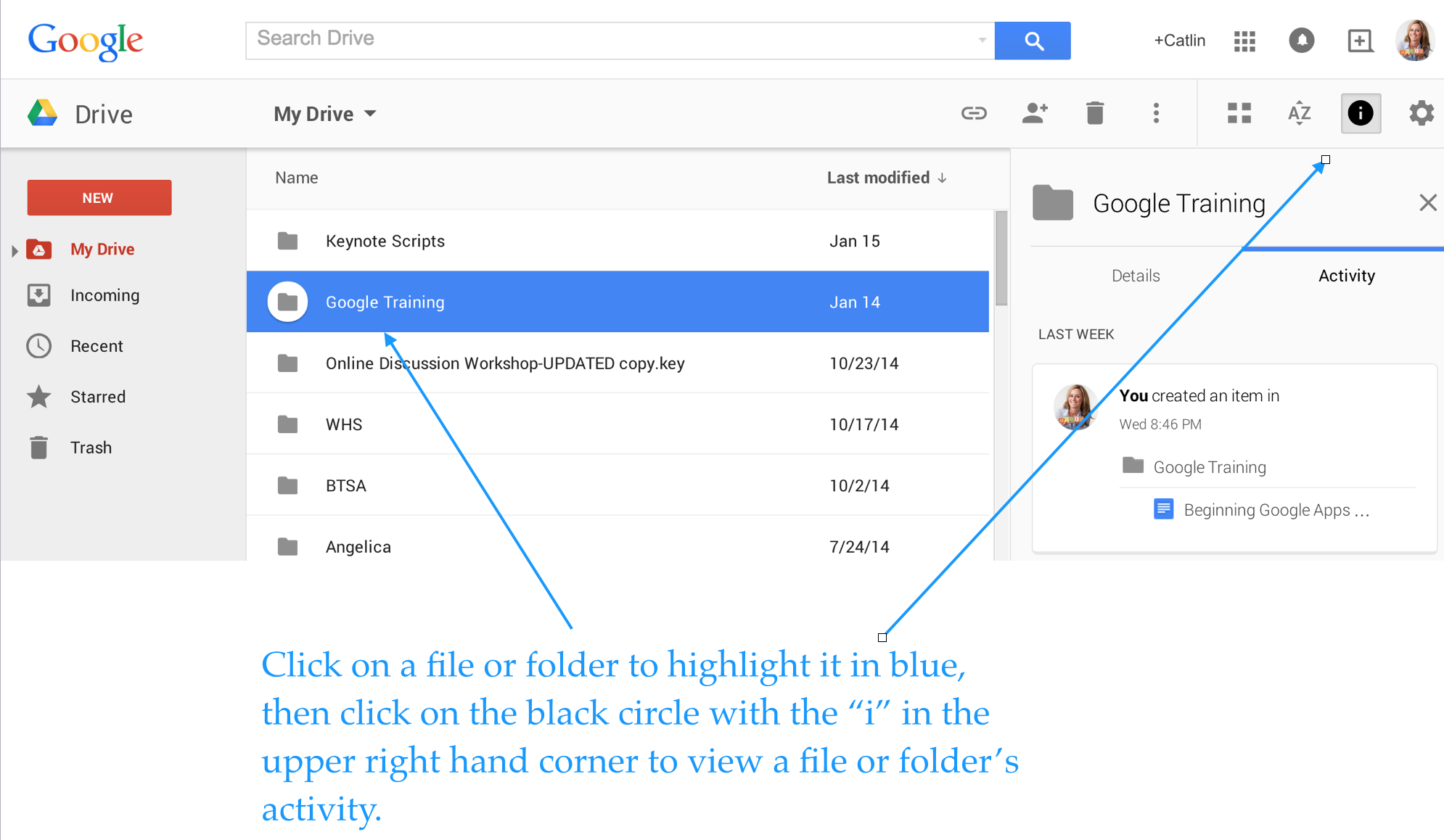
Enjoy total transparency with the “View Details” icon (black circle with the letter “i” in the middle). Simply click on a file or folder and see all of the activity associated with it. You can see when documents were created, when they were edited, and who edited them!

Screen Shot 2015-01-20 at 4.06.24 PM


Last, but not least, you can insert files, photos and videos directly from Google Drive into your emails.

Screen Shot 2015-01-20 at 1.34.37 PM


If you use Google Drive and have tips to share, please post a comment!


This post originally appeared on Catlin Tucker: Blended Learning & Technology in the Classroom and was republished with permission. 


Why we should teach our students digital marketing skills

**The Edvocate is pleased to publish guest posts as way to fuel important conversations surrounding P-20 education in America. The opinions contained within guest posts are those of the authors and do not necessarily reflect the official opinion of The Edvocate or Dr. Matthew Lynch.**

A guest post by David Cutler

“It is time for schools to stop blocking Facebook, Twitter, Instagram, and other social networks that students love and already use daily outside of school.”

So writes Mark Barnes in his book, Teaching the iStudent: A Quick Guide to Using Mobile Devices and Social Media in the K-12 Classroom. Ad nauseam, schools advertise how they use technology to prepare kids to excel in an increasingly global 21st century, as if no other school is doing the same thing. Meanwhile, too few schools teach students how to make effective use of not just Facebook and Twitter, but also other popular online tools, instead preferring teacher-friendly alternatives that few use in the real world.

It may be true that plenty of students know how to create digital media, but too few know how to produce high-quality content, the kind that makes them stick out to not only college admission officers, but also potential employers. If you think “marketing” is a dirty word, and that educators have no business teaching students how to do this, you need to reconsider your role. We need to teach and encourage students to post original, quality content to brand their unique identities in a sea of increasingly indistinguishable resumes—which are going the way of the typewriter.

In fact, right now I’m teaching my freshman European history students how to create and maintain a WordPress site. Throughout the year, they will post their thoughts and creative responses. Moreover, students will learn to feel more comfortable sharing their work, crucial for successful collaboration in the digital age. As a next step, students will register for a Twitter handle, to be used for sharing and discussing topics related to European history. If they choose, Tweets can be embedded on their sites.

When it comes down to it, I do more than just teach history. I encourage students to use evolving digital skills to explore, develop, and express their own passions and interests. Of course, I’m fortunate to work at a wonderful school, whose ace technology department allows and fosters digital creativity.

I recently spoke with Barnes, curious to hear his thoughts. Not surprisingly, he agrees, adding that WordPress is the most powerful blogging platform in the world. “I always say…make sure that you give them the opportunity to do some niche-blogging, too, because ultimately, that’s what they’re going to do,” Barnes says. “That’s what we do. Our niche is education—we tend to write about education. Who knows what theirs is going to be, but they’re going to be creating content that’s going to be really important. I think teaching them at a young age how to do that effectively is really important.”

For the most part, I’ve found that when students share their work online, the quality of that work improves. I noticed as much in 2011, when I helped students launch The Falconer, the student news site of Palmer Trinity, a terrific private school in Palmetto Bay, Florida. Before submitting stories to me, students carefully reviewed each other’s work. Once their stories were posted, students felt even more excited about receiving feedback, not just from the class, but also from the wider school community.

More than anything else, I think, student excitement for online sharing stems from wanting to make a difference and having their voices heard. Nothing fulfills that yearning quite like the Internet, which allows students to use not just writing, but also photographs, audio, and video to tell stories that can elicit an immediate response and make an immediate impact.

Barnes tells me of one former student who blogged about Google Glass before the invention took off. “Here’s a kid, 12- or 13-years-old, and he writes this amazing post and does his own review of it, and includes pictures and outside links. It was just, you can comment on anything you want,” he says. “He wound up getting…150 or 170 comments on this one post. People were coming to him like he was the expert. It was such a great opportunity to share that with kids across all my classes and just say, ‘This is what writing and curating content is really about. You become an expert at something, and people come to you.’”

Last week, I also spoke with Eric Sheninger, whose courageous book, Digital Leadership: Changing Paradigms for Changing Times, echoes much of what Barnes and I believe so strongly in promoting. I asked Sheninger how best to serve students in the digital age, and his response leaves little to the imagination. “Adapting and evolving with the times and worrying more about learning than numbers,” he says. “When you focus more on learning, everything else falls into place.”

In that vein, more schools must develop the courage to teach how to leave behind a positive digital footprint.

This post originally appeared on spin.edu, and was republished with permission.

____________________

David Cutler is a coach, history and journalism teacher at Brimmer and May, an independent school in Chestnut Hill, Massachusetts. He is the founder of Spin Education.

Why “anti-tech” teachers irk me

**The Edvocate is pleased to publish guest posts as way to fuel important conversations surrounding P-20 education in America. The opinions contained within guest posts are those of the authors and do not necessarily reflect the official opinion of The Edvocate or Dr. Matthew Lynch.**

A guest post by Lisa Mims

The conversation went something like this:

Teacher: Do you know he suggested using Tagxedo at Reading Night?
Me: What a wonderful idea!
Teacher: I don’t see why they want to use technology. (said with disdain)
Me: Why not? The kids and parents would have a good time.
Teacher: What if it doesn’t work? What if it doesn’t print? Then what are we supposed to do?
Me: What do you mean doesn’t work? It’s really easy to use.
And the conversation continued...

“Technology” is not something you can pick up or put down, it’s not a solid object. That is what frustrates me so much about people who are “anti-tech”. It makes me want to scream at the top of my lungs every time someone says to me, “See, I used the Smartboard today, I used technology.”

Or, after typing an entire paragraph on a web page, it’s deleted, and the person yells, “See, that’s why I don’t use technology!”

Technology is not a subject!!!  It is a tool that is not going away. It’s not something extra that you add to a lesson, it’s just part of your lesson. You know, the way you use the textbook. I had a hard time wrapping my mind around the question, “What if it doesn’t work?” So does that mean that we shouldn’t use it? What isn’t going to work? The Internet? The computers? Tagxedo?

Yes, there is a chance any one of those things might not work, but there is a greater chance they might. And what an experience that would be for those who use it! It reminds me of when my principal, who asked us to think outside of the box after a tech conference, asked me to put my Sliderocket presentation on a flash drive because the “Internet” might not work that day.The “Internet” worked just fine.

When I was thinking of a way for my kids to creatively describe themselves, I chose Tagxedo as a way to do that. While planning my lesson, I did not begin with, “How can I use Tagxedo today?” When I want to connect with students in another state or country, I use Wallwisher, Edmodo, Twitter, etc… because it’s a way to connect beside pen and paper.  When I want my students to share their thoughts simultaneously about the novel I am reading aloud, “Today’s Meet” is a wonderful tool. And, I don’t only use the Smartboard during observations, just to prove that I am using “technology”, because that’s what “they” want to see.

All the wonderful things I do with my class is not done to “show off”. It’s because it engages my students and makes teaching enjoyable. And yes, I do have a life. There are so many great ideas I get from so many different people in my PLN, so there’s no need to spend every waking hour trying to find them on my own.

We have to let go of this fear of the unknown , the fear of change. We have to remember that we should be lifelong learners, and not be scared to share our knowledge, even in a way that might not be comfortable for us!

This post originally appeared on Diary of a Public School Teacher, and was republished with permission.

_______________

Diary of a Public School Teacher is a blog where Lisa Mims shares her  thoughts about any aspect of the teaching profession. She is a DEN (Discovery Education Network) STAR Educator! She loves writing and I has contributed posts to Free Technology for Teachers, Edudemic, TeachHub, GoAnimate, Edutopia, etc.

What Are the Benefits of Using Virtual Reality in K-12 Schools

Virtual reality is one of the biggest trends in education, right alongside makerspaces. However, if you ask the average educator what the benefits of using VR in the classroom are, many would draw a blank. Why? Because a lot of educators literally jump on the bandwagon of the newest technologies without doing their homework. In the end, their students suffer. If you are an educator who currently uses or wants to use virtual reality, but don’t fully understand its full capabilities and benefits, then I am talking to you. Not to fret, if you keep reading this article, you will find out what all the hype is about, and how virtual reality technology can help your students prosper.

Allows students to experience things that are not possible in a traditional classroom. By using a VR headset or device, students can be transported to places and environments which are not readily available to them. This enhances their learning experience and can help them visualize things that were previously only theoretical. Imagine if you a student who is learning about the American Revolution and are curious about the life of a “redcoat” or British soldier. With the help of virtual reality, you could be transported to the Battle of Bunker Hill and experience it firsthand. The first thing that you would probably notice is the sense of urgency in the air, and the fierce fighting going on all around. While this would not be appropriate for younger students, older students could certainly benefit from the experience. These types of experiences also help students connect to the material being presented, and the importance of learning history.

Makes students interested in learning. Students love to watch something as opposed to reading or hearing it. By creating a visual representation of the materials being taught, students become engaged more than ever before. Things that they would never be able to experience in real life, all of a sudden become tangible. This motivates students to learn, and suddenly learning becomes a passion, not a requirement. It doesn’t feel like work anymore, it seems like fun. As a general rule, when we enjoy something, we do it with more purpose and drive.

Eliminates the language barrier. The language barrier is usually a problem when it comes to international education. If you want to study in another country, you have to have a decent command of the language. With virtual reality and its subsequent software, every possible language can be embedded into the learning experience. Language is no longer a barrier.

Did I leave anything out?

3 Ways Mobile Technology Boosts Instruction

The conversation about the benefits of mobile technology is often centered on students. What do students get out of adopting mobile technology?

But shouldn’t there also be a discussion about educator preference? After all, an Education Market Research post shows that educator enjoyment of technology is a major contributing factor to its ever-growing use in the classroom.

The debate is always student-centric but for these students to excel, teachers need to thrive too. This means administrative plans beyond simply purchasing mobile devices, or implementing bring-your-device policies that include teacher empowerment of the technology.

Mobile technology has potential to change the student-teacher dynamic for the better but only if implemented correctly. Here are a few ways I think all teachers can benefit from smart mobile technology use:

  1. Higher engagement levels. At least at the outset, use of mobile technology in K-12 classrooms will mean more students are interested in the class material. It remains to be seen what will happen once the novelty effect wears off, but perhaps by then mobile learning will be even more advanced than it is today, capturing students’ attention in new ways. Part of the interest in mobile learning from students’ perspectives is the flashy, fun element but the bigger attraction is empowerment. Lessons leave the blackboard and take place at the desk, giving students more control over it. Higher engagement from K-12 students who use mobile technology is a direct result of a feeling of ownership on the part of the student, whether perceived or not.
  2. Convenient progress tracking. Mobile education applications keep electronic records of where students succeed and where they need more help. This provides a great service to teachers who lack the time and resources to create customized learning plans based on student work profiles (though there are certainly some teachers who do put in this time, painstakingly). When students learn through mobile technology, teachers benefit from the convenient reporting. There is no guesswork on what skills need sharpening, particularly in areas like math. If an entire class population is struggling with a skill, the technology reporting signals to the teacher that the topic needs to be revisited. On the flip side, excess time is not spent on topic areas that are already learned.
  3. Less paperwork. Mobile learning gives copy machines a break and amounts to less paperwork for teachers. Instead of students waiting for an in-class assignment to be graded and then redone, mobile applications allow immediate opportunities to try again. This is a practical perk of mobile learning but one that makes the teaching AND learning process less cumbersome. In addition to less loose papers, mobile technology limits the amount of textbooks and other hard class materials that need to be carried around and stored in classrooms.

Anything that makes educators’ jobs a little easier, without sacrificing student achievement, benefits K-12 learning as a whole. The discussion of mobile technology in classrooms as it relates to students is vital but the teaching aspect matters a lot too. Schools need to provide resources for teachers to feel comfortable teaching though in mobile technology formats. This needs to happen in order for educators to really notice the positive impact it makes on their jobs.

How do you think mobile technology positively change the teaching profession?


The 5 Obstacles You Must Overcome As a Tech-Savvy Educator

As amazing an impact as technology can have on education, modern digital resources are unfortunately far from evenly available. Do you know what technological poverty can look like? Do you know what causes lie behind it? Below, we’ve listed the top five most common barriers to introducing technology to the classroom.

1. The Digital Divide

Earlier in this chapter, we looked at the digital divide and broke it down by race, class, and gender. The digital divide is considered one of the biggest barriers to introducing technology into the classroom. All students are expected to have computer skills, and often it is just assumed that they all do. Unfortunately, this is not the case: access to technology is still not equal. Students who have less access to technology are mostly those living in low-income homes. Even if these students have a technology-based education at school, with a computer and Internet access, they will still not have the same advantages as those who have computer access at home. Access to technology by itself, however, is not a guarantee of computer literacy and skills. It also depends on how the technology is used. Some schools use computers for drill-and-practice exercises, while others foster problem-solving activities, challenging students to develop deeper levels of understanding.

The digital divide has been closing recently, due to lower prices for computers, new mobile phone technology, and a growing number of schools that have computer equipment. But the digital divide in the differences in the quality of hardware, software, and connectivity resources doesn’t seem to be closing. More wealthy homes will always be ahead of homes living in poverty, and urban and suburban students will always have better and faster Internet connections than rural students, who sometimes don’t have an Internet connection at all.

2. Lack of Funds

Maintaining a network within a school with decent hardware and software requires a considerable amount of money, which many schools simply do not have. Information technology is expensive. State and local governments spend more than $5 billion annually to equip schools with computers, networks, hardware, and software. Apart from the cost of providing the school with the necessary equipment to maintain this, schools have to have a technology budget each year that includes hardware and software maintenance, in addition to the hiring of trained personnel to handle technical issues.

3. Lack of Training

To achieve a successful introduction of technology into the classroom, trained support personnel and training for teachers are essential. Teachers can’t be expected to use technologies that they’re not comfortable working with. Technical problems can discourage teachers from using the technology, so it’s important to have a technical support professional available at all times. This way, problems will be only minor inconveniences. Providing teachers with complete training on the technology they will be using, as well as the possible problems and how to solve them, is a valuable investment for education. Teachers who are comfortable with and understand these technologies are the most likely to effectively use these technologies in the classroom.

In response to the fact that teacher training on technology is “hit and miss” in American schools, many educational institutions are including technology training in their course work for obtaining an initial teacher license.

4. Internet Access

Access to cyberspace—the world of information provided through the Internet—is of huge benefit to students and teachers. Access creates opportunities for communicating with any part of the world, opportunities for online simulation applications, social networking, Web-based documents, and endless other sources of information. These are just some of the benefits that a school without Internet access misses out on. During the 1990s, President Bill Clinton created the National Information Infrastructure (NII), the goal of which was to encourage all schools, hospitals, and government agencies to become connected to the Internet. This program included an E-rate, or Education Rate, which were discounted rates for schools and libraries, based on the income levels of the students’ families and location of the school. Since NII was implemented, the number of public schools with Internet access has risen dramatically. By 2005, fifteen years after the NII was established, there was virtually no difference in access between poorer and wealthier schools.

5. Access to Technology

As mentioned, differential access to technology creates a digital divide. Schools are making big efforts to reduce this gap, and making it possible for all students have access to high-end technology in both poor and wealthy schools. Schools have been able to reduce the number of students per computer, but despite this, the digital divide concerning the difference in technology access at home has not changed as much. This gap between quality technology access in low-income homes and more affluent homes remains wide.

Does your classroom experience any of these issues? If so, have you taken any steps to try to overcome the obstacle? Talk to the other teachers in your school and to your administrators about how you can work together to remove the hurdles standing between your students and their chance at a maximized education.


Digital Doom? 3 Effects of Texting and Tweeting on Students’ Writing Skills

Internet and cell phone cultures have brought a whole new meaning to American slang. Not only are kids these days speaking informally, but now those relaxed rules of grammar are sneaking into written words too.

This is probably not surprising at all, but do you know just how much this culture has affected our students’ writing skills? Fortunately, I have three research-backed results to show you.

1. Students can no longer tell the difference between formal and informal writing: The Pew Research Center’s Internet and American Life project asked middle and high school educators about their thoughts on digital tools and the impact on student writing. The biggest problem with these digital avenues of composition, according to surveyed teachers, is the blurring of lines between formal and informal writing. Abbreviations are common, particularly on platforms like Twitter that have a 140-character limit. Most smartphones now have no limits on texting characters, but students that owned phones with the 160-character limits of just a few years ago have already formed short, abbreviated habits. In the digital realm, short and sweet is the key – even if a grammar, punctuation and writing formalities fall by the wayside. The same is not true of educational writing pursuits though, as K-12 writing instructors must prepare students for the demands of strong, professional writing in college and the workplace.

2. But at least they are more creative: Over two-thirds of the respondents said that writing platforms provided through Internet and cell phone use have improved student creativity. Students also have more outlets for collaboration which encourages improvement and “putting it out there” in terms of writing that may have been closeted to notebooks or diaries in pre-Internet generations.

3. Even after graduating college, young adults cannot write. A report released by the Partnership for 21st Century Skills found that over 26 percent of college graduates have deficient writing skills. These findings were not based on graduation assessment exams, but compiled by interviewing actual employers. These employers said that many college-educated employees could not even accomplish the basic writing tasks of the job proficiently. How are these students earning college degrees if their writing is not up to par though? With the average U.S. student accruing $35,200 in college debt, it would seem learning the basics of writing, at least above a “deficient” level, would be a given takeaway.

The deficiency is not the fault of the colleges and universities though, at least not totally. Students are showing up for college without the skills needed to write well and with schools assuming they already know the basics. The 2011 book Academically Adrift found that less than half college students felt their writing had improved at all in college. Less than half also said they were never required to write a paper longer than 20 pages. In a nutshell, the writing proficiency that half of these students exhibited as seniors in high school was the same four years later, despite the so-called rigors and high cost associated with a college education.

While colleges could certainly take a hint from these numbers, the work of remedial writing education is not the responsibility of colleges. It falls on the teachers that come long before the adult years. These teachers face an uphill battle though, especially in an age where formal writing is often confused with everyday communication. The tools for creativity in the writing process may be better than ever, but the constraints of digital communication are hurting students’ composition and their attention spans too.

How can students who have essentially made a lifestyle of short, segmented, slang-ridden writing conform to the formal communication still expected in the real world? It starts with teachers who set high standards and do not waver. In the long run, the fear of losing a student’s interest by insisting on high writing standards is a small one compared to the implications of college graduates viewed as writing-deficient by the people who sign their paychecks.

How can K-12 teachers win out against the negative impact of digital communication on formal writing? Please share your thoughts.

2 Concepts that Illustrate How Fun Math Actually Is

President Obama’s Race to the Top initiative emphasizes STEM learning, particularly in mathematics, in order for more students to make it to high school graduation and the college degree beyond it. At its core, mathematicians’ median annual pay in 2013 was just over $101,000 – and is expected to grow by 23 percent by 2022. Take into account all of the computer science, technology and engineering jobs that are also rising rapidly, and it’s easy to see why students today NEED math proficiency and why it is up to P-12 educators to instill both aptitude and an interest in the traditionally less-exciting subject.

In other words, math is useful.

However, math is more than just useful. It can also be fun and engaging. Math can be an experience.

Let’s look at two concepts that show that math is really more than an obscenely difficult, abstract subject we need to learn at school to become more globally competitive.

  1. Math as a universal language. Fifth-grade students at Woodward Elementary School had an interesting math assignment last fall: watching college football games. Though seemingly fun on the surface, the assignment had an ulterior motive. Students were asked not simply to watch the college football games, but to score the plays and keep track of yards, points and time. The raw data they collected was then translated into fractions and percentages and used as mathematics learning tools. What is most remarkable about this assignment, first reported by Fox News, is that the point of the exercise was not simply to make math “fun” or practical. Teacher Scarlett Childers was also looking for a way to reach across the socio-economic and language barriers of her students.

At Woodward, 98 percent of the student body is on the subsidized lunch program and 95 percent learned English as a second language. Math, it seems, became a universal language in her classroom, better understood through a real-world assignment. The statistics at Woodward represent a larger cultural trend, too. Over 60 million people, or one-fifth of people, in the U.S. do not speak English at home which presents a problem in English-speaking K-12 classrooms. Dual-language programs have long been the trendy tactic for bringing down language-learning barriers.

Math is something we struggle with in our public schools regardless of socioeconomic status. In Rhode Island, for example, poor math performance in high school is linked to lower enrollment in college and failure to complete college. Fewer than 42 percent of 11th grade Rhode Island students who were considered “below proficient” on NECAP math ended up enrolling in college. Rhode Island is not exactly known as a diverse area, so that statistic presumably means that most of those students are native English speakers and from mid- to high-income households.

Imagine then the ramifications of that statistic on more diverse, urban K-12 classrooms? The good news is that urban school districts, though still often underperforming in math, are showing the greatest positive improvement in math achievement. Large cities are making progress more quickly than the nation as a whole. Fourth and eighth graders in U.S. cities with at least 250,000 people have improved more quickly in math learning than the national average, according to a report by National Assessment of Educational Progress. The students who speak English as a second language in these urban settings are improving at a faster rate in math than their native English-speaking peers around the country – and that speaks volumes to the power of math as a universal subject and equalizer.

There are certainly programs that target urban students when it comes to math, and other STEM, learning but I’d like to think that much of that progress is a direct result of the teachers in the classroom, like Scarlett Childers. There is no way that one math-learning or ESL initiative drawn up by a district or the state can adequately address the students that need the extra boost. Individualized plans, like the college football scoring assignment, are what really get through to students and bring them to a place of better long-term comprehension. Instead of being a learning complexity, I believe innovative math learning initiatives are the key to overall K-12 academic improvement. Math is a universal language and one that needs practical applications to really have an impact. That starts with the teachers but needs support from the decision-makers to truly make a difference.

  1. Math as a role-playing game. I had the chance to learn about Mathbreakers, a virtual math playground that starts with topics as basic as counting and advances through complicated subjects like Calculus. Instead of handing students worksheet-style problems through digital means, Mathbreakers uses action adventure role-playing to give students a fun, yet calculated, gaming environment that puts math at the center. As classrooms become even more gamified, Mathbreakers is a leader in making those concepts effective ones with real-world applications.

The game uses number sense, or the ability to see how to work with numbers and multiple solution approaches, instead of using rote memorization concepts like times tables. Players are in control of their futures in a third-person shooter style that takes them through an array of conquests and challenges.

Mathbreakers is a step towards a full math curriculum available in a virtual world, where students can learn about multiple types of math in the same environment. The vision of the application’s creators is that math learners at many levels can use the game to help visualize and understand mathematics on a fundamental level. That starts with basics like number sense, fractions, the number line, operators, and negative numbers.

Instead of giving players one set answers, Mathbreakers lets them use creativity to use math and create their own worlds, in essence. I was really impressed with the way the application seamlessly integrated concepts like multiplication and functions with the storyline and fun of the game itself. Not only does the game encourage players to use math (not just recite it) but it really is a lot of fun.

It seems that the Mathbreakers concept is really starting to catch fire. Schools are now interested in buying Mathbreakers applications to supplement, or even replace, their existing math practices. It makes sense since Mathbreakers adheres to Common Core Standards for grades 1 to 5.

As more people learn about Mathbreakers, I believe that more students will be given the opportunity to have an “Aha!” moment with math. We cannot force students to be interested in any topic but with the right presentation, educators can give students a better chance at succeeding in even the most difficult topics. The game has the ability to transform the way basic math is taught, and to transform student attitudes in the process.

Mathbreakers is a start-up from Mountain View, California. Check out their website at https://mathbreakers.com/

What are other ways to make math more appealing to students?

How text messages help mentors connect with students in Idaho

Photo: Getty Images

The text message is a powerful tool in an unconventional high school program in Idaho.

The technology allows mentors working with Idaho PTECH to reach high school students in far-flung places in this sparsely populated state. The high-tech, one-on-one mentoring is part of a pilot program that aims to help students discover and prepare for a career that they can embark on right out of high school, or with minimal post-secondary training.

“They don’t know what they want a lot of times,” said Alan Millar, executive director of Idaho PTECH, so the mentoring provides “a caring adult to talk about goals, reaffirm them, and make concrete steps how to get there.”

Related: can u fix education w/txts?

Idaho PTECH’s mentoring program makes use of InsideTrack, a company that assists with personalized mentoring. Students are also being mentored via an online group – sort of like Facebook – where they interact and do activities. And the mentors are available by phone, too.

Dave Jarrat, a vice president at InsideTrack, said the company had discovered, through work that included mentoring programs at large, well-known universities, that electronic modes of communication allowed them to work with more students more effectively. Some students prefer to talk via text message, for instance, and they open up more to mentors when contacted that way.

“Technology has really helped with that,” said Hayley Kimble, a PTECH mentor from InsideTrack. “Get on the phone and it’s just one-word answers. But I can text back and forth with a student and they won’t lose focus.”

That’s not to say the technology simply serves messages in the most comfortable format. The mentors (they call themselves coaches) ask questions to determine the goals of each student. Some students need to be pushed outside their comfort zone. Kimble worked with one student, who had been homeschooled, on his telephone skills, which were sorely lacking. Improving that skill was important to the student’s success after high school.

This story was produced by The Hechinger Report, a nonprofit, independent news organization focused on inequality and innovation in education. Read more about Blended Learning.

Why one Mississippi district ditched textbooks for laptops

Superintendent says new technology improving academics, behavior
Kiara McPherson and Jeremiah Hilliard, two students at Em Boyd Elementary, work on a science project. Students say they prefer the iPads to the desktop computers that they used to use in class.
Two student at Greenville’s Em Boyd Elementary, work on a science project on an iPad. Districts across Mississippi, like Greenville and Columbus, have adopted technology programs in classrooms. Photo: Jackie Mader

When Philip Hickman took over the role of superintendent in 2014 in the Columbus Municipal School District in east Mississippi, technology was almost nonexistent. Students used slow desktop computers and mismatched keyboards that were at least 10 years old. Hickman, who formerly worked as an assistant superintendent for the technology-rich Houston Independent School District in Texas, said he panicked when he saw the state of technology. “It was inappropriate to even present that to our kids,” Hickman said. “It was very scary to realize we were not preparing our kids for the future.”

Hickman decided to infuse the district with digital devices in an attempt to boost opportunity for students. Just a few weeks after he took the helm, he returned nearly $900,000 worth of textbooks the previous superintendent had ordered. He used that money to buy enough laptops and iPads for every high school student to have their own device, and for every elementary and middle school student to have access to a device in their classroom.

Initially, Hickman said, this move caused an uproar in the community. “A lot of people were very upset that their children were not coming home with textbooks,” Hickman said. “They were saying kids weren’t learning.”

Hickman was slowly able to get the community on board as he spoke to families and teachers about the importance of preparing students for a global society where technology use is inevitable. He organized professional development for teachers and provided coaches to help teachers learn about and roll out technology in classrooms. “When [students] grow older, they’re going to be utilizing technology, it’s going to be a main part of what they do,” Hickman said. “One of our responsibilities is to really prepare that 21st century child.”

Hickman said he has seen academic performance and attendance increase and behavioral problems decrease. (Test score data is not yet available from the past year). More students than ever before are participating in dual enrollment with two local colleges, in part, Hickman said, because they now have more access to college and career information and understand the importance of college readiness to achieve their career goals. (A recent report from Bellwether Education Partners suggested that personalized learning, like the program in Columbus, is especially promising for rural students because they can access more courses and opportunities like dual enrollment). “No matter what background our kids come from, they deserve [opportunity] like everyone else,” Hickman said.

This story was produced by The Hechinger Report, a nonprofit, independent news organization focused on inequality and innovation in education. Read more about Mississippi.