
Edtech

It’s ok to date new technology, you don’t have to marry it!

**The Edvocate is pleased to publish guest posts as way to fuel important conversations surrounding P-20 education in America. The opinions contained within guest posts are those of the authors and do not necessarily reflect the official opinion of The Edvocate or Dr. Matthew Lynch.**
Education Trends-A-Go-Go 

It’s SO easy to get overwhelmed with all the new education tech and trends going on in the world.
1:1
Flipping
Makerspace
Genius Hour
Common Core
Mobile Learning
Design Thinking
Google Classroom
Brain Based Learning
Project Based Learning
Learning Management Systems
Transformative Brain Based Learning Spaces

Sheesh….I could go on! It’s EXHAUSTING!

Ed Tech Relationship Anxiety

Then….there’s all the new technology that you have to get, use, and master! Don’t have an unlimited budget or a super generous PTA? OK, now you have to get funding from a place like Donor’s Choose. (Which is totally, doable! But does take a wee bit of effort) Once it was Smart Boards now it’s Tablets and 3D printers.

Then what? What happens when you run out of money to buy the supplies? OMGosh, again. Exhausting!

Take a Deep Breath, It’s OK! 

But I’m here to tell you…It’s OK. You don’t have to try to be the expert at everything.  You don’t have to totally flip your classroom making videos yourself to take the place of daily instruction.  You can start by sourcing some great videos already created and add them to your lesson plan. From places like YouTubeSchooltube, & Flocabulary you can add that rich Remix Mash-Up without hours of video editing. I call it the partial flip – having augmented information available for tutorial or reinforcement and to spark student engagement. My Lesson Path (formerly Mentor Mob) on Big Rich Mt. Olympus is an example of this. Curated rather than created content.

Baby Stepping to Change OR Alternative Ideas to Transformation 

Instead of pitching out all of your furniture to create a brain based & friendly learning classroom why not just buy a few bean bag chairs for $39.99 on Amazon to create a comfy reading nook or discussion circle!

Instead of building a whole lego wall or a Makerspace center spending thousands of dollars with expensive equipment. Why not start small and create a Makerspace cart that can roll around the school with bins of Legos, patterned duck tape rolls for crafting, and a couple Makey Makey kits? See below for more ideas & resources.

And if it doesn’t catch on, you lose funding, replacement materials gets to be too much, or it just flops? You haven’t invested all that much! But most likely you will love it, your kiddos will go crazy over it, the parents and admin will be impressed and you will want to expand it. Either way – you win! But it’s OK to start small & grow!

Instead of stressing about not having tablets to utilize mobile media in the classroom, use your own iPad or smart phone and film Vine video stop action animation book trailers, science experiments, art talks, or social studies history snippets!

Or spark the engagement of Twitter and the ease of Google forms to have the kiddos write a #StoryIn140,  do Twitter style book reviews or QR Code Scavenger Hunts!

OR use QR Codes around the school with Loo Reviews & Pocket videos or 10 Things to do with QR Codes at Back to School Night! It’s not the tool it’s how you use it!

It’s OK to date new technology (or teaching inovation) you don’t have to marry it! 

That’s right, the coolest ed tech trends you’ve heard about at conferences, on Twitter, or during a webinar, you know, the ones that may have also been leaving you awake at night feeling stressed out or inadequate for not jumping in with both feet?  Yeah, those. They don’t have to be all done at once! You don’t have to overhaul your life, you can just adapt! You can simply “pilot” and “beta test” new technologies and new teaching ideas on a small scale. Then, when you find one you like – you can go steady. Date a while. See how it goes.
When you’re ready to commit, you’ll know it!

New Tool Trauma
You also don’t have to get each and every new tech tool that comes out. Remember the Laser Disc? Buy one for yourself maybe and get good at it. Bring it to school and try it with small groups. My school isn’t  a 1:1 or total BYOD school or iPad school. Some of the coolest things I did with QR codes and mobile media in the early days (5 years ago) was with 2 iPod Touch Gen 4’s, my own smart phone, & my first iPad. It’s NOT what you have, it’s the creativity of how you use it. It’s the innovation of teaching and not the tool. Tools come and go, the daring spirit to try new things keeps moving on!

Social Media Stress?

Twitter
Flickr
Vine
YouTube
Blogger
Edublogs
Instagram
LinkedIn
Facebook
SnapChat
There’s a LOT of Social Media outlets that are out there – which ones should you join? Which ones should you just be registered to and which should you be actively involved with? Sure, I’ve blogged about Transparency is the New Black and one of my missions is for all educators to model and create a positive web presence so that they become more visible (and less vulnerable) in their schools and in the communities. But gee whiz, there are only so many hours in the day, right?

If you’re a long time reader or follower then you may know that Twitter and Scoopit are my preferred social media tools, that I broke up with Facebook years ago, and that I’m committed to this blog that you’re reading now. So, what’s your outlet of choice?  Years ago (2008) I created a couple graphics to illustrate that life...err Social Media is less like a fancy Table d’hôte menu and more like a Dim Sum experience…or Tapas!

You can just just try small plate here and there – like it? Get another! Not to your taste?  Push it aside and move on.

Funny how the plates have changed over the yearsSecond Life and Nings are out and Instagram and Vine are in!

Here’s what social media outlets & tools I am active on, followed by those that I have a presence but not a penchant.

The first list means that I’m here at least once a week – if not more.  As a commitment to my profession, I have foregone a personal social media and just maintain a professional one.
That was my choice. I have a formula.
Listed in order of my preference, time, & devotion. Like, we’re in love and dating steady, OK?

Twitter
Wikispaces (Ex: 1, 234)
Flickr  
————–Just starting out? Stop here!————–
Ready for more? Consider Adding these!

Blogger – Professional blog
Edublog – School / Professional blog
Scoopit – Curation Tool
Vine  (Instant street cred w/ kiddos – Lesson Idea)
Instagram  (Why? Read more!)
Slideshare
YouTube 
Skype 

I’m sorta here, I filled out a profile, but I don’t visit very often. It’s more to point you to where I really am. Like, we’re friends, nothing too serious.

LinkedIn – (Whatever you do, fill out the profile & add a picture! Be where your parents are, because you’re a professional, too!)
Google+
Pinterest

I tried it, I don’t like it, You can’t make me do it! Don’t poke me!

Facebook
Snapchat

Now it’s YOUR turn! What social media outlets can’t you live without? What did I miss? Disagree? Bring it on! Agree? I’d LOVE to hear it! What new trends do you love, hate, & want to marry?

This post originally appeared on The Daring Librarian blog, and was republished with permission.

Read all of our posts about EdTech and Innovation by clicking here. 

____________________________

Gwyneth A. Jones, aka The Daring Librarian, is a blogger, a Tweeter, an international Ed Tech speaker, trope and meme archivist, creator of content, a citizen of advocacy, and a resident of social media. Gwyneth is a Google Certified Teacher (#GTAWA11), and the author of the award winning The Daring Librarian blog. In recognition of being a change agent in her field, Ms. Jones was named an Innovator and a Mover & Shaker by Library Journal Magazine in 2011, a Gale/Cengage New Leader 2010, and the Best of the Best and a Visionary Leader by Teacher Librarian Magazine in 2012. She was honored to have served on the 2011-2014 ISTE Board of Directors representing all PK-12 educators and school librarians.  Her work & writings have been featured in the New York Times, The Washington Post, and the Huffington Post.


How digital gives literacy a boost

By way of the United States Department of Education and the National Institute of Literacy, nearly 15 percent of the U.S. population cannot read.

That is an astonishing number.

Delving deeper into the metrics, just 29 percent of adults read at a basic level and nearly 20 percent of high school graduates cannot read.

It’s why we celebrate and encourage reading in schools and observe International Literacy Day in September. From the echos of hearing “reading is fundamental” to understanding the basic nature of being able to read street signs or contracts, reading is a basic need of life.

That’s why companies like myON are so important. A business unit of Capstone, myON “created a personalized digital literacy environment that transforms learning…and expands the classroom for teachers and students by providing unlimited access to the largest collection of more than 10,000 enhanced digital books…”

myON recently expanded its offerings by redesigning “its award-winning personalized literacy environment for PreK-12.”

The company’s new redesign also includes a new writing tool, the myON Literacy Toolkit, advancements in content recommendations based upon individual student interests, and much more.

In an effort to help improve the literacy rate, companies like myON are important to the future of education as they are on the cutting edge of technology and have their fingers on the pulse of what teachers and students need. By combining what is familiar to today’s students (digital learning options) with the fundamentals of reading, we can fight against illiteracy in ways that were not possible just a generation ago. I look forward to hearing the progress with these digital reading tools, and seeing a more literate public as a result.

Read all of our posts about EdTech and Innovation by clicking here. 

The power of the iPad in Kindergarten

**The Edvocate is pleased to publish guest posts as way to fuel important conversations surrounding P-20 education in America. The opinions contained within guest posts are those of the authors and do not necessarily reflect the official opinion of The Edvocate or Dr. Matthew Lynch.**

By Kristi Meeuwse, ADE

Technology won’t replace teachers, but teachers who don’t teach with technology will be replaced. -unknown

Last week, our school iPads were replaced.  We were very excited to exchange our iPad 2’s for the new iPad Air.  Our old iPads served us well but were suffering from frequent app crashes. The replacement took about a week…no small feat when you are talking about over 800 iPads. The excitement over the idea of new iPads was suddenly replaced with the knowledge that we would be without iPads for a few days. My kids quickly realized this and asked, “Um, how will we do our work with no iPads?”  I responded, “I’m not sure…maybe we will do some worksheets.” Puzzled, the kids responded with, “What are worksheets?” You see, they had never completed one before.

It was definitely like going back in time and I’m certain I don’t ever want to teach again without having those devices. My students were used to having choices about their day and about demonstrating their learning. I was used to personalizing their learning and serving as a facilitator while they directed themselves. Student-centered and student-directed learning is one of the keys to educational change.

So, now we have our beautiful new devices and the kids immediately went to work. Their work. We have been working on number stories in their math journals. Even though I’m providing the number stories, there is still choice. For example, Sam had 7 buttons.  Some were blue and some were yellow.  How many of each were there?

Here are a couple of samples from my kids:

IMG_0003

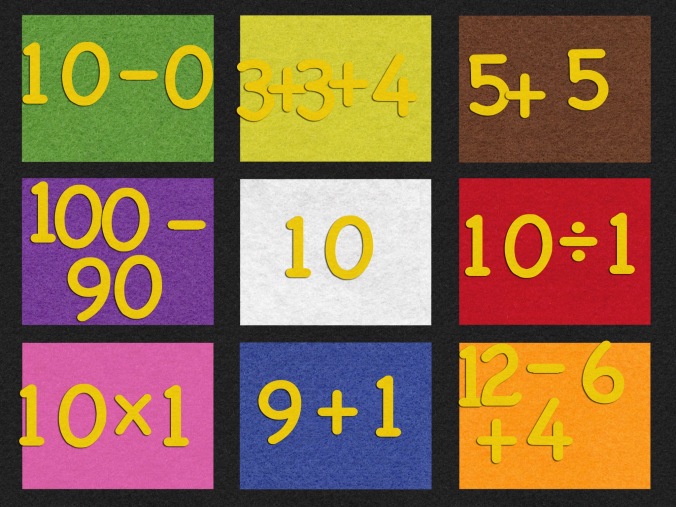
IMG_0004One was being a wise-guy, but still got the right number of buttons. By making these number stories open-ended, students have the ability to use multiple pathways to get to the answer. Another student and a partner, worked together to create what we call an “incredible equation”. One of the students was stronger in math (clearly, as he is able to multiply and divide at age 5) and the other was working on grade level. Together they made this:

 

IMG_0005

By letting my students work where they are, and not where a worksheet forces them to be, the sky is the limit. The iPads give my students the freedom to move on, to move up, and to be in charge of their learning.

So, yes, I am thrilled to have our iPads back. We saw first hand the power of the iPad in our classroom. Even though we have only 22 school days remaining, we are going strong to the end!

Today we will do exciting new things. Let’s get to it!

Read all of our posts about EdTech and Innovation by clicking here. 


Kristi Meeuwse teaches kindergarten in Charleston, South Carolina. In January, 2011, her kindergarten class started a 1:1 iPad pilot for the school district and the results so far have been very successful. You can read more about it on her blog iteachwithipads.net.

A mother’s view on cell phones in the classroom

**The Edvocate is pleased to publish guest posts as way to fuel important conversations surrounding P-20 education in America. The opinions contained within guest posts are those of the authors and do not necessarily reflect the official opinion of The Edvocate or Dr. Matthew Lynch.**

A guest column by Karen Bresnahan

In recent years, there has been a lot of chatter on the internet about why cell phones shouldn’t be allowed in classrooms. Some teachers and parents are dead set against the idea, while others think it could work.

Schools everywhere are busy making new rules about cell phones. Some schools allow students to carry their phones, but only use them at lunch or in between classes, while others have banned the phones altogether from the learning environment.

The debate, it seems, has centered more on the negative side of the argument which views cell phones as a distraction, a temptation, and a detriment to learning because students can use them to avoid paying attention in class by texting on social media or playing video games, or to cheat on tests, by looking up the answers on Google.

As a parent, I always try to use my common sense when thinking about what I should teach my children. It seems to me that cell phones can be a difficulty or a benefit, depending entirely on the attitude of the teacher. After all, they get to decide what happens in their classroom.

I know, as a mom, how important it is for my kids to know what good behavior and bad behavior is at home. At school, it is no different for the teacher who must show the students what is expected of them and to enforce the rules the same way a parent does. If my child uses a cell phone in the classroom to text their friends or play video games, I expect the teacher to do something about it.

But, cell phones don’t have to always be tied to the expectation of bad behavior or misconduct. There can be a positive side. There are many ways cell phones can actually help children learn. Our kids already use the phones every day and they enjoy using them.

Do we want to take technology away from them and punish them for using it, or should we motivate them to use it in good ways?

With or without technology, it is always important to make sure our children know how to learn. It is up to parents and teachers to show them how. The best teachers know all the different ways to motivate students to learn, so the attitude of the teacher is the most important thing when it comes to deciding about cell phones. There are many ways that cell phones can add to learning.

Students can use their phones to do Google searches about any subject. The cameras on phones make it possible for them to take photos and videos for a school project or record an important school event. Phones can be used in emergencies to call for help, or to text a parent about a problem. Phones can be used on field trips to find locations, or on a daily basis, to make communication easier between students and teachers. Cell phones are a way for teachers to make learning applicable to real life and to let students have fun while learning.

Teachers are already finding helpful ways to use technology in the classroom and cell phones are just another way for students to use the internet to connect them to educational resources. Cell phones have become like tiny computers in their hands because the phones are so much better than they used to be.

Computer applications and software are making it easier for students and teachers to share information. Things like Dropbox, Evernote, Schooltown, Socrative, Wiffiti, and Polleverywhere are helpful online resources that many teachers are using now. Cell phone use supports the popular concepts of flipped classrooms and blended learning.

We live in a technology abundant world and cell phones have become a way of life for families. Most children already use cell phones long before they come to school. As adults, we rely upon technology every day, and it makes no sense to discourage our children from using it productively at school.

As a parent, I expect my children to behave at home and I support what the teacher does in the classroom. If a teacher wants to use cell phone technology as a tool for learning in the classroom, I am all for it. But if a teacher wants to take my child’s phone away when he uses it to misbehave, I am in favor of that too.

I want school to be a fun and active learning environment for my children, where technology allows them to quickly access information, and stimulates them to find exciting new ways to learn anything they want to learn. As long as what they are doing in the classroom peaks their individual interests, I am happy.

Cell phones are just another form of technology that can be used to help students become better and faster at learning. Phones can also be used for group sharing and hands on learning that has been shown to have a 90 percent retention rate.

To me, the argument is not about why we shouldn’t use phones in the classroom, but how can we best use technology as a tool to make learning more exciting and more fun, so that students can learn and grow to be self-motivated learners for the rest of their lives.

__________

Karen Bresnahan is a professional writer, photographer and artist from Boise, Idaho. She has a Bachelor’s degree in Communications from the University of Idaho and is the mother of three children. She is a small business owner of Romantic Idaho Weddings, KBLifelines Positive Quotes, and Idaho Naturals Desertscapes artwork. She enjoys writing about education, parenting, health and fitness and positive thinking. Her goal is to motivate, educate and inspire others through her writing and photography. You can connect with her through email at [email protected] or on Twitter @idaho1111

Study: Narrowing achievement gap would add $10 trillion to GDP by 2050

One study after another has shown a wide educational achievement gap between the poorest and wealthiest children in the United States. This prompted researchers at the Washington Center for Equitable Growth, a group focused on narrowing inequality, to study and conclude that if America could improve education performance for the average student, everyone would benefit.

The U.S.  ranks behind more than 33 advanced industrialized countries that make up the Organization for Economic Cooperation and Development when it comes to math and science scores. The study used scores from the 2012 Program for International Student Assessment, a test used around the world to measure and compare achievement.

America ranks behind countries such as Korea, Poland and Slovenia in the 24th spot.

Elimination of the achievement gap in the U.S. will boost the economy — but this requires raising the country’s average score to 1,080.  The average combined score for the U.S. is 978, and the O.E.C.D average is 995.

If the U.S. could move up a few notches to number 19 – so the average American score would match the O.E.C.D. average – it would add 1.7 percent to the nation’s gross domestic product over the next 35 years, according to estimates by the Washington Center. This could lead to approximately $900 billion in higher government revenue.

If the U.S. scores matched Canada, number 7 of the O.E.C.D. scale, America’s gross domestic product would increase by 6.7 percent. After taking inflation into account, this is a cumulative increase of $10 trillion by 2050.

The achievement gap in America is a pressing issue, and it is certainly something we have to hone in on to eliminate. I hope to see our country’s O.E.C.D. ranking improve in the near future so we can narrow, and eventually close, the achievement gap and benefit from the boost in the economy too.

Click here to read all our posts concerning the Achievement Gap.

How LRM is transforming teaching and learning

Behind every successful adult is at least one person who pushed him or her to greatness. If you ask some of the world’s highest achievers what motivated them to keep going, they usually mention a specific person who inspired them along the way – a parent, a teacher, a mentor, a coach.

Think about the people in your own life who made a positive impact when you were young. If you are an educator, it was probably a teacher of your own who inspired you to take that next step and answer the call to teach. There were likely other less-direct influences on your career choice, and others who influenced other parts of the positive parts of your adult life.

Now imagine what it would look like if all of those mentors – those teachers, those coaches – had been able to combine their efforts for a singular purpose: guiding you on the road to successful adulthood. It’s a pretty amazing thought, right? But most of those people were probably from different circles of your life with you (a kid) being the only connection between them. Technology is changing that though, by better aligning the important relationships in a student’s life.

More specifically, Learning Relationship Management is delving deeper into how mentors like teachers and coaches help guide all students to success — both academically, and in other areas of life. The Learning Relationship Management Alliance is a leader in this student-friendly technology that can also be applied to other groups that benefit from mentor support, like senior citizens in assisted living.

The LRM Alliance created this infographic to summarize exactly what the vision is for this relationship technology, including a need to cultivate authentic relationships, personalize learning, streamline content, and connect networks in a student’s life. Take a look:


So how is the LRM Alliance progressing these ideas in a coherent way that any district can implement? By combining the strengths of several leading companies to raise awareness about the many benefits to this learning setup. This group of edtech innovators is changing the way students succeed through electronic means that extend beyond academic pursuits. The five companies that make up the LRM Alliance are:

Through community-enabled mentorship, the strengths of a variety of people associated with each student is tapped. This includes, and is not limited to, parents, teachers, sports coaches, and more. Even older siblings can be included in the community to help encourage, monitor and ultimately guide the student to positive learning outcomes.

When it comes to personalized and blended learning, LRM allows K-20 brick and mortar schools and online schools to move from small pilot programs to large, full-scale implementation. Teachers and administrators have more information on how students are progressing and can tailor lessons to better fit their needs and learning styles. Personalized learning paths are in turn supported through learning relationship management and strengthened by the mentors outside the classroom who are in the student’s network. Learning Relationship Management does not just setup personalized and blended learning lesson plans; it gives students the tools to execute those plans.

Learning Relationship Management is not just about prescriptive methods, though, or simply handing out assignments. The students themselves are an integral part of the process of goal-setting, intervention planning and the communication that takes place about them. Every student can benefit from LRM tools because it does not dictate what people must take part. If a student lives with grandparents, or has a drama teacher but no sports coaches, or even has a trusted teacher he wants to keep in the system even when class has ended, LRM technology makes all of that possible.

Learning Relationship Management has the potential to combine what schools are already doing right with a stronger support group outside the classroom. There can be numerous people (invited by the student and overseen by the lead adult administrator) who weigh in on the goals, benchmarks and activities of the student. There is a lot of power in the community-enabled coaching model and the more people who can contribute to the success of a student — in a streamlined, productive way — the better that student will fare in school, and in life.

You can learn more about the Learning Relationship Management Alliance and its member companies at the organization’s site.

Read all of our posts about EdTech and Innovation by clicking here. 

The positive connection between games and online learning

By Mitch Weisburgh, cofounder of Games4Ed

Game-based learning has the potential to drastically improve the way children are taught.

Games have peculiar qualities that let them engage hard-to-reach students in a way lessons cannot. Researchers have begun to explore the intrinsic qualities of games that make them promising learning tools, and anecdotal evidence is available everywhere.

I personally know a student who struggled in history until Assassin’s Creed sparked his interest in the French revolution; he is now an honors history student. I know many students who spend hours playing Minecraft and many hours more learning new skills and techniques on YouTube, which they then apply to Minecraft. Clearly, a good game is a powerful motivator for learning. It engages the mind and the passions simultaneously, with obvious results. But why, and how, does this work, and how can we harness it in schools?

Who uses games? 99% of boys, 94% of girls, and 62% of teachers play video games.

Games foster ideal conditions for learning

There is a sweet spot for learning that lies between what a person can do without help, and what they can only accomplish with help. Lev Vygotsky coined the term zone of proximal development to describe this spot. In the zone of proximal development, the lesson is neither so easy that the student is bored, nor so difficult that he gives up.

Teachers use their training and skill to create lessons that fall into their students’ zone of proximal development, but Plass, Homer, and Kinzer show in Playful Learning: An Integrated Design Framework that successful games tend to aim toward this same zone. The tantalizing opportunity provided by games is a lesson that measures player skill, and then delivers an appropriate response automatically.

Gamers beware, however. According to Tobias et al, when the game mechanics become complex, the zone of proximal development is overshot and learning can be inhibited. Game designers “need to be mindful of the cognitive load imposed on players” to learn to play.

Games encourage growth

Games relate to another key aspect of learning. Carol Dweck pioneered the idea is that individuals who see themselves as evolving through hard work and dedication will grow their abilities, while those who see their talents as fixed traits will not. She called this the growth mindset paradigm, laid out in her book Mindset: The New Psychology of Success. Games reinforce the growth mindset through their treatment of failure.

Games that support a growth mindset allow for “graceful failure” by embedding low-stakes failure into the game mechanics. These games encourage balanced risk-taking and exploration. A player who fails at a well-made game immediately tries again, and when the player eventually succeeds, the idea of growth through practice is reinforced. Kris Mueller, an eighth grade teacher writing for Edutopia, wrote: “A well-designed game leads players through carefully-leveled tasks that prepare them to succeed in bigger challenges.”

Games improve spatial skills

There are literally hundreds of research and pseudo-research papers on games. A meta-analysis of more than 100 studies, Effects of video-game play on information processing: a meta-analytic investigation, found that studies generally agreed: games improve visual processing, visual-spatial manipulation of images, and auditory processing. The analysis, undertaken by Powers, Brooks, Aldreich, Palladino, and Alfieri, attributed much of the improvement to video games demanding that players interpret, mentally transform, manipulate, and relate dynamic changing images.

Games have significant value for education because the skills cultivated by games are widely applicable outside of games. Tobias, Fletcher, and Chen showed this in a review of 95 studies, Digital Games as Educational Technology: Promise and Challenges in the Use of Games to Teach (to be published later in 2015). They found “evidence of near and far transfer in applying learning from games to external tasks.”

Specifically, action games, often called First Person Shooter (FPS) games, improve attention, mental rotation, task switching, speed of processing, sensitivity to inputs from the environment, resistance to distraction, and flexibility in allocating cognitive as well as perceptual resources. Not only did people learn these skills from video games, there was a significant ability to transfer that learning to other activities.

Games are linked to STEM achievement and greater creativity

Spatial skills “can be trained with video games (primarily action games) in a relatively brief period” and that these skills “last over an extended period of time.” More excitingly, the improvement in visual-spatial skills is related to other, more scholarly, improvements. The Benefits of Playing Video Games (Granic, Lobel, and Egels in American Psychologist, January, 2014) noted that those learning these skills from video games show increased efficiency of neural processing. Improvements in spatial skills predict achievement in science, technology, engineering, and mathematics.

There are also links between playing video games and enhanced creativity, although we do not yet know the exact nature of the connection. Perhaps games enhance players’ creativity, or creative people tend to play video games, or some combination is at work.

Games foster engagement

One of the most important factors related to learning is time on task. It is highly related to proficiency and can be used to predict math proficiency to the nearest tenth of a grade placement. Yet, students are found to be thinking about topics entirely unrelated to academics a full 40% of the time while in classrooms. In fact, on average, high school students are less engaged while in classrooms than anywhere else.

In the Handbook of Positive Psychology in Schools, Shernoff and Chikszentmihalyi make two points that relate directly to the need for increased engagement. They found that enjoyment and interest during high school classes are significant predictors of student success in college, and that this engagement is a rarity in US schools.

High engagement is observed when students focus on mastering a task according to self-set standards or a self-imposed desire for improvement. You’ll remember that those standards are linked to the growth mindset outlined by Dweck. Engagement (enjoyment and interest) is represented by heightened concentration and effort in skill-building activities along with spontaneous enjoyment from intrinsic interest and continued motivation.

This relationship between time spent and skill applies to video games as well. The more time spent playing educational games, the greater the gain in skills and knowledge. Unlike class time, however, video games are great at capturing and holding attention. The average gamer spends 13 hours a week playing games.

It is not clear whether the positive effects of game-based learning stem from greater time spent learning, or increased efficiency in learning, or both. It is clear, however, that more time is spent learning when educational games are used than when they are not. Tobias et al report that those who learn using games, “tend to spend more time on them than do comparison groups.”

What makes an optimal learning environment?

Shernoff and Chikszentmihalyi propose conditions for an optimal learning environment which match strikingly with the benefits of educational gaming. An optimal learning environment:

  1. presents challenging and relevant activities that allow students to feel confident and in control
  2. promotes both concentration and enjoyment
  3. is intrinsically satisfying in the short term while building a foundation of skills and interests
  4. involves both intellect and feeling
  5. requires effort and yet feels like play

Their research shows that video games may foster this environment. Students using a video game approach made considerably greater learning gains than those in a traditional classroom, and were linked to a higher level of engagement.

Shernoff provides an example: a full semester college course, Dynamic Systems and Control.

A college course was designed around a video game in which students race a virtual car around a track for homework and lab exercises. The students reported a higher level of interest, engagement, and flow, and the video game was able to maintain “the high level of rigor inherent to the challenging engineering course while adding the perception of feeling active, creative, and in control characteristic of flow activities. The students who interacted with the video game also demonstrated greater depth of knowledge and better performance in the course.”

SRI, in research on GlassLab STEM games for K12, found that, for the average students, learning achievement increases by 12 percent when game based learning augments traditional instruction, and if the “game” is a simulation, achievement increases by 25 percent.

The research so far points to the tremendous value of games in education, and marks signposts for differentiating “good” and “bad” games. Yet there is still little knowledge on the most effective ways to produce games “the reliably yield pre-specified instructional objectives.” Also, it’s hard to know in advance if students will master a specific standard through X hours playing any one game.

A combination of games and other instructional methods has been shown to be especially effective. “Integrating games into the curriculum improves transfer from games to school learning tasks.”

Games, combined with other instructional strategies, may be the solution to Bloom’s two-sigma problem.

References:

Effects of video-game play on information processing: A meta-analytic investigation Powers, Brooks, Aldreich, Palladino, Alfieri; Psychonomic Society, 22 March, 2013

Digital Games as Educational Technology: Promise and Challenges in the Use of Games to Teach Tobias, Fletcher, Chen; Educational Technology, due in September or October 2015

Playful Learning: An Integrated Design Framework Plass, Homer, Kinzer; Games for Learning Institute; December, 2014

Flow in Schools Revisited Shernoff, Chikszentmihalyi, Handbook of Positive Psychology in Schools, Second Edition, Routledge, Taylor & Francis Group

Engagement and Positive Youth Development: Creating Optimal Learning Environments David J Shernoff, APA Educational Psychology Handbook, Chapter 8

Independent Research and Evaluation on GlassLab Games and Assessments, SRI, 2012, http://ww2.kqed.org/mindshift/2014/06/27/games-in-the-classroom-what-the-research-says/

The Benefits of Playing Video Games, Granic, Lobel, Engels; American Psychologist, January, 2014

_____

Mitch Weisburgh is the cofounder of Games4Ed.

Read all of our posts about EdTech and Innovation by clicking here. 

Edtech aims to save time, combine resources

It’s no secret that teachers spend a lot of non-instructional time on paperwork. It seems as data tracking with students has improved, the amount of it that teachers are asked to do has risen. Grading assignments and filling out report cards are just a drop in the bucket of keeping up with the data needed for individual students, schools, districts and states. The data is well-intended of course and meant to ensure that students are on track, both academically and otherwise.

It just takes time. A lot of it. Technology has made it easier to track student achievements and development but in most cases, has not streamlined that data in the best way possible. Even digital systems often overlap with each other and require the same data to be entered more than once.

Just this week, MIDAS Education released its EEM (Education Enterprise Management) solution intended to bring all student data together in one spot. EEM is an edtech-wide movement that favors integration of information systems, rather than having a need for separate ones. Customized instruction is the aim of the MIDAS system that gives real-time access to teachers, parents, students and administrators through a user-friendly Web interface. MIDAS is not just a curation tool that gives users a single sign on —  it actually replaces all of these systems with a single platform powered by one massive database.

MIDAS encompasses the functionality of up to 13 different software packages in one EEM solution, with a single log-in and an intuitive user interface.

I really like the idea of housing everything in one spot and making it accessible to everyone who needs the information. This not only saves time for the educator and administrators, but ultimately benefits the students. More streamlined policies on data strengthen the help kids can receive throughout their P-20 careers.

For more information, please visit MIDASEducation.com.

Read all of our posts about EdTech and Innovation by clicking here. 

4 Keys to Getting Reluctant Readers from ‘No’ to ‘Wow’

Interactive, multimedia environments can turn reading into something that students actually enjoy.

By Ted Levine

Reading is the most fundamental skill an early learner can develop to start on a path towards success, both as a student and as a young citizen. But I hear from educators all the time about how hard it is to engage reluctant readers, especially at the elementary level when development is most crucial. So the question then becomes: What tactics can we use as educators to encourage those reluctant readers to turn the corner, and ultimately to get them excited about reading and learning?

Just like any other skill, reading is something everyone needs to work at. It requires time, effort, and repetition in order to be properly developed. While educators have the important task of working with young learners to develop their reading skills, student also need support and encouragement at home. No tactics or “shortcuts” will help reluctant readers make progress unless there is time carved out in class and at home to focus on their reading. Having said that, there are some key tactics that educators can use to help drive reluctant readers down the path towards reading proficiency—and even enjoyment.

1) Invite young learners to engage in multimedia learning environments. A multimedia learning environment may consist of reading texts, photographs, videos, audio, and even some interactive elements, all mashed up into one single experience. Technology is often overlooked when it comes to reading, but multimedia learning environments can provide an incredible springboard for students who are reluctant to pick up a book.

Young learners are often drawn into the excitement and movement of multimedia elements, particularly video and interactive content. By contrast, huge chunks of text and reading environments that lack any visually engaging components are daunting for reluctant readers.

We recently held a webinar with Dr. Kimberly Greene, an associate professor of education at Brandman University. Dr. Greene had strong opinions about the importance of shorter passages, approachable fonts, and digital reading environments that deliver an inviting experience. Another of her strong opinions is the second tactic I will share:

2) Don’t send reluctant readers into environments that are too “childish.” This point struck a particularly strong chord with the webinar’s attendees, who were mostly upper elementary and middle school educators.

For example, let’s take a 6th-grade student who currently reads at a 3rd-grade level. The print or digital reading environments available at that reading level often have a childish design. Reading something obviously designed for young kids can be a source of embarrassment for the student to read in front of his or her peers, and oftentimes is counterproductive to achieving the desired outcomes for this type of student. Instead, every student in this example 6th-grade class should be able to experience an interactive reading environment like Kids Discover Online, where every student in class has the same rich reading experience, but at slightly different levels.

3) Start small. For a reluctant reader, sitting down to read for a full hour might feel overwhelming. Aim to have them start with just 15 minutes of reading. You can even begin with five or 10 minutes. No marathon runner kicks off their training season with a 26-mile run. The point is to break down the walls of intimidation and frustration, and to gradually build up your learner’s skills.

4) Create “wow” moments. Getting kids to read is one thing; getting them excited about reading is another. I believe that giving students a reading experience filled with iconic photographs, beautiful illustrations, short-form video, and interactive elements that support the text will create the “wow” moments that every educator so desperately seeks to deliver to his or her students. Having these inspiring moments when they “get it” will lead students to approach reading with feelings of excitement instead of apprehension. Rather than seeing reading as a chore, they will look forward to it and engage on a deeper level with the content.

If we can instill that love of reading in our students, we are giving them a huge head start on the road to academic success.

Ted Levine is the president and CEO of Kids Discover, follow him on twitter, @KIDS_Discover


Read all of our posts about EdTech and Innovation by clicking here. 

Classroom Technology: Does it Really Make a Difference?

Public school teachers have a lot on their plate when it comes to measuring achievement. Student success is determined through assessments, graded materials and even technological savvy. The general consensus seems to be that in order to give K-12 students a fighting chance in the real world, teachers and administrators must stay on top of any and all technology trends. Is it worth the effort though?

The National Center for Education Statistics reported in 2009 that 97 percent of K-12 teachers had computers in their classrooms every day. In addition, 54 percent were able to bring a computer into the classroom. The overall ratio of students to classroom computers was 5.3 to 1.

Well that was then and this is now. Since 2009, teachers have made the shift to include mobile devices like tablets and Smartphones as part of the classroom culture. Computers are still there, but are quickly playing second fiddle to smaller, faster and just-plain-cooler pieces of technology. While the inclusion of cutting-edge technology certainly grabs the attention of students, does it actually make a difference in academic success?

Does technology really provide more opportunities?

The problem with answering these questions is that not enough time has passed since the influx of Internet-based learning has stormed K-12 classrooms. At a technology summit in early 2012, Troy Williams of Macmillan New Ventures told a packed conference room that companies like his do not “have the outcomes yet to say what leads to a true learning moment.” He added that it would still be another three to five years before those numbers can truly be analyzed. Matthew Pittinsky, a co-founder of the popular Blackboard software, agreed with Williams, saying that “these are really early days” when it comes to truly integrated technology intended to improve student success in K-12 and higher education settings.

In its widest definition, though, technology has always been associated with the creation of a level playing field for students. Bernard John Poole of the University of Pittsburgh wrote ten pillars of technology integration in K-12 schools and his final point reads: Recognize that technology is for all, and involves all, in the process of lifelong learning. Poole talks about the way that teachers must receive ongoing training, and parents must be equally involved, in order to promote student achievement through technological advances. While his points sound good on paper, it leads one to wonder if he truly believes that technology is necessity of learning, or if it is only a means to capturing an ever-waning student body attention span.

At the public school level, all students have equal access to classroom computers and mobile devices. Even if these youngsters have no electronic access at home, upon entering a classroom they are able to interact with technology and keep up with their peers. That is all well and good – but does it matter? If all public K-12 classrooms got rid of computers and banned Internet-based learning, would it negatively impact academic success through college years? Would it affect graduation rates? Would American kids fall behind the rest of the world?

I think that truly depends on how you look at it. Does the technology itself provide heightened learning experiences? I’d argue that it does not. Instead, the implementation of the technology is a necessary move to keep students interested in the subject matter. I am not saying that I am against rapid adjustment to cutting-edge technology in learning and practice; I think there is no way to avoid embracing it and still turn out high numbers of world-ready graduates. I just think that there is a danger in relying on the technology to convey learning materials in a vacuum. Look at how much technology has changed since the 2009 report I referenced above. Does this mean that the students growing up in public school atmospheres in 2013 will be better prepared for life than those of 2009? What about the students of 2017, and so on?

What do you think? Does technology improve learning?

Read all of our posts about EdTech and Innovation by clicking here.