online learning

10 Ed Tech Companies You’ll Absolutely Love

I have been blogging about education reform and innovation since 2010, and over that time span I have spotlighted a lot of ed tech companies and organizations. I thought it would be important to highlight a few ed tech companies that I really love and believe in. Without further ado, here are ten that will amaze you:

  1. Class Charts

ClassCharts presents teachers with data-rich information that they need to make informed seating decisions and to tackle behavior issues. When integrated between classrooms, teachers can see how the behavior of their students ranks compared with other places, and together educators can create plans to guide students toward higher achievement. With the whole-school option, administrators and other school leaders can see which students need extra learning resources. Parents can even learn about their children’s behavior patterns.

It gives students the best chance at success, no matter what classroom they are in. Since the software became available in 2013, more than 70,000 teachers have signed up and more than 2.5 million students are in the system.

  1. Fourier Education

The einstein Tablet+ from Fourier Education has a specific focus on STEM initiatives. Instead of going out and searching for STEM-centric lessons on a generic tablet or smartphone, the einstein Tablet+ comes preloaded with experiments and modules that cover physics, biology, human physiology, chemistry, and environmental science. It can be connected to classroom projectors and monitors so that all the students can participate at once, or it can be used as an individual tablet for customized learning in grades K-12. Teachers can search for highly-reviewed (and even completely free) mobile apps to use on the screens in their classrooms.

  1. HelpHub

The online tutoring company HelpHub uses an innovative way to match tutors with students, 24/7 and at times that are convenient for both. The unique platform connects students and tutors with each other over interactive messaging, web video and phone features. All interaction is analyzed, and useful information is sent to the larger HelpHub community to begin online communities that center on particular schools, networks or topics. By utilizing the instant access to technology that already exists, HelpHub connects students and tutors in a moment and ensures that a frustrated student finds help quickly.

  1. Peerless-AV

Peerless-AV is a wireless projector system that believes it can overcome technology obstacles in K-12 classrooms. The projector comes with a built-in wireless receiver and stream sound and HD content (up to 1080 pixels) from up to 131 feet. Teachers can connect up to five audiovisual input devices (all wirelessly) including their computers, tablets, DVD players, MP3 players and even VHS tapes. Teachers now have a streamlined way to project their content from many device sources. Teachers are also able to stream their own audio in real-time through a microphone, even with their backs to the class.

A product like this Peerless-AV projector allows for teachers to speed up or slow down lessons if needed but keep the attention of the class in the process. It cuts out the clunkiness of multiple audio-visual systems and their wires.

  1. Mathbreakers

Mathbreakers is a virtual math playground that starts with topics as basic as counting and advances through complicated subjects like Calculus. Instead of handing students worksheet-style problems through digital means, Mathbreakers uses action adventure role-playing to give students a fun, yet calculated, gaming environment that puts math at the center.

Mathbreakers is a step towards a full math curriculum available in a virtual world, where students can learn about multiple types of math in the same environment. The vision of the application’s creators is that math learners at many levels can use the game to help visualize and understand mathematics on a fundamental level. That starts with basics like number sense, fractions, the number line, operators, and negative numbers.

I was really impressed with the way the application seamlessly integrated concepts like multiplication and functions with the storyline and fun of the game itself. Not only does the game encourage players to use math (not just recite it) but it really is a lot of fun.

  1. CALL (Comprehensive Assessment of Leadership for Learning)

The Comprehensive Assessment of Leadership for Learning, or CALL, is a survey-based system developed by three Wisconsin educators. It calculates areas of strengths and weaknesses in schools and creates an action plan for improvement. It is a smart assessment tool to implement at the end of the year and then brainstorm actionable steps on improvement when school is back in session.

More than ever, schools are in need of transformational leadership that creates learning opportunities for students but also prepares them for the real-world economy. The pressure has never been greater, particularly as Common Core Standards and other state-based ones heighten accountability for teachers, administrators and other instructional staff. The prevailing belief that principals were responsible for all the leadership roles within a particular school is starting to fade. While principals certainly need solid leadership traits, distributing those responsibilities can actually lead to stronger school systems that are able to better support student bodies.

It really is true that “it takes a village” and understanding how each educator in a school can best contribute to its success leads to stronger student outcomes and stronger schools. By implementing the in-depth CALL survey, school leaders can see exactly HOW to get where they need to be.

  1. Alma: Free Student Information and Learning Systems

Alma is a student information and learning management system that combines a vast range of reporting features that are typically only available in several fragmented systems – instead of a central location. Alma brings together lesson planning and curriculum management with student and classroom management to give teachers all the tools they need right at their fingertips, and with one login.

Schools can upgrade the core package for a fee to include “extras” that may be helpful to their operations, like on-site support and custom data migration. Alma has customized solution plans based on the needs of the school, and the budget being used. Alma is a cloud-based system which means that there is no cumbersome hardware or software to install and maintain. Most schools will be able to set up the system in a day or less.

As a former public school teacher, I wish I had access to the type of technology and reporting that Alma offers. I still remember thinking of the school bell at the end of my day as the signal of my “lunch break” and that there were still many hours of work ahead of me. I feel the pain of today’s teachers, asked to do even more on an already-tight schedule.

  1. EduSkills

EduSkills offers ELL data portfolio software (AccountabELL) that helps educators better manage the often fragmented school system data for ELLs. By streamlining the management side of ELL initiatives and documentation, the AcountabELL system makes it possible for all educational stakeholders to make informed decisions about ELL instruction and progress.

A few of the features of the program include scanning and uploading capabilities that help track the Home Language Survey and other ELL forms, calculations of immigrant/bilingual/ELL students across a chosen selection, and support of Title III requirements like language instruction education plans, parent notification and reporting. All of these specific tasks centralize ELL tasks and give educators easier ways to look at the data sets, and apply what it all means to real-time classroom activities. The software makes it easier for communication between all of the important people in a student’s career: current teachers, future teachers, administrators and parents.

  1. Brainzy: Smart Learning for the Youngest Students

I’m always interested in the ways in which companies are combining technology with learning initiatives, and I recently got the chance to check out Brainzy, a new math and reading program from Education.com that focuses on 30 foundational academic skills for ages 3 to 7. The site was developed based on data from the 20 million worksheets or modules downloaded by educators from Education.com every year (to put this in perspective, one-quarter of U.S. teachers have accessed materials from Education.com).

Brainzy eliminates the foundational learning guesswork on the part of parents and teachers by aligning with Common Core Standards on various subjects for pre-K, kindergarten and first grade students. Brainzy offers a 7-day free trial, after which the monthly cost for families and teachers is less than a trip to the coffee shop and provides unlimited access to the resources on the site.

Fun and friendly characters accompany the lessons, aligning the Brainzy experience with what kids already enjoy doing at that age—singing songs, using their imaginations and learning through creative play.

  1. ParentSquare

ParentSquare is a simple to use, private communication platform that streamlines communication via web, email, text or mobile app. The easy-to-use interface offers two-way messaging, file and photo sharing, event and volunteer sign-up and more. With tabs for messages, events, people, photos, files and other options, parents can log into one system and have all the information they need. In short, ParentSquare makes school-to-home messaging simple, empowering parents to take a more active role in the academic success of their kids. Some of the standout features of ParentSquare include:

  • Text, email, web and mobile apps ensure schools reach every parent
  • In addition to classroom communication, parents can join and interact with school groups like fundraising committees or ELAC.
  • An instant Spanish translation option, removing this language barrier in homes where it may otherwise prevent parents from being completely in the know regarding their kids’ academics.
  • A people directory that gives contact information for important figures at the school and allows for messaging them within the platform

As a billion dollar industry, educational technology is one area of education reform that I am passionate about. I hope you enjoyed reading about these ten ed tech companies that I love and think will make an impact.

Read all of our posts about EdTech and Innovation by clicking here. 

Ask An Expert: K-12 Online Learning as a Life Skill

Question: My district recently announced that 30% of our high school courses will now be offered online, and this percentage will increase in the coming years. I think its a great idea, but most of my colleagues are totally against it, citing that it will dehumanize the learning process, among other things. Do you that my district is on the right track? Nicole C.

Answer: Nicole, here is my take on the topic. Online learning is more than a fad. The facts are staggering: According to the International Association for K-12 Online Learning, there are nearly 1.9 million K-12 enrollments in online courses every school year, up from under 50,000 in 2000. The current number does not even include students enrolled in primarily online schools. Thirty-one states have full-time online schools that serve on a statewide basis.

The top reason that districts give for offering online options is for credit recovery, with 81 percent of urban schools citing this reason. Are online courses really equal to ones in the classroom though? It really depends who you ask. Recent news reports out of California show that high school graduation rates are at an all-time high of 78 percent, with even higher numbers in areas like San Francisco and San Jose. While some educators use these numbers to point to student success, critics say the rise in graduation numbers does not necessarily mean students with more education. The rise of online courses as a means to “make up” failed or incomplete classes are part of the reason more kids graduate – but do they know what they should?

It is of course impossible to answer that vague of a question but the debate rages on just the same. Just how rigorous is an online high school course? This is likely a cloudy area for those of us who grew up before the Internet forever changed the face of distance education. On a basic level, if a student reads the material, and is able to give correct answers on a test, that means he or she has “learned” the content. When an educator takes into account other influential factors like learning style, intelligence and work ethic, that basic definition becomes murky. The general consensus in the education community seems to be that even though online courses have merit, they are less rigorous than classroom settings.

Then there is the issue of online learning as an overarching ideology. Embracing the inevitability that online learning is a very real part of the average college education, the state of Florida began requiring in 2011 that high school students in the 24-credit graduation option to take at least one online course. The public, Internet-based Florida Virtual School leads the way in this innovation and is considered a national leader in the e-Learning model. So in this example, Florida is not simply offering online courses as a backup; the state mandates that students on a college prep path get early exposure to the type of learning they are likely to see in college.

This point really accents the two very different ways to look at online courses in K-12 education. On one hand, there is educational merit, though that education is debatable as to the actual extent of its effectiveness. On the other hand, there is the practicality aspect of exposing students to online learning long before the college years. The second point paints online learning as a life skill of sorts – something for kids to understand before entering the real world as adults, much like balancing a bank account or learning how to create a resume. Without a solid understanding of online learning before graduation, students are less prepared for what they will face academically following high school.

The K-12 online course dissenters are just wasting their breath, in my opinion. The momentum of online learning is gaining speed. Educators can best spend their time looking for ways to enhance the content of what is offered in virtual courses and making the most of what classroom time is available.

Read all of our posts about EdTech and Innovation by clicking here. 

Internet Access is the “Toll Road to Equity”

By Lydia Dobyns

While access to technology and the internet are not silver bullets per se, the absence of these critical tools and resources present significant impediments to achieving “college and career readiness” for students.

Secretary of Education Arne Duncan said: “Most schools have about as much internet bandwidth as your house,” during a conference in Washington, D.C.   “We are denying our teachers and students the tools they need to be successful. That is educationally unsound and morally unacceptable.”

In my travels throughout the country, I’ve visited many schools where teachers are constrained in the resources they can provide their students. For these students, it’s not only about the lack of resources; this has the additional unintended consequences of impacting students’ abilities to conduct research instantaneously, collaborate easily with their peers and take advantage of learning opportunities outside the classroom day.

Here’s what I mean about powerful learning fueled by the use of technology and broadband access. At Columbus Signature Academy, a public district high school in Columbus, Indiana, a DNA project was launched in partnership with Professor John Cavaletto of the Purdue University Department of Botany and Plant Pathology.  Professor Cavaletto not only helped initiate the project and stayed connected with students using online video tools, he also provided students access to a robust research database.  Students actually discovered a new strain of yeast, thanks in part to this embedded use of internet-based resources.

According to a policy brief from the National Education Association (NEA), researchers are finding a clear link between technology utilization, student achievement and student motivation.  There’s a significant difference between studying theory and learning first-hand what is relevant.  Motivating students with coursework that is real and relevant fosters the type of education where students are truly engaged ─ and engaged students succeed.  Freshmen and sophomores at Meridian Early College High School in Sanford, Michigan, worked with Merrill Technologies to produce a cart for use in manufacturing. The project combined science, technology, math and engineering to solve a challenging and complex ‘real-world’ problem. Merrill Technologies went on to produce this cart that now helps to solve a very real workplace challenge.

Investing in technology and access for students should not be viewed as discretionary spending.  We need state and federal funding mechanisms that recognize access to technology and broadband is fundamental to providing equal learning opportunities for all students.  Otherwise we risk perpetuating a “have” and “have not” educational system. We should want a better America. Our national aspiration ought to be that every student, regardless of zipcode, not just graduate from high school, but graduate “college and career ready.”

Access to technology and the internet in everyday educational experiences can be as transformative as Gutenberg’s printing press was when his mass-produced Bible marked the beginning of a shared knowledge revolution. How can we expect our students to compete globally when technology and internet literacy are considered basic “college and career” entry skills?  These days even so called “blue-collar” jobs require some “white-collar” skills.

Technology as an embedded part of a comprehensive education strategy just makes sense.  An iPad is not a cure-all, nor is the lack of technology the reason we fail to meet student needs. Successfully reinventing education calls for system-level response, and that response needs to include providing students and teachers with the resources that are found in today’s workplace.


Read all of our posts about EdTech and Innovation by clicking here. 

___

Lydia Dobyns halydia dobynss combined careers as a technology entrepreneur and executive, with education policy and non-profit service. She served two terms as a school board member, led an education foundation and directed replication strategies in the non-profit education sector. As President and CEO of New Tech Network, she directs strategy, new initiatives, product development, and school development services. Among the chief initiatives for New Tech are expanding its network of 160 schools, working with districts and communities for systemic change, further development of the learning management system, NTN Echo and expansion into K-12.
Her entrepreneurial and executive career featured work in the high technology, online services, consumer products and health care industries. Previous roles for Lydia included CEO of goodcompany.com, VP and General Manager for AOL and VP of Corporate Marketing for Ashton-Tate. She graduated with a B.A. in English from the University of California, Berkeley.


4 Benefits of Virtual Labs

It seems that there is nothing that cannot be done online anymore. On a personal level, we do everything from paying bills to scheduling entire vacations in a matter of minutes because of online access. Think about it for a moment: What daily online activities do you do today that were not an option 10 years ago? Five years ago? Last year?

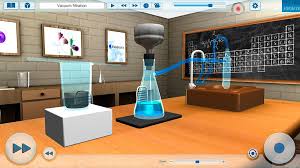
Now consider classroom technology and how it is also evolving rapidly. Implementation of technology in the classroom goes beyond Google searches and reading apps. It stretches into every area of learning, including the sciences. Virtual laboratories are popping up in school districts and online learning curriculum across the country and making it easier and less expensive for students to do experiments remotely. Here are some of the benefits of virtual labs:

  1. Flexible access.Perhaps the most often cited benefit of any online learning is that it can be done at the student’s convenience and when he or she learns best. The same is true of virtual laboratories if the experiments are on the student’s own time. In some cases, a virtual lab may be used during regular class time which narrows this benefit but still allows flexibility for the teacher who is not limited by using resources within a strict timeframe.
  1. Instant feedback.Students can redo experiments on the spot while they are still in a critical thinking mode. All the results are recorded, making communication between teachers and students more efficient too. Experiments no longer have a “one chance” option and students can analyze what went wrong immediately and give it another shot.
  1. Top-notch equipment.Schools and students that use virtual labs have access to cutting-edge technology when it comes to experimentation. Companies that build and maintain virtual labs must compete with each other to stay ahead of technology progression and that raises the quality of options for students. With a virtual lab, students do not have to settle on outdated, yet expensive, equipment because a school cannot afford to replace it consistently.
  1. Lower costs.There is a fee associated with using virtual labs but the capital and maintenance costs are drastically reduced. Instead of one school footing the bill for resources, the cost is split among the clients of the particular virtual lab. This allows school to provide a better learning experience for students at a fraction of the cost.

Higher efficiency, lower costs, better equipment – is there a downside to virtual labs? I’d say it is too early to really see the effects, positive or negative, of science through virtual experimentation, but a few red flags pop into my own mind. I remember many of my in-class science experiments vividly. The sights, smells and sounds of biology and chemistry reactions at my own hand cemented the lessons into memory. It was real for me because it was right in front of my face and I was the one controlling the outcomes (or so I thought).

I wonder how much of that wonder is lost in a digital format? I can’t imagine the next generation of scientists will fall in love with their fields from watching experiments on a computer screen but I could be wrong. Even with the in-person science experimentation I did in school, I had no desire to enter those fields. So perhaps those with a predisposition for the true sciences will not be deterred by virtual experimentation. Perhaps even more students will find a love for those fields because digital lessons allow for more repetition and instant feedback.

Like all classroom technology, virtual labs need to be scrutinized to ensure that behind the flashy capabilities, their true purpose is being met. That will take some time and testing, of course, but I think it is possible with the right combination of in-person and remote lessons.

Do you use a virtual lab in your classroom? What do you think about its potential for learning?

Read all of our posts about EdTech and Innovation by clicking here. 

Virtual Laboratories – All Good?

It seems that there is nothing that cannot be done online anymore. On a personal level, we do everything from paying bills to scheduling entire vacations in a matter of minutes because of online access. Think about it for a moment: What daily online activities do you do today that were not an option 10 years ago? Five years ago? Last year?

Now consider classroom technology and how it is also evolving rapidly. Implementation of technology in the classroom goes beyond Google searches and reading apps. It stretches into every area of learning, including the sciences. Virtual laboratories are popping up in school districts and online learning curriculum across the country and making it easier and less expensive for students to do experiments remotely. Here are some of the benefits of virtual labs:

Flexible access. Perhaps the most often cited benefit of any online learning is that it can be done at the student’s convenience and when he or she learns best. The same is true of virtual laboratories if the experiments are on the student’s own time. In some cases, a virtual lab may be used during regular class time which narrows this benefit but still allows flexibility for the teacher who is not limited by using resources within a strict timeframe.

Instant feedback. Students can redo experiments on the spot while they are still in a critical thinking mode. All the results are recorded, making communication between teachers and students more efficient too. Experiments no longer have a “one chance” option and students can analyze what went wrong immediately and give it another shot.

Top-notch equipment. Schools and students that use virtual labs have access to cutting-edge technology when it comes to experimentation. Companies that build and maintain virtual labs must compete with each other to stay ahead of technology progression and that raises the quality of options for students. With a virtual lab, students do not have to settle on outdated, yet expensive, equipment because a school cannot afford to replace it consistently.

Lower costs. There is a fee associated with using virtual labs but the capital and maintenance costs are drastically reduced. Instead of one school footing the bill for resources, the cost is split among the clients of the particular virtual lab. This allows school to provide a better learning experience for students at a fraction of the cost.

Higher efficiency, lower costs, better equipment – is there a downside to virtual labs? I’d say it is too early to really see the effects, positive or negative, of science through virtual experimentation, but a few red flags pop into my own mind. I remember many of my in-class science experiments vividly. The sights, smells and sounds of biology and chemistry reactions at my own hand cemented the lessons into memory. It was real for me because it was right in front of my face and I was the one controlling the outcomes (or so I thought).

I wonder how much of that wonder is lost in a digital format? I can’t imagine the next generation of scientists will fall in love with their fields from watching experiments on a computer screen but I could be wrong. Even with the in-person science experimentation I did in school, I had no desire to enter those fields. So perhaps those with a predisposition for the true sciences will not be deterred by virtual experimentation. Perhaps even more students will find a love for those fields because digital lessons allow for more repetition and instant feedback.

Like all classroom technology, virtual labs need to be scrutinized to ensure that behind the flashy capabilities, their true purpose is being met. That will take some time and testing, of course, but I think it is possible with the right combination of in-person and remote lessons.

Do you use a virtual lab in your classroom? What do you think about its potential for learning?

Read all of our posts about EdTech and Innovation by clicking here. 

Without teacher guidance, all the tech in the world will be quite useless

**The Edvocate is pleased to publish guest posts as way to fuel important conversations surrounding P-20 education in America. The opinions contained within guest posts are those of the authors and do not necessarily reflect the official opinion of The Edvocate or Dr. Matthew Lynch.**

Kentaro Toyama, University of Michigan

A couple of years ago, I taught an afterschool class at a Seattle nonprofit, the Technology Access Foundation (TAF), which provides STEM education (science, technology, engineering, math) to children from less-privileged backgrounds. My students were 8-11 years old, and it was the first time that I had taught elementary school students.

The curriculum devised by TAF’s staff involves hands-on interaction with laptops to explore programming, robotics and audio editing. With a PhD in computer science and a range of experience teaching older students, I thought it would be easy.

It was anything but.

To allow students a lot of interaction with their devices, I avoided lectures and instead had the students work on their own while I went from table to table to help them individually. My hope was to give the children a chance to learn at their own pace.

The students, however, had other ideas. The minute I turned my attention to one, the others started playing video games. However nutritious the syllabus, they were drawn to the cognitive candy of flashy graphics and sound effects.

The problem I faced at TAF was a small version of the conundrum that confronts parents and schools everywhere: how do we prepare children for a technological world while avoiding the distractions of technology?

Diversions in India

I first encountered this problem about a decade ago in India. At the time, I was the head of a research team at Microsoft Research in Bangalore. My group explored ways in which computing technology could support poor communities. Education was one of our focuses.

Many Indian government schools boasted computer labs, but given limited funds, they often had no more than five or six PCs. With class sizes of 40 or more, this inevitably meant that crowds of children would huddle around each machine, with most of them unable to access the mouse or keyboard.

We tried an innovation in which a single PC was outfitted with multiple mice, each with an attendant cursor on screen. This customized educational software, called MultiPoint, allowed several students to interact simultaneously.

MultiPoint was a hit with students. A controlled trial showed that for some exercises, students could learn as much when they were sitting five to a PC as when they had a PC all to themselves.

A Technology Access Foundation student sneaking in a video game during an afterschool programming class.
Kentaro Toyama, CC BY

However, when we tried to take the idea to other schools, we were stymied.

One problem we often encountered was that teachers would be overwhelmed with the mechanics of the technology. Without a dedicated IT staff or significant training themselves, they’d spend the first 15-20 minutes of a 50-minute class fiddling with the PCs to set them up.

Whatever the technology’s potential, in actuality, time was diverted from learning.

Technology’s law of amplification

Similar things happened in dozens of other projects we ran in education, agriculture, healthcare and so on. Despite our best efforts at good design, computing technology did not, in and of itself, lower costs, improve pedagogy, or make organizations more efficient.

Teachers didn’t improve just by using digital content; administrators didn’t become better managers through clever gadgets; and budgets didn’t grow with the use of supposedly cost-saving machines.

Anurag Behar, CEO of a nonprofit we worked with, put it succinctly:

“At its best, the fascination with [digital technology] as a solution distracts from the real issues.”

Contrary to Silicon Valley hype, machines don’t add a fixed benefit wherever they’re used. Instead, technology amplifies underlying human forces – the unproductive ones as much as the beneficial ones. My book, Geek Heresy: Rescuing Social Change from the Cult of Technology, explains in detail why technology by itself doesn’t solve deep social problems.

Other researchers have found a similar pattern. University of California, Irvine, researcher, Mark Warschauer, along with colleagues Michele Knobel and Leeann Stone, sums up this challenge in his paper:

Placing computers and internet connections in [low-income] schools, in and of itself, does little to address the serious educational challenges faced by these schools. To the extent that an emphasis on provision of equipment draws attention away from other important resources and interventions, such an emphasis can in fact be counterproductive.

In other words, while digital tools can augment the efforts of a well-run learning environment, they harm dysfunctional schools by distracting them from their goals.

The amplification principle also applies at the individual level.

Children have both a drive to learn and an affinity for quick rewards – digital aids amplify both. Few people would imagine that children left in a room with an encyclopedia and enticing toys (even educational ones) could, on their own, summit the intellectual mountain that is a K-12 education.

Handing students a computing device and expecting them to teach themselves is the virtual equivalent of being left in such a room. Rigorous research by economists Robert Fairlie and Jonathan Robinson finds that laptops provided free to students result in no educational gains of any kind.

In other words, while technology can amplify good pedagogy, there is no way around quality adult guidance for real learning.

People first, technology second

At TAF, I was lucky to have a good manager and several terrific teachers as role models. They recommended that I set some rules. For example, I asked students to close their screens any time I was doing a demonstration. I prohibited free time with the laptops if they came early, so that they wouldn’t start off with games. And anyone caught playing video games during class was sent to my manager for a few words of discipline.

Implementing these rules was a challenge at first, but young children are mercifully responsive to firm adult direction. Within a couple of classes, the students got used to the new class culture, and they started focusing on the learning activities.

What I learned was that even in a class about computers, maximizing screen time wasn’t the goal. The first requirement is the proper mindset – focused motivation in students and capable adult supervision.

If technology amplifies human forces, then a good outcome with technology requires that the right human forces be in place first.

Read all of our posts about EdTech and Innovation by clicking here. 

The Conversation___________

Kentaro Toyama is Associate Professor, Technology and Global Development at University of Michigan.

This article was originally published on The Conversation.

Read the original article.

How to create a collaborative learning environment with technology

**The Edvocate is pleased to publish guest posts as way to fuel important conversations surrounding P-20 education in America. The opinions contained within guest posts are those of the authors and do not necessarily reflect the official opinion of The Edvocate or Dr. Matthew Lynch.**

A guest post by Meghan Zigmund

After two years of having iPads in our first grade classroom, I’ve found a few strategies that work to set up a successful and collaborative learning environment. We use our set of iPads to connect, create, share, and much more. However, without a few expectations and procedures our room would be chaos! So here are a few strategies for successful collaboration that can be applied to just about any technology in your classroom.

1 – Visual Expectations

We use Popplet to set up expectations for iPad procedures. Students generate the expectations, with some teacher guidance to make sure a few key issues are included. Students usually end up thinking of things that I haven’t even considered! Next, we take pictures to represent each expectation, and add them to a web in Popplet. This is usually done on one iPad, displayed through an Apple TV so everyone can see what we’re creating. Then, we print it out and post it around the room. The student’s love seeing themselves, and the visual reminders are really effective. Having these expectations makes creating and collaborating together much smoother.

2 – Time to Explore

Our students arrive with all different types of experiences and ability levels for all subjects, including technology. However, there is no need to “teach” students the ins and outs of every app you want them to use all year. Don’t be afraid to just let them discover and explore, especially together. Demonstrate and app or two, show them something you think they’ll be excited about, or better yet, let a student demonstrate what they know. Then give them some time on their own to just play. It doesn’t have to be a huge amount of time, but you’d be amazed at what they discover. You don’t even have to have a device for each student. Let them share and learn from each other.

Students are naturally going to take some time to explore anyway, why not give them some time upfront? They’ll end up being more productive and creative in the end. Time to explore is one of the most powerful strategies I use all year. Be sure you also include time to share their experiences after exploration. It’s well worth it!

3 – Community of Experts

Teachers can’t be the only expert anymore. We must foster a community of experts in our classrooms. Doing this helps students to feel empowered, and encourages ownership in learning. Who doesn’t want to feel like an expert at something? As students explore and discover we add their name and skill to our “Expert List”. If you’re looking for someone to help you record in ChatterPix, edit your photo, or find just the right image in Haiku Deck, then we have an expert for you! No need to ask the teacher, just check out who can help.

We do, however, enforce the rule above. Even though a student might be getting some help, I still want them experiencing the process and learning.

4 – Tweets

Oh, the amazing power of Twitter. If you don’t have a class account yet, get one A.S.A.P. Besides the amazing power to connect, learn and collaborate with others around the globe, Twitter encourages our class to work together. When we post class Tweets, everyone works together to decide what to post, helps edit, and feels ownership in what we’ve shared. There is almost always a discussion about what we want to share, and why.

To help my young learners become ready to Tweet their projects and thinking, we”ll start our year off having a “Tweeter of the Day” so that students gain experience and guide each other on what it means to Tweet and be a responsible, respectful citizen. We’ll collaborate on a set of visual rules to help, and learn to work together as a community in the process.


I’m so excited to begin building a new collaborative community of learners in just a few short weeks. What steps will you take to foster a collaborative learning environment this year?

This post originally appeared on Fractus Learning and zigzagstech, and was republished here with permission.

Read all of our posts about EdTech and Innovation by clicking here. 

______________

Meghan is a first grade teacher with a passion for inspiring student creativity and deepening their thinking through technology. She loves learning and creating with her students and hopes to inspire others to do the same.

It’s ok to date new technology, you don’t have to marry it!

**The Edvocate is pleased to publish guest posts as way to fuel important conversations surrounding P-20 education in America. The opinions contained within guest posts are those of the authors and do not necessarily reflect the official opinion of The Edvocate or Dr. Matthew Lynch.**
Education Trends-A-Go-Go 

It’s SO easy to get overwhelmed with all the new education tech and trends going on in the world.
1:1
Flipping
Makerspace
Genius Hour
Common Core
Mobile Learning
Design Thinking
Google Classroom
Brain Based Learning
Project Based Learning
Learning Management Systems
Transformative Brain Based Learning Spaces

Sheesh….I could go on! It’s EXHAUSTING!

Ed Tech Relationship Anxiety

Then….there’s all the new technology that you have to get, use, and master! Don’t have an unlimited budget or a super generous PTA? OK, now you have to get funding from a place like Donor’s Choose. (Which is totally, doable! But does take a wee bit of effort) Once it was Smart Boards now it’s Tablets and 3D printers.

Then what? What happens when you run out of money to buy the supplies? OMGosh, again. Exhausting!

Take a Deep Breath, It’s OK! 

But I’m here to tell you…It’s OK. You don’t have to try to be the expert at everything.  You don’t have to totally flip your classroom making videos yourself to take the place of daily instruction.  You can start by sourcing some great videos already created and add them to your lesson plan. From places like YouTubeSchooltube, & Flocabulary you can add that rich Remix Mash-Up without hours of video editing. I call it the partial flip – having augmented information available for tutorial or reinforcement and to spark student engagement. My Lesson Path (formerly Mentor Mob) on Big Rich Mt. Olympus is an example of this. Curated rather than created content.

Baby Stepping to Change OR Alternative Ideas to Transformation 

Instead of pitching out all of your furniture to create a brain based & friendly learning classroom why not just buy a few bean bag chairs for $39.99 on Amazon to create a comfy reading nook or discussion circle!

Instead of building a whole lego wall or a Makerspace center spending thousands of dollars with expensive equipment. Why not start small and create a Makerspace cart that can roll around the school with bins of Legos, patterned duck tape rolls for crafting, and a couple Makey Makey kits? See below for more ideas & resources.

And if it doesn’t catch on, you lose funding, replacement materials gets to be too much, or it just flops? You haven’t invested all that much! But most likely you will love it, your kiddos will go crazy over it, the parents and admin will be impressed and you will want to expand it. Either way – you win! But it’s OK to start small & grow!

Instead of stressing about not having tablets to utilize mobile media in the classroom, use your own iPad or smart phone and film Vine video stop action animation book trailers, science experiments, art talks, or social studies history snippets!

Or spark the engagement of Twitter and the ease of Google forms to have the kiddos write a #StoryIn140,  do Twitter style book reviews or QR Code Scavenger Hunts!

OR use QR Codes around the school with Loo Reviews & Pocket videos or 10 Things to do with QR Codes at Back to School Night! It’s not the tool it’s how you use it!

It’s OK to date new technology (or teaching inovation) you don’t have to marry it! 

That’s right, the coolest ed tech trends you’ve heard about at conferences, on Twitter, or during a webinar, you know, the ones that may have also been leaving you awake at night feeling stressed out or inadequate for not jumping in with both feet?  Yeah, those. They don’t have to be all done at once! You don’t have to overhaul your life, you can just adapt! You can simply “pilot” and “beta test” new technologies and new teaching ideas on a small scale. Then, when you find one you like – you can go steady. Date a while. See how it goes.
When you’re ready to commit, you’ll know it!

New Tool Trauma
You also don’t have to get each and every new tech tool that comes out. Remember the Laser Disc? Buy one for yourself maybe and get good at it. Bring it to school and try it with small groups. My school isn’t  a 1:1 or total BYOD school or iPad school. Some of the coolest things I did with QR codes and mobile media in the early days (5 years ago) was with 2 iPod Touch Gen 4’s, my own smart phone, & my first iPad. It’s NOT what you have, it’s the creativity of how you use it. It’s the innovation of teaching and not the tool. Tools come and go, the daring spirit to try new things keeps moving on!

Social Media Stress?

Twitter
Flickr
Vine
YouTube
Blogger
Edublogs
Instagram
LinkedIn
Facebook
SnapChat
There’s a LOT of Social Media outlets that are out there – which ones should you join? Which ones should you just be registered to and which should you be actively involved with? Sure, I’ve blogged about Transparency is the New Black and one of my missions is for all educators to model and create a positive web presence so that they become more visible (and less vulnerable) in their schools and in the communities. But gee whiz, there are only so many hours in the day, right?

If you’re a long time reader or follower then you may know that Twitter and Scoopit are my preferred social media tools, that I broke up with Facebook years ago, and that I’m committed to this blog that you’re reading now. So, what’s your outlet of choice?  Years ago (2008) I created a couple graphics to illustrate that life...err Social Media is less like a fancy Table d’hôte menu and more like a Dim Sum experience…or Tapas!

You can just just try small plate here and there – like it? Get another! Not to your taste?  Push it aside and move on.

Funny how the plates have changed over the yearsSecond Life and Nings are out and Instagram and Vine are in!

Here’s what social media outlets & tools I am active on, followed by those that I have a presence but not a penchant.

The first list means that I’m here at least once a week – if not more.  As a commitment to my profession, I have foregone a personal social media and just maintain a professional one.
That was my choice. I have a formula.
Listed in order of my preference, time, & devotion. Like, we’re in love and dating steady, OK?

Twitter
Wikispaces (Ex: 1, 234)
Flickr  
————–Just starting out? Stop here!————–
Ready for more? Consider Adding these!

Blogger – Professional blog
Edublog – School / Professional blog
Scoopit – Curation Tool
Vine  (Instant street cred w/ kiddos – Lesson Idea)
Instagram  (Why? Read more!)
Slideshare
YouTube 
Skype 

I’m sorta here, I filled out a profile, but I don’t visit very often. It’s more to point you to where I really am. Like, we’re friends, nothing too serious.

LinkedIn – (Whatever you do, fill out the profile & add a picture! Be where your parents are, because you’re a professional, too!)
Google+
Pinterest

I tried it, I don’t like it, You can’t make me do it! Don’t poke me!

Facebook
Snapchat

Now it’s YOUR turn! What social media outlets can’t you live without? What did I miss? Disagree? Bring it on! Agree? I’d LOVE to hear it! What new trends do you love, hate, & want to marry?

This post originally appeared on The Daring Librarian blog, and was republished with permission.

Read all of our posts about EdTech and Innovation by clicking here. 

____________________________

Gwyneth A. Jones, aka The Daring Librarian, is a blogger, a Tweeter, an international Ed Tech speaker, trope and meme archivist, creator of content, a citizen of advocacy, and a resident of social media. Gwyneth is a Google Certified Teacher (#GTAWA11), and the author of the award winning The Daring Librarian blog. In recognition of being a change agent in her field, Ms. Jones was named an Innovator and a Mover & Shaker by Library Journal Magazine in 2011, a Gale/Cengage New Leader 2010, and the Best of the Best and a Visionary Leader by Teacher Librarian Magazine in 2012. She was honored to have served on the 2011-2014 ISTE Board of Directors representing all PK-12 educators and school librarians.  Her work & writings have been featured in the New York Times, The Washington Post, and the Huffington Post.

How digital gives literacy a boost

By way of the United States Department of Education and the National Institute of Literacy, nearly 15 percent of the U.S. population cannot read.

That is an astonishing number.

Delving deeper into the metrics, just 29 percent of adults read at a basic level and nearly 20 percent of high school graduates cannot read.

It’s why we celebrate and encourage reading in schools and observe International Literacy Day in September. From the echos of hearing “reading is fundamental” to understanding the basic nature of being able to read street signs or contracts, reading is a basic need of life.

That’s why companies like myON are so important. A business unit of Capstone, myON “created a personalized digital literacy environment that transforms learning…and expands the classroom for teachers and students by providing unlimited access to the largest collection of more than 10,000 enhanced digital books…”

myON recently expanded its offerings by redesigning “its award-winning personalized literacy environment for PreK-12.”

The company’s new redesign also includes a new writing tool, the myON Literacy Toolkit, advancements in content recommendations based upon individual student interests, and much more.

In an effort to help improve the literacy rate, companies like myON are important to the future of education as they are on the cutting edge of technology and have their fingers on the pulse of what teachers and students need. By combining what is familiar to today’s students (digital learning options) with the fundamentals of reading, we can fight against illiteracy in ways that were not possible just a generation ago. I look forward to hearing the progress with these digital reading tools, and seeing a more literate public as a result.

Read all of our posts about EdTech and Innovation by clicking here. 

The power of the iPad in Kindergarten

**The Edvocate is pleased to publish guest posts as way to fuel important conversations surrounding P-20 education in America. The opinions contained within guest posts are those of the authors and do not necessarily reflect the official opinion of The Edvocate or Dr. Matthew Lynch.**

By Kristi Meeuwse, ADE

Technology won’t replace teachers, but teachers who don’t teach with technology will be replaced. -unknown

Last week, our school iPads were replaced.  We were very excited to exchange our iPad 2’s for the new iPad Air.  Our old iPads served us well but were suffering from frequent app crashes. The replacement took about a week…no small feat when you are talking about over 800 iPads. The excitement over the idea of new iPads was suddenly replaced with the knowledge that we would be without iPads for a few days. My kids quickly realized this and asked, “Um, how will we do our work with no iPads?”  I responded, “I’m not sure…maybe we will do some worksheets.” Puzzled, the kids responded with, “What are worksheets?” You see, they had never completed one before.

It was definitely like going back in time and I’m certain I don’t ever want to teach again without having those devices. My students were used to having choices about their day and about demonstrating their learning. I was used to personalizing their learning and serving as a facilitator while they directed themselves. Student-centered and student-directed learning is one of the keys to educational change.

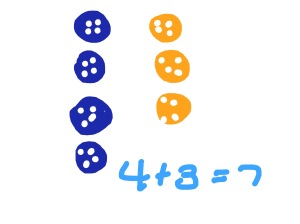
So, now we have our beautiful new devices and the kids immediately went to work. Their work. We have been working on number stories in their math journals. Even though I’m providing the number stories, there is still choice. For example, Sam had 7 buttons.  Some were blue and some were yellow.  How many of each were there?

Here are a couple of samples from my kids:

IMG_0003

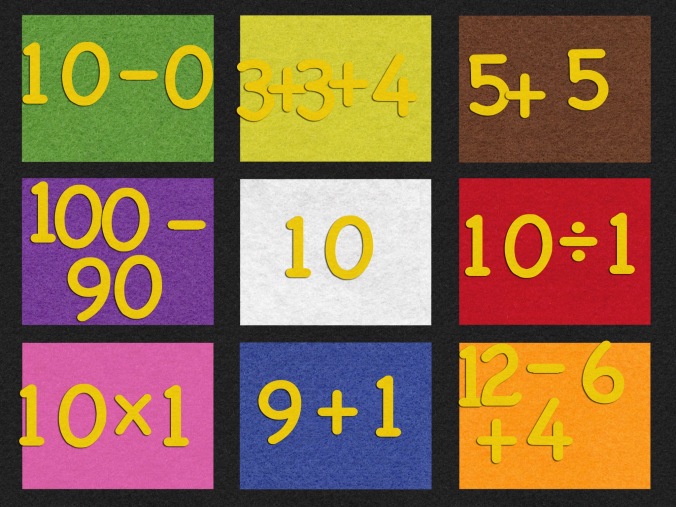
IMG_0004One was being a wise-guy, but still got the right number of buttons. By making these number stories open-ended, students have the ability to use multiple pathways to get to the answer. Another student and a partner, worked together to create what we call an “incredible equation”. One of the students was stronger in math (clearly, as he is able to multiply and divide at age 5) and the other was working on grade level. Together they made this:

 

IMG_0005

By letting my students work where they are, and not where a worksheet forces them to be, the sky is the limit. The iPads give my students the freedom to move on, to move up, and to be in charge of their learning.

So, yes, I am thrilled to have our iPads back. We saw first hand the power of the iPad in our classroom. Even though we have only 22 school days remaining, we are going strong to the end!

Today we will do exciting new things. Let’s get to it!

Read all of our posts about EdTech and Innovation by clicking here. 


Kristi Meeuwse teaches kindergarten in Charleston, South Carolina. In January, 2011, her kindergarten class started a 1:1 iPad pilot for the school district and the results so far have been very successful. You can read more about it on her blog iteachwithipads.net.