Pedagogue Blog

What Are the Benefits of Using Virtual Reality in K-12 Schools

Virtual reality is one of the biggest trends in education, right alongside makerspaces. However, if you ask the average educator what the benefits of using VR in the classroom are, many would draw a blank. Why? Because a lot of educators literally jump on the bandwagon of the newest technologies without doing their homework. In the end, their students suffer. If you are an educator who currently uses or wants to use virtual reality, but don’t fully understand its full capabilities and benefits, then I am talking to you. Not to fret, if you keep reading this article, you will find out what all the hype is about, and how virtual reality technology can help your students prosper.

Allows students to experience things that are not possible in a traditional classroom. By using a VR headset or device, students can be transported to places and environments which are not readily available to them. This enhances their learning experience and can help them visualize things that were previously only theoretical. Imagine if you a student who is learning about the American Revolution and are curious about the life of a “redcoat” or British soldier. With the help of virtual reality, you could be transported to the Battle of Bunker Hill and experience it firsthand. The first thing that you would probably notice is the sense of urgency in the air, and the fierce fighting going on all around. While this would not be appropriate for younger students, older students could certainly benefit from the experience. These types of experiences also help students connect to the material being presented, and the importance of learning history.

Makes students interested in learning. Students love to watch something as opposed to reading or hearing it. By creating a visual representation of the materials being taught, students become engaged more than ever before. Things that they would never be able to experience in real life, all of a sudden become tangible. This motivates students to learn, and suddenly learning becomes a passion, not a requirement. It doesn’t feel like work anymore, it seems like fun. As a general rule, when we enjoy something, we do it with more purpose and drive.

Eliminates the language barrier. The language barrier is usually a problem when it comes to international education. If you want to study in another country, you have to have a decent command of the language. With virtual reality and its subsequent software, every possible language can be embedded into the learning experience. Language is no longer a barrier.

Did I leave anything out?

Why “anti-tech” teachers irk me

**The Edvocate is pleased to publish guest posts as way to fuel important conversations surrounding P-20 education in America. The opinions contained within guest posts are those of the authors and do not necessarily reflect the official opinion of The Edvocate or Dr. Matthew Lynch.**

A guest post by Lisa Mims

The conversation went something like this:

Teacher: Do you know he suggested using Tagxedo at Reading Night?
Me: What a wonderful idea!
Teacher: I don’t see why they want to use technology. (said with disdain)
Me: Why not? The kids and parents would have a good time.
Teacher: What if it doesn’t work? What if it doesn’t print? Then what are we supposed to do?
Me: What do you mean doesn’t work? It’s really easy to use.
And the conversation continued...

“Technology” is not something you can pick up or put down, it’s not a solid object. That is what frustrates me so much about people who are “anti-tech”. It makes me want to scream at the top of my lungs every time someone says to me, “See, I used the Smartboard today, I used technology.”

Or, after typing an entire paragraph on a web page, it’s deleted, and the person yells, “See, that’s why I don’t use technology!”

Technology is not a subject!!!  It is a tool that is not going away. It’s not something extra that you add to a lesson, it’s just part of your lesson. You know, the way you use the textbook. I had a hard time wrapping my mind around the question, “What if it doesn’t work?” So does that mean that we shouldn’t use it? What isn’t going to work? The Internet? The computers? Tagxedo?

Yes, there is a chance any one of those things might not work, but there is a greater chance they might. And what an experience that would be for those who use it! It reminds me of when my principal, who asked us to think outside of the box after a tech conference, asked me to put my Sliderocket presentation on a flash drive because the “Internet” might not work that day.The “Internet” worked just fine.

When I was thinking of a way for my kids to creatively describe themselves, I chose Tagxedo as a way to do that. While planning my lesson, I did not begin with, “How can I use Tagxedo today?” When I want to connect with students in another state or country, I use WallwisherEdmodoTwitter, etc… because it’s a way to connect beside pen and paper.  When I want my students to share their thoughts simultaneously about the novel I am reading aloud, “Today’s Meet” is a wonderful tool. And, I don’t only use the Smartboard during observations, just to prove that I am using “technology”, because that’s what “they” want to see.

All the wonderful things I do with my class is not done to “show off”. It’s because it engages my students and makes teaching enjoyable. And yes, I do have a life. There are so many great ideas I get from so many different people in my PLN, so there’s no need to spend every waking hour trying to find them on my own.

We have to let go of this fear of the unknown , the fear of change. We have to remember that we should be lifelong learners, and not be scared to share our knowledge, even in a way that might not be comfortable for us!

This post originally appeared on Diary of a Public School Teacher, and was republished with permission.

_______________

Diary of a Public School Teacher is a blog where Lisa Mims shares her  thoughts about any aspect of the teaching profession. She is a DEN (Discovery Education Network) STAR Educator! She loves writing and I has contributed posts to Free Technology for Teachers, Edudemic, TeachHub, GoAnimate, Edutopia, etc.

Why we should teach our students digital marketing skills

**The Edvocate is pleased to publish guest posts as way to fuel important conversations surrounding P-20 education in America. The opinions contained within guest posts are those of the authors and do not necessarily reflect the official opinion of The Edvocate or Dr. Matthew Lynch.**

A guest post by David Cutler

“It is time for schools to stop blocking Facebook, Twitter, Instagram, and other social networks that students love and already use daily outside of school.”

So writes Mark Barnes in his book, Teaching the iStudent: A Quick Guide to Using Mobile Devices and Social Media in the K-12 Classroom. Ad nauseam, schools advertise how they use technology to prepare kids to excel in an increasingly global 21st century, as if no other school is doing the same thing. Meanwhile, too few schools teach students how to make effective use of not just Facebook and Twitter, but also other popular online tools, instead preferring teacher-friendly alternatives that few use in the real world.

It may be true that plenty of students know how to create digital media, but too few know how to produce high-quality content, the kind that makes them stick out to not only college admission officers, but also potential employers. If you think “marketing” is a dirty word, and that educators have no business teaching students how to do this, you need to reconsider your role. We need to teach and encourage students to post original, quality content to brand their unique identities in a sea of increasingly indistinguishable resumes—which are going the way of the typewriter.

In fact, right now I’m teaching my freshman European history students how to create and maintain a WordPress site. Throughout the year, they will post their thoughts and creative responses. Moreover, students will learn to feel more comfortable sharing their work, crucial for successful collaboration in the digital age. As a next step, students will register for a Twitter handle, to be used for sharing and discussing topics related to European history. If they choose, Tweets can be embedded on their sites.

When it comes down to it, I do more than just teach history. I encourage students to use evolving digital skills to explore, develop, and express their own passions and interests. Of course, I’m fortunate to work at a wonderful school, whose ace technology department allows and fosters digital creativity.

I recently spoke with Barnes, curious to hear his thoughts. Not surprisingly, he agrees, adding that WordPress is the most powerful blogging platform in the world. “I always say…make sure that you give them the opportunity to do some niche-blogging, too, because ultimately, that’s what they’re going to do,” Barnes says. “That’s what we do. Our niche is education—we tend to write about education. Who knows what theirs is going to be, but they’re going to be creating content that’s going to be really important. I think teaching them at a young age how to do that effectively is really important.”

For the most part, I’ve found that when students share their work online, the quality of that work improves. I noticed as much in 2011, when I helped students launch The Falconer, the student news site of Palmer Trinity, a terrific private school in Palmetto Bay, Florida. Before submitting stories to me, students carefully reviewed each other’s work. Once their stories were posted, students felt even more excited about receiving feedback, not just from the class, but also from the wider school community.

More than anything else, I think, student excitement for online sharing stems from wanting to make a difference and having their voices heard. Nothing fulfills that yearning quite like the Internet, which allows students to use not just writing, but also photographs, audio, and video to tell stories that can elicit an immediate response and make an immediate impact.

Barnes tells me of one former student who blogged about Google Glass before the invention took off. “Here’s a kid, 12- or 13-years-old, and he writes this amazing post and does his own review of it, and includes pictures and outside links. It was just, you can comment on anything you want,” he says. “He wound up getting…150 or 170 comments on this one post. People were coming to him like he was the expert. It was such a great opportunity to share that with kids across all my classes and just say, ‘This is what writing and curating content is really about. You become an expert at something, and people come to you.’”

Last week, I also spoke with Eric Sheninger, whose courageous book, Digital Leadership: Changing Paradigms for Changing Times, echoes much of what Barnes and I believe so strongly in promoting. I asked Sheninger how best to serve students in the digital age, and his response leaves little to the imagination. “Adapting and evolving with the times and worrying more about learning than numbers,” he says. “When you focus more on learning, everything else falls into place.”

In that vein, more schools must develop the courage to teach how to leave behind a positive digital footprint.

This post originally appeared on spin.edu, and was republished with permission.

____________________

David Cutler is a coach, history and journalism teacher at Brimmer and May, an independent school in Chestnut Hill, Massachusetts. He is the founder of Spin Education.

Teachers: How to Use Google Drive

By Catlin Tucker

For teachers who are just getting started with Google, Google Drive can be intimidating! In preparation for a Google training, I’ve put together a short explanation of Google Drive and its basic features. Although an increasing number of people have a Gmail account, I run into teachers all the time who are not sure what Google Drive is or how it works.

Google Drive is like a big virtual bucket! It’s where everything you create with Google apps–documents, forms, sheets, slides, drawing–are stored. And unlike a traditional word processing document, you never need to click “Save”…EVER.  Your work is automatically saved every 5 seconds (or so).

Google Drive comes with 15 GB of free storage, so you can save files, photos, and videos. You can access any file in your Google Drive from any device as long as you have internet access. This means you are no longer tethered to a piece of hardware. You can open, edit and share files from any device that can get online.

For those with unreliable internet access, you can also install Google Drive onto your devices and work offline. Then when you are back online, your devices will sync and store your work!

Here are some screenshots to help you navigate your Google Drive.

Organize your files in whatever order makes sense to you. You can limit your view to the files you’ve created, the files that have been shared with you or the files that have been most recently edited. This makes it easy to locate the files you’re looking for.

Screen Shot 2015-01-20 at 2.47.26 PM


Click on a file or folder and check out the “More actions” icon (3 vertical dots) to manage your documents more easily.

Screen Shot 2015-01-20 at 3.28.31 PM


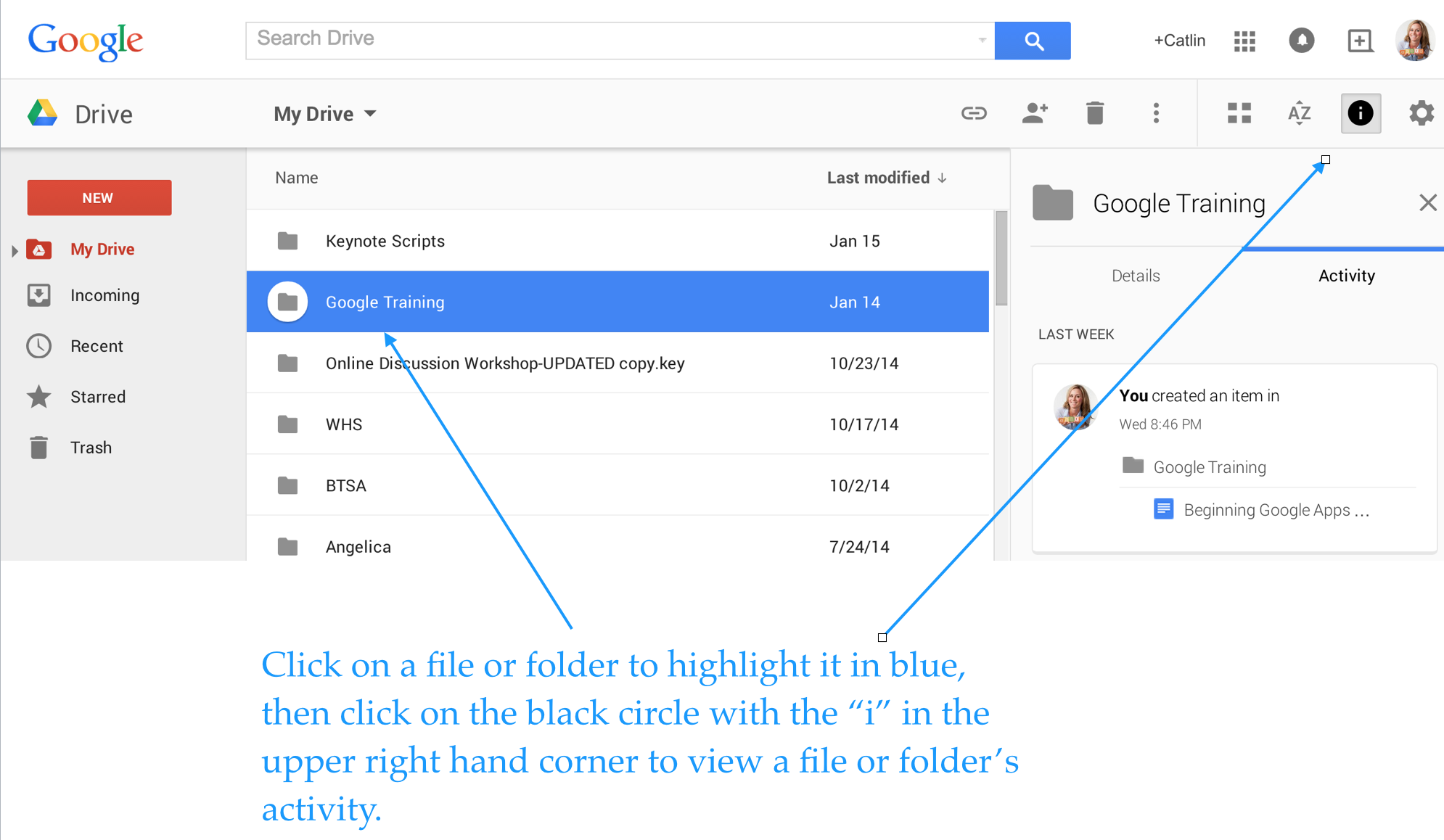
Enjoy total transparency with the “View Details” icon (black circle with the letter “i” in the middle). Simply click on a file or folder and see all of the activity associated with it. You can see when documents were created, when they were edited, and who edited them!

Screen Shot 2015-01-20 at 4.06.24 PM


Last, but not least, you can insert files, photos and videos directly from Google Drive into your emails.

Screen Shot 2015-01-20 at 1.34.37 PM


If you use Google Drive and have tips to share, please post a comment!


This post originally appeared on Catlin Tucker: Blended Learning & Technology in the Classroom and was republished with permission. 


Why Teachers Should Embrace Technology in Their Classrooms

By Matthew Lynch

Teachers have a lot on their plate when it comes to measuring achievement. Student success is determined by assessments, graded materials and even technological savvy. The consensus seems to be that to give K-12 students a fighting chance in the real world, teachers and administrators must stay on top of any and all technology trends. While it’s impossible to use every piece of technology to the students’ advantage, there are some legitimate reasons (aside from the cool factor) that teachers should embrace technology in their classrooms.

At-risk students

Technology has made it possible for students who fall off the traditional path to jump back on and finish what they spent most of their childhood working towards. This may be in the form of taking remote classes from home, remedial classes in on-campus computer labs or even by enrolling in full-time online schools, public or private. The technology available for these options benefits students who face difficulties with a normal school schedule including teenage parents, students with short-term or long-term illnesses, teens with substance abuse struggles, or those who had poor academic performance due to learning disabilities or bullying.

Equality through Technology

Technology is also a great equalizer in K-12 classrooms. Students have the same access as their peers to whatever technology is available in their district and specific classroom. While there is certainly some technology discrepancies between one district and another, often based on the socioeconomic status of the families within that district, within each district students have fair access to technology. In a way, things like computers and mobile devices in classrooms usher in the technology of the outside world and give students who may not otherwise have access a chance to use it for learning purposes.

Having in-classroom technology more directly impacts the graduation rate by providing customized learning experiences. A student who needs extra help on a particular topic need not hold up the entire class, or feel embarrassed asking for that help when there are computer modules and tablet apps available for individual learning experiences. Teachers who spot a trouble area with a particular student can gear that teen towards more exercises to master the topic. Of course, technology is not the magic wand to fix all problems, but it does allow for more flexibility of the learning process which in turn makes it easier for a wider group of students to stay in classrooms until the end of the K-12 journey.

College Prep

K-12 educators used to have the goal of helping their students reach high school graduation, but now the pressure is on to create students who go on to achieve college goals too. No matter how advanced the technology options in a particular school district, they are dwarfed by the reliance on and widespread use of technology on college campuses. High school students who become acquainted with technology for things like course selection, class management, and actual learning modules are better.

Other Technology Perks

There are so many ways that academics are enhanced by technology that simply did not exist ten years ago. Today, students can benefit from online learning modules if a major illness or suspension keeps them at home. For students who are struggling under the academic and social pressures of traditional schooling, online learning provides an alternative to stay on track from the comforts of home. Online learning is just a brushstroke on the contemporary portrait of learning technology. Within classrooms, teachers can encourage students to work individually on a computer or mobile devices, freeing up some time to work in-person with those who might need the extra attention.

Teachers can also communicate more effectively with parents and students regarding upcoming assignments, supplementary lesson plans, and areas where students could benefit from extra practice. With browser-based technology, and cloud-based options, teachers can provide easy access to information and parents and students can log in at their convenience.

Technology is transforming the teaching process into one that is more interactive as well. Instead of waiting to see how much a student knows at the end of a term, progress can be measured in real-time – and adjustments can be made. Teaching is becoming less instructor-centric and more of a collective process.

What do you think? Did I leave any benefits of classroom technology out?


Cloud Computing and K-12 Classrooms

Cloud computing has taken the business world by storm. Climate controlled rooms full of servers are quickly being replaced by remote storage technology, whimsically referred to as “the cloud.” Over half of U.S. businesses use some form of cloud computing to back up their important data and improve productivity. Instead of trying to find the capital to pay for a secure server structure, businesses are subscribing to cloud services and paying for more storage as their needs grow.

The practical uses of cloud computing technology also translate to K-12 classrooms. Simply put, cloud storage saves space, money and time for teachers, parents, students and administrators. A report by CDW Government found that over 40 percent of schools use cloud applications to store their data and by 2016, schools are expected to spend 35 percent of IT budgets on the cloud. The savings add up though. Right now K-12 schools report that their cloud initiatives are saving them an average of 20 percent on IT costs. By 2016, those savings are expected to reach 27 percent.

So how exactly are K-12 schools using cloud computing and what are the benefits? Let’s take a look:

Stronger communication through access. Through K-12 cloud platforms like Edline, teachers have better communication with parents and students regarding assignments, tests and projects. Parents can log in from anywhere (including their phones or tablets) and instantly know how their kids are progressing. Teachers can post important messages and keep an archive of completed work in one spot. Depending on the school, cloud forums may even allow parents and students to contribute in the application for a two-way dialogue.

Disaster planning. Schools collect a lot of information on their students and that data impacts decisions and the well-being of the kids. It takes a lot of time to build student databases and maintain them. If a man-made or natural disaster threatened the physical location of school records, whether hard copies or stored on servers, it could mean a catastrophe when it comes to student information. Using cloud computing ensures that student records are secure and accessible, no matter what happens to the physical school building.

One-stop shopping. Cloud platforms are able to bring together data pools that were previously unconnected so that educators and administrators have everything they need in one spot. Since there is no physical equipment that schools must purchase to get started with cloud computing, there is also a pay-as-you-go mentality. Schools do not need to pay upfront for infrastructure and can add cloud storage as their needs increase. It saves money, space, time and other resources.

Fast recovery of data. If you’ve ever experienced a server crash on a personal or professional level, it can be a long time while you wait for your information to come back. Cloud-based businesses recover data quickly and often handle any technical issues that might arise in a “crash” situation. A word that is often associated with all cloud applications is “redundancy” because the technology eliminates any chance of single-point failure.

Some peripheral benefits of cloud computing are decreased energy costs and high security features to ensure protection and privacy of student information. As K-12 schools move toward cloud computing, student information will be better preserved and shared content more accessible. While use of the cloud does not have a large direct impact on classroom activities it does improve teaching efficiency overall. It also has long-term savings attached which is always a bonus when it comes to K-12 technology spending.

Does your school use the cloud yet? If so, how has it improved your school efficiency?


How Should Colleges Teach?

For many students, graduating from high school means heading off in short order to a residential four-year college or university to pursue higher education, a college degree, and – eventually – a career that will allow them to be a self-sustaining, productive member of society.  But as technology continues to reshape the landscape of education, many are beginning to wonder if the traditional brick-and-mortar colleges are the best way to serve the needs of the students.  The question becomes: how should colleges teach?  And how can they best serve the needs of all their prospective clients?  Is a physical college experience really the best way?  Or is there a growing place for digital learning in higher education?

We can consider two ends of the college education spectrum: traditional physical classes and online classes.  Each offers their own benefits and drawbacks, and each serves the needs of different types of students in specific ways.

Face to Face Courses

There are many benefits to traditional classes.  For a lot of students, the college experience is about more than simply taking classes.  The social experience can be as instructive as the classes in which one enrolls.  Brick-and-mortar colleges have the benefit of giving students the opportunity to spread their wings, living alone for perhaps the first time, managing their own affairs with less parental guidance (or interference) and opening a new world of opportunities through campus clubs and organizations.  Teaching via lecture in a physical classroom that meets are prescribed times can still incorporate a myriad of educational technology, but the structure of definitive classes is a necessity for some students who are still trying to learn to manage their own time and education.  Furthermore, the face-to-face interaction with the professor and the other students can provide both socialization and support for college students.

Online Courses

Not every student has the luxury of being able to afford to live on campus and attend college full-time.  Nor, in today’s flexible climate with people still chasing the American dream, are college rosters comprised solely of recent high school graduates.  In many situations, therefore, online education is an ideal opportunity.  Online colleges offer flexible schedules to accommodate other responsibilities and commitments, lower overall cost to students, and the ability to telecommute from wherever you are to whatever institution in which you wish to enroll.  With online educational portals such as BlackBoard, Moodle, and Google Classroom, it is easy to receive instruction, turn in work, and collaborate with the professor and other students through a digital medium.

Blended Learning

Of course, very rarely is there a one-size-fits-all best option for anything, least of all education.  Sometimes offering a mix of online and traditional classes can best meet the widest range of needs for the widest range of students.  Students can take physical classes during the regular semester and supplement their learning with online classes between semesters and during the summers, allowing them the freedom to work or intern while still earning credits and progressing through their education.  Letting students learn in different ways will accommodate their shifting needs throughout their educational pursuits.

Whether a college offers physical classes, online learning, or a mixture of the two, one thing is for certain: it is essential for professors to incorporate edtech in their teaching strategies.  From PowerPoints shown via projectors to Near Pod presentations sent remotely to students’ tablets or handheld devices, technology is a critical part of students’ education in the modern world.  Since most students attend college – either online or physically – in the hopes of settling into a lucrative career, it is essential that higher education students how to use technology to become more productive, to find the information they need, and to disseminate important information.  These are all technological skills that students will use in the real world.

Colleges should utilize technology to make education more accessible to more students.  Technology possesses the power to break down barriers, making education and achievement attainable even to those for whom it has always seemed out of reach.  The transformative power of technology is apparent in the ways in which it is improving the lives and opportunities of people throughout education.

Stretching Your School’s EdTech Budget

Every school wants to offer its students the best, most current, most meaningful opportunities.  In the modern era, this means providing its learners with appropriate and useful technology.  Unfortunately, technology can also be very expensive. With school budgets ever tightening, being fiscally responsible and taking advantage of cost saving measures is paramount in making sure that students are best taken care of and given the best opportunities.

Here are nine tips for making your dollars count in integrating technology in educational settings.

  1. Take advantage of group rates

There is power in numbers.  A single iPad is expensive, for sure, and a thousand iPads are, theoretically, a thousand times more expensive – or are they?  Most tech providers offer a discount for buying technology in bulk.  Sometimes, too, schools can earn discounted rates if they are part of a consortium of schools investing in technology together.    Additionally, try to get quotes from two – or more – tech suppliers.  When companies compete, you can save big.

  1. Practice sustainable technology

Be careful not to over-purchase just because you think you’re getting a good deal.  It’s more fiscally responsible to buy just what you need.  Wasted technology can end up being a drain on resources.  As technology ages, make sure you are investing in maintenance only for machines that are salvageable.  For instance, computers that are more than five years old are often more expensive to continually repair than to replace with newer, more efficient and effective machines.  Sustainable technology also means rotating the technology.  Technology classes should receive the most advanced technology, as their class necessitates, but there are many teachers and classes that would be glad for the hand-me-downs.  This will save money and put existing tech to good use.

  1. Purchase the right tools for the job

Make sure you are purchasing machines and technology that are appropriate for your school’s needs.  Stocking a computer lab with iPads, for example, might not be practical if students will be using the lab mainly for typing papers.  Likewise, you may not need a high-powered machine for every class.  Those same English classes, though, do not need gaming laptops with endless RAM and enviable graphics cards.  It’s a good rule of thumb to purchase the least expensive technology that meets your needs and is reliable and reputable.

  1. Purchase tools that can multi-task

In a similar vein, don’t box yourself into technology that can only be used for one class or circumstance.  In one-to-one initiatives, netbooks can be used for a variety of classes and tasks.  Make sure that you research what tools can be used in all – or at least most – classes and provide students with the opportunities they need.

  1. Search out opportunities for freebies, especially software and apps

Web-based software apps are becoming increasingly popular, and many apps for tablets are, if not free, available in a “lite” version that often is free.  This is a great way to try out programs without committing to spending large portions of your technology budget.  You can pilot apps with groups of students, study their comparative efficacy and, if the students, teachers, and admin agree that something is worthwhile, you can invest your budget in the full paid version.  This saves money that could be otherwise wasted buying apps that might end up being useless/

  1. Standardize (reduce cost for training and support/repairs)

Even though education is a largely personal, often artistic endeavor, there is something to be said about standardizing the technology.  Standardizing the type (Windows or Apple?  Tablet or netbook?) of technology you use can increase cost savings through bulk purchasing options, streamlining repair, and making training simple and uniform.

  1. Stop spending money on old/obsolete tech

There may always be teachers who prefer overhead projectors, VHS players, film reels, or cassette tapes.  But maintaining and repairing these items is costly.  Overhead projector bulbs alone can be a substantial cost to school tech budgets.  Phasing these technologies out or – even better – selling these outdated machines can pad your tech budget, making more room for the things that will benefit the students most.

  1. Leverage buy-back and rental programs

Mac to School is an Apple program that supplies technology and one-to-one opportunities for school districts.  As the tech ages, Mac to School will buy back the items, helping to offset the cost of replacement technology.  Some technology suppliers also offer rental programs.  Schools can rent devices for a number of years before sending them back to the manufacturer in exchange for new devices.  In either case, the data is wiped from the devices so that student and school information isn’t inappropriately disseminated.

  1. Explore creative funding options

The best way to stretch a budget is to make a budget bigger!  Explore state and federal funding options, available grants, or appeal to the community.  As Bring Your Own Devices become more acceptable, it offers the opportunity for districts to invest their tech budgets in other pursuits as well.

Technology is becoming a necessity in education.  Preparing students to use technology is an essential real-world skill.  Following these tips will help your district make the most of the money they have to provide the students with the technology they need.


How is Technology Revolutionizing Campus Libraries?

Technology impacts the ways in which teachers – whether elementary, secondary, or post-secondary – present information and assess student learning and capabilities in the classroom.  And students use technology to change the way they learn and communicate in return.  It stands to reason, therefore, that libraries should also grow and change with the influx and prevalence of technology in education.  Technology is a powerful force in education.  Here are five key ways it continues to revolutionize learning experiences in libraries:

  1. It’s not just about the books!

The first (and arguably most significant) way that technology has impacted libraries is that it has shifted the focus from books to digital resources.  Libraries used to be places where students came to read and research, using books that they couldn’t access elsewhere to find information that would be otherwise out of reach.  Now, however, thanks to technology, information is readily abundant.  Libraries now must shift their focus to the sharing and exploration of information, to safely and wisely using the resources available through the internet.  Whereas libraries of yesteryear may have featured stacks and rows of books, wooden study tables and carrels, not you are more likely to see couches and cafes, comfortable study group areas, and maker spaces.  Libraries are shifting from being repositories of information to meeting spaces for the exploration of worldwide information.

  1. Makerspaces

In the spaces where books used to dominate, one way that libraries are letting technology enhance their value is by adding maker spaces.  Makerspaces are creative areas that let students of all levels – and the community at large – gather to brainstorm, problem solve, and create using communal resources.  Because libraries often have resources and buying power greater than that of a single person, they can offer attractive maker space options.  Some of these options include laser cutters and 3D printers.

  1. Subscriptions to databases

As information becomes increasingly digitized – including access to scholarly articles that can be viewed instantaneously after peer review, instead of waiting weeks or months for publication in a paper journal or magazine – libraries become essential places for offering students access to the research they need across all content areas.  Instead of facilitating the long-ago interlibrary loan, now university libraries subscribe to databases for the benefit of their students.  Students can tap into these databases with a university or library log-in, or sometimes simply by being connected to the library’s wifi.  These databases allow the students to connect their learning to the world at large, and to ferret out the information they need to enhance their understanding of a subject, research a project, or write a paper.

  1. Greater, more efficient access to resources

More and more, librarians are becoming facilitators.  Just as high school teachers are “flipping” their classrooms, letting the students learn on their own and then practice their skills under the tutelage of a teacher, so do librarians work now not to find information for students, but to teach students how to navigate resources.  Librarians’ jobs now are to help students become independent researchers; they maintain database subscriptions and digital resources to steer students down the paths they need to find the necessary information.  Instead of performing hours-long, often fruitless internet searches, librarians will know which databases and journals will best suit students’ needs.

  1. Rethinking the roles of librarians

More and more libraries are restaffing their spaces with technology coaches.  As their library buildings are filled with maker spaces and computers, tablets and digital resource centers, it becomes necessary for technology coaches to be on hand to teach students how to use new technology, to maximize the potential of the technology available, to repair and update the hard- and software, and to oversee the appropriate use of the library’s resources.  Librarians may teach the students where to find the digital information they need, but technology coaches maintain the portals to said information, giving students an open, speedy road to their information destinations.

Technology is changing everything about the world around, from how we do our shopping to how we communicate to how we learn.  Now, too, as libraries become more and more plugged in, technology is changing how we get our information, making it faster and granting us access to the most current resources in the easiest way.  Libraries will continue to play a critical role in connecting students to knowledge – the only thing that changes is the lens through which we view that information.

How technology can help connect off-campus students

Living on-campus during college years has its advantages: utilities are paid for, all campus resources easily accessible, social events are easy to attend, students don’t worry about commuting, etc. Living off-campus also has its advantages: lower rent, more freedom in housing, no curfews, alone time, and much more.

But, off-campus and online students can be at a disadvantage when it comes to connectivity, community, and educational support. Because of these disadvantages, many universities have come up with solutions to help these students feel more a part of the university and be able to succeed.

Connectivity

Being on-campus definitely has an advantage when it comes to being connected with resources: most universities provide free wi-fi, libraries have a huge array of online journals and primary resources, and the university IT team is there to help. But, as an off-campus or online student, sometimes there are issues connecting to university resources.

Princeton University helps its off-campus students connect to their server by using the program, EZproxy. This service doesn’t require any configuration and can be used to allow students to access university library online databases. Off-campus users will need to only supply their university net ID and passwords.

Many universities also provide a secure remote access (SRA) service, which requires installing and configuring software compatible with the student’s computer’s operating system. GlobalProtect is another network security program for students who live off-campus.

University library websites also allow a student login to access online journals and databases regardless of where the student is using the Internet.

At Oral Roberts University in Oklahoma, the administration has created an IT concierge service to help students with computer and connectivity issues. They have even created OneCampus from rSmart as their “digital concierge” platform. This allows students both on-campus, as well as off-campus, to get help with connecting to the services and resources they need.

Community

Students who live on-campus have a community built in—only students live in the dorms, there are many on-campus parties and activities, and clubs typically meet on campus. Sometimes, off-campus students can feel left out and not a real part of the university community. But, there are many technological ways to build community with off-campus and online students.

Online peer support networks are huge. Twitter groups, Facebook pages, Instagram profiles, etc. can help off-campus students stay in-the-know with campus activities and news. It’s also a great way for students with similar interests or majors to get to know each other.

Northeastern University has created a program that functions both online and in-person to help bridge the gap between the college and off-campus students. This program is called Community Ambassadors. They work with Off-Campus Student Services to help with leases, services, advocacy, promoting student connections to, and encouraging student relations to the community.

Educational Support

When living on-campus, it’s easy to take a half hour and go visit a professor during office hours for extra help or meet with other on-campus students for group projects. However, off-campus students and online students don’t have that opportunity. Having a way to connect with classmates, TAs, and professors online allow these students to still get the help and support they need.

Universities typically provide students with a school-related email on their secure server. Students can use these email addresses to contact other students, staff, or departments for school-related business. When a professor sees the name of the university in an email address, he will be more likely to answer it than an old email from middle school.

Collaborative Internet hosted services such as DropBox or Google Drive can really help students connect with each other without even leaving their apartment or house. By using these “cloud” programs, off-campus students can share documents or projects with their classmates without the hassle of finding time to meet in person.

Smartphone apps such as GroupMe and WhatsApp can also help off-campus or online students get the support they need from TAs or classmates. GroupMe is an app that creates private chat rooms for small groups. This is perfect for working on projects or sharing notes. It even works over SMS if you don’t have a smartphone. Photos, videos, and locations can even be shared. WhatsApp is a secure, reliable messaging system. It includes video chat, texting, video and photo sharing. It even has the ability for users to send documents, PDFs, spreadsheets, slides, and more.

By using technology to allow remote access to online programs and servers, connect with the on-campus community, and work with classmates and professors, universities can help their off-campus and online students have as much success as their on-campus students.

Guidelines for Young Children Using EdTech

Technology is ever pervasive in children’s lives. At home, children watch TV, play video games, and spend their days on tablets and phones. Technology is even becoming prevalent in the education of children. However, the younger the child, the less screen time they should have according to the American Pediatrics Association. There is also the added danger of cyberbullying and online predators for educators and parents to consider. With as much fun and help technology can be in the classroom, it is very important that teachers and administrators are careful and selective in the educational technology choices for young students.

The Department of Education has been trying to create guidelines for the role that technology should play in school, especially for younger students. According to the Department, “The rapid pace of innovation in technology provides a seemingly endless stream of new learning options for families and early educators. The goal of the Departments is that all children in every community and at every socioeconomic level have equitable access to appropriate technology in early learning settings and that technology is used responsibly with young children.”

Ponder these four key steps when evaluating and deciding on a specific educational technology:

  • Establish learning goals for the children.
  • Identify the hardware or devices you would like to have.
  • Analyze features and content of the software/program in meeting learning goals.
  • Plan how the educational technology will be integrated into the curriculum.

When considering the breadth and scope of technology to use in younger grades, focus on these guiding tips.

Technology, when used appropriately, can be a tool for learning.

Consider these questions: Does the technology help children to learn, engage, express, imagine or explore? Does it complement and supplement learning and not replace learning? Will it help individual students with their own growth and development? Is it following the Common Core and state educational standards, or is it being used for free time? Is the technology age appropriate?

Technology is only useful if it responds well with the ages and developmental levels of the children and is a smart fit with their individual needs, interests, and their social and cultural contexts. Are they being actively engaged with the technology? The Department and Education and the Department of Health and Human Services jointly defined “active use of technology” as referring to what happens in the mind of the child. Are they generating insights, making associations, adding knowledge, or creating their own content? These are important questions to consider since much of the technology aimed at preschoolers and toddlers don’t have this proven research behind it.

One important thing to remember about proper use of educational technology, especially for younger students, is keeping them safe. The Children’s Online Privacy Protection Act (COPPA) protects children under 13 by requiring certain apps or websites to necessitate verifiable parental consent.  Schools must remember that any information collected from a child, such as photos or voice recordings, must be protected with security measures. Parents must provide consent to sign students up for online educational programs at school. The Family Educational Rights and Privacy Act (FERPA) also helps protect children’s privacy online when technology is being used at school.

Technology should be used to increase access to learning opportunities for all children.

Is there technology for students to use at the school if they don’t have the resources at home? Are you using technology to take advantage of virtual field trips when physical field trips aren’t part of the school budget? Does the technology encourage global learning and engaging in different cultures? How does the technology support STEM and early learning?

As mentioned before, technology shouldn’t replace learning—it should expand learning. If there isn’t a purpose to the technology, or if some students aren’t able to access the technology, then it wasn’t a good choice.

Technology may be used to strengthen relationships among parents, families, early educators, and young children.

Does the technology encourage communication between staff and parents of the students? Can parents access the technology being used in the classroom? Does the technology help parents become more involved in the school?

Try to include the students’ families with the technology that you use in the classroom. Make sure you are transparent about what technology is used in your classroom. Is there a version that they can download or use at home to continue the learning process?

Technology is more effective for learning when adults and peers interact or co-view with young children.

Are students left alone with the technology, or are they guided by an adult? Does the technology encourage social learning and skills? Are parents or teachers encouraging active use of more passive technology? Are parents or teachers discussing the content or goals for using the technology before students use it? Do parents or teachers view the content with students and interact in the moment? After use of the technology, do teachers or parents engage the children in a de-briefing or extended learning activity?

Technology use for younger students is great—it encourages the inclusion of STEM, mastering skills that will be needed in later education, and creates new learning opportunities. Just remember that technology is the best used in younger classrooms when co-viewed and engaged with an adult. But, don’t forget that physical activity and unstructured play are essential for younger students.


10 Technologies to Keep Schools Safe

With all the news of different school shootings, it is becoming increasingly important to take advantage of new technology to keep schools safer. Implementing effective high-technology security systems can be costly and lengthy but there are four tips to make the decision of what is best for your school:

  • Know your school’s unique needs.
  • Start small, then build smart…don’t try to implement every technology security system at once.
  • Head off controversy by including the families of students in the decision-making process.
  • Don’t forget to hire people to oversee, run, maintain, and upgrade the system.

With these four tips in mind, here are ten very popular and effective technologies that keep schools safe.

#1 Social Net Watcher

At a middle school in Indiana, administrators launched their new computer program, Social Net Watcher. This program works in “the cloud” to find dangerous words posted on Facebook which then, through the program’s algorithm, will alert the school administrators.  This program helps the school to keep an eye on cyber bullying. Bruce Canal, the President of Social Net Watch, said “With the new bullying law that went into effect in Indiana this summer, schools are now required to report to the Department of Education the number of bullying events that they’ve had. Our software also allows them to go in and create a report to send to the Department of Education.”

#2 Anonymous Alerts

Another technology that helps prevent bullying or other severe and dangerous situations such as a weapon on campus is the Anonymous Alerts app. At Round Rock ISD, students and staff can download this app on their Apple or Android products and can anonymously report incidents. Round Rock ISD spokesperson, Corey Ryan, mentioned that they want students to feel safe and comfortable when sharing concerns about safety and security.

#3 NetSafe Kit

Many schools feel that they can’t completely protect their students online. So, they are focusing on teaching students to be prepared and safe while online. This NetSafe Kit helps schools teach students cyber safety and digital citizenship.

#4 Visitor Management System

Many schools require visitors to sign in on a paper log and show proof of ID before entering the halls of the school. However, at Stow-Munroe Falls High School, the administration is using a technological visitor management system to protect its students. Visitors have their state or federal identification scanned and the system checks a national database of registered sex offenders.

#5 Entry Control Equipment

Not only should schools require visitors to check in with the office before going any farther into the school, but many schools feel it necessary to keep all exits locked at all times. These schools have entry control equipment: electromagnetic doors that can be remotely locked or unlocked. Visitors buzz in and the office staff can choose to unlock the doors for them or not.

#6 Metal Detectors/X-Ray Machines

Especially in inner-city schools where violence and drugs are rife, metal detectors and x-ray machines are a necessity to keep entrances to the school campus safe. This will allow detection of guns, knives, or other weapons before they are brought on campus.

#7 Surveillance Cameras

Over 90% of K-12 schools in the United States have security cameras and video surveillance equipment. Cameras should be placed in the school hallways, large rooms (such as the library, cafeteria, and gym), and especially near the front entrance. Some security systems come with alert buttons that send emergency transmissions to police.

#8 Panic Buttons

Teachers can wear small panic buttons such as the Mobile Duress panic button on their belts or pockets during the day. If some trouble or danger arises, the teacher can push the button and an alert is sent to both the authorities and the school administrators. The administrators will then make everyone in the building aware of the threat while first responders make their way to the school. Different brands of panic buttons can double as microphones or voice amplifications systems.

#9 Mass Messaging Software

Mass messaging software, such as e2campus, allow schools to immediately send messages to parents, students, faculty, and staff at the same time when there is a threat. Messages can be sent in the form of email, voice, or text and can be sent to both computers and smart devices. Even without threats or danger to the school, this program is nice to have to send community-wide reminders or memos.

#10 Alertus Desktop

Having all the computers of staff members connected is important to keeping the school safe. Using Alertus Desktop, or other similar programs, allows desktop alerts to appear on every computer screen on campus. This is a great idea, especially if a student or faculty member is in an area that doesn’t have great cell service. It can also help all staff members stay coordinated and be used to send staff memos and reminders.

Remember, the safety of the students and staff at your school are of the utmost importance. Don’t be too paranoid in your decision making, but be smart.


Latest Posts