Uncategorized

How Do You Engage Parents Who Don’t Speak English?

Teacher Kerri Gardner uses a communication app with a translation feature to connect her kindergarten class with parents and the wider community.

By Chaks Appalabattula

Parent communication is a challenge in every school. According to a Gallup poll, only 1 in 5 parents are truly engaged with their children’s school. Districts with high immigration and low income rates have the added problem that many parents don’t fully understand English. Often, these same families have incomes that make regular access to a computer impossible. Most of these families do have access to a smartphone, though. Here’s an example of how one district took advantage of that fact to engage hard-to-reach parents.

Holyoke School District is a Title 1 district in Colorado that serves more than 400 families. The district communicates with these families through teacher notes and calls, newsletters, emails, newspaper articles, and more. Holyoke also offers evening workshops and meetings throughout the year on topics including technology, literacy, and scholarship applications. There are several committees that parents are encouraged to join, including an Accountability Committee, Parents in Education (PIE), and a Wellness Committee. The district also helps families with its Migrant Program and Homeless Program. Despite all of these existing programs, engaging immigrant parents is always a challenge, since they do not feel connected to the school community.

Turning Disconnected Parents into Academic Allies

Kerri Gardner is a kindergarten teacher at Holyoke Elementary School. Like many teachers in her district, she is always looking for a way to engage parents in her classes. “I wanted parents to know what we did throughout the day so they could talk to their child about it,” she said. In her search for a way to get past the language barrier that exists with many of her parents, about a year ago she found an app called Bloomz that promised to simplify communication with parents, and decided to give it a try.

Bloomz is a free mobile and web app that works on traditional phones (via text message), on computers, or even smartphones (via a mobile app). Bloomz offers translation to more than 84 languages. When she first started using the app, Gardner “was concerned about participation level from parents because our population is high poverty and we have high populations of a second language being spoken at home. Despite this, most of my parents signed up.”

With the Bloomz translation feature, Gardner posts messages or updates in English and parents receive them automatically translated into their preferred language. Gardner also bridges the language barrier by communicating with images. Last year, she remembered, “I took a lot of pictures to share with parents what fun learning activities we were doing. Pictures worked really well in Bloomz because of the language issues with parents, and for parents to share the pictures with their child in order to increase discussion.”

Staying in touch with parents on a daily basis had an impact on the dynamics of her classroom, too. “Bloomz promotes better behavior,” she said, “letting parents know how a student’s behavior is at school so parents can reinforce good behaviors at home or discuss poor behavior.” (Bloomz has recently announced new features to help track students’ behavior and share student portfolios, which will be available in time for the new school year.)

The daily communication allowed Gardner to work with parents to their students’ academic benefit, she said. Inspired by a message from her, “A parent talks to their child about what he learned that day and sees that he could use a little more practice and works with him at home on the skill.”

Gardner also found her own innovative ways to use the app in the classroom. “We took the photos and used them in class to meet a social studies standard, putting the pictures from the year in order on a timeline,” she shared. “I’ve basically photo-documented my kindergartners’ entire year because of the Bloomz app.”

Connecting with the Community at Large

In order to have a lasting impact, though, technology has to go beyond the classroom setting to help schools build relationships with their parent communities. As Gardner put it, “Bloomz helps develop positive relationships between school, home, and even the public by letting parents see the good things we’re doing at school.”

Her school administrator has taken notice, and is now asking several other teachers to start using the app as well. “It gives him a window into my classroom so that he can see what learning activities I’m using to teach the standards,” she said.

Gardner has big plans for Bloomz beyond the classroom: “To promote positive relationships with the community, next year I’d like to invite our local newspaper to view our Bloomz feed so that if they see a learning activity that they like, they can print it in the newspaper—with parent permission if photos are involved.”

Technology doesn’t only benefit people in high-income communities. Armed with a phone, a powerful imagination, and a communication app that seamlessly translates for her diverse community, Gardner has helped catapult Holyoke into a new century of community-building and parental engagement.

Chaks Appalabattula is the CEO of Bloomz, a new app that connects teachers with parents, creating an engaged parent community in classrooms and schools.

Want to follow Bloomz on Twitter? Follow them @BloomzApp

Service-Learning Develops Character in Students

By Michele Pitman, CEO of intelliVOL

Educating the whole child and developing character goes beyond the core subjects being taught each day. Many school districts recognize this and have instituted programs encouraging or requiring students to give time in service to their community and peers. Organizations like the National Honor Society have incentivized service, giving recognition for student efforts outside of school. And, when these students apply to colleges and universities, their service record usually improves their chance at being accepted.

Given how much we as a culture value community service and the well-rounded individual, more U.S. high schools need to offer institutionalized and systemized service opportunities for their students. In the vast majority of public schools, service is a club activity. In private schools, service is so important that it is graded. But in most public schools, students must find their own charitable organization and arrange to work there of their own initiative. There may be an advisor to help in this process or they have established relationships with nonprofits thereby making it is easier to connect, but a student’s service has no bearing on their formal school record.

The National Honor Society does fill in the gap where organized, school-mandated service is not available. Through the NHS, students give hours and track that data by school sponsors who are responsible for verifying, tracking and reporting student hours given to service. This legitimizes the student’s efforts and for college applications, is a critical validation in a hyper-competitive landscape.

Yet, turning service into more than simply checking-off-the-box-so-I-can-get-into-college scenario, requires a bit more effort. In the over 10 million service hours that students have logged and tracked for schools through our company, the overwhelming majority of school leaders tell us that students need to think about their service and its impact. They need to make a personal connection between their lives and those whom they have helped. Schools call this reflection. Service, they say, is more significant and meaningful when students are required to write down their thoughts after they’ve completed their service.

Teachers and student advisors recognize this connection between action and mind. Guilford County Schools in North Carolina has a very active service-learning program with over 1.4 million service hours logged to date, and is nationally recognized as a District of Character by Character.org. Yvonne Eason is the coordinator for character development and service-learning at the district. Guilford, like many schools we work with, requires students to write down their thoughts about their service. “The reflections piece is huge for us. We’re looking for our students to reflect on the experience of service-learning. This goes well beyond just recording the number of learning hours served. It gives students a chance to share what impact each experience had on them personally as learners and individuals, as well as what type of impact they’re having on the community, or organization they’re serving,” says Ms. Eason.

Reflection is at the very base of building a well-rounded individual who has skills and experiences beyond classroom instruction. This simple action–writing down our thoughts of helping others—takes our regimented, subject-heavy learning environment beyond the “how” and answers the question, “Why?”


About the Author

Michele Pitman, creator of x2VOL developed the platform in partnership with high schools to give them an easier, more accurate way to manage, track, verify and report service hours students give in the community. x2VOL is the most widely used service tracking and reporting platform in K12 education with over 10 million approved service hours.


Performance Matters Premieres Episode 3 of Salon Series Exploring Educator Viewpoints on Personalized Professional Learning

Sandy, Utah — Aug. 16, 2016 — In a nationwide survey, more than 500 principals and teachers indicated that trust and respect are vital to a successful personalized professional learning initiative. Yet, obstacles such as differing views of the evaluation process or a lack of trust in evaluation results can make it difficult to create a climate that supports teachers’ professional learning needs. In Episode 3 of the Performance Matters (formerly Truenorthlogic) Educator Viewpoints on Personalized Professional Learning Salon Series, K-12 educators, school leaders and district administrators are invited to explore how to build trust, respect and empathy into personalized professional development in a free, comprehensive report and a webinar on Sept. 8th at 2 p.m. Eastern time.

Episode 3, titled “Trust and Respect: Must-Have Attitudes,” shares key findings from the survey and best practices from educators including how Long Beach Unified School District in Calif. developed empathy upfront in the professional learning design process, and how Boulder Valley School District (BVSD) in Colo. joined together with the teachers’ association to recreate their approach to teacher evaluations. In addition, it features an interview with the Hasso Plattner Institute of Design (d.school) at Stanford University and links to tools for interviewing and empathy mapping, among others.

”When Colorado established new educator evaluation requirements, we decided to completely revamp our system for teacher and principal evaluations. We knew that a high level of respect and trust would be required for our new system to be accepted, and this required a great deal of planning and collaboration with all parties,” said Shelly Landgraf, assistant superintendent of human resources for BVSD. “As a result, we now have an effective evaluation system that is valuable to all employees, and we look forward to sharing what we’ve learned with other districts.”

To get the Episode 3 Guide or register for the webinar, visit http://insights.performancematters.com. Educators can also join in the conversation on social media using the hashtags #AMPeducators and #PPLSuccess.

About Performance Matters

Performance Matters accelerates student success by combining powerful student and educator growth solutions with real-time analytics. The Performance Matters Platform includes tools for student assessment development and delivery, as well as educator professional learning management, performance evaluation and observer calibration. Together these solutions, leveraged with a real-time analytics engine, provide specific, actionable insights that boost student performance and build educator capacity. Performance Matters was formed through the integration of two best-in-class education solution providers: Truenorthlogic, the leader in educator professional growth tools, and Performance Matters, an authority in student assessment and data analytics. For information, visit www.performancematters.com.

Media Contact:

Leslie Eicher, APR, Eicher Communications Inc.

(314) 965-1776

[email protected]


New Studies Show Children Improve Language and Reading Skills, and Brain Function, After Using Fast ForWard Program

Oakland, Calif. — Aug. 16, 2016 — In 2015, only 36 percent of fourth-grade and 34 percent of eighth-grade students performed at or above the Proficient level in reading on the National Assessment of Educational Progress (NAEP). New approaches to improve reading skills are introduced and used in schools every year, yet the problem persists. The answer, according to research, lies not in some newfangled method, but rather in addressing the root causes of students’ reading difficulties.

In the 1990s Dr. Michael M. Merzenich, winner of the 2016 Kavli Prize in neuroscience, worked with fellow neuroscientists Drs. Paula Tallal, William Jenkins, and Steve Miller, and showed that improvements in brain function — including those cognitive skills essential to reading — could be achieved through the use of computer-controlled training. Twenty years later, the software program they developed — Fast ForWord® from Scientific Learning Corp. (OTC PINK:SCIL) — continues to be vetted and proven to remediate the underlying difficulties that keep struggling readers from making progress. To date, results have been demonstrated in more than 250 research studies, including two new, independent studies.

In an article published in Frontiers in Psychology, Sari Ylinen and Teija Kujala reviewed studies that show how auditory or phonological training leads to reading improvement and physiological changes in the brain for children with learning difficulties, including dyslexia, specific language impairment (SLI), or language learning impairment (LLI). Among the studies they cited, several demonstrated improvements in children’s language and reading skills and brain function after training with the Fast ForWord program.

In a study published in Brain Topography in December 2015, Sabine Heim, Naseem Choudhury and April A. Benasich reported that after Fast ForWord use, children with LLI showed improved language skills and changes in patterns of neural activity that indicate “a change in cognitive control strategies.” This is consistent with other neuroscience studies on children with and without LLI (Stevens et al., 2008) and children with dyslexia (Temple et al., 2003). All of these studies suggest that the improved language and literacy performance seen after Fast ForWord use may result from better attention and memory.

For information, visit www.scientificlearning.com.

Media Contact:                                                                           

Hallie Smith
Scientific Learning Corporation
(619) 888-0887
[email protected]      


Custom Assessments Allow Teachers to Easily Blend Cross-Curricular Concepts

Kids Discover Online users of the science and social studies curriculum can now design their own homework and assessments within the platform.

Just in time for back to school, Kids Discover, a leading provider of science and social studies curriculum, has added custom Assessments to its Kids Discover Online learning environment.

With the new tool, educators have full control to mix and match science and social studies materials to create, distribute, and assess custom quizzes, tests, and homework assignments directly within the platform.

Teachers can choose from 5,000 pre-built questions covering more than 1,200 science and social studies topics. Question types include discussion prompts, short answer, multiple choice, and true/false, allowing educators to choose how they want to assess what they’ve taught.

Using the pre-built questions as a starting point, teachers can customize each question and group different types of questions together to create a variety of assessments ranging from short multiple-choice quizzes to longer mixed-question assessments.

To help differentiate homework assignments from assessments, teachers can lock and unlock content to restrict what the student can view while the assessment is in progress.

The Kids Discover Online platform automatically grades all true/false and multiple-choice questions using customized answer keys. The Gradebook feature keeps all student scores in one place so teachers can track students’ progress through the year, analyze their strengths and weaknesses, and provide intervention when necessary.

According to Ted Levine, the president and CEO of Kids Discover, the Assessments feature was inspired by Kids Discover users. “It is so important that our users know we listen to their feedback and requests,” he said. “They are our best source of information on how to continue making our solution the absolute best for them and their students.”

EXO U Launches Ormiboard to Help Teachers Transform Mobile Devices into Interactive Whiteboards

The collaborative SaaS tool works on any device to engage students through interactive activities, games, and lesson-building

(Montreal, Canada) August 23, 2016 — EXO U Inc. (“EXO U” or the “Corporation”) (TSXV: EXO), a software development company, today announced the launch of Ormiboard, a first-of-its-kind digital learning environment that redefines whole-classroom teaching by transforming any device with any operating system into an easy-to-use whiteboarding and collaboration tool.

“Created using teacher feedback to build a hassle-free whiteboarding experience linked with collaboration and sharing features to engage students, Ormiboard realizes the potential of today’s BYOD, 1:1, and mixed-device classrooms,” said Jim Kirchner, the CEO of EXO U. “We say ‘the world is your whiteboard’ because Ormiboard’s web-hosted environment effectively puts interactive whiteboards in the hands of every student, whether they’re at school or home—creating an omnipresent 21st century canvas focused on student collaboration and creation.”

Teachers can migrate existing whiteboard content from software such as Smart Notebook and ActivInspire to capitalize on the work they’ve already done. They can also choose from Ormiboard’s ready-made lessons or create their own activities, games, and lessons with students on any device within Ormiboard’s easy-to-use interface.

Ormiboard’s expanding library of templates and searchable content covers all subject areas and includes quick quizzes, click-and-drag assignments, games, and exams. Users can also create and customize lessons using a floating toolset to insert more than 500 vector clip art images, pictures, shapes, text, tiles, sounds, actions, and more.

“In class, Ormiboard incorporates all devices into a single immersive learning environment and empowers teachers to instantly push content and activities to student devices, jump to external content, simultaneously view multiple student sessions on one screen, and select any students’ activity to appear on the front-of-class display,” further explained Kirchner.

Ormiboard allows teachers to create multiple forms of questions and push them to student devices, and results are available on an educator’s device immediately. This capability allows teachers to assess as often as they like and use students’ responses as part of the lesson. Teachers can then save sessions in order to track students’ performance individually or in groups.

“Ormiboard can even help your students grow into coding and support STEM skills development if teachers add simple Javascript into lessons so students can animate activities themselves,” added Kirchner.

In seconds, teachers can fully integrate Ormiboard with Google Classroom, Google Drive, Dropbox, Evernote, and other popular third-party platforms.

Ormiboard is available directly to teachers worldwide. To sign up for a free trial or for more information please visit Ormiboard.com. For a limited time, early adopters of Ormiboard Go will receive a dramatically discounted price.


About EXO U

At EXO U, we believe that people learn best with instructional technologies that support and don’t interrupt the momentum of teaching, learning, and collaboration—whether they are learning in person, remotely, or across an evolving device landscape. That’s why our web-based whiteboarding and classroom management solutions for educational institutions and corporations work on any device with any OS, anytime and anywhere, solving important mobility issues such as security, privacy, real-time collaboration, and management of application and content. EXO U’s shares trade on the TSX Venture Exchange under the ticker symbol EXO.V. For more information about Ormiboard, visit Ormiboard.com and follow us on Twitter @ormiboard.

Press Contact

Jacob Hanson

PR with Panache!

[email protected]

6 Best Practices for Internal Communication in Public Schools

Written by Eric Walters and Karen Gerberry

Internal communication may be more important than many think. 42% of communication is  delivered   through   other   people.  Whether  it  is  information   needing  to  be communicated  to  teachers,  students  or  administration  a  student  success  is highly dependent on the frequency and quality of communication. Successful communication between teachers and parents is most common in schools with well-informed, effective educators.

Schools, realizing this, have implemented practices to communicate valuable information within their school systems. What are some of these strategies and what benefits do they provide to these school districts?

  1. Developing New Policies

School systems can often be dispersed, making meetings and collaboration difficult. With advancements in technology, however, sharing thoughts and ideas is becoming increasingly easier. In the past, in order to make policy changes, the school board would have to coordinate meetings between all interested parties to develop new policies. Now, with the use of wikis, administrators can access information regarding changes in the school district and make adjustments accordingly.

Not only has technology made it possible for people to access this information from anywhere at any time, but it has also expanded the reach of this data. Before the use of wikis, many parents and faculty were left out of the policy­making process altogether. Whether the problem was logistical or time related, some would argue that there was not an accurate representation of all interested parties.

By using technology to streamline an antiquated process, school districts have afforded many people the opportunity to provide insights and opinions on some of their most important educational concerns.

  1. Schools Employing Internal Communications Managers

With all of the responsibilities involved with being an educator, it is easy to get caught up in day today activities and lose sight of larger issues within the school district. Schools are realizing that a disconnect exists in the communication process and are becoming more active in increasing engagement with employees.

To assist teachers in becoming more involved with internal communication, some districts are employing Internal Communications Managers. These managers act as facilitators of information throughout the school district. Their primary responsibilities are to keep employees informed on major initiatives, events, and news affecting the school district.

Although this method is slightly different than wikis, the idea is essentially the same. The Internal Communications Managers help teachers stay involved by gathering the information and releasing it to interested parties, thus reducing teachers’ time devoted to the discovery of this information.

  1. Developing Employee Portals

There are many facets and resources on school districts’ websites that provide valuable information to visitors.  But, often, what lies within these sites are valuable portals tailored for specific audiences.

At this point, it is commonplace for both students and teachers to have portals in the school district website. Portals are valuable resources for educators to find information that pertains strictly to the data that is important to them. With the obvious value that these portals provide, think of the value that may be added if every school made these resources available to their employees.

  1. Being Recognized by Leadership

Few things at the workplace are more satisfactory than hearing how much your boss appreciates you.  So,  when  we  talk  about  internal  communication  in  schools,  it is important that we address the interaction between the school board and the educators. It is vital that the school board keeps acknowledge educators that are making an extraordinary effort to enhance students’ education. When board members recognize these educators, they need to implement positive reinforcement practices to encourage future innovation.

On the other hand, if the school board notices teaching practices that are less than expected, they can communicate this to educators and push for corrective action.

  1. Using Digital Signage

The challenges of communicating with staff in a public school system are apparent. Whether checking and responding to emails or logging into portals, communication can require a great deal of effort.

Because of this challenge, we are now seeing schools take the “billboard” approach throughout their buildings. These digital signs are easily recognizable and don’t require additional effort to absorb the information. Schools are using these billboards to display both general and emergency information.

If these signs are placed throughout the school, educators will also see them as they pass by. This eliminates the need to have a phone conversation or to send out a memo

to all interested parties. The digital signage creates a platform to simultaneously provide all of the necessary information to the entire staff.

  1. Remembering that Communication is Key

If we want educators to be as effective as possible, we need to keep them informed. Parent­teacher communication is crucial to student success, and in order to maximize the effectiveness of teachers we need to master the internal communication process.

With these 6 best practices for better internal communication in public schools you are sure to see an improvement in overall employee communication. A school that is engaged together will have students that succeed together. To kick off your communication this school year sign up for your FREE trial of Ving here. It is time to start using a tool that allows you to be in control of your communication and start knowing what is and isn’t working at your school.

Ving


Ving – The Content Management System Educators Have Been Waiting For

Ving is a powerful web-based content management tool for teachers who want to create interactive lessons with multimedia and assessment tools.  Suffice it to say, Ving is not your typical content management system due to its ability to track student progress and integrate with Google Drive and Classroom.  Ving and Google Classroom work perfectly together to create a powerful content and learning management system.   Ving also solves an age-old problem educators have faced when utilizing a LMS (Learning Management System) or CMS (Content Management System) . . . the inability to track the time a student spent watching a video, reading a document or completing a quiz. Ving is unique because it tracks student progress as they work through your lesson content and provides useful analytics.  Essentially, Ving is the perfect tool for blended or flipped learning for any learning environment. I recently utilized Ving in an actual classroom situation and here I share my impressions on the usefulness and usability of this tool.

How Ving Works

Ving allows educators to upload their own resources into a content management system and then track students in real-time as they work through videos, quizzes, articles and audio clips.  From the moment a student starts interacting with an assignment an educator can track a student’s progress real-time.

Ving works on any device and teachers have the ability to email or post assignments from “Google Classroom, student portals, and social media pages”. Ving features a user interface where teachers can upload any combination of videos, audios, documents, images directly from their computer or Google Drive. Equally impressive is the ability to create quizzes and surveys for assessment.

Other useful features are the ability to save your Ving as a template in Google Drive to be used in future assessments or by another educator.  The template feature allows for collaboration and sharing between teachers, school districts and beyond.  Also, the ability to sync Google contacts with Ving is a huge time-saver when inviting students to your Ving. Finally, student analytics can be easily exported in Excel or CSV format for recording keeping.

Getting Started with Ving

Sign up was almost effortless as I was able to link Ving directly to Google Apps for Education account with a few clicks.  I immediately appreciated Ving’s clean interface as It provided easy access to the Home, Inbox, Shared and Draft Icons. A quick look around and I was ready to jump in!  With a click on the  “+New Ving” button I was directed to the highly intuitive content interface and then dived right into creating my first assignment.

Content Management Interface

Ving 1

Ving’s simple interface had me uploading lesson files in no time.  As Ving integrates with Google Drive I was able to upload photos, videos and audio clips from the cloud effortlessly.  Several documents essential to my lesson were on my Windows PC, no problem, Ving provides the capability to upload content directly from my computer.  I was preparing a lesson on the use of binary in computing for my high school computer science course and uploaded several videos, a PDF document and images.  Additionally, I recorded a voice file for instructions on how to complete the module.  Finally, I created a quiz to assess their knowledge on my newly minted lesson materials.  With a simple click on a “+” button I was able to choose from 6 question types include True/False, Yes/ No, Multiple Choice, Multiple Response, Likert Scale and Short Answer.

I post all my teaching materials on Google Classroom however it often becomes cluttered with videos, documents and other course related information.  Ving to the rescue!  I simply create a self-contained module with all my learning resources and post the link in Google Classroom thus avoiding clutter and streamlining a student’s viewing experience.  Shortly after implementing Ving in my teaching practice students commented on how they enjoyed having all the learning content available in one Ving.  It made sorting through Google Classroom a less daunting task.

Creatively, Ving has several useful options as well including the ability to customize the resource layout via a selection of different grid types and color schemes.  I was able to reorder my resources with easy drag-and-drop functionality.  It was time to click on “Create” and bring my Ving to life,

Using the Analytics Interface

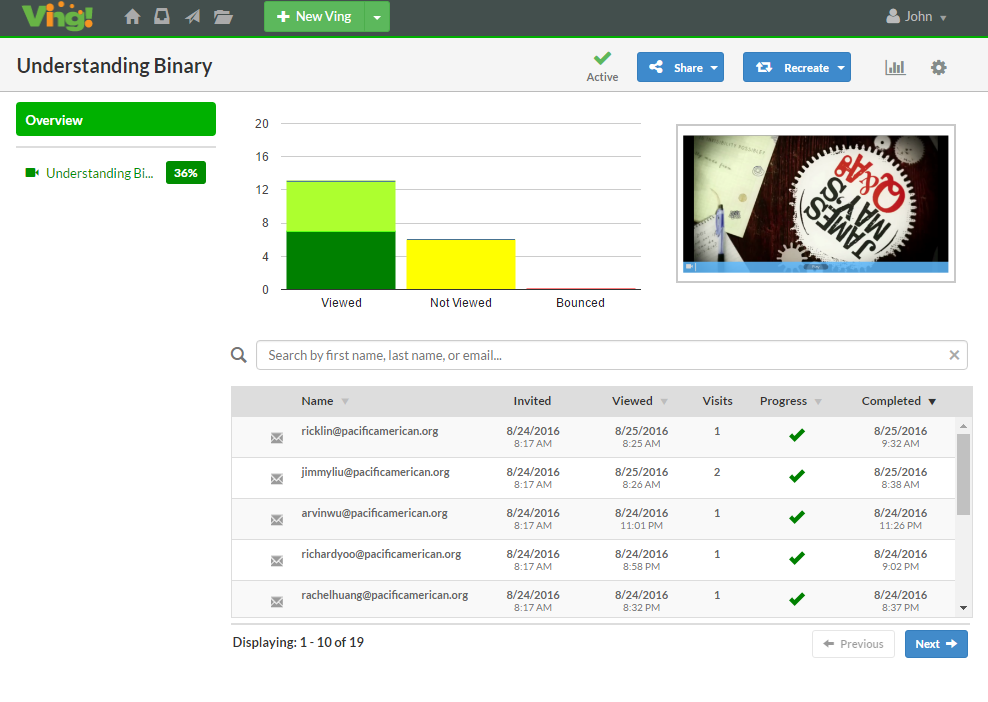
Ving 2

After creating my Ving I clicked “Share” and was ready to invite students via my Google contacts.  Previously, I had created a contact list for my Computer Science course in Gmail and was able to send a Ving invite with one simple group email.  Additionally, I found that I needed to make some edits after my Ving was published.  In this particular case I was able to take advantage of Ving’s “revise” feature which allowed me to add a PDF document and edit my active, shared Ving without my students being the wiser!

Student Experience and Real-Time Analytics

As my Computer Science students worked through the lesson content they received a green check mark as they completed viewing videos, documents, audio and quizzes. I received an email that my students were working on the Ving and could track real time as they worked through the modules. Most importantly I was able to see how much time they dedicated to each module. Finally, I was able export student results via Excel or CSV format. 

A Powerful, Flexible Solution to Content Management

Ving is a much needed tool for blended or flipped learning environments due to its ability to track student analytics as they progress through teacher provided multimedia, documents and quizzes.  It only takes moments for an educator to gain insight into which students’ lack engagement and motivation.  As this academic year progresses I’m looking forward to creating and organizing my future teaching units with Ving.  I recently demonstrated Ving to other teachers and they are extremely excited to use the platform in their own teaching practice due to its ease of use and its ability to enhance Google Classroom.

There are several features that I hope the developers will upgrade in the near future.  For instance, when creating a quiz, I couldn’t select the correct answer and later realized that I would need to self-grade quizzes.  An automatic grading feature will enhance Ving greatly.  In terms of summative assessments integrating Google Forms into their platform would be incredibly powerful as well. Additionally, there is a small-learning curve when using Ving, therefore the existence of a help button located directly in the interface would be helpful rather than burying it in the menu section.  That being said, the Ving team enlists the use of email to provide its users with timely hints and suggestions.

In closing, Ving is truly innovative and a must-have tool for any educator and has the capability to vastly improve one’s teaching practice.  It has greatly improved the Google Classroom experience for my students. The web-based tool greatly enhances the ability to flip your teaching practice with its ability to track student progress and time spent watching a video, reading a document, listening to audio or taking a quiz.  I will enthusiastically be recommending Ving to my fellow educators.

To kick off your communication this school year sign up for your FREE trial of Ving here. It is time to start using a tool that allows you to be in control of your communication and start knowing what is and isn’t working at your school.

Ving


ClassFlow Launches New App for Teacher-Parent Communication

The new Moments app allows teachers to chat with parents and share assignments, announcements and awards

(ATLANTA, GA) September 1, 2016 – ClassFlow Moments, a new free app for teacher-parent communication, is the latest addition to Promethean’s award-winning collaborative learning software ClassFlow. With the ClassFlow Moments app, teachers can easily share classroom assignments, announcements, and awards with parents so they can proactively engage with their students’ learning. ClassFlow Moments is free for parents.

“Most parents can identify with asking their children about school and receiving a one-word answer,” said Vincent Young, the Chief Marketing Officer at Promethean. “ClassFlow Moments offers a new way for teachers to connect parents to their students’ classroom activities. As teachers assign homework or reward students with award badges in ClassFlow, they can easily alert parents at the same time. The parent-student conversation after school then shifts to ‘Tell me how you earned a badge for excellent class participation today,’ or ‘What ideas interest you for your science project?’ With the ClassFlow Moments app, students receive additional support from their family to reinforce their education.”

According to a report from the Southwest Educational Development Laboratory (SEDL), “Programs and interventions that engage families in supporting their children’s learning at home are linked to higher student achievement.” Using the ClassFlow Moments app, teachers can bring parents and guardians into the learning process by sharing classroom content directly from ClassFlow – the hub where they direct classroom activities, deliver lessons, launch quizzes and interactive polls, and send out homework assignments.

Using their ClassFlow account and the free ClassFlow Moments app, teachers can send parents:

  • Class assignments: Communicate assignments and their due dates so parents can work with their student to encourage timely and quality completion.
  • Class activities and announcements: Remind parents to send in permission slips for a field trip, of a school celebration taking place this week, and that students have a test on Friday – all from the same place where teachers manage lessons and class content.
  • Student success and awards: Notify parents of any badges given to students during class for showing initiative, being a team player, solving problems, and more.
  • Messages: Chat with parents securely from the app. Teachers can chat one-on-one with an individual parent, or start a group chat to reach all parents.

“It’s so important to invite parents and guardians into the learning process, but it can be challenging when I’m already pressed for time as a special rotations teacher focused on STEAM learning and technology,” said Jaime Vandergrift, Instructional Technology Specialist and ClassFlow Ambassador. “ClassFlow Moments makes it easy to keep parents informed about what’s happening in my classroom and our school. There are quick and simple instructions for parents on how to get and use the app. It’s also intuitive for me as a teacher, since the ClassFlow lesson software I’m already using can directly share information with parents through the app. An open line of communication between the teacher and the parent is essential in shaping a student’s learning journey.”

For parents and guardians, the ClassFlow Moments app is available on the Google Play Store and on the App Store for iPhone®.

ClassFlow simplifies the way teachers discover, create and deliver interactive learning. ClassFlow is trusted by over 50,000 schools and institutions in 154 countries worldwide.

To learn more about ClassFlow and sign up for a free account, visit ClassFlow.com.

About Promethean

Promethean is a global education company that improves learning productivity by developing, integrating, and implementing innovative 21st-century learning environments that help make everyone more engaged, empowered, and successful. Promethean’s main corporate offices are located in Blackburn, UK, and Atlanta, USA. Promethean is a member of the Net Dragon Websoft Holdings Limited (HKSE: 0777) group of companies.  For more information, please visit PrometheanWorld.com.

Promethean Media Contact

Suzy Swindle

[email protected]

206-661-0757

©Promethean 2016. All Rights Reserved. Promethean, the Promethean logo, and ClassFlow are trademarks or registered trademarks of Promethean Limited in the United Kingdom, United States, and other countries around the world. Google Play is a trademark of Google Inc. iPhone is a registered trademark of Apple Inc.

Teachers Pay Extra for a Purposeful Career

Balancing purposeful work against profitable work is a tension in every industry and profession, but for teachers the scales are tipped from the outset. Nationally, teachers in the U.S. make just over three-quarters as much as other comparably educated workers make. In effect, the profession comes with a built-in tax on earning potential.

There is no entirely fair system of taxation, in part because it is hard to agree on a definition of “fairness” all stakeholders can agree on. But it is inarguable that teachers are the lynchpin of education. Schools simply cannot function without them, yet our current system forces teachers to put purpose well ahead of profit. Beyond questions of fairness, this ought to shine a light on how we talk and think about education entirely.

Rethinking ROI

We know without even having to look at income data that teachers, by and large, are not doing what they do for the money or the prestige. Just consider the continuing education pathways teachers may pursue: the PhD and the EdD.

The difference is often marginal, but generally comes down to a matter of the role of research. A PhD in education mirrors the knowledge-expansion formula other PhD-level programs, with an emphasis on developing research over an extended period, while modern EdD programs focus more on expanding leadership skills, with an emphasis on applying research and accessibility for working professionals.

What both advanced degrees have in common is outcomes.

Evidence suggests that while teachers pursuing either credential expect some positive impact on their careers (advancement to administrative positions, increased compensation), the self-reported satisfaction of graduates exceeded any other measure of outcomes from the degrees. In other words, teachers appreciate the skills and knowledge they gain through advanced study, but do not necessarily get any material rewards for their credentials.

They approach their work with greater confidence and larger toolkits, while they approach new roles or advancement with mostly a symbolic value-add in the eyes of employers. Even at the highest level, it seems, the purpose-profit deck is stacked.


Taxing Altruism

Not only do educators take a potential pay cut by entering the field, their continuing education pathways offer a better chance of personal development than career advancement. They pay, repeatedly, for an opportunity to maximize their impact as teachers, with no guarantee of reward.

At every level, this demonstrates that teachers clearly aren’t in it for the money.

Perhaps teachers recognize that the best way to contextualize education and learning is not merely as a transactional relationship, where more learning corresponds with more earning. Education, first and foremost, is about personal development, not a strategic advantage.

That message is often buried today beneath data on earning potential and career outcomes anchored to various levels of academic attainment. We assess degrees based on the salaries commanded by graduates, even rank schools according to the relative incomes of their alumni.

Yet survey after survey and paper after paper reports that purpose, not profit, is what workers want most from their jobs. Work-life balance, job satisfaction, engagement–this is where traditional ROI equations fall apart with their exclusive focus on money in, money out.

One More Lesson

The point of discussions about education, from our curricular priorities to guiding students from preschool to the university, should not be overwhelmed by economics. Teachers have been guiding us by example on this point by paying a growing tax to stay in their profession, adding value without maximizing their own reward. Education opens doors to earning and contributing more.