EdTech & Innovation

The Coolest Ways Teachers Are Using Robots in the Classroom

In recent years, technology has had a massive impact on education. One of the most exciting developments is the integration of robots in classrooms. This article explores the coolest ways teachers are using robots to captivate their students and enhance their learning experiences.

1. Assisting Students with Autism

Many schools have started using robots to help students with autism improve their communication and social skills. These humanoid robots, such as Milo and NAO, engage children through games, storytelling, and dancing, making them comfortable in social spaces and aiding their overall development.

2. Teaching Programming Skills

One of the best ways to get kids interested in programming is to introduce them to robots that they can control themselves. Many educational robots, like LEGO Mindstorms, Dash & Dot, and Sphero SPRK+, allow students to easily learn programming languages and develop logical thinking through hands-on experimentation.

3. Language Learning

Language learning is another area where robots have found a place in classrooms. Robots like Blue Frog Robotics’ Buddy or Ling Technology’s Jibo facilitate language learning by interacting with students in their target language, helping them with pronunciation and vocabulary acquisition.

4. Peer Tutoring

Peer tutoring is a unique concept where students teach each other various subjects. Robots like RUBI from UC San Diego or EMAR from University of Washington enable peer tutoring by observing student interactions and providing real-time feedback on their teaching techniques.

5. Interactive Storytelling

Interactive storytelling is a creative method of using robots to enhance student engagement. Robots like Kibo and Ozobot bring stories alive for students by acting out scenes or creating interactive visuals, sparking their imagination and encouraging collaborative learning.

6. Developing Problem Solving Skills

With the help of coding-based curriculums combined with robotic kits such as Robolink’s CoDrone or Makeblock’s mBot Ranger, teachers are enabling students to build their own robots and solve complex challenges. This fosters an environment of curiosity, creativity, and practical problem-solving.

7. Supporting STEM Education

Robots like VEX Robotics’ VEX EDR or Wonder Workshop’s Cue offer a hands-on approach to learning science, technology, engineering, and mathematics (STEM) concepts. These robots challenge students to apply their newly learned concepts in real-world situations, making STEM education more engaging and relevant.

In conclusion, the implementation of robotics in classrooms has revolutionized the way students learn and interact. From assisting students with autism to enhancing STEM education, robots are providing innovative ways for teachers to engage their students and create a more dynamic learning experience. As technology continues to evolve, we can expect to see even more fascinating applications of robotics in education.


12 Great Headsets With Microphones for Teachers and Students

Introduction:

In today’s digital learning environment, teachers and students require suitable headsets for effective virtual communication. This article highlights 12 great headsets with microphones that cater to teachers and students’ unique needs, ensuring clear audio quality and a comfortable wearing experience.

1. Logitech H390 USB Headset

The Logitech H390 is a versatile USB headset with an adjustable microphone, noise-cancellation feature, convenient inline controls, and plush ear pads for superior comfort during long use.

2. Mpow M5 Pro Bluetooth Headset

The Mpow M5 Pro provides excellent battery life, noise reduction capabilities and allows for hands-free calling via a built-in microphone. Its flexible headband ensures comfortable wear throughout the day.

3. Jabra Evolve 65 UC Stereo Headset

This wireless headset offers outstanding sound quality, an integrated busy light for minimizing interruptions, and dual Bluetooth connectivity. It is perfect for professionals seeking a reliable solution for virtual teaching or learning.

4. Plantronics Blackwire C3220

The Plantronics Blackwire C3220 offers crystal-clear audio quality at an affordable price. Its lightweight design and adjustable headband make it suitable for extended use in teaching scenarios.

5. BlueParrott B450-XT Noise Cancellation Headset

This headset delivers advanced noise cancellation technology ideal for noisy environments such as classrooms or busy households. With a long-lasting battery life and customizable features, it caters to various users’ needs.

6. HyperX Cloud Stinger Headset

The HyperX Cloud Stinger showcases an essential set of features such as rotating ear cups, a swivel-to-mute mic function, dependable sound quality, and an adjustable steel slider for maximum durability.

7. NUBWO N7 Gaming Headset

The NUBWO N7 is an affordable option with multi-platform compatibility providing high-quality audio and comfortable memory foam ear cups wrapped in soft leather. A noise reduction microphone ensures clear communication during online classes.

8. SENICC A66 Stereo USB Headset

This plug-and-play USB headset offers an adjustable headband, 270-degree rotatable microphone, built-in audio controls, and excellent sound quality. It is a perfect budget-friendly option for teachers and students alike.

9. JBL Quantum 400 Wired Over-Ear Gaming Headset

The JBL Quantum 400 features immersive QuantumSOUND Signature audio that delivers an incredible audio experience. Its voice focus directional boom mic enhances communication clarity in virtual classrooms.

10. Sennheiser SC 165 USB (508318)

The Sennheiser SC 165 provides exceptional comfort with soft leatherette ear pads and adjustable headbands. The noise-cancelling microphone ensures optimal sound for both teaching sessions and student interactions.

11. Microsoft LifeChat LX-6000 Headset

This headset offers ultimate comfort with wide headbands, ultra-soft ear pads, and a convenient inline call control system. Microsoft’s LifeChat LX-6000 utilizes ClearChat technology to produce crisp, clear audio quality.

12. Corsair HS50 Pro Stereo Gaming Headset

The Corsair HS50 Pro features custom-tuned 50mm neodymium audio drivers providing excellent sound quality during virtual classes. The detachable unidirectional microphone reduces ambient noise for enhanced voice clarity.

Conclusion:

Equipping teachers and students with the right headset ensures seamless virtual communication and better learning experiences. These 12 fantastic options cater to various budgets, preferences, and requirements to enhance the teaching and learning process in the digital age.

Teachers: Win an Epson Document Camera for Your Classroom!

Attention all teachers! Are you tired of wrestling with outdated technology in your classroom? Do you wish you had cutting-edge tools to help bring your lessons to life? If so, we have exciting news for you! You now have the chance to win an Epson Document Camera for your very own classroom.

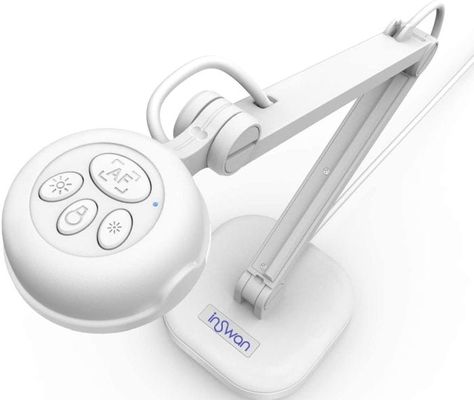
The Epson Document Camera is a game-changing piece of technology designed to enhance the learning experience for students. With its high-resolution imaging and user-friendly interface, this document camera allows teachers to seamlessly incorporate visual aids and real-time demonstrations into their lessons.

So, how can you win this fantastic prize? It’s simple! Follow these easy steps:

1. Share Your Story: Write a brief essay (300-500 words) explaining how an Epson Document Camera would make a positive impact on your teaching style and your students’ learning experience. Be creative and let us know why your classroom deserves this upgrade!

2. Snap a Photo: Take a picture of your current teaching setup, displaying the need for an Epson Document Camera in your classroom.

3. Submit Your Entry: Visit our website (www.epsonclassroomcontest.com) and fill out the entry form, which will ask for your name, email address, school name, and grade level. Don’t forget to attach your essay and photo before clicking “submit!”

The contest is open to all K-12 educators in the United States, and entries will be accepted until [date]. Our judging panel will review all submissions and select one deserving winner based on creativity, need, and the potential impact of the document camera on teaching and learning styles.

If you’re selected as the lucky winner, not only will you receive an Epson Document Camera for your classroom but also professional development training from Epson experts to ensure you get the most out of this amazing tool.

Don’t miss out on this incredible opportunity to enhance your classroom with the help of an Epson Document Camera. Enter today and prepare to revolutionize the way you teach! Good luck, educators!

Schoolwide Technology Tools That Will Improve Your School

In the ever-evolving landscape of education, technological advancements have transformed the way schools deliver knowledge to students. Educators are consistently searching for innovative tools to improve teaching strategies, boost student engagement, and enrich the learning environment. This article explores an array of schoolwide technology tools that can revolutionize your school’s educational experience.

1. Learning Management Systems (LMS)

An LMS is a digital platform that facilitates the management of course materials, student enrollment, grading, and communication between teachers and students. Examples include Canvas, Blackboard, and Moodle. These platforms can streamline administrative tasks and support engaging online learning environments in which students can access resources, participate in discussions, and submit assignments.

2. Student Information Systems (SIS)

SIS platforms are designed to store and manage student data such as grades, attendance records, and demographic information. Popular SIS platforms like PowerSchool and Infinite Campus ensure school administrators have easy access to essential information that aids decision-making while also providing insights into a student’s overall performance.

3. Interactive Whiteboards

Interactive whiteboards have become common in modern classrooms due to their ability to augment traditional teaching methods with multimedia capabilities. Brands like SMART Board and Promethean offer interactive displays that allow teachers to annotate directly on content or create engaging lessons incorporating videos and images.

4. Classroom Response Systems

Classroom response systems like Kahoot! and Quizlet Live offer gamified ways for students to engage with learning material while providing real-time feedback for educators. These tools not only excite students about the subject matter but also help identify areas where additional instruction may be needed.

5. Formative Assessment Tools

Tools like Google Forms or Edmodo provide opportunities for ongoing assessment through quizzes, surveys, exit tickets, or class polls. Real-time feedback from these formative assessments allows educators to align teaching strategies with student understanding continually.

6. Video Conferencing and Collaboration Tools

Platforms such as Google Meet, Microsoft Teams, or Zoom have become increasingly popular for conducting virtual meetings and fostering collaboration among students and teachers. These tools equip educators with the means to deliver engaging remote learning experiences and encourage teamwork among classmates.

7. Digital Content Curation Tools

Tools like Wakelet or Padlet empower students and teachers to organize digital resources, such as articles, videos, images, or audio files. These collaborative platforms stimulate critical thinking skills while enabling users to create visually-appealing multimedia presentations.

8. Educational Apps

Many schools now offer 1:1 device programs, providing students with access to mobile devices loaded with educational apps that complement their learning experiences. EdTech applications like Duolingo for language learning or Khan Academy for personalized tutoring significantly enhance student learning outcomes.

In conclusion, integrating technology into educational settings is crucial for schools to remain relevant in a swiftly progressing world. Integrating these practical schoolwide technology tools can maximize efficient school management, improve teaching strategies, and enrich the overall learning experience for students.

A Look at Amazon Inspire for Education

Introduction

Amazon Inspire is an innovative platform for education that aims to revolutionize the learning experience for teachers, students, and educational institutions. This powerful tool provides a vast library of educational content combined with a user-friendly interface, making it easy for educators to access top-quality resources. In this article, we will take a closer look at Amazon Inspire and its potential impact on the education sector.

Features of Amazon Inspire

1. Extensive Library of Resources:

Amazon Inspire offers millions of educational resources, including lesson plans, homework assignments, videos, games, and apps. These resources are searchable by grade level, subject, and specific learning criteria. This extensive library allows teachers to find the right materials quickly and easily.

2. Collaborative Sharing:

Teachers can upload their own content to share with colleagues on Amazon Inspire or even collaborate on new content creation. By working together and sharing high-quality resources, educators can save time and expand their own teaching repertoires.

3. Compatibility with Learning Management Systems (LMS):

Amazon Inspire integrates seamlessly with most Learning Management Systems (LMS) used in schools today. Consequently, the teacher’s workflow becomes smoother – they can use the platform to search for useful resources directly from their LMS.

4. Accessibility Standards:

To ensure usability for all students, Amazon Inspire adheres to Universal Design for Learning (UDL) standards. Its resources are available in various formats, such as closed captions and screen reader support that cater to diverse student needs.

5. Curated Collections:

Amazon Inspire features curated collections from trusted educational partners such as National Science Foundation (NSF), Newseum Education Foundation, and EDUCAUSE Learning Initiative (ELI). These collections ensure reliable content from highly regarded sources.

Benefits of Amazon Inspire for Education

1. Time-saving:

The comprehensive search feature of Amazon Inspire significantly reduces the time teachers spend searching for resources. With the platform’s advanced search functions, finding the perfect resource now only takes minutes.

2. Quality Assurance:

The resources on Amazon Inspire go through a rigorous vetting process to ensure they meet high-quality standards. Consequently, teachers can trust the materials they select for their students.

3. Customizable Content:

Educators can easily create personalized collections of resources tailored to their specific curriculums. With customization options, teachers have the flexibility to adapt materials based on their students’ unique needs and learning styles.

4. Professional Development:

By sharing and collaborating with other educators, teachers using Amazon Inspire are able to grow professionally, exchange ideas, and improve their teaching skills.

Conclusion

Amazon Inspire is an exciting addition to the modern education landscape that offers a wealth of possibilities for educators looking to enhance their teaching methods with high-quality content. The platform not only saves time but also promotes collaboration, innovation, and professional growth amongst educators. In an ever-evolving world of education, Amazon Inspire is a potent tool that promises to enable profound positive impacts on teachers and learners alike.

Win a Kano Computer Kit for Your School!

In today’s tech-driven world, computer literacy is no longer a luxury but a necessity. Learning programming and coding skills sets students on the right path to success in the digital age. Recognizing the importance of these skills, we are excited to announce an incredible opportunity for schools across the nation – a chance to win a Kano Computer Kit!

The Kano Computer Kit is an innovative and user-friendly learning tool designed to help students build their own computers and learn how to code. The kit comes with all the necessary components, easy-to-follow instructions, and educational software that makes coding enjoyable and accessible for children of all ages.

Participating in this contest not only provides schools with access to cutting-edge technology but also fosters creativity, critical thinking, and problem-solving skills among students. By introducing coding at an early age, children will gain essential knowledge that will prepare them for future careers in technology.

Here’s how your school can enter the contest:

1. Submit your school’s information: To participate in the contest, please provide your school’s name, address, contact person, email address, and phone number. This information will be used exclusively for contest purposes.

2. Write a compelling essay: We want to know what makes your school unique and why you deserve to win the Kano Computer Kit. In 500 words or less, describe your school’s commitment to computer education and how the Kano Computer Kit will benefit your students.

3. Share your entry on social media: Let your friends, family, and community members know about your entry by posting it on social media platforms like Facebook, Twitter, or LinkedIn. Be sure to use the hashtag #KanoComputerKitContest.

Once you’ve completed these steps, sit back and wait for our panel of judges to review all entries. The winning schools will be notified via email and phone by a designated date.

Every child deserves the opportunity to become digitally literate and excel in the ever-evolving world of technology. Participating in the Kano Computer Kit Contest is a fantastic way to level the playing field and set your students on the path to success. Don’t miss out – submit your entry today and win a Kano Computer Kit for your school!

What Is Flippity And How Does It Work For Teachers?

Introduction:

Flippity is an innovative educational tool designed to enhance classroom activities and make learning an engaging and interactive experience for students. With multiple templates and game-based applications, Flippity has proven to be a popular resource for educators seeking to support their students’ learning goals while fostering an enjoyable classroom atmosphere. In this article, we will explore what Flippity is and how it works for teachers.

Understanding Flippity:

Flippity is essentially an online platform that offers various templates, tools, and applications compatible with Google Sheets. By integrating data from your Google Sheets into the platform, you can generate a variety of educational activities such as flashcards, quizzes, random name pickers, games, and other classroom resources. Flippity eliminates the need for extensive technical knowledge, allowing teachers to use their creativity and customize tools to suit their curriculum requirements.

How Does Flippity Work for Teachers?

1. Ease of use: Flippity provides user-friendly templates that make it easy for teachers to input data from their Google Sheets and create interactive activities in just a few clicks. Once the data is uploaded to the corresponding template, Flippity generates a unique URL that can be shared with students or embedded on a website.

2. Customizable Templates: There are numerous Flippity templates available to suit different learning objectives, including flashcards, quizzes, crossword puzzles, scavenger hunts, and more. Teachers can adapt these templates according to their specific lesson plans and even tailor them to meet individual student needs.

3. Gamification of Learning: One of the standout features of Flippity is its ability to transform conventional learning materials into engaging games. Bingo boards, memory matching games, and quiz shows are just some examples of how Flippity adds a fun twist to education.

4. Collaboration and Real-Time Updates: Another advantage of using Flippity is that it facilitates collaboration between students and teachers, allowing for real-time updates and instant feedback on student performance. Assignments can be created and tracked via shared Google Sheets, leading to seamless communication and data management.

5. Free Access: Flippity is available to educators at no cost, making it a budget-friendly option for schools and individual teachers looking for dynamic educational tools.

Conclusion:

Flippity offers an incredible variety of engaging applications that cater to different learning styles, allowing teachers to create customized, interactive experiences for their students. With its ease of use, collaboration potential, gamification of learning, and no-cost access, Flippity stands as an invaluable asset for educators in today’s technologically-driven world.

Win an Epson Interactive Laser Display Package

Are you ready to revolutionize the way you deliver presentations and engage with your audience? Get ready to win an Epson Interactive Laser Display Package in our upcoming giveaway!

Epson, the renowned leader in imaging technology, is spearheading a new generation of innovation with its Interactive Laser Display Package. This cutting-edge technology provides users with an unparalleled opportunity to streamline presentations, foster collaboration, and maximize audience engagement.

In this article, we will provide an overview of this highly sought-after package and the exciting features it offers. We will also provide details on how you can enter our giveaway for a chance to win this valuable tool for your office or learning environment.

Features of the Epson Interactive Laser Display Package

The core of any interactive laser display package is the projector itself. Epson’s ultra-short-throw projector provides bright, high-resolution images that remain vibrant even in brightly lit rooms. Paired with its interactive capabilities, this projector is designed for seamless integration into any presentation space.

One notable feature of the package is its easy-to-use collaborative whiteboarding software. This intuitive software works together with the projector and touch-sensitive screen to create an interactive canvas, providing presenters and team members with a virtual space to showcase ideas, annotate plans, or brainstorm designs using pens or their fingers.

Another standout aspect of the package is its compatibility with various devices – laptops, tablets, smartphones – making it simpler than ever for multiple presenters to connect directly to the system and share their work.

Benefits of Using an Interactive Laser Display Package

An Epson Interactive Laser Display Package comes with many advantages:

1. Enhanced Communication: With interactive whiteboarding software available at your fingertips, communication becomes smoother and more efficient within teams and during meetings.

2. Increased Audience Engagement: The interactive features encourage participants’ active involvement during presentations making it more memorable and meaningful.

3. Streamlined Collaboration: The package supports multiple users interacting simultaneously, making it possible for teams to work together more effectively, whether face-to-face or remotely.

How to Enter the Giveaway

Now that you know the potential game-changing benefits of an Epson Interactive Laser Display Package, don’t miss this golden opportunity to win one. Participating in the giveaway is easy:

1. Visit our website’s contest page and complete the entry form with your name, email address, and other required details.

2. Share the giveaway on your preferred social media platform by using our designated hashtag.

3. For additional entries, follow our social media handles and tag friends who might be interested in participating as well.

Don’t miss out on your chance to transform your presentations and collaborations with an Epson Interactive Laser Display Package. Enter the giveaway today for a chance to revolutionize your communication experience!

Infographic: Why Your School Needs Bing in the Classroom

Introduction:

With the rapid evolution of technology, integrating digital resources into the educational landscape has become increasingly important. One such resource that often goes unnoticed is Bing – a powerful search engine that can greatly enhance the learning experience for your students. In this article, we’ll explore the reasons behind incorporating Bing in the Classroom through an infographic that highlights its benefits.

1. Safeguarding Students from Inappropriate Content:

Bing in the Classroom provides a safe and secure browsing experience. By using advanced filtering options that strictly limit access to inappropriate content, Bing ensures that your students remain focused on their academic goals while surfing the web.

2. Comprehensive Search Features:

Unlike other search engines, Bing offers unique features tailored to meet the needs of educators and students alike. For example, Bing’s visual search allows users to explore concepts using interactive images, while its advanced filters make it easier to hone in on specific topics or resources.

3. Enhances Critical Thinking Skills:

Bing offers a unique opportunity to cultivate critical thinking skills by encouraging students to explore various angles of a topic and evaluate different sources of information. This approach helps develop analytical capabilities crucial for success in today’s ever-changing world.

4. Supporting Educational Initiatives:

The Bing Rewards Program enables schools to earn valuable points by using Bing as their default search engine. These points can then be redeemed for free Microsoft devices and software, helping to enhance the learning environment with cutting-edge tools and resources.

5. Encouraging Collaboration and Creativity:

Bing promotes interaction among students by offering collaborative tools like Bing Pulse, which enables real-time engagement on various issues or topics. Additionally, the integration of Bing Images and Maps allows students to express their creativity while working on projects.

6. Environmental Sustainability:

Bing’s commitment to environmental causes is evident through its Carbon Offset Program, where they offset their carbon emissions by investing in clean energy projects. By using Bing, your school will be contributing to a greener and more sustainable future.

7. Free Lesson Plans and Resources:

Bing offers a plethora of free lesson plans, educational games, and interactive resources designed specifically for teachers and students. By incorporating these resources into your curriculum, you’re equipping your students with valuable tools that will keep them engaged in the learning process.

Conclusion:

In today’s digital age, it’s crucial to provide students with innovative yet reliable online experiences. Bing in the Classroom offers an array of features that foster a secure browsing environment, enhance critical thinking skills and promote collaborative learning. By incorporating Bing into your school’s curriculum, you’ll not only empower your students but also contribute positively towards a sustainable future.

You Bought the Apps. How Are They Being Used?

In today’s digital age, the app market has ballooned to an impressive scale, catering to almost every need and niche imaginable. However, purchasing an app is just the first step; understanding how these apps are being used and the implications of their usage is vital for today’s discerning consumers. In this article, we aim to explore different aspects of app usage and discuss key factors that influence how we interact with these digital tools.

The Power of Data Collection

From social media platforms to productivity tools, apps collect unfathomable amounts of user data. By consenting to an app’s terms and conditions, users often grant developers the permission to access their private information – including contacts, location, and browsing history – for targeted advertising purposes. Consequently, it is crucial for users to be aware of the data-sharing policies employed by their preferred applications.

The Issue of Security

As mobile devices have become indispensable in our daily lives, securing sensitive information stored on them has assumed paramount importance. Unfortunately, many apps lack robust security measures or may contain vulnerabilities that expose users to cyber-attacks. Regularly updating apps and using reliable security software can help mitigate such risks.

Digital Well-being: Striking the Right Balance

As apps continue to infiltrate various domains of our lives – from work and education to leisure and socialization – striking a healthy balance between screen time and offline activities has become essential for maintaining mental and physical well-being. Digital detoxes and designated screen-free time can reinforce better habits while promoting self-awareness about personal app usage.

Addressing Addiction & Privacy Concerns

Some applications utilize psychological techniques – like rewards-based systems – that can lead users down a path of excessive consumption or addiction. In light of this, it is important for both individuals and regulatory authorities to scrutinize such practices while fostering safe online spaces for users.

Purchasing an app is the initial step towards fulfilling a digital need – but understanding how these apps are being used, their impact on our lives, and the potential risks associated with them is critical. By remaining mindful of these considerations, users can make informed decisions about the apps they choose and how they engage with them. Ultimately, this awareness will pave the way for a more conscientious digital culture that prioritises both user well-being and data privacy.