EdTech & Innovation

Learn More About A Free Movement Kit And Curriculum For Your School!

Introduction

In today’s fast-paced world, the importance of movement and physical activity in schools is paramount. Incorporating a comprehensive, holistic movement program can greatly impact students’ physical, mental, and emotional well-being. A Free Movement Kit and Curriculum is a fantastic resource that can immensely benefit your school by helping students develop essential motor skills while promoting an active lifestyle.

The Free Movement Kit and Curriculum

The Free Movement Kit and Curriculum is an innovative program that offers engaging and educational tools for schools to inspire an active lifestyle in students. It includes easy-to-follow lesson plans, dynamic movement activities, age-appropriate content, and hands-on materials designed to make learning about physical fitness fun and enjoyable.

Main Features:

1. Comprehensive Lesson Plans: The curriculum comes with step-by-step lesson plans aligned with national physical education standards. These plans incorporate progressive skill development through a variety of enjoyable games and activities.

2. Engaging Materials: The Free Movement Kit includes colorful posters, equipment cards, certificates, stickers, and activity resources – all designed to support successful implementation and highlight the importance of a healthy lifestyle.

3. Targeted Age Groups: The Curriculum caters to various age groups, from preschool to high school students, ensuring that the content remains relevant and effective throughout different stages of development.

4. Customizable Content: The program allows teachers to customize the curriculum according to their specific needs or goals. This adaptability provides the flexibility necessary to align with different school environments or teaching styles.

5. Professional Development Support: Schools can access online support and resources to aid in implementing the curriculum successfully. Teachers may also receive continuing education credits via workshops or webinars on integrating movement into their classrooms effectively.

Benefits for Students

1. Improved Physical Health: Regular physical activity helps prevent obesity, reduces risk of chronic diseases in adulthood, enhances muscular strength, increases cardiovascular endurance, and improves bone health.

2. Boosted Mental Health: Active learning through movement has been shown to combat stress, improve mental clarity, and encourage better focus in the classroom.

3. Enhanced Social Skills: Participation in group activities fosters teamwork, communication, cooperation, and leadership qualities among students.

4. Increased Academic Performance: Studies have shown that physically active children often achieve higher academic scores, contributing to overall school success.

5. Lifelong Wellness: The Free Movement Kit and Curriculum empower students to adopt an active lifestyle – a valuable life skill that extends beyond their schooling years.

Conclusion

As educators, it is our responsibility to equip our students with tools that promote their overall well-being. The Free Movement Kit and Curriculum is an invaluable resource for schools seeking to create a community that values physical activity as an essential part of education. Implementing this dynamic program allows schools to cultivate healthier, happier, more successful students who are well-prepared for the challenges of their future endeavors.

7 Essentials in My Emergency Teacher Toolkit

As an educator, there will be times when your regular plan falls through, and you need to quickly adapt to a new situation, whether it’s due to technical issues, absent colleagues, or unexpected events. In these situations, having an emergency teacher toolkit is crucial for maintaining the learning atmosphere and keeping students engaged. Here are seven essential items to include in your toolkit:

1. Engaging Ice Breakers

Starting off on the right foot can make all the difference when dealing with unexpected events. Be sure to have a list of age-appropriate ice breakers that can help establish a rapport with your students and set the stage for productive discussions.

2. Backup Lesson Plans

While you might have your lesson plans scheduled down to the minute, emergencies can throw a wrench in your carefully constructed agenda. Having ready-to-use backup lessons will ensure that you’ll be able to maintain momentum even when unforeseen circumstances arise.

3. Time-Management Activities

Emergency situations can often reduce the time frame you have available for your planned activities. It’s important to have time-management exercises at hand that can help reinforce core skills or introduce new concepts without eating up too much instructional time.

4. Quick Assessment Tools

When you’re stepping in last-minute or facing unexpected changes in the class dynamic, you may not have the opportunity to review every student’s recent progress. Quick assessment tools can give you an efficient way to gauge comprehension and understanding, allowing you to focus on addressing gaps in knowledge as they arise.

5. Collaborative Group Work Resources

One of the best ways for students to learn from each other is through collaborative group work activities. Having resources available for these types of activities (e.g., problem-solving tasks or discussion prompts) ensures that students remain engaged and productive during unplanned shifts in the daily schedule.

6. Accessible Educational Technology Tools

A critical component of any emergency teacher toolkit is a variety of accessible educational technology tools. Be prepared with easy-to-use software applications and digital resources that can support differentiated learning, accommodate various learning styles, and keep students engaged during those unplanned teaching moments.

7. A Support Network

The best emergency teacher toolkit not only includes a variety of tangible resources but also access to a support network of colleagues and mentors. Make sure you have people you can count on to provide advice, feedback, and assistance, whether it’s a fellow teacher or a professional mentor.

In conclusion, including these seven essentials in your emergency teacher toolkit will ensure you’re prepared to tackle unexpected challenges head-on, maintain an atmosphere conducive to learning, and always keep your students engaged in the process.

Free Educational Videos Offer Teachers an Alternative to YouTube

Introduction:

In recent years, the internet has become a valuable resource for educators seeking new ways to engage and instruct their students. One of the most popular online tools for teaching is YouTube, which offers countless educational videos across various subjects. However, the platform isn’t without its drawbacks, particularly when it comes to ad content and other distractions. As a result, numerous free alternatives have emerged to provide teachers with high-quality, ad-free educational videos for classroom use. This article will discuss some of these alternatives and their benefits.

Why Seek YouTube Alternatives?

While YouTube can be an excellent teaching resource, it also comes with certain limitations that hinder its efficacy as a full-fledged educational tool. Pre-roll ads can create unwanted interruptions during lessons, while suggested videos often distract students from the primary content. Moreover, navigating through the vast array of non-educational content can be challenging and potentially expose students to inappropriate material.

Free Alternatives to YouTube for Educational Videos:

1. PBS LearningMedia

PBS LearningMedia provides teachers and students access to thousands of free classroom-ready videos, images, games, lesson plans, and interactive resources. The content spans various subjects and is produced by reputable sources like National Geographic and NASA.

2. TED-Ed

As an offshoot of the TED Talks organization, TED-Ed curates high-quality educational videos featuring expert speakers on various topics. They present information in engaging ways tailored for educating audiences through concise animated shorts.

3. TeacherTube

Specifically designed for teachers and education-focused audiences, TeacherTube offers user-generated content created by educators themselves. This resource includes tutorial videos, lesson plans, and even user-submitted lectures on different subjects.

4. Smithsonian Channel and National Geographic

Both Smithsonian Channel and National Geographic offer a large selection of their video content freely on their official websites or through dedicated apps. These resources cover topics such as history, science, nature, and culture, providing an inside look into reputable research institutions.

5. BrainPOP

While BrainPOP offers a subscription with premium features and resources, they also have a selection of free educational videos geared towards young students. Their content is designed to engage children through fun and interactive learning experiences.

6. Vimeo

Though not explicitly geared towards education, Vimeo – known for its high-quality content – is home to numerous instructional and educational videos created by professional institutions, organizations, and filmmakers.

Conclusion:

The internet has revolutionized the way we teach and learn, providing a vast range of tools and resources that foster engaging and effective learning experiences. Free educational video platforms offer a valuable alternative to YouTube’s ad-laden content while still harnessing the potential of multimedia learning experiences. By exploring these options, teachers can bolster their lesson plans with high-quality videos tailored for education without disruptions or distractions.

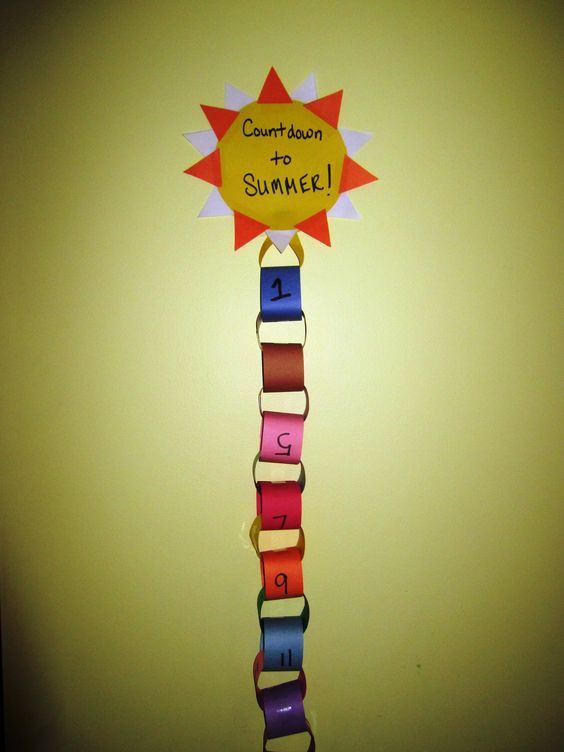
The Case Against Summer Countdown Calendars

Summertime is a season that many people eagerly anticipate. The sun is shining, the days are longer, and there’s plenty of opportunity to enjoy outdoor activities. As the end of the school year approaches, excitement for summer vacation brews, and summer countdown calendars become popular instruments to keep track of the remaining days until freedom officially begins. However, there’s a case to be made against these seemingly harmless visual aids.

Firstly, summer countdown calendars tend to shift our focus from being present in the daily moments to anticipating the future too heavily. Though looking forward to something can bring pleasure, constantly counting down the days can result in overlooking small victories and special experiences in our everyday lives. Being present is crucial for our happiness and well-being.

Secondly, they create unnecessary pressure on kids and can cause anxiety. The constant reminder that a countdown is taking place inadvertently sets expectations on students that might become difficult to achieve. With every passing day, students might feel an increasing sense of urgency or stress surrounding their performance in school, final exams, or other commitments. Aligning their success with the passing of time shown on a calendar may be detrimental to emotional well-being.

Moreover, these calendars create unrealistic expectations for summer itself. Summer vacation often becomes an idealized period where we expect time off from responsibilities and a pause on all obligations. However, life continues as usual despite warmer months being filled with more leisure activities. By over-romanticizing summer through countdowns, we set ourselves up for disappointment when it doesn’t meet our lofty expectations.

Another concern about these calendars is that they may produce negativity toward learning and education by feeding the idea that school is something worth “escaping” from. Instead of promoting enjoyment or excitement for learning experiences at school, countdown calendars feed into the narrative that school is inherently undesirable compared to relaxing summer vacations.

Finally, summer countdowns have been known to increase envy among peers. Students who have access to more extravagant vacation plans can sometimes inadvertently foster a sense of comparison or jealousy within their social circles. On the other hand, children without fancy vacations might feel left out or inadequate as they hear about others counting down to exciting destinations and experiences.

While a summer countdown calendar may seem like a harmless and fun way to anticipate the arrival of vacation time, it’s important to consider the various negative consequences that come with these countdowns. By focusing on being present, appreciating all aspects of life during both school and vacations, and fostering a healthy attitude toward learning, we can better enjoy all our days—without counting them down.

Free Customizable Parent-Teacher Conference Forms

Introduction

In today’s fast-paced and technology-driven world, an efficient and effective communication between parents and teachers is crucial to help students reach their fullest potential. One way to facilitate this communication is through parent-teacher conferences, which can provide a platform for both parties to discuss concerns, improvements, and progress. To make this process smoother and more organized, free customizable parent-teacher conference forms are invaluable tools.

Benefits of Customizable Forms

Customizable parent-teacher conference forms can boost productivity and organization for both parents and teachers by providing a standardized format that addresses specific needs. Below are some benefits of using these forms:

1. Tailored Communication: Customizable forms allow teachers to include aspects tailored to individual students, fostering transparent conversations with parents.

2. Save Time: Using pre-made templates will save time for busy teachers, as they can simply adjust the forms according to their particular requirements.

3.Track Progress: These forms provide a tangible record of discussions held during parent-teacher conferences, making it easier to monitor progress and set achievable goals.

4. Consistency: Implementing customizable forms ensures that crucial topics are addressed consistently across all meetings, leading to more productive interactions.

Features to Look For

While searching for free customizable parent-teacher conference forms online, consider the following key features:

1. Editable Format: Choose a form that is available in an editable format like Microsoft Word or Google Docs so you can easily modify the content based on individual student needs.

2. Clear Structure: Opt for a template with a well-defined structure that allows you to capture all essential information in an organized manner.

3. Compatibility with Technology: Search for templates compatible with digital platforms such as Google Forms or Microsoft Forms, ensuring that everything is centralized and easily accessible.

4. Adaptability: Select a form that caters to various academic levels, from elementary school through high school, allowing you to accommodate the diverse needs of your students.

Where to Find Free Customizable Forms

Numerous websites offer free customizable parent-teacher conference forms. Here are a few reliable sources:

1. Teachers Pay Teachers: A popular choice for educators, this platform offers free resources created by fellow teachers.

2. Scholastic: In addition to educational resources, Scholastic also provides an assortment of free and customizable templates for parent-teacher conferences.

3. Education World: This site caters to teachers, school administrators, and parents alike by offering a collection of editable conference forms.

4. TeacherVision: Providing numerous resources for all grade levels, TeacherVision offers editable parent-teacher conference forms among their many tools.

Conclusion

Free customizable parent-teacher conference forms ensure productive and efficient communication between educators and families. By selecting the right form with essential features, you can enhance your parent-teacher conferences and foster a collaborative environment where students can thrive. Don’t hesitate to explore the various resources available online to find the perfect form that meets your individual requirements.

37 Magical Disney Songs for Your Classroom Playlist

Every classroom needs a little magic, and Disney songs provide the perfect soundtrack to inspire students and create an engaging learning environment. These 37 Disney songs will add excitement and happiness to your classroom playlist. From up-tempo tracks to heartwarming melodies, these tunes embody the enchantment of Disney.

1. “A Whole New World” (Aladdin)

2. “Be Our Guest” (Beauty and the Beast)

3. “Circle of Life” (The Lion King)

4. “Colors of the Wind” (Pocahontas)

5. “Friend Like Me” (Aladdin)

6. “Hakuna Matata” (The Lion King)

7. “I Just Can’t Wait to Be King” (The Lion King)

8. “Part of Your World” (The Little Mermaid)

9. “Reflection” (Mulan)

10. “Under the Sea” (The Little Mermaid)

11. “You’ve Got a Friend in Me” (Toy Story)

12. “In Summer” (Frozen)

13. “Bibbidi-Bobbidi-Boo” (Cinderella)

14. “When You Wish upon a Star” (Pinocchio)

15. “Supercalifragilisticexpialidocious” (Mary Poppins)

16. “Zero to Hero” (Hercules)

17. “Try Everything” (Zootopia)

18. “Into the Unknown” (Frozen 2)

19. “You’re Welcome” (Moana)

20. “How Far I’ll Go” (Moana)

21. “Love is an Open Door” (Frozen)

22. “Let It Go” (Frozen)

23. “I Want To Be Like You” (The Jungle Book)

24. “When I See An Elephant Fly”(Dumbo)

25. “I Can Go The Distance” (Hercules)

26. “I’ll Make A Man Out Of You” (Mulan)

27. “True To Your Heart” (Mulan)

28. “Beauty and the Beast” (Beauty and the Beast)

29. “Can You Feel the Love Tonight” (The Lion King)

30. “Tale as Old as Time” (Beauty and the Beast)

31. “Touch the Sky” (Brave)

32. “You Can Fly!”(Peter Pan)

33. “Let’s Go Fly a Kite” (Mary Poppins)

34. “What’s This?” (The Nightmare Before Christmas)

35. “The Bare Necessities” (The Jungle Book)

36. “Seize the Day” – Newsies

37. “When Will My Life Begin?” – Tangled

These 37 Disney songs offer a delightful mix of old and new favorites that your students will love. Create an engaging, lively atmosphere in your classroom by incorporating these magical tunes into your playlist today!

How I Automated Classroom Tasks (and Saved My Sanity)

As a teacher, one of the biggest challenges I faced was managing the many classroom tasks that piled up throughout the day. From grading assignments and taking attendance to planning lessons and organizing events, it seemed like there was always something demanding my attention. Eventually, I realized I needed to find a way to take control of these responsibilities without sacrificing my sanity.

After researching different automation tools and strategies, I devised a plan to automate several key aspects of my classroom. The result? Not only did I save time and reduce stress, but I also became more organized and gained more freedom to focus on what truly matters: shaping young minds.

Here are the ways I automated essential classroom tasks:

1. Grading Assignments

The time-consuming process of grading assignments was the first thing on my automation hit-list. By using tools such as Google Forms and Quizlet, I created self-grading quizzes and activities that immediately assessed students’ work and provided feedback. This not only saved me countless hours but also allowed for quicker intervention when students struggled with particular concepts.

2. Taking Attendance

The simple yet regular task of taking attendance used to take up a surprising amount of time each day. To streamline this process, I implemented an online check-in system using Google Sheets. Every morning, students signed in on their devices, marking themselves present or absent in real-time. This eliminated the need for manual roll calls and provided an accurate record for administrative purposes.

3. Lesson Planning

To make lesson planning more efficient, I started utilizing online planning tools like Planboard. This platform enabled me to easily drag-and-drop lessons into specific calendar dates, create templates for recurring activities, and store resources such as videos or articles to use in class. By automating my lesson plans this way, it allowed me more time to think creatively about how to engage my students and adjust teaching strategies as needed.

4. Threaded Outlook reminders

To keep track of the never-ending to-do list, I started utilizing threaded reminders in Outlook to set up tasks and due dates. These reminders would send a notification to my email and phone whenever an important deadline or meeting approached, helping me stay organized and avoid unexpected surprises.

5. Virtual Assistant

Finally, I decided to take advantage of AI virtual assistant technology by using tools like Amazon’s Alexa in my classroom. I could ask Alexa questions on the fly, set timers for activities, or quickly check the weather before heading outdoors – all without having to manually search for information or interrupt my workflow.

By automating these essential classroom tasks, not only was I able to save my sanity, but my students also benefited from a more relaxed and efficient learning environment. Embracing automation allowed me more time to focus on what truly matters – teaching and nurturing these young minds as they develop into the leaders of tomorrow.

Navigating the No-Fridge, No-Microwave Policy at Your School

Introduction

Picture this: You’re excited to start your new school year, meticulously preparing your dorm room or apartment with the essentials. But, to your surprise, you find out that your school has a strict policy against microwaves and fridges in dorm rooms. Fear not—you can still enjoy convenient meals even when your school won’t let you have a fridge or microwave.

Identifying School Resources

1. Community Kitchens: Many schools provide students with designated communal kitchen areas in dormitories or other campus buildings. Familiarize yourself with these spaces and their timings to save on cafeteria meal costs.

2. Microwave Access: Inquire whether your campus has microwaves available in common areas such as student lounges, dining halls, or even the library. Make use of these public microwaves to prepare your meals quickly and efficiently.

Meal Planning Solutions

1. Buy Non-Perishable Foods: Stock up on non-perishable items such as canned vegetables, boxed meals, granola bars, and nuts. These dry foods can be easily stored in your room without the need for refrigeration.

2. Insulated Containers: Invest in insulated containers like thermoses for storing hot or chilled meals like soups, chili or yogurt parfaits. These food storage options can keep your food at the desired temperature until mealtime.

3. No-cook Recipes: Discover recipes that don’t require any cooking at all. Salads with canned protein (like tuna or chickpeas), wraps filled with cold cuts and cheese, or overnight oats are easy to prepare without needing a kitchen appliance.

Maintain Food Hygiene & Safety

1. Store Food Appropriately: Always store food properly by using airtight containers and plastic zip bags to ensure freshness and prevent pest problems.

2. Cleanliness is Key: Keep your eating area clean and clutter-free. Regularly wipe down surfaces with disinfectant wipes, and dispose of any food waste in a sealed bin.

3. Monitor Food Consumption: Follow the guidelines for maximum storage times at room temperature, and avoid keeping perishable food items for too long.

Dining Options on Campus

1. Meal Plans: Consider opting for a meal plan if your school offers them. These prepaid plans can cater to different budgets, dietary needs, and schedules while ensuring you have access to prepared meals.

2. Campus Cafes & Restaurants: Skip the long lines at the dining hall for faster, more diverse food options by exploring local cafes and restaurants around campus.

In Conclusion

While your school’s policy might seem restrictive, it pushes you to be more creative in finding alternative ways to maintain a balanced diet without the use of microwaves or fridges in your living space. Through proper planning, resourcefulness, and a positive attitude, tackling this challenge can help build essential life skills that extend beyond your academic years.

The Piggy Bank Quiz

Introduction:

Financial literacy is a crucial life skill. Unfortunately, the subject can be difficult for some people to grasp, especially children. One way to help young minds understand and gain confidence in managing money is by engaging them in educational games such as The Piggy Bank Quiz!

The Piggy Bank Quiz: A Fun Financial Journey

The Piggy Bank Quiz is a fun and interactive quiz that covers various aspects of basic financial knowledge, from understanding the concept of savings to managing expenses and investing. It aims to provide a lighter approach to financial learning, allowing children to both enjoy themselves and learn vital information in the process.

Quiz Structure:

The quiz comes in multiple-choice format, with 4 possible answers for every question. Each question tests a different area of finance, from budgeting to saving tips. As participants progress through the quiz, the difficulty level gradually increases, providing a moderate challenge for players of all ages.

How to Play:

1. Launch The Piggy Bank Quiz online or through its app.

2. Read each question carefully and choose the correct answer out of four options.

3. Keep going through each question until you’ve completed the quiz.

4. At the end of the quiz, you’ll be presented with your score along with explanations for any questions you got wrong.

Benefits of Playing The Piggy Bank Quiz:

– Enhanced financial literacy: By participating in this quiz, children can enhance their comprehension of fundamental financial concepts.

– Improved critical thinking skills: Since this game poses realistic financial questions and scenarios, learners will develop problem-solving abilities that will also apply in real-life situations.

– Enjoyment: The Piggy Bank Quiz provides an entertaining way for children to engage with important topics without feeling overwhelmed or bored.

Tips for Success:

1. Encourage open discussion around finances – Facilitate conversations about money management at home so children can apply their learnings from the quiz to their real-life experiences.

2. Pair the quiz with other financial resources – Complement the Piggy Bank Quiz with relevant literature, videos, and activities to further enhance financial literacy.

3. Monitor progress and address weak areas – Identify any gaps or areas that children may struggle with and seek additional support to address these issues.

In Conclusion:

The Piggy Bank Quiz is an engaging and educational way for children and adults alike to learn about managing money effectively. By incorporating this tool into your personal finance curriculum, you’ll not only provide a fun learning experience but also teach valuable life skills crucial for future success in managing personal finances.

12 Teacher-Approved Computer Mice for K-12 Students

Introduction:

As technology becomes an integral part of education, it’s essential to ensure that K-12 students have access to reliable and age-appropriate computer peripherals like mice. We’ve compiled a list of 12 teacher-approved computer mice that cater to the varying needs and preferences of students in different age groups.

1. Logitech M325 Wireless Mouse

This ambidextrous mouse is perfect for younger students with its small and comfortable design. The scroll wheel allows easy navigation through documents and websites, while its wireless feature ensures clutter-free workspaces.

2. Microsoft Basic Optical Mouse

Microsoft’s simple yet sturdy optical mouse provides a comfortable grip and smooth performance. Its wired design makes it easy to set up and an ideal choice for classrooms on a budget.

3. Jelly Comb 2.4G Slim Wireless Mouse

With its sleek design and multiple color options, this wireless mouse is an attractive option for students who prefer a touch of personalization. It offers smooth movement, high precision, and a quiet clicking sound perfect for shared learning spaces.

4. Contour Unimouse

Recommended for middle school students, this adjustable mouse caters to various hand sizes and grip styles. The built-in DPI button allows users to change cursor speed easily, enhancing user experience.

5. HP X3000 Wireless Mouse

This versatile wireless mouse has a contoured shape that’s suitable for both left-handed and right-handed users. Its different color options cater to individual preferences, making it popular among students.

6. Dell MS116 Optical Mouse

With its straightforward design, the Dell MS116 offers dependable performance in a wide range of educational settings, from computer labs to classrooms.

7. Anker Ergonomic Optical USB Wired Mouse

For older students experiencing wrist discomfort, this ergonomic mouse helps relieve pressure with its vertical design that encourages a more natural hand posture.

8. Razer DeathAdder Essential

With programmable buttons, this gaming mouse is not only perfect for high school students who enjoy video games but also those who require easy access to specific functions for productivity apps and coding projects.

9. VicTsing MM057 Wireless Mouse

This budget-friendly wireless mouse offers incredible value with its five DPI levels, allowing students to personalize cursor speed to suit their preferences.

10. Apple Magic Mouse 2

A popular choice for Mac-based classrooms, Apple’s Magic Mouse 2 provides seamless Bluetooth connectivity and multi-touch functionality for easy navigation through various applications.

11. Logitech G203 Lightsync

This wired gaming mouse is an excellent option for older students due to its advanced sensor technology that delivers precise cursor movement. It also includes customizable RGB lighting that adds a touch of flair.

12. Penclic B3 Mouse

The unique pen-like design of the Penclic B3 encourages a more relaxed grip, reducing the risk of repetitive strain injuries. The wireless connection makes it ideal for both individual and collaborative learning environments.

Conclusion:

By selecting from our list of 12 teacher-approved computer mice, educators can enhance the computer experience for K-12 students by providing them with comfortable and functional options tailored to their age group and learning preferences.