Uncategorized

Pass or Fail: Multi-Age Classroom Success Stories

In this multi-part series, I provide a dissection of the phenomenon of retention and social promotion. Also, I describe the many different methods that would improve student instruction in classrooms and eliminate the need for retention and social promotion if combined effectively.

While reading this series, periodically ask yourself this question: Why are educators, parents and the American public complicit in a practice that does demonstrable harm to children and the competitive future of the country?

Should kids be assigned classrooms based on age, or development?

The multi-age classroom and education philosophy are supported by research as an effective approach to education. Historically, multi-age education philosophies have also been proven to be useful all over the world. Though Mason and Burns have suggested that the instruction in multi-age classes is less effective, since these classrooms usually have higher achievers and more experienced teachers, masking negative aspects through a selection bias, other research contends there is no difference or that multi-age classes are a significant improvement.

Although multi-age programs, according to various research efforts, appear to involve certain difficulties with implementation in school and classrooms, it is clear that the benefits outweigh the costs when there is adequate awareness and application of reflective research and best-practice initiatives.

The international models of multi-age programs point to various advantages. Multi-age classrooms are popular in numerous countries. In 1995, for instance, around the point at which such classrooms were becoming well regarded, more than half of the classrooms in the Netherlands, Finland, Portugal, and Western Australia had multi-age groupings, and an estimated one in seven Canadian classrooms was multi-age.

Because of the educational success of multi-age classrooms, in 2004 the Netherlands Antilles federal government established requirements that all schools change from traditionally graded systems to a child-centered and mixed-aged approach.

The Australian Association of Multi-age Education was created in 1994 to support and lead multi-age schools in Australia. The goal of the organization is to provide professional development activities and tools, including access to relevant newsletters, journals, and workshops. The organization also holds biannual conferences to pool resources and information.

Multi-age groupings in Canada occur quite regularly in childcare centers and preschools, many of them operating independently of direct government involvement. The rules regarding implementation and management of multi-age programs were rolled out gradually and were designed to create best practices for centers and schools using the model.

Certain educational philosophies make use of multi-age classrooms, including the Montessori model and the Reggio teaching philosophy for preschool and primary education. In both philosophies, self-guided curriculum is also a crucial element, best integrated within the multi-age environment.

The success of the multi-age system is also fairly well documented. Professor Pavan, for instance, undertook a review of sixty-four studies on non-graded (multi-age) schools, concluding that 58 percent of students in those environments performed better than their peers on measures of academic achievement. Approximately 33 percent of the tested students performed as well as their peers in multi-age classrooms and only 9 percent of the tested students performed less well in a multi-age environment compared to a graded environment.

The same study found that students in multi-age settings were more likely to have positive self-concepts, high self-esteem, and positive attitudes toward school. It noted that the benefits to students, including academic benefits, tended to increase the longer the student was maintained in a non-graded setting. Those students called “underachieving” in the graded classroom were also, according to Parvan’s study, found to benefit from the multi-age classroom. Students in the multi-age classroom did better in assessments the more they were exposed to the multi-age environment.

Another study, in Columbia, Missouri, targeted public schools using computer technology as a tool for supporting school reform and creating multi-age classrooms in what had been a graded, single-age classroom environment. The results of the study, which targeted students in kindergarten through third grade, showed that the technology did help to establish multi-age classrooms successfully. The study’s results also confirmed that practical assistance and continuous support were key to the success of the multi-age classrooms. The schools appeared to show high improvement within a year in areas such as curriculum appropriateness.

A common concern among parents is that older children in multi-age settings receive less significant and fewer benefits than younger children. However, research has consistently shown that when older students are involved in teaching knowledge and skills to younger students, there are substantial benefits to academic performance and even IQ scores. Arthur Whimbey, for instance, in a Talking About Problem Solving (TAPS) study, found that students who are regularly allowed to “teach” another student show improvement in IQ assessment scores by as much as eighteen points.

It is worth considering the basic assumptions of the multi-age classroom when it is implemented in accordance with its guiding educational philosophy of child-centered learning. The assumptions detailed by Aina include:

(1) children learn as a total person

(2) children go through similar stages of development but experience stages differently

(3) the way children feel about themselves and their sense of competence in learning impacts their learning

(4) the best way for children to learn is through interaction with the environment and with people

(5) children learn best when they are taught via integrated curriculum that allows for pattern-building and access to sensory data

(6) children should not be given knowledge but allowed to construct it themselves

(7) the process of learning depends on social interaction

(8) children learn the skills of communication and expression through sharing their learning with others

(9) children learn math skills and processes best when allowed to explore, discover, and solve real mathematics problems

(10) children learn best in a classroom environment that is organized but flexible and imbued with developmentally appropriate tasks.

In other words, child-centered learning is just what it claims to be: the child is the focus of the education effort and is allowed to create the lead focus of curriculum and teaching strategies. The assumptions also emphasize an important developmental point, which is that every student develops differently. While developmental phases are similar for each of us, we experience each phase differently and are affected by developmental phases in different ways. Education systems have to allow for this if they are to effectively support what Aina describes as “total person” learning.

So how do we translate these obvious positive outcomes to today’s age-segmented classrooms?


Pass or Fail: Multi-Age Classrooms and Mainstream Inclusion

In this multi-part series, I provide a dissection of the phenomenon of retention and social promotion. Also, I describe the many different methods that would improve student instruction in classrooms and eliminate the need for retention and social promotion if combined effectively.

While reading this series, periodically ask yourself this question: Why are educators, parents and the American public complicit in a practice that does demonstrable harm to children and the competitive future of the country?

The often idealized model – the model that is more specifically targeted to educational outcomes and the developmental benefit of the child – concentrates on creating a diverse but balanced grouping of students of mixed ages and mixed abilities. In the most idealized model, the notion of having mixed abilities also extends to including both children who are gifted and those with special needs in the classroom at a ratio that promotes mainstream inclusion.

The theory behind this is that there are tremendous benefits to a social and natural setting that is enhanced with these levels of diversity (based on age as well as ability). Specifically, these types of multi-age classrooms can help to improve or otherwise enhance the social and emotional skills of students.

Some research on early childhood multi-age grouping has shown that stu­dent disobedience is much less common in multi-age groupings compared to single-age classrooms. Higher language development has also been noted in multi-age groupings compared to single-age classrooms. It is thought that this is because there is more language exchange among mixed-age children.

Research conducted in the 1960s demonstrated that there were significant gains in reading and language-skills areas for students in multi-age classrooms, especially compared to peers in single-age classrooms. Although there is little recent research to replicate these findings, some recent studies have targeted multi-age classrooms. These studies showed evidence of higher and faster cognitive development for those in multi-age classrooms compared to those in single-age classrooms.

Other research has found that the first day of school is far more relaxed and comfortable for students and teachers in multi-age classrooms in elementary schools. The pressures are lower, for two reasons. First, the environment is familiar to a portion of the student population. Second, the teacher is familiar with the students and, in the case of a teacher who has been in the same position for some time, with the process of managing the classroom and integrating new students moving forward. Student worries about grade retention or social promotion – a major source of anxiety for many students – are not applicable in the multi-age classroom, and thus the classroom is less stressful than its multi-age counterpart.

A key advantage of the multi-age classroom is that it lets students learn at an individualized pace, working to reach their full potential but in their own time. Teachers often tend to have more motivation to focus on the progress of individual students within the multi-age classroom. This focus is better supported in the multi-age environment, especially as an alternative to moving through textbooks or working on a rigid schedule, as so many teachers must of necessity do in a single-age classroom.

The student-centered, project-based learning environment is more likely to emerge when there is this kind of motivation and focus. Students of different levels are better able to pay attention to individual projects. The underlying curriculum can be designed to challenge the knowledge and abilities of the individual student. Work can be more easily designed to challenge specific knowledge and abilities with the student-centered, project-based approach, especially when compared to the common curriculum.

Students do not need to be on the same level as their peers to succeed. A lot can be learned from each other in a multi-age, multi-ability classroom setting if it is framed correctly.

Edtech’s Ideal User Interface Requires More Than Simplicity

Most discussions regarding the development of educational technology boil down to one key factor: How easy is it to use? Simplicity is often the name of the game when it comes to creating new technologies — any application or tool that doesn’t offer an optimal experience in terms of usability is usually rejected in favor of one that has a better user experience.

While simplicity and usability are undoubtedly important considerations when developing educational technology, educators have other priorities as well. The most well-designed, elegant solution is meaningless in the face of other deficiencies, which means that edtech developers need to consider the entire experience and role of the technology in the classroom if they expect their products to be embraced and successful. Everything from the graphics interface to the page layout must be designed so that it supports the cognitive processes of learning to improve outcomes.

What does this look like? Good user interfaces incorporate any number of features, but the following are among the most important.

Graphics User Interface (GUI)

The look and feel of any educational technology tool, whether an online classroom, an educational game, or a multimedia presentation, is important to the effectiveness of the overall learning experience. All too often, the GUI dominates the experience to the point that the content becomes secondary to the colors, design features, cartoon characters, logos, and more.

This creates a cognitive overload, in which more of the user’s attention and brain power is devoted to processing the graphics than on the subject matter being presented.

Ideally, then, the GUI should play a secondary role to the content, or enhance the presentation. On a more technical level, this means choosing the right technology for the device or product, e.g., 8-bit, 16-bit, or 32-bit graphics processor, as well as the right colors and design. At the same time, the GUI must be responsive, and compatible with a variety of different devices and screen sizes. Consider developing interfaces that borrow characteristics from familiar websites or games, which help make the product more intuitive and comfortable for students to use.

Also, when choosing graphics for the product, avoid adding graphics or photos simply for decoration. Although studies indicate that most learners are more successful with a combination of text and graphics, that doesn’t mean adding random or unrelated graphics just to break up the text. Graphics should always serve a purpose, whether to explain a concept (especially those that would otherwise be invisible), indicate transitions and progress, show relationships, or indicate the structure of the learning. When technology is designed in this way, it has a better chance of being attractive, intuitive, and effective.

Add a Human Element

It almost seems counterintuitive, but some of the most effective educational technology tools are those that include a human element in the instructional. Studies indicate that people learn better when they perceive some type of social presence, rather than a disembodied “other” providing the instruction. This can be accomplished as easily as using a conversational tone, but most edtech developers also include a virtual agent of some type, whether an avatar, cartoon character, or just a human voice providing narration.
However, while virtual agents can have a positive effect on the learning, it can also be distracting when the agent is used for entertainment rather than instruction — or overused. In other words, a cartoon character that provides an occasional hint or guidance is effective. A cartoon character that pops up every two minutes will quickly become annoying. In addition, your virtual agent doesn’t necessarily need human appearance. As long as the agent exhibits human-like behaviors, such as gesturing, it can be effective, especially when accompanied by a human voice.

Offer Feedback and Control

Learning is most effective when it includes feedback and a give and take between the student and the instructor. Effective educational technology includes ample feedback, not only about student performance, but about progress. Design your product so that it responds to user commands; even something as simple as a green light or click sound when the student answers a question can provide assurance that they are on the right track.

And finally, give users some control. While they may not be able to control the sequence of the content or which tasks must be completed, include features like video control, the ability to review older material, or save their progress and exit. This helps learners become active participants, and not simple passive observers.

Educational technology is a growing and expanding field, and developers are still working on the ideal methods of instruction. But understanding how people learn, and using that information to guide product design, will ensure better outcomes in every respect.

Pass or Fail: The Challenges of Multi-Age Classrooms

In this multi-part series, I provide a dissection of the phenomenon of retention and social promotion. Also, I describe the many different methods that would improve student instruction in classrooms and eliminate the need for retention and social promotion if combined effectively.

While reading this series, periodically ask yourself this question: Why are educators, parents and the American public complicit in a practice that does demonstrable harm to children and the competitive future of the country?

Applying a multi-age concept to classrooms, instead of the more rigid age-based system we use today, could solve a lot of problems — but what are the obstacles?

Here’s a story from Sarah, a teacher in the Midwest. Sarah’s school is in an urban setting. Her school had been chosen to participate in a pilot program to bring multi-age classrooms to the school district. Sarah found herself teaching a mixed classroom of students from first through fourth grades. She ended up with a ratio of ten boys to four girls, which she noted was a significant error and led to difficulties.

Sarah had received a total of just one day of training in preparation for the multi-age classroom, and she displayed a high level of anxiety about the class. Sarah noted that there were no structures for planning and staff development in place that would have allowed her to bounce ideas off colleagues or receive mentoring. The administration expected her to be able to deal with the change on her own.

Though the classroom had been allotted $2000 for materials and was told to boost the level of computer-assisted learning, the money did not arrive until after the school year had started, leaving Sarah floundering to fulfill her mandate. Once the computers did arrive, there were other problems involved with implementing the technology. The school had contracted with a software company from another state that essentially guaranteed growth in math and reading skills … as long as the classroom met certain standards. One of these standards required that students spend half an hour a day at the computer; if they missed a session, Sarah was expected to supervise a make-up session.

Sarah was not the only teacher in difficulty at the school—the problems were widespread, and dissatisfaction among the teachers was rampant. Sarah, as it turned out, ended up being one of the few who succeeded in getting a handle on the material. Some teachers went on strike, largely due to the multi-age pilot program, and several resigned.

As the example above demonstrates, implementing multi-age classrooms requires more than just directives from the administration or district-level authorities. Teachers must be given adequate preparation, and if new technologies are introduced, this should happen well in advance. However, studies have shown that, if implemented correctly, multi-age classrooms offer significant advantages.

It is well documented that multi-age groupings increase academic achievement levels. Although Slaton implied that the forced assignments for both teachers and students in multi-age classrooms could lead to negative academic outcomes, and attributed misunderstanding or lack of understanding about multi-age educa­tion to the inconsistent definition of multi-age education, many more studies identify the significant benefits of the multi-age program.

One of the issues with attempting to identify the benefits of study is, as Lloyd and others have suggested, due to the wide range of ways multi-age groupings are put in place. The diversity of multi-age program development and implementation makes it diffi­cult for researchers to generalize about the aca­demic impact of multi-age education. Nevertheless, the academic, social, and emotional benefits are enormous.

Educators have been attracted by the benefits of the multi-age classroom for some time. This is at least one of the reasons for the considerable diversity of the multi-age model: that so many organizations, groups, and educators have applied the model one way or another.

What if we all came together to form a collective, expert opinion on how to run these classrooms? If we combined our knowledge, how could our students benefit?


Pass or Fail: An Ideal Multi-Age Classroom

In this multi-part series, I provide a dissection of the phenomenon of retention and social promotion. Also, I describe the many different methods that would improve student instruction in classrooms and eliminate the need for retention and social promotion if combined effectively.

While reading this series, periodically ask yourself this question: Why are educators, parents and the American public complicit in a practice that does demonstrable harm to children and the competitive future of the country?

Obviously a multi-age classroom has children of different ages – but other than that factor, what would an ideal multi-age classroom look like?

The often idealized model – the model that is more specifically targeted to educational outcomes and the developmental benefit of the child – concentrates on creating a diverse but balanced grouping of students of mixed ages and mixed abilities. In the most idealized model, the notion of having mixed abilities also extends to including both children who are gifted and those with special needs in the classroom at a ratio that promotes mainstream inclusion.

The theory behind this is that there are tremendous benefits to a social and natural setting that is enhanced with these levels of diversity (based on age as well as ability). Specifically, these types of multi-age classrooms can help to improve or otherwise enhance the social and emotional skills of students.

Some research on early childhood multi-age grouping has shown that stu­dent disobedience is much less common in multi-age groupings compared to single-age classrooms. Higher language development has also been noted in multi-age groupings compared to single-age classrooms. It is thought that this is because there is more language exchange among mixed-age children.

Research conducted in the 1960s demonstrated that there were significant gains in reading and language-skills areas for students in multi-age classrooms, especially compared to peers in single-age classrooms. Although there is little recent research to replicate these findings, some recent studies have targeted multi-age classrooms. These studies showed evidence of higher and faster cognitive development for those in multi-age classrooms compared to those in single-age classrooms.

Other research has found that the first day of school is far more relaxed and comfortable for students and teachers in multi-age classrooms in elementary schools. The pressures are lower, for two reasons. First, the environment is familiar to a portion of the student population. Second, the teacher is familiar with the students and, in the case of a teacher who has been in the same position for some time, with the process of managing the classroom and integrating new students moving forward. Student worries about grade retention or social promotion – a major source of anxiety for many students – are not applicable in the multi-age classroom, and thus the classroom is less stressful than its multi-age counterpart.

A key advantage of the multi-age classroom is that it lets students learn at an individualized pace, working to reach their full potential but in their own time. Teachers often tend to have more motivation to focus on the progress of individual students within the multi-age classroom. This focus is better supported in the multi-age environment, especially as an alternative to moving through textbooks or working on a rigid schedule, as so many teachers must of necessity do in a single-age classroom.

The student-centered, project-based learning environment is more likely to emerge when there is this kind of motivation and focus. Students of different levels are better able to pay attention to individual projects. The underlying curriculum can be designed to challenge the knowledge and abilities of the individual student. Work can be more easily designed to challenge specific knowledge and abilities with the student-centered, project-based approach, especially when compared to the common curriculum.

With the right approach, multi-age classrooms can meet the needs of each student in them and help break the unhelpful cycle of social promotion and retention.

New Metrics Measure Success at Kaneland High School

Fighting the problem of tardiness by changing school culture

We are a nation obsessed with numbers in education especially in core subjects which we use to validate progress on standards and to adjust curriculum plans and sequence. A growing number of schools are exploring the use of non-curriculum metrics like social-emotional growth as a way to measure and quantify success. Among the new metrics is tardiness.

At its most benign state, a tardy student is mildly disruptive. Late students interrupt classroom flow and disrupt the teacher and students. For schools with strict “locked door” policies, tardiness can be very distracting, forcing the teacher to take one or two additional tasks to admit the student to the classroom and report the tardiness to the office.

School administrators in Kaneland High School in Illinois took a new approach this school year to combat tardiness because of a new security routine to lock classroom doors at the sound of the bell. “For years we have been looking at PBIS options to try changing the lax attitude we had toward tardies,” said Ryan Malo, the dean of students. “With the locked door policy, tardies just had to be stopped.”

The tardy process used to involve many steps, a lot of paper, and diligent attention for tracking compliance. If a student was late, the teacher would mark them tardy and the attendance secretary would have to run a report. After that, the discipline secretary would count, by hand, how many tardies a student had and a consequence would be issued.

The student and guardian were then notified when the consequence was to be served and if they failed to comply, the process repeated itself. Despite every best effort, sometimes consequences like detention just weren’t being completed and when that happened, it reinforced a cultural perception that tardiness was not a major issue. Students were not overly committed to getting to school or classes on time because it didn’t seem important but school officials knew that tardiness could be hampering everyone’s instructional progress.

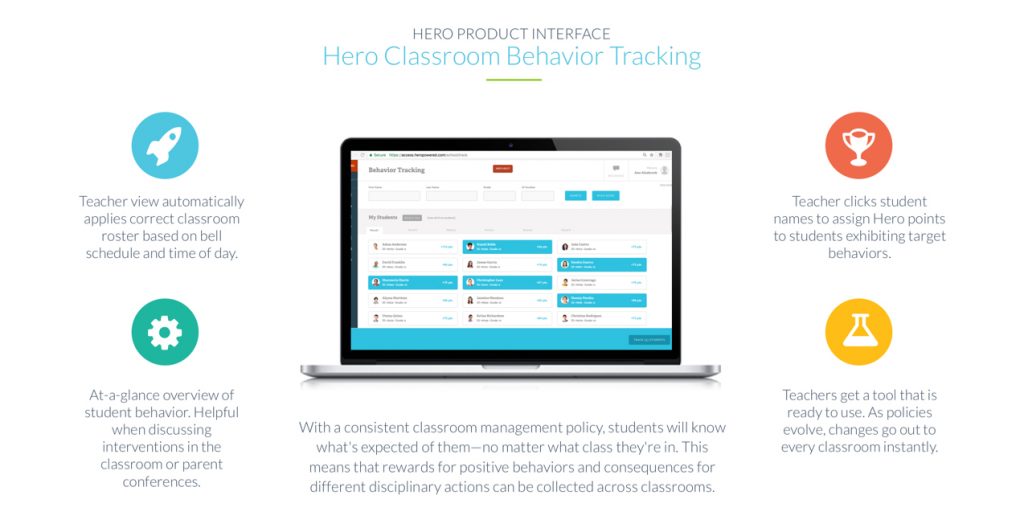
In general, the Kaneland culture is already very positive but administrators decided that Hero K12 could help them put the brakes on tardiness by making it easier to track and enforce. When asked about this CEO Mark MacDonald said, “Hero K12 is really a culture changing resource that encourages and rewards positive behaviors like getting to class on time.” Hero makes it easier for educators to reinforce positive behaviors which can have a profound impact on school climate. After a pilot phase, Kaneland leaders began looking to Hero’s other capabilities like encouraging and rewarding positive behaviors rather than just tracking tardies.

“We have a very supportive and caring culture on our campus but tardiness was a problem, especially with the new security program in place,” said Jill Maras, the school principal. Kaneland is still in the early stages with Hero K12 but its effect on tardiness is dramatic.

“We’ve seen an overall decline in the number of tardies, a drastic decline,” said Malo. “there are less tardies both as an overall number and in the number of students who are tardy.” Last year, there were over 1,700 tardies in one month. This year, there have been 1,600 tardies in one semester. There has been a 29 percent drop in unexcused tardies. As a result, there are fewer detentions being served.

“To be fair, we also installed digital clocks all over the school so there was no ambivalence about what time it is,” adds Malo. The other key was setting expectations and explaining that consequences would be enforced. “There was a lot of grumbling at the beginning of the year but I explained to all the students that the expectations haven’t changed but our process for how we record and manage tardiness and detentions has changed. If a student is not in the right place, how we track and hold them accountable has changed,” he says.

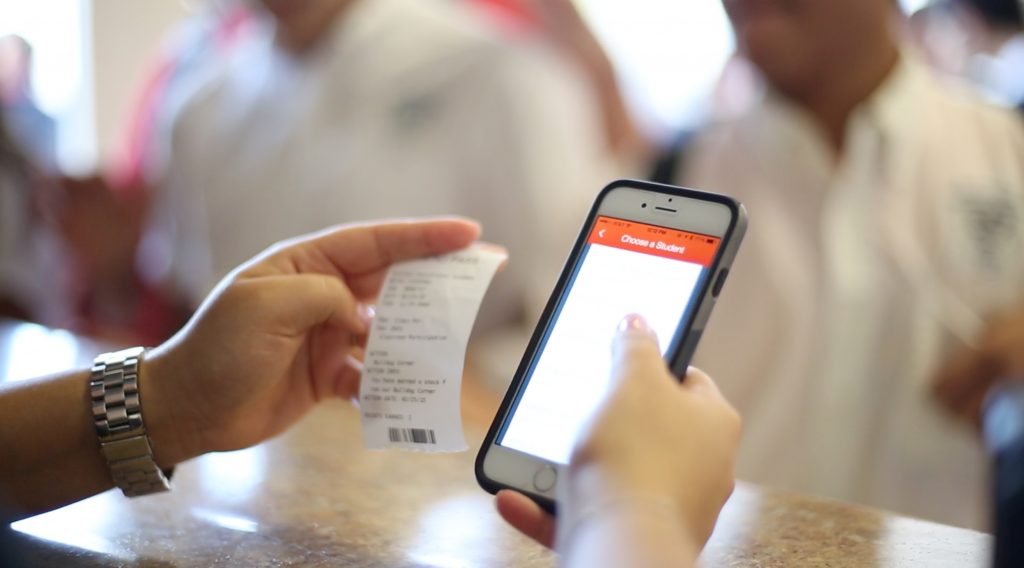
“The complaining has stopped,” adds Principal Maras. When students realize a digital system is in place and that it can’t be gamed, then it removes the grey area. Malo adds, “There is less stress in the attendance office. After the bell rings, the students know to come to the office and get a pass. It’s the only way they can access the classroom. The pass has their warning or consequence. Teachers no longer have to manage this discipline on their own. Students have a consistent policy. The classrooms are not disrupted. Parents can get involved. It’s better all around. Hero is a one-stop shop. We get the tardy, it prints it out and then we can communicate more easily with the people who staff those detentions.”

Studies show that emphasis on positive behavior yields better results than returning punitive consequences such as detentions. And nearly every educator agrees that suspensions, especially for excessive tardiness, exacerbates the problem and often leads to students dropping out of school. Kaneland administrators recognize this and are well on their way in implementing positive behavior tracking. Eighty percent of students received positive behavior points during Homecoming Spirit Week. Mr. Malo explained how. “We used that homecoming week as a pilot to see how we could implement a focus on positive behavior. The results were fantastic and extremely encouraging for both staff and students. We are looking forward to rolling out full implementation of positive points and rewards going into next year.”

With the drop in tardies and the shift in students’ attitudes about tardiness, Malo feels they can expand how they use it next year and start rewarding students for positive behaviors. Right now the school is tracking observed positive behavior, positive character in the classroom, being on time, and supporting other students. Points can be used for Homecoming benefits like discounted admission, a t-shirt, attending the big game or going to a special DJ-hosted lunch at school.

“We are in the nuts and bolts phase,” Malo says. “we want students and teachers to buy in for the positive outcomes. This is all part of a more comprehensive effort to personalize learning and create individual student profiles to meet their needs where they are.” Tracking tardies is just one piece of this whole student emphasis which recognizes that building up students so they are ready for college or jobs is more than just teaching them subject matter. It is equally important to be respectful, disciplined, professional, and on time.

Disclosure: This preceding post was sponsored. We were compensated by the sponsoring company, and consider this to be an advertisement. However, we only endorse or recommend services or products that we think would be a good fit for our readership. We are disclosing this in accordance with the Federal Trade Commission’s 16 CFR, Part 255: “Guides Concerning the Use of Endorsements and Testimonials in Advertising.”


What Are the Benefits of Using Virtual Reality in K-12 Schools?

Virtual reality is one of the biggest trends in education, right alongside makerspaces. However, if you ask the average educator what the benefits of using VR in the classroom are, many would draw a blank. Why? Because a lot of educators literally jump on the bandwagon of the newest technologies without doing their homework. In the end, their students suffer. If you are an educator who currently uses or wants to use virtual reality, but don’t fully understand its full capabilities and benefits, then I am talking to you. Not to fret, if you keep reading this article, you will find out what all the hype is about, and how virtual reality technology can help your students prosper.

Allows students to experience things that are not possible in a traditional classroom. By using a VR headset or device, students can be transported to places and environments which are not readily available to them. This enhances their learning experience and can help them visualize things that were previously only theoretical. Imagine if you a student who is learning about the American Revolution and are curious about the life of a “redcoat” or British soldier. With the help of virtual reality, you could be transported to the Battle of Bunker Hill and experience it firsthand. The first thing that you would probably notice is the sense of urgency in the air, and the fierce fighting going on all around. While this would not be appropriate for younger students, older students could certainly benefit from the experience. These types of experiences also help students connect to the material being presented, and the importance of learning history.

Makes students interested in learning. Students love to watch something as opposed to reading or hearing it. By creating a visual representation of the materials being taught, students become engaged more than ever before. Things that they would never be able to experience in real life, all of a sudden become tangible. This motivates students to learn, and suddenly learning becomes a passion, not a requirement. It doesn’t feel like work anymore, it seems like fun. As a general rule, when we enjoy something, we do it with more purpose and drive.

Eliminates the language barrier. The language barrier is usually a problem when it comes to international education. If you want to study in another country, you have to have a decent command of the language. With virtual reality and its subsequent software, every possible language can be embedded into the learning experience. Language is no longer a barrier.

Did I leave anything out?

What Are the Drawbacks of Using Virtual Reality in K-12 Schools?

Virtual reality is a hot topic in K-12 education, and many futurists are calling it the next big thing in edtech. In response to this, we wrote, “What Are the Benefits of Using Virtual Reality in K-12 Schools.” In that article, we listed all of the benefits of using virtual reality in the classroom. Since we never like to be accused of reporting one side of an issue, we decided to explore the other end of the virtual reality coin. Yes, you guessed it; in this piece, we will list all of the drawbacks of using virtual reality in K-12 schools.

Devalues the importance of human connections and synergy in education. In the quest to embrace technology and to make learning more accessible and exciting, we forget about the importance of human connection. With virtual reality, it’s just you and your virtual reality software. Even if your classmates are experiencing it right alongside you, it’s not the same as human connection. When I was a little kid, I reveled in the synergy of learning right alongside my classmates in a physical environment. As an adult, I have used virtual reality, and while it’s amazing, it’s still not the same as experiencing something firsthand, alongside actual human beings. Sure, using it can give you goosebumps, but they’re just artificial. Nothing takes the place of the goosebumps that appear when you experience something first hand.

Virtual Reality is rigid and lacks flexibility. If you are in a class with a teacher, you can ask questions, and receive one on one assistance. You can do the same thing in virtual reality, but the experience is not the same. Also if you are using a specific software that has been programmed to do a couple of things and nothing else, then the learning options are paltry. This lack of flexibility can stifle the teaching and learning process, and hamper a student’s intellectual development. This happens because education is not a fixed event, it needs the flexibility to flourish.

Sometimes functionality is an issue. When you are using virtual reality software or apps, if they malfunction, the student’s learning experience is over. Students can’t engage in the learning activity again until the problem is fixed. So, if a student is using virtual reality to experience what life was like for a soldier during the Revolutionary War, and their headset goes out, that’s it for the learning experience.

Virtual reality can create “VR addicts.” Edtech is only about 20 years old, so we are just learning of some of the possible consequences of using it. Research shows that kids can become addicted to virtual reality in the same way that drug addicts become addicted to heroin. Virtual reality and other edtech devices affect the frontal cortex, the section of the brain that controls impulses and execution, in the same way, that heroin does. Using virtual reality increases dopamine levels, which is why students become miserable when you take their virtual reality headsets away from them.

It is really expensive. Over the last decade, we have seen edtech become increasingly expensive. The cost of introducing virtual reality into all K-12 schools in the United States would cost billions of dollars. Even though each district would be purchasing their own products, their share would still be hundreds of thousands of dollars, even millions, depending on the size of the district. Is virtual reality worth the cost? I don’t know, but it is a valid question. What I do know is, because of the cost, only the richer districts would be able to afford it. Under-resourced districts, which overwhelmingly enroll low-income students would not be able to purchase virtual reality devices. This would exacerbate the inequality that already exists in education.

Did I leave anything out?


All You Need to Know About Buying Virtual Reality Headsets, Goggles, and Glasses

With virtual reality being one of the biggest trends to hit edtech in years, educators need to know as much about this technology as possible. As a matter of fact, education futurists are predicting that this technology will be instrumental in the future of education, right up there with personalized learning. In a previous article, we provided our readers with a list of the best virtual reality games on the market. As a follow-up, this article will teach them all they need to know about virtual reality headsets, goggles, and glasses. The first thing that you need to know is that when people use the terms virtual reality headsets, goggles, and glasses, they are mainly talking about the same thing.

For the purpose of this article, we decided to use the term headset, because it is the most widely used term to refer to an apparatus used to power a virtual reality environment. Think of the games as the software, and headsets as the devices that run the software. These parts make virtual reality possible.

What is a Virtual Reality Headset?

Virtual reality headsets, just create a virtual reality environment for the user. The best virtual reality lets you explore a virtual space like you are actually there. They are widely used for gaming, but also have applications in other fields, including education. In education, they are highly coveted for their ability to simulate training environments. For example, medical students can use virtual reality headsets to practice medical procedures. Virtual reality headsets are made up of a stereoscopic head-mounted display (which provide individual images for each eye) stereo quality sound, and tracking sensors that monitor head motion.

Purchasing Virtual Reality Headsets

If you are in the market to buy a virtual reality headset, keep in mind that the virtual reality devices that are available today will be obsolete by the beginning of the next year. However, that does not mean that you should wait to make a purchase. Many of the virtual reality headset options that are available today are fun, inexpensive and can be powered by your phone.

Modern virtual reality headsets fit into one of two categories, mobile or tethered. Mobile headsets are essentially shells with lenses into which you place your cell phone. The lenses partition the screen into two distinct images, one for each eye, essentially turning your phone into a virtual reality device. Mobile headsets like the Samsung Gear VR and Google Cardboard are priced at under $100, which makes them more affordable for the average person. However, smartphones are not made distinctly for virtual reality and as a result, do not provide the best visual experience for the user.

Tethered headsets have to be physically connected to PCs for them to work. The physical connection can be a bit awkward, but allowing your computer to do the video processing makes your virtual reality experience more complex, which is a good thing. This also means that the display is built into the headset, instead of your smartphone. This drastically improves both the video image and head tracking.

However, there is a trade-off, as you probably have already guessed. The least expensive tethered virtual reality headset is $400, and it requires up to $160 in extra accessories to operate the device. The Oculus Rift is $500, and it needs an additional $100 for Oculus Touch controllers. The HTC Vive is comprehensive and quite impressive, but it is also the most expensive at $800.

Now that you understand the difference between mobile and tethered virtual reality headsets let’s discuss your options in more detail. We will start by discussing some mobile options, and then some tethered ones.

Google Cardboard is a virtual headset and accompanying software that only provides a beginner’s experience. It’s cheap, works with Android and IOS devices, and has a lot of content for its users to choose from. Using the headset is really simple. You download the Google Cardboard app, place your phone in the Cardboard headset, watch a short demo, and you are ready to go. You can browse the Google Play Store’s Cardboard section to shop for new content. Many of the content options for the Google Cardboard are free. The rest are inexpensive.

One of the drawbacks of Google Cardboard, as impressive as the platform seems, is the fact that it does not represent the best that virtual reality has to offer. The headsets are rather cheap, and not comfortable. It’s like looking through a pair of binoculars. Even if you have a top of the line phone, the resolution will probably be lacking, thanks to the headset’s lenses. Also, there is a lot of content available for Google Cardboard, but since much of the content is 360-degree video, the case could be made that it is not virtual reality at all. Even with the drawbacks, the Google Cardboard headset is a steal at $15.

Samsung Gear VR is a lot like Google Cardboard. The headsets are $99, and just like Google Cardboard, it uses your phone to display and process the videos. That’s where the similarities stop. For one, it will drain your cell phone battery really quickly. However, it is very comfortable, and you don’t have to hold the headset to your face.

When you first see the Samsung headsets, they look like plastic versions of Google Cardboard, but they have a lot of fancy sensors build into it. There is a sensor that can be used to pause or play your video, and a touchpad on the side, so you can use the onscreen options. The virtual reality experience that you get with Samsung Gear VR is actually one of the best ones available on the mobile-powered VR market, but that is not saying much. Like Google Cardboard, there is a ton of content available, which is of course a good thing.

Oculus Rift has become an industry leader in the tethered VR headset industry. However, when compared to the HTC Vive and the PlayStation VR, it does not quite live up to the hype. This is disappointing to all of us that were expecting more. The retail version of the headset is out, and while it is very expensive, it is also very advanced. From a technical view, it is indistinguishable from the Vive. Its price tag is $200 less that the Vive, but it does not have the Vive’s ability to display an entire room.

HTC Vive is by far the most comprehensive virtual reality headset on the market. It is absolutely breathtaking. It’s complete package contains two motion controllers, two base stations, and a headset. It is the lone VR system that monitors your movements from a base, instead of from your seat. It also has motion controllers that are remarkably more advanced than the PlayStation Move. Here is the drawback: at $800 for the entire package, the price is a tough pill to swallow, especially for schools that are looking to purchase the product. Also, it needs a lot of computing power just to operate.

PlayStation VR gives the user a refined, easy to use tethered virtual reality experience with an affordable price tag. Unfortunately, you can only use PlayStation VR titles on it, but this is an industry norm. It has a theater mode that allows you to play any PS4 game on it if you are sitting in front of a large screen, and the VR games are really great. You need a camera (PlayStation)  for the headset to operate, and a Move controller bundle for the motion controls. However, at $400 a headset, it is still the most affordable tethered headset on the market and one of the most impressive.

Did we miss any? If so, let us know.

20 of the Best Virtual Reality Games in Education

As the edtech market explodes, established companies and startups are scrambling to be the first to take advantage of the “next big thing.” For many, that means entering the virtual reality market, or more specifically creating virtual reality games. With so many companies and startups developing virtual reality games, how can schools and private citizens decide what product to spend their money on? This may seem like a simple choice, but making the wrong decision can cost you a lot of your hard earned money, and stunt the user’s intellectual growth and development. As you can see, the stakes are very high, and the margin for error is minuscule.

Since we have been covering this market for several years, we feel as though we are experts in predicting what virtual reality games will give you the most bang for your buck. That’s why we decided to create a list of the best virtual reality games in education so you can make an informed decision. The games that we chose to feature are either free or low cost, and we tried to stay away from more pricey options unless their value proposition was worth the high price tag. Without further ado, here is our list of the best virtual reality games on the market.

  1. Star Chart – with over 20 million users this app brings the universe a little closer. Students can learn about constellations by aiming their phones at the night sky. There are additional features that allow students to interact with facts about planets and space discovery.
  2. Google Translate – while conventional Google Translate may not sound like a VR app, its new camera feature students can translate 30 languages by aiming their camera at a Students can watch in real time as the text is translated. This additional feature is great for language student
  3. Cleanopolis– Fighting climate change becomes interactive with this app. Students learn about CO2 and battle along with Captain Clean to save the world. Not only is this a fun game but the educational quality would make it great in any science classroom.
  4. Public Speaking VR – practice the skills of public speaking with this immersive VR experience. With photorealistic environments, students can prepare for a job interview of a class presentation.
  5. Quiver – Watch colored in creations come to life with Quiver. Though VR technology, 2D images become 3D and “walk “ off the page. Ideal for younger students.
  6. Boulevard – Art classes can now be supplemented with visits to some of the world’s best art museums. Students can tour six art museums, interact with famous artworks and learn about the art, all thanks to the advancements of VR technology
  7. Unimersiv – History comes alive with the apps developed by Unimersiv. Students can explore ancient Greece, the Titanic or the Egyptian Mysteries.
  8. InMind– Neurons and brain tissue have never looked more realistic. Travel into the brain and learn about anatomy with this great app.
  9. Apollo 11 VR – Be part of one of the most significant space expeditions. Though VR technology, students can have a front seat in this documentary style app. This award winning app is pushing the possibilities of VR as an educational tool
  10. Earth AR – See the globe from new unseen angles. Motion detection and zooming capabilities will make geography more interactive.
  11. Cospaces– creating virtual realities is not as impossible as it sounds. Students are actively involved in the creation and creative process that goes into building a VR world
  12. TiltBrush – Creating 3D paintings is every artist’s dream, and now with TiltBrush, it is a reality. Painting Is done using a handheld “paintbrush,” and the creation possibilities will be awe inspiring for any creative student.
  13. Anatomy 4D – study the human body with clear images that come to life. Ideal for biology students or anyone with interest in the inner workings of the body.
  14. Sites in VR– explore famous landmarks in all their splendor. With an emphasis on Islamic temples, tombs, and ancient cities, students will get to see sites that otherwise would be inaccessible
  15. King Tut VR – Explore the tomb of the legendary Egyptian king and get lost in the secret chambers full of hieroglyphics and treasures
  16. Flashcards- Animal Alphabet – Made for younger students, this immersive flashcard game teaches students words while bringing it all together with some colorful animal friends
  17. Imag-n-o-tron– Stories jump off the page with Imag-n-o-tron. Downloadable content makes this app suitable for any age. Students improve their reading while engaging with complimentary images making the VR world an educational space
  18. EON Experience – This collection of VR lessons encapsulates everything from physics to history. Students or teachers can create their VR lessons from preloaded content.
  19. Titans of Space – This guided tour of space is both informative as it is breathtaking. With voice overs, facts and scored music it is a cutting edge VR product.
  20. Discovery VR Discovery TV channel compiled all the content for this app. Students can explore exotic natural locations and interact with our planet in a futuristic way.

Well, that’s it for our list. Did we miss any?