Tech Advice

Why YouTube TV is Getting More Expensive and What it Costs Now

In recent times, YouTube TV has seen an increase in prices which has left users wondering, “why?” The reasons behind the pricing changes can be attributed to content costs and licensing fees which have increased as the platform continues to grow. Let’s delve deeper into why YouTube TV is becoming more expensive and what it costs now.

Content and Licensing Fees

One of the primary factors responsible for the price increase is the rising cost of content and licensing fees. With more networks and channels becoming available on YouTube TV, it is only natural that the platform has to pay higher fees to secure broadcasting rights for these channels. Partnerships with major networks such as NBCUniversal, ViacomCBS, and Turner Networks have contributed to this increase in costs.

Furthermore, subscriber growth translates into a need for more investment in infrastructure and technology. As YouTube TV accumulates new users, it becomes necessary to maintain a seamless streaming experience by investing in advanced software, hardware, and security features.

Another reason for the mounting expenses is original content creation. Although YouTube started as a platform for user-generated media, it has now ventured into producing its own unique content – a cost-intensive process that’s passed on to subscribers.

So What Does it Cost Now?

The cumulative impact of content costs, licensing fees, and infrastructure investments has resulted in a noticeable price hike for YouTube TV subscriptions. As of July 2021, the monthly subscription fee for YouTube TV is $64.99. This marks a significant increase from its earlier days when users paid around $35 per month.

While the price point may be higher than some competitors such as Hulu Live or Sling TV, YouTube TV offers a multitude of features that enhance user experiences like unlimited DVR storage at no additional cost and access to local channels depending on your location.

The Future of YouTube TV

Despite higher prices, industry experts believe that YouTube TV will continue to grow and evolve as a preferred streaming option for many users. With strategic investments in content, infrastructure, and technology, YouTube TV aims to provide viewers with exceptional streaming services without compromising quality. The platform’s seamless integration with Google products like Chromecast and Google Home only adds to its allure.

In summary, YouTube TV’s increasing price tag is a reflection of its growing content offerings and the need for continued investment in infrastructure and technology. While it may be more expensive than some alternatives, users still benefit from the platform’s wide array of features that make it worth considering as their go-to source for live and on-demand entertainment.

Top 7 Ways to Fix SSL Connection Error in Safari for iPhone

When browsing the internet on your iPhone, you might occasionally encounter an SSL connection error in Safari. This error indicates that there’s a problem with the website’s SSL certificate, which can compromise your data security. To ensure you maintain a safe browsing experience, it’s essential to fix this issue promptly. Here are the top seven ways to resolve SSL connection errors in Safari for iPhone:

1. Check the Date and Time Settings

If your iPhone’s date and time are set incorrectly, it could cause SSL connection errors. To fix this:

– Go to “Settings” on your iPhone.

– Tap on “General”, and then “Date & Time”.

– Enable the “Set Automatically” option.

2. Verify the Website’s URL

Sometimes, the error might arise due to an incorrect or outdated URL. Always double-check if you’ve entered the website’s address correctly and update any saved bookmarks with the right URL.

3. Clear Safari Cache and Cookies

Clearing cache and cookies can help fix SSL connection errors related to stored data:

– Open “Settings” and scroll down to “Safari.”

– Tap on “Clear History and Website Data.”

– Confirm by tapping “Clear History and Data.”

4. Disable VPNs or Proxy Servers

VPNs or proxy servers can interfere with SSL connections. Disable them temporarily to see if they’re causing the error:

– Go to “Settings” and select “General.”

– Tap on “VPN” and disable any active VPN connections.

– If you’re using a proxy server, navigate to “Settings” > “Wi-Fi” > tap the “i” icon beside your network > scroll down to “HTTP Proxy,” disable and save.

5. Update iOS

Outdated iOS versions might contain bugs that lead to SSL errors. Keep your iOS up-to-date by following these steps:

– Go to “Settings” > “General” > “Software Update.”

– Download and install any available updates.

6. Reset Network Settings

Resetting network settings can resolve connection issues:

– Open “Settings” and tap on “General.”

– Scroll down to “Reset.”

– Tap on “Reset Network Settings” and confirm by entering your passcode.

7. Troubleshoot with a Different Website or Browser

Lastly, try connecting to a different secured website to test if the error persists. If it does, consider using an alternative browser like Google Chrome or Mozilla Firefox to see if the issue is specific to Safari.

In conclusion, fixing SSL connection errors in Safari for iPhone involves checking date and time settings, verifying the URL, clearing cache and cookies, disabling VPNs or proxy servers, updating iOS, resetting network settings, or trying alternative websites or browsers. Following these solutions will likely resolve the issue and ensure a secure browsing experience on your iPhone.

Understanding Snapchat’s Guidelines: What Can Get You Banned?

Snapchat, the popular multimedia messaging app, has gained significant traction over the years among people of all age groups. With its unique and engaging features like temporary photo sharing, filters, and lenses, users are hooked to this platform, making it a social media staple. However, a positive experience on Snapchat is largely dependent on abiding by the platform’s community guidelines.

Violating these rules can lead to account suspensions or even permanent bans. To continue enjoying Snapchat without interruptions, here are some activities that could potentially get you banned:

1. Adult Content: Snapchat strictly prohibits the distribution of adult content, including nudity and explicit sexual material. Sharing explicit images or videos can result in immediate account termination.

2. Invading Privacy: Sharing someone else’s private information, such as addresses or phone numbers without consent, is a big no-no on Snapchat. Violating privacy-related guidelines could lead to penalties or an outright ban.

3. Harassment and Bullying: Similar to most social media platforms, Snapchat has a zero-tolerance policy for bullying, harassment, or intimidating behavior targeted towards individuals or groups.

4. Illegal Activities: Using Snapchat to engage in or promote illegal activities such as drug distribution or organized crime is strictly forbidden and can lead to serious consequences.

5. Impersonation: Creating accounts with misleading names or pretending to be someone else is not allowed on Snapchat. This includes impersonating celebrities, public figures or other users.

6. Spamming and Phishing: Sending unwelcome repetitive messages or creating deceitful content in attempts to steal personal information is strictly against Snapchat’s guidelines.

7. Self-Harm and Suicide Content: Content that promotes or glorifies acts of self-harm or suicide is strictly prohibited on Snapchat.

8. Hate Speech and Discrimination: Snapchat upholds an inclusive atmosphere for all users, therefore hate speech targeting specific races, genders, religions, or any other form of discrimination is not tolerated.

9. Violent Content and Threats: Sharing gruesome images, showcasing harm to animals, or making threats of violence are all particularly disallowed on Snapchat.

10. Unauthorized Data Usage: Accessing another user’s account, collecting data without permission, or acquiring information from Snapchat through unauthorized means is also a clear violation of the guidelines.

11. Encouragement of Rule-Breaking Activities: Encouraging other users to engage in activities that violate Snapchat’s community guidelines can lead to disciplinary action or an account ban.

Staying in line with these community guidelines ensures a pleasant Snapchat experience and is crucial to maintaining access to this engaging platform. So, think before you snap!

ASUS ROG Phone 7 Ultimate Review: A Gaming Phone with a Hidden Door

Introduction:

The gaming phone market is becoming more competitive than ever, and ASUS has been relentless in pushing the limits of its hardware to cater to the needs of avid gamers. The ASUS ROG Phone 7 Ultimate is a prime example of power and innovation combined, with a new twist: a hidden door. In this article, we delve into the unique features and performance capabilities of this latest gamer-centric device.

Design and Build:

The ROG Phone 7 Ultimate boasts a sleek design, flaunting an RGB-illuminated logo and holographic patterns that enchant any gaming enthusiast. But what sets it apart from its predecessors is the unique “hidden door” – an exciting detail extending across the back of the phone, exclusively designed for better connectivity and gaming experience.

Display:

The device features a stunning 6.8-inch 1080p AMOLED display, supporting a smooth 165Hz refresh rate. The HDR10+ compliant screen ensures vibrant colors, deep blacks, and incredible contrasts. With its ultra-responsive touch latency of 1ms, playing action-packed games on the ROG Phone 7 Ultimate feels like a dream.

Performance:

Underneath the hood lies Qualcomm’s Snapdragon 898 processor, powering up this gaming beast. Paired with Adreno 730 GPU and an impressive 18GB RAM configuration, it promises unparalleled performance. For heat dissipation during intense gaming sessions, ASUS has included an upgraded AeroActive Cooler to avoid thermal throttling.

Battery:

The ROG Phone 7 Ultimate houses a massive 6,000mAh battery that supports up to 90W fast charging technology. This ensures ample playtime even when your favorite mobile game devours power. Gaming sessions can be extended without stressing about low battery life.

Cameras:

While a gaming phone does not typically prioritize camera specifications, the ROG Phone 7 Ultimate features a reliable triple-camera setup: a 64MP primary sensor, an ultrawide 13MP lens, and a 2MP macro shooter. The front-facing camera is a respectable 24MP, perfect for capturing selfies or streaming games online.

Audio:

The device incorporates front-facing stereo speakers, which produce clear sound and an immersive audio experience during gameplay. The integrated DTS:X Ultra technology adds an extra element of depth and surround sound to your gaming sessions.

Software and Connectivity:

This gaming behemoth runs Android 12, with ROG UI customization options transforming the phone into a personalized gaming haven. The “hidden door” mentioned earlier houses dual physical USB-C ports that facilitate several attachments – ranging from gamepads to external displays – for versatile gaming sessions.

Conclusion:

ASUS raises the bar yet again in the gaming segment, with the ROG Phone 7 Ultimate offering unmatched performance and unique innovations like its hidden door for connectivity. Be it mind-blowing display quality, powerful processing capabilities, or stunning design – this device leaves no stone unturned when it comes to satisfying every gamer’s demand.

The Roku Channel vs. Pluto TV vs. Tubi: What’s the Best Free Streaming Video Service?

In today’s world of digital entertainment, many people are cutting the cord and joining streaming platforms to get their daily dose of movies, TV shows, and documentaries. With options like Netflix and Disney+ requiring monthly subscriptions, there’s a rising demand for free streaming services that provide quality content without costing viewers a dime. Three contenders in this race are The Roku Channel, Pluto TV, and Tubi. In this article, we’ll compare these platforms to help you determine which one is the best fit for your needs.

Content Library

The Roku Channel offers a wide range of content, including movies, popular TV series, live news channels, and kids’ programming. The platform provides over 10,000 titles with new content added regularly. The library is ad-supported but still offers users an enjoyable viewing experience.

Pluto TV has an even more extensive collection featuring more than 250 channels divided into categories like movies, entertainment, news and sports. It boasts syndicated TV shows as well as exclusive content from popular channels like MTV and Nickelodeon.

Tubi has an impressive amount of content with over 20,000 titles spanning various genres like action, comedy, horror, kids, drama and classics. It features an extensive collection of cult classics and international offerings alongside mainstream hits.

User Interface and Navigation

The Roku Channel has a clean interface that makes it easy for users to find available content by scrolling through categories displayed on the home screen. There’s also a search feature for tracking down specific titles.

Pluto TV’s interface is more reminiscent of cable television with its channel-based design; users simply select and view channels organized into subgenres for easy navigation. This setup will appeal to viewers used to the traditional cable model.

Tubi boasts a user-friendly interface showcasing its content in neatly organized categories. It provides personalized recommendations based on user preferences, making it easy to discover new content.

Device Compatibility

The Roku Channel has widespread device compatibility, being available on Roku streaming devices, Smart TVs, as well as mobile devices (iOS and Android) and through a web browser.

Pluto TV can be accessed via various devices including Roku, Amazon Fire TV, Apple TV, Android and iOS smartphones and tablets, gaming consoles like PlayStation and Xbox, and through a web browser.

Tubi is widely accessible through devices such as Roku, Amazon Fire TV, Apple TV, Google Chromecast, gaming consoles like PlayStation and Xbox, Android and iOS smartphones and tablets, and via a web browser.

Final Verdict

Choosing the best free streaming service depends on the individual’s preferences and viewing habits. If you want a blend of live channels with on-demand content similar to traditional cable offerings, Pluto TV emerges as the top choice. Tubi is an excellent option for those who gravitate towards its extensive library of hard-to-find cult classics as well as mainstream hits. Lastly, The Roku Channel balances the two with its mix of live channels and on-demand movies, making it a stable choice for most viewers.

Ultimately, there is no clear winner among these three platforms; each offers unique features catering to different user requirements. It’s worth exploring all three services to find the one that suits your entertainment needs best.

Sony’s Project Q: PS5 Game Handheld Revealed – What We Know So Far

The gaming world is abuzz with anticipation for Sony’s upcoming project, codenamed “Project Q.” As a handheld companion to the PlayStation 5, this new gaming device aims to bring the seamless gaming experience of console gaming on-the-go. Here’s everything we know so far about this exciting addition to the PlayStation family.

Release Date & Pricing

While no official release date has been announced, sources speculate that Project Q could hit shelves as early as 2023. Pricing details are currently under wraps, but given the premium nature of Sony’s products, we can expect the handheld to be priced competitively.

Hardware & Design

The overall design of Project Q is sleek and modern and expected to provide a comfortable yet immersive gaming experience. Some leaked renderings showcase the device featuring a large display and a design reminiscent of earlier versions of PlayStation Portable (PSP) devices.

It is rumored that Project Q will leverage custom AMD technology like its older sibling, the PS5. Moreover, it may share architecture with the console itself which would allow for seamless interconnectivity between Project Q and your PS5.

Game Compatibility & Connectivity

One of the most significant aspects of Project Q is its compatibility with PS5 games. Players can expect access to an extensive library of games from their PS5 console without having to repurchase them. Thanks to cloud streaming technology like PlayStation Now, users may be able to stream games directly on their handheld device.

Seamless integration goes beyond just playing games – allowing for transfers between your PS5 and Project Q. Furthermore, USB-C connectivity can be used for faster data transfers and charging.

Battery Life

Battery life is always a concern when it comes to powerful handheld devices. Early speculations indicate that Sony may be targeting a battery life similar to that of Nintendo Switch – approximately 4-6 hours, depending on the type of game you’re playing.

Additional Features & Accessories

Project Q might come with additional features and accessories for a truly immersive gaming experience. These could include AR and VR functionalities, wireless headphones, or even gaming keyboards. It wouldn’t be surprising if Sony offers an ecosystem of Project Q-compatible products to supplement your handheld gaming needs.

What’s Next?

As we eagerly await further developments and official announcements from Sony, the hype surrounding Project Q continues to grow. If rumors are to be believed, gamers can look forward to the next generation of handheld gaming which combines the power of console gaming with the flexibility and portability of a handheld system.

How to Listen to Apple Podcasts on Your Android Phone

Introduction:

Apple Podcasts is a popular platform for audio content, offering a variety of podcasts for its users. While it is designed with Apple devices in mind, Android users don’t have to miss out on accessing their favorite podcasts. If you are wondering how you can listen to Apple Podcasts on your Android phone, this article will guide you through the process.

Step 1: Choose a podcast app for Android

While there isn’t an official Apple Podcasts app for Android devices, there are several great alternatives that provide access to the same content. Some popular podcast apps for Android include:

1. Pocket Casts

2. Google Podcasts

3. Castbox

4. Podcast Addict

5. Podbean

Choose and download an app from the Google Play Store to your Android phone.

Step 2: Find and subscribe to Apple podcasts

Once you’ve downloaded and installed a podcast app, launch it on your device. Most apps will have a search function where you can type in your favorite podcast name or enter a URL if you have it handy.

You can search by podcast name, host or genre to find popular Apple Podcasts including “Serial,” “The Joe Rogan Experience,” and “Radiolab.” When you locate the desired podcast, simply click on ‘Subscribe’ or ‘Follow’ within the app.

Step 3: Customize your listening experience

After subscribing to your favorite podcasts, you can modify several aspects of your listening experience within the app settings, such as playback speed, sleep timers, and notifications for new episodes. Most apps also offer playlist creation features along with automatic download options for offline listening.

Step 4: Explore curated content

Many podcast apps offer suggestions based on your interests and listening history in order to help you discover new content from both Apple Podcasts and other sources. This feature can be a great way to discover new podcasts that may not necessarily be featured on the Apple platform.

Step 5: Sync your podcast subscriptions across devices

Some podcast apps like Pocket Casts offer cloud sync features that allow you to access your subscriptions and listening progress across multiple devices, including iOS, Android, and web browsers. This can be especially helpful if you have multiple devices or switch between platforms.

Conclusion:

It’s easier than ever for Android users to listen to their favorite Apple Podcasts with compatible podcast apps. By following these simple steps, you can discover a world of audio content tailored to your interests and enjoy the convenience of keeping up with your favorite podcasts anywhere, anytime.

The Best Way to Machine Wash Your Sheets, Comforter, and Pillowcases

Introduction:

Maintaining the cleanliness and hygiene of your bedding is essential for a comfortable and healthy sleep. Washing your sheets, comforter, and pillowcases might seem like a straightforward task, but there are some best practices that can help you achieve optimal results. In this article, we will explore the best way to machine wash your bedding to ensure they remain fresh, clean, and long-lasting.

Step 1: Separating Your Bedding

Start by separating your bedding based on fabric types and colors. Dedicate one load for sheets and pillowcases and another for the comforter. This separation not only helps in effective cleaning but also prevents damage due to excessive load on the washing machine.

Step 2: Pre-Treatment for Stains

Before washing, pre-treat any visible stains on your sheets, pillowcases or comforter with a stain remover or laundry detergent. Apply the stain remover directly on the stain and let it sit for at least 15-30 minutes before proceeding with washing.

Step 3: Washing Your Sheets and Pillowcases

For regular washing of cotton or linen bedding, use warm water (around 40°C/104°F) and gentle cycle settings on your washing machine. Add mild or eco-friendly detergent as per the recommended quantity. Avoid using bleach or fabric softeners as they can damage the fabric fibers over time.

Step 4: Washing Your Comforter

Wash your comforter separately from other bedding items using cold water (20°C/68°F) and a gentle cycle setting with low agitation. Add mild detergent according to the product’s instructions. If your comforter is too large for your washing machine, consider taking it to a laundromat with larger capacity washers.

Step 5: Drying Your Bedding

To dry your sheets and pillowcases, partially tumble dry them on the lowest heat setting to remove excess moisture, then hang them up to air dry naturally. This combination will help reduce wrinkles and minimize fabric damage.

For comforters, it is best to air-dry them outdoors or in a well-ventilated area. If you prefer to use a dryer, select the lowest heat setting and place dryer balls or clean tennis balls inside the dryer to help fluff the comforter evenly.

Step 6: Storing Your Bedding

When storing your freshly laundered bedding, ensure they are completely dry to avoid mildew formation. Neatly fold and store your sheets and pillowcases in a cool, dry place away from direct sunlight.

Conclusion:

Following these steps will not only keep your sheets, comforter, and pillowcases clean and fresh but will also help in prolonging their lifespan. A well-maintained bedding set contributes significantly to your overall sleep quality and hygiene, so make sure you invest time in proper care for a comfortable and healthy night’s sleep.

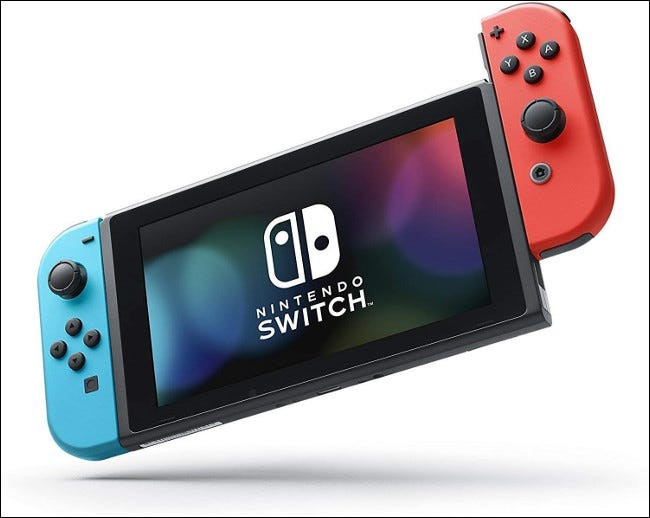
A Comprehensive Guide to Nintendo Switch Modding

Introduction:

The world of gaming has undoubtedly evolved, with constant innovation and advancements in technology. The Nintendo Switch, one of the most popular gaming consoles, offers a hybrid gaming experience that can be enjoyed both at home and on the go. As with many gaming consoles, modding or modifying the device has attracted the attention of gamers who are interested in elevating their gaming experience. This article will explore everything you need to know about Nintendo Switch modding, from its implications to the methods available.

Why Mod Your Nintendo Switch?

Modding your Nintendo Switch can open up an array of possibilities for improved performance and customization. Whether it’s unlocking new features, boosting processing power, or altering the aesthetics of your console and games, modding can offer a personalized experience tailored to your preferences.

Methods of Modding:

1. Hardware Mods: These mods involve physically altering the console itself. Some examples include adding an internal fan for better cooling or replacing the Joy-Cons with custom shells.

2. Software Mods: These are modifications made to the Switch’s firmware or game files. Through software modding, players can access features such as save editors, custom themes, or homebrew applications that can enhance their gaming experience.

3. Emulation: A common form of software modding is installing emulators that allow players to run games from other platforms on their Nintendo Switch.

4. Custom Firmware (CFW): This is one of the most comprehensive forms of modding that allows users complete control over their system settings and features.

Risks Associated with Modding:

While modding your Nintendo Switch can lead to exciting new features and capabilities, it’s essential to be aware of potential risks as well:

1. Warranty Void: Opening up or altering your Nintendo Switch hardware will automatically void its warranty, leaving you without manufacturer support in case any problems arise.

2. Legal Issues: Distributing copyrighted content or engaging in activities like installing unapproved apps may result in legal consequences.

3. Bricking: If not done correctly, modding can cause irreversible damage to your console, rendering it inoperable – a condition known as “bricking.”

4. Security: Running non-authorized software on your Switch may expose your console to malware or other security threats.

5. Update Problems: Modded consoles can face difficulties with system updates, which may affect compatibility with new games or features.

Conclusion:

Nintendo Switch modding offers numerous opportunities for customization and enhancing gaming experiences. However, it’s crucial to weigh the potential benefits against the risks involved and adhere to local laws regarding copyright and software distribution. To ensure a safe and enjoyable gaming experience, always exercise caution when modifying your console and adhere to reputable sources for modding information and tools.

How to Track the Location of a Verizon Wireless Cell Phone

In today’s world, the ability to track the location of a cell phone has become not only a convenience but also a necessity. Parents may want to keep tabs on their children’s whereabouts, while employers might need to monitor their employees’ locations. With that in mind, this article will explore how to track the location of a Verizon Wireless cell phone using various methods and tools.

1. Family Locator Service

Verizon Wireless offers its subscribers access to their Family Locator service. This feature allows account owners to track the real-time location of Verizon Wireless cell phones under their plan. To use Family Locator:

a. Sign in to your My Verizon account.

b. Go to ‘Add-ons & Apps’ > ‘Family Locator.’

c. Add devices you want to track by following the on-screen instructions.

d. Install the Family Locator app on each device you want to track.

e. Finally, you can access your Family Locator interface with an updated location map for all connected devices.

2. Smartphone Tracking Apps

Another option for tracking a Verizon Wireless cell phone is by using third-party smartphone tracking apps. There are numerous apps available on Google Play Store and Apple App Store, such as Life360, mSpy, Mobile Tracker, and more. These apps offer various tracking features and services that can help you locate a cell phone’s location remotely.

To use these apps:

a. Download and install your preferred tracking app on the target device.

b. Create an account or sign in with your existing credentials.

c. Allow necessary permissions for the app to function effectively.

d. Start tracking the device remotely through web portals or companion apps.

3. Call Customer Support

In case of emergencies, you can contact Verizon Wireless customer support for assistance in locating your device. Remember that you’ll need relevant information like account details and the device’s phone number to receive help from customer support.

4. Use Built-in Location Services

Smartphones come with built-in location services that can help locate a missing device. For Android, ‘Find My Device’ and for iOS, ‘Find

My iPhone’ are the respective services that enable users to track their cell phones when needed.

To access these services:

a. Sign in using your Google or Apple account credentials.

b. Access the ‘Find My Device’ or ‘Find My iPhone’ portal online.

c. View the real-time location of your cell phone or take remote actions like locking, ringing, or erasing the device’s data.

Remember that these services require the missing device to be connected to the internet and have location services enabled.

In conclusion, tracking a Verizon Wireless cell phone is possible through various methods, such as Verizon’s Family Locator service, third-party smartphone tracking apps, contacting customer support, and utilizing built-in location services. These options cater to user preferences and situations and ensure that monitoring your Verizon Wireless cell phone location is stress-free and efficient.