EdTech & Innovation

Meet the Viral Teacher Who Created Tennis Ball Chairs

As educators continuously search for innovative ideas to better engage with their students and enhance learning, one teacher has caught the attention of the world with her unique and inspiring creation: tennis ball chairs.

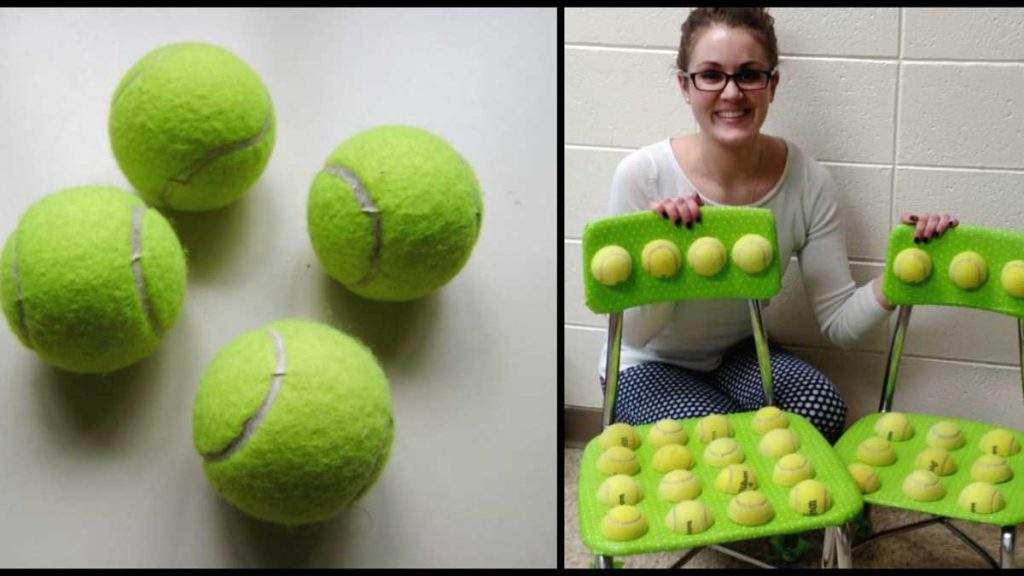
In an effort to provide a more comfortable seating experience for her students, particularly those with special needs or attention deficits, this creative teacher came up with an ingenious and low-cost solution to alleviate restlessness and fidgeting, while simultaneously promoting concentration and focus. The simple design involves attaching tennis balls to each leg of standard classroom chairs. With this modification, the chairs provide soothing sensory input and offer noise reduction benefits, making them ideal for students who struggle with sensory overload or distractions.

Social media channels have given this inventive educator a platform to share her idea, quickly turning her into a viral sensation. Teachers across the globe are now implementing this practical and affordable solution in their own classrooms. Not only has this sparked interest in alternative seating options for students, but it has also initiated discussions about creative approaches to customize learning environments tailored to children’s needs.

The idea behind tennis ball chairs has become a symbol of dedication and passion that teachers bring to their profession. The internet is filled with praise for the teacher responsible for bringing this concept to life. Her out-of-the-box thinking has led to widespread recognition and gratitude from parents, colleagues, and even industry experts.

Moreover, the tennis ball chair innovation underscores the importance of catering to individual differences and unique learning styles when it comes to education. Many educational experts have long advocated for personalized learning approaches but seeing a simple yet effective idea take off in such a viral manner adds credence to these concepts.

The success of tennis ball chairs demonstrates how powerful it can be when educators think outside the box. By providing students with specialized seating that encourages a calm and focused state of mind, they set the foundation for their learners’ academic success. It’s a reminder that small innovations can lead to significant changes in educational practices and, ultimately, better outcomes for students.

Thanks to this teacher’s innovative thinking and dedication to her students’ needs, she has revolutionized the way educators and parents view classroom design. Tennis ball chairs may seem simple, but their impact on countless students highlights the potential that lies in such creative solutions. As more teachers embrace this inventive approach and other groundbreaking ideas, our classrooms will continue to transform, adapting to better support the diverse needs of every student.


Best Blue Light Glasses for Teachers and Students

Technology is an integral part of our daily lives. No more so than for teachers and students who constantly interact with various digital devices, including computers, tablets, and smartphones. Prolonged exposure to these devices can result in exposure to harmful blue light which may lead to eye strain, headaches, and disturbed sleep patterns. This is where blue light glasses come into play, protecting your eyes from excessive blue light exposure. In this article, we will discuss the best blue light glasses specifically designed for teachers and students.

1. TIJN Blue Light Blocking Glasses

TIJN glasses are designed with a stylish frame and clear lenses providing an optimal mix between fashion and functionality. The lenses are able to block up to 95% of harmful blue light while providing minimal color distortion. Suitable for both teachers and students who spend countless hours in front of screens, these glasses can help reduce eye fatigue.

2. ANRRI Blue Light Blocking Glasses

ANRRI offers a lightweight but sturdy frame and clear lenses engineered to block 90% of blue light emitted by digital devices. Specially designed for avid device users, ANRRI glasses can help relieve eye strain, reduce headaches, and improve sleep quality.

3. DONNA Unisex Blue Light Blocking Glasses

DONNA Unisex glasses are made with a metal frame that is not only durable but also comfortable for long hours of wear. These glasses block out 99% of harmful blue light, ensuring maximum protection for your eyes. With an elegant unisex design, these glasses are perfect for both male and female students and teachers.

4. GAMMA RAY Optics Blue Light Blocking Glasses

GAMMA RAY Optics offers glasses that effectively block out blue light without sacrificing style or comfort. The advanced lens material filters out almost 97% of harmful blue light rays while maintaining a near-clear appearance. Ideal for teachers and students who desire a fashionable way to protect their eyes from strain and fatigue.

5. Cyxus Blue Light Blocking Glasses

Designed for both optimal eye protection and style, Cyxus glasses are made with lightweight metal frames and clear lenses that block out up to 90% of harmful blue light. These glasses are perfect for teachers who need a durable and stylish option for daily wear during long hours in front of digital screens.

In conclusion, selecting the right pair of blue light glasses is essential in ensuring the protection of your eyes from excessive blue light exposure. Even if you may not be experiencing symptoms like eye fatigue or headaches, it’s better to get ahead of potential issues by considering one of these top-rated blue light glasses options. Teachers and students should prioritize their eye health amidst an increasingly digitized educational environment, as small measures can go a long way in maintaining overall well-being.

The Best Teacher-Recommended Online Planners

In today’s fast-paced world, staying organized and managing time effectively has become increasingly important. One of the best ways to accomplish this is by using an online planner. Teachers, in particular, can benefit from these digital tools, as they juggle multiple tasks and deadlines throughout their workday. In this article, we will explore the best teacher-recommended online planners that will help you stay on track with your work and personal life.

1. Google Calendar

Google Calendar is a popular choice among educators for its simplicity and seamless integration with other Google tools like Gmail and Google Classroom. With straightforward event creation and color-coding options, you can easily manage your schedule while also collaborating with colleagues by sharing and viewing each other’s calendars.

2. Trello

Trello is a versatile project management tool that uses a unique card-based system to help you organize tasks and increase productivity. Teachers can create individual boards for each class, add assignments with due dates, and attach necessary materials, ensuring everyone stays informed on the progress of projects.

3. Todoist

Todoist is a powerful task management app that allows you to create to-do lists, set reminders, and prioritize tasks using a visual system called “Karma.” Teachers can use Todoist to plan lessons, track assignments, and collaborate with colleagues by sharing task lists.

4. Evernote

Evernote is more than just a note-taking app; it can serve as your personal digital planner where you can save lesson plans, lecture notes, resources, and much more. With its tagging system, you can quickly retrieve the information you need when planning lessons or meetings.

5. Asana

Asana is a project management tool that simplifies task organization by allowing you to create projects with custom workflows and deadlines. Teachers can use Asana to collaborate with colleagues on initiatives such as curriculum development and assessment planning.

6. TeacherPlanBook

Specifically designed for K-12 educators, TeacherPlanBook offers a complete suite of tools to streamline lesson planning, assignment tracking, and collaboration. The online software integrates with Common Core Standards and allows teachers to create reusable templates that can be customized for individual classes.

7. Smartsheet

Smartsheet strikes the perfect balance between functionality and ease of use. This dynamic work management platform enables you to create and share visual timelines, schedules, and project plans with ease. Teachers can use Smartsheet for lesson planning, managing events, and collaborating on departmental initiatives.

In conclusion, these teacher-recommended online planners cater to a variety of needs within the educational setting. Whether you are searching for a simple calendar app or a comprehensive project management tool, there is undoubtedly a solution that will fit your requirements. By adopting one of these digital planners into your daily routine, you can enhance your productivity, stay organized, and ultimately create a more effective learning experience for your students.

Use This Simple Approach When Helping At-Risk Students

Introduction:

At-risk students face a myriad of challenges that may hinder their academic and personal growth. As educators, mentors, and policymakers, it is crucial to provide tailored support to help these students overcome the obstacles they encounter. This article will highlight a simple, yet effective approach when it comes to assisting at-risk students in their journey towards success.

Identifying At-Risk Students:

Before diving into the approach, it is important to understand who at-risk students are. They can be individuals facing one or more risk factors such as low socioeconomic status, learning disabilities, lack of family support, language barriers, or other social and emotional issues.

The Simple Approach: Building Relationships

An often overlooked but powerful way to assist at-risk students is by building strong relationships with them. The following are some key elements of this simple approach:

1. Establish Trust:

Trust is the foundation of any healthy relationship. Start by creating a safe and nonjudgmental environment for the student to express themselves freely. This can be achieved by actively listening to their thoughts and concerns, showing empathy, and being consistent in your treatment.

2. Provide Emotional Support:

Many at-risk students may lack emotional support from their families or communities. Offer encouragement and validation to help them develop resilience and self-esteem. Acknowledge their strengths and accomplishments while also helping them navigate challenges.

3. Offer Academic Guidance:

Demonstrate genuine interest in the student’s academic progress by regularly checking in on their assignments and classroom performance. Provide resources tailored to their specific needs, such as tutoring or customized study materials.

4. Encourage Involvement in Extracurricular Activities:

Support the student in finding extracurricular activities that align with their interests and strengths. This not only provides an opportunity for socialization but also cultivates a sense of belonging within the school community.

5. Foster a Growth Mindset:

Encourage a growth mindset in at-risk students by helping them understand that intelligence and abilities are not fixed but can be developed through effort and persistence. Praise effort instead of innate talent, and teach them how to set realistic goals for themselves.

6. Stay Connected with Parents and Caregivers:

Maintain open lines of communication with the student’s parents or caregivers. Keep them informed about their child’s academic progress and any potential concerns. Collaborate to create comprehensive support strategies that cater to the student’s unique needs.

Conclusion:

Assisting at-risk students might seem like a daunting task, but this simple approach of building relationships can make a significant impact on their lives. By fostering trust, providing emotional support, offering academic guidance, encouraging extracurricular involvement, instilling a growth mindset, and collaborating with parents and caregivers, you can help these students overcome obstacles and reach their full potential.

If You’re Still Using These 5 Words as a Teacher, It’s Time to Reconsider

Introduction:

As educators, we understand the importance of language in shaping our students’ perceptions and understanding of the world around them. It is essential that teachers constantly evaluate their language choices to ensure they are promoting a positive and inclusive learning environment. Here, we highlight five commonly used words that have negative connotations and provide suggestions on how teachers can reconsider and adapt their language use in the classroom.

1. “Fail”

The word “fail” can have a detrimental impact on students’ motivation, self-esteem, and willingness to take risks in their learning. Young learners, especially, might see failure as the end of their learning journey, rather than an opportunity for growth. Instead, consider using words like “not yet,” “improve,” or “grow” to emphasize that learning is a process and every challenge is an opportunity to sharpen skills.

2. “Shy”

Labeling a student as shy might discourage them from participating in class discussions and sharing their ideas; it also undermines the fact that each learner has unique strengths and weaknesses. To foster increased engagement among introverted students, be mindful of their sensibilities by offering alternative ways for them to express their thoughts, such as through written assignments in class or using anonymous digital platforms.

3. “Talent” or “Gifted”

Ascribing certain abilities purely to talent or natural gifts can inadvertently undermine the value of hard work, perseverance, and practice. It sends a message that only those who possess innate abilities can succeed in certain disciplines like maths or art. Instead of praising one’s talent exclusively, acknowledge the effort put into developing skills and abilities. Use phrases like “I can see that you’ve been working hard on this” or “Your determination is really paying off.”

4. “Boys” & “Girls”

Using gender-specific terms may contribute to reinforcing gender stereotypes in the classroom. When addressing students, strive to eliminate any hint of bias and exclusion by using more inclusive language, such as “students” or “class.” This promotes a more balanced learning environment and creates intentional spaces where every student feels valued and respected.

5. “Just”

This little word might slip into our language without us even realizing it; however, it often conveys implicit judgment when spoken before an instruction or expectation, such as, “just focus” or “just try your best.” Instead of minimizing the challenges that students may face, acknowledge the grit and effort required for the task. Communicate that you believe in their ability to overcome any obstacles they might face.

Conclusion:

Being mindful of the words we choose as educators is essential to creating a supportive and inclusive classroom culture. By reevaluating our language patterns and removing potentially harmful phrases, we can empower and encourage all students to thrive. Keep in mind that self-reflection is an ongoing process – continue to refine your teaching practice and make positive impacts on your students’ learning experiences.

Kickstart K-3 Students’ Writing Skills Using Technology

Introduction:

The digital age has opened up endless possibilities for educators to enhance their teaching strategies and engage students in more exciting ways. One of those ways is using technology to kickstart writing skills in kindergarten through third-grade students. This article will explore the advantages of integrating technology into K-3 classrooms, various tools and resources available, and tips for successfully incorporating these tools in class.

Advantages of using technology for K-3 writing development:

1. Engagement: Digital writing tools make the process more interactive and appealing to students who might be hesitant to start writing. Colorful visuals, interactive features, and innovative exercises help young learners build writing skills while having fun.

2. Personalization: Technology allows teachers to customize learning experiences based on individual student’s needs, interests, and skill levels. This tailored approach boosts motivation and ensures all students can progress at their own pace.

3. Collaboration: Many digital writing platforms enable students to collaborate with each other, providing an opportunity to practice teamwork and peer review skills early on.

4. Immediate feedback: Online tools often provide instant feedback on the student’s work, enabling them to learn from their mistakes faster, and helping them feel more confident in their writing abilities.

Tools and resources:

1. ABCmouse: Designed for children ages 2-8, ABCmouse offers a comprehensive curriculum with carefully planned lessons that cover reading, writing, math, science, and social studies.

2. Zaner-Bloser Handwriting: This app helps students master handwriting fundamentals with step-by-step animations that break down letter formation.

3. Storybird: A digital storytelling tool where children can create original stories by using beautiful illustrations provided on the platform. The drag-and-drop interface makes it easy for young learners to develop narratives while honing their writing skills.

4. Book Creator: Students can create their digital books with this user-friendly app featuring text, drawing, and audio options. Each student’s book can be exported as an eBook or even printed for a tangible writing portfolio.

5. Google Docs: This cloud-based word processing software allows multiple users to collaborate on documents in real-time, fostering a collaborative writing environment.

Tips for successful integration of technology:

1. Provide clear instructions: To maximize the benefits of using digital tools, teachers must provide their students with clear, step-by-step instructions on how to use the technology correctly.

2. Encourage creativity: Allow students to explore their creativity by using various digital tools and offering a wide range of writing projects.

3. Monitor progress: Regularly review each student’s work and provide constructive feedback to support their growth.

4. Facilitate peer interactions: Foster opportunities for students to work together on collaborative writing projects and share their work with classmates.

5. Don’t rely solely on technology: Ensure that traditional handwriting and writing techniques are still being taught alongside technology usage, fostering a balanced skillset in students.

Conclusion:

Incorporating technology into early elementary classrooms can greatly benefit children’s writing development by engaging them in interactive and personalized activities that cater to their interests and skill levels. By exploring various tools, resources, and tips mentioned above, teachers can create dynamic learning environments that encourage K-3 students to become confident writers.

7 Fun Light Up Globes for the Classroom

Introduction:

Educators are always looking for ways to create an engaging and fun learning environment. One great method is incorporating light up globes that capture students’ attention and spark their curiosity about our planet. In this article, we’ll explore seven amazing light up globes perfect for your classroom.

1. Waypoint Geographic Earth by Day and Night:

This is a 12-inch illuminated globe that showcases the world’s countries in vivid colors during daylight hours and incredible constellations with stars at night. This versatile globe adds an educational touch to any classroom and makes geography and astronomy lessons more fascinating.

2. TCP Global Illuminated World Globe:

The TCP Global Illuminated World Globe features a built-in LED light that brings the globe to life, showcasing stunning relief details in varied colors. The 13-inch diameter globe offers accurate political boundaries, oceans, continents, countries, capitals, and more. The light enhances the learning experience, making it easier for students to locate various geographical features.

3. USA Toyz Illuminated Constellation World Globe:

This 3-in-1 interactive globe features a detailed world map with LED lights, serving as a great visual aid during geography lessons. Additionally, it doubles as a celestial globe showcasing clear constellation patterns when illuminated in a dark room. This creative addition to the classroom helps foster students’ interest in both geography and astronomy.

4. Little Experimenter LED Illuminated World Globe:

The Little Experimenter LED Illuminated World Globe is perfect for younger children interested in learning about the world around them. This 8-inch diameter globe features colorful illustrations of animals residing in different countries, helping children learn about global wildlife while fostering their geographical knowledge.

5. Replogle Hastings 12-inch Antique Ocean Globe with Illumination:

With its elegant antique design, this 12-inch illuminated globe is perfect for history enthusiasts or older students. The Replogle Hastings Globe features accurately drawn political boundaries and countries that are easy to identify in a vintage-style font, making it a beautiful and functional addition to the classroom.

6. Discovery 2-in-1 World Globe with LED Light:

The Discovery 2-in-1 World Globe provides students with an interactive learning experience. The 12-inch diameter globe offers detailed geographical information alongside icons representing various aspects of culture, wildlife, and landmarks. When illuminated, the globe doubles as a night light, creating a perfect ambiance for classrooms that encourage kids to explore the world.

7. National Geographic Kids Light Up Globe:

This eye-catching globe combines the learning experience of National Geographic with a fun and interactive design. Featuring a clear acrylic stand and easy-to-read typeface, this 10-inch illuminated globe makes it simple for children to locate countries and continents while also providing additional information about animals and marine wildlife.

Conclusion:

Incorporating fun light up globes in your classroom can engage students in their learning experiences and fuel their curiosity about our world. These seven globes offer a diverse range of features that cater to various ages and interests, making them excellent additions to any educational space. Create an illuminating learning environment with these fantastic light up globes!

Popplet: The Ultimate Mind Mapping Tech Tool

Introduction

In today’s fast-paced world, organizing thoughts and ideas effectively is crucial for success in any field. Whether you’re a student, teacher, or a professional, a visual representation of your ideas can help streamline your thought process and boost productivity. This is where Popplet, a cutting-edge mind mapping tech tool, comes into play.

What is Popplet?

Popplet is an innovative mind mapping application that enables users to create, organize, and present their ideas visually. It provides a user-friendly interface that allows you to create mind maps and brainstorm productively by connecting thoughts and ideas in the form of ‘popples.’ These popples can be customized and include text, drawings, images, or videos.

Key Features of Popplet

1. Intuitive Interface: Popplet offers a clean and simple interface for creating mind maps quickly and easily. Its drag-and-drop functionality enables users to create popples and arrange them according to their preference.

2. Multimedia Support: Unlike traditional mind mapping tools that only support text inputs, Popplet allows users to incorporate different types of content such as images, drawings, and videos into their maps for enhanced visualization.

3. Collaboration: Popplet promotes collaboration by allowing multiple users to edit a single mind map in real-time. It provides options for sharing maps through email or social media platforms like Facebook and Twitter.

4. Presentation Mode: Popplet comes with an inbuilt presentation mode that enables users to showcase their maps during meetings or lectures seamlessly.

5. Exporting Options: Users can export their mind maps into various formats such as PDFs, JPEGs, or PNG files for printing or sharing purposes.

6. Platform Compatibility: Popplet is available on multiple platforms including iOS devices (iPad/iPhone), web browsers on PC & Mac, making it accessible across various devices.

Applications of Popplet

1. Education: Students can use Popplet to organize their study material, brainstorm for projects, or prepare presentations. Teachers can also utilize the tool to create lesson plans, develop teaching aids, and facilitate interactive classrooms.

2. Business: Professionals can use Popplet to manage projects, organize meetings and events, develop marketing strategies or visualize complex ideas to improve decision-making.

3. Personal Use: Individuals can use Popplet for organizing their thoughts, setting goals, planning events, or simply jotting down ideas anytime inspiration strikes.

Conclusion

Popplet is an exceptional mind mapping application that paves the way for effective idea generation and organization. The multitude of features it offers makes it an invaluable tool not just for professionals and students but also for everyday use. If you’re looking to enhance your productivity and optimize the way you process information visually, then Popplet is a must-try technology.

Why I’m Going Gradeless This Year

As an educator, my primary goal has always been to inspire a love for learning and help my students realize their potential. Over the years, I’ve come to question the effectiveness of traditional grading systems in achieving this goal. After much research and introspection, I have decided to go gradeless this year. Here’s why:

1. Fostering Intrinsic Motivation: Traditional grades mostly reflect a student’s ranking within their class rather than their personal growth and learning progress. By removing grades from the equation, the emphasis shifts towards intrinsically motivating students to learn for the sake of understanding and growing – not simply for a letter or number.

2. Reducing Anxiety: Research has shown that one of the leading causes of stress among students is the pressure to perform well academically. Eliminating numerical gauges of success enables me to create an environment where students can focus on learning without anxiety.

3. Encouraging Risk-taking: When students are preoccupied with striving for perfect scores, they may be hesitant to take risks in their work or engage in creative problem-solving. A gradeless environment fosters exploration and open-mindedness as students grapple with new material without fearing failure.

4. Promoting Collaboration: Traditional grading systems often perpetuate competitive environments where high-performing peers are pitted against each other. Instead, going gradeless encourages collaboration and peer learning as students recognize that they can grow together, share knowledge, and learn from one another’s experiences.

5. Turning The Focus To Feedback: Grades often lack context, whereas authentic feedback creates opportunities for dialogue between teachers and students or among peers about their learning process and how to improve it. Shelving numerical judgments empowers me to provide more meaningful feedback that drives individualized growth.

6. Developing Lifelong Learners: As educators, our role is to equip students with skills needed for lifelong success beyond our classrooms. By going gradeless, students will learn to value the learning process itself and become self-motivated individuals, fostering the development of critical thinkers and problem solvers well-prepared for future challenges.

In conclusion, while I anticipate some challenges in navigating a gradeless classroom, I believe that the benefits of shifting to this approach far outweigh any obstacles. This year, I am excited to see my students thrive as they immerse themselves in their learning journeys without the limits imposed by traditional grading systems.

Apple Education Discount: Everything You Need To Know

Apple has always been committed to providing the best tools and resources for educators and students, which is why they offer an education discount on a variety of their products. In this article, we’ll guide you through everything you need to know about the Apple Education Discount, including who is eligible, how to access it, and what products are available at a discounted price.

Who is eligible for the Apple Education Discount?

The Apple Education Discount is available to the following individuals:

1. K-12 teachers, staff, and administrators

2. Higher education faculty and staff

3. College students

4. Parents purchasing on behalf of their college student

5. Homeschool teachers

Please note that eligibility varies by country, so it’s essential to check your local Apple Store’s website for specific information on eligibility in your region.

How to access the Apple Education Discount?

To access the Apple Education Discount, follow these simple steps:

1. Visit Apple’s official education store website: [https://www.apple.com/education/](https://www.apple.com/education/)

2. Select your region and country if prompted.

3. Browse through the available products and promotions.

4. Verify your eligibility by logging in with your education institution’s credentials or uploading documentation that supports your claim.

What products are available at a discounted price?

The Apple Education Discount offers savings on several popular products, such as:

1. MacBook Air

2. MacBook Pro

3. iMac

4. iPad Pro

5. iPad Air

6. Mac mini

7. Mac Pro

Additionally, discounted accessories like headphones, cases, and keyboards are sometimes available as part of special promotions or bundled deals.

How much can you save?

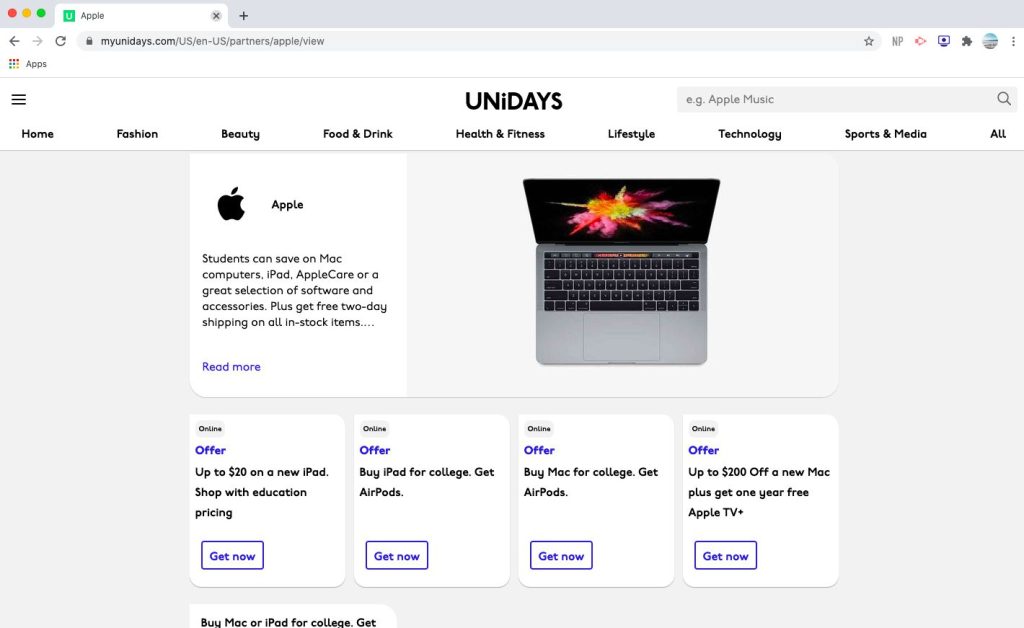
While discounts vary by product and time of year, students can typically save between 5% to 15% off retail prices on select items like MacBooks and iPads. During back-to-school or holiday seasons, Apple occasionally offers additional promotions, such as free AirPods with eligible purchases or extra discounts on accessories.

Are there any additional benefits?

In addition to the discounted prices, Apple also offers:

1. Education-exclusive payment plans: Students can access flexible financing options and extended payment plans, making it easier to budget for their purchases.

2. AppleCare+ for a reduced price: Students can purchase the extended warranty and technical support plan at a discounted rate, providing extra peace of mind for their devices.

3. Free software and apps: Many essential educational apps and software programs are available for free or at a discounted price for students and educators.

In conclusion, the Apple Education Discount is an excellent opportunity for students, parents, and educators to save money on cutting-edge technology for learning and teaching. Check your eligibility and take advantage of this valuable program today!