EdTech & Innovation

How to Find the Best Remote Teaching Jobs

In recent years, remote teaching has become an increasingly popular career choice for educators seeking flexibility and work-life balance. With the recent COVID-19 pandemic, this trend has gained even more traction as schools and institutions worldwide have turned to remote learning options. As an educator, finding the best remote teaching job can seem like a daunting task, but by following these guidelines, you can optimize your search and secure the ideal role.

1. Assess Your Skills and Preferences

Before diving into your job search, take some time to assess your skills and preferences. Identify your strengths as an educator and how they can translate into a remote teaching environment. Are you adept at creating engaging online content? Do you excel at virtual communication? Knowing your unique strengths will help guide you toward positions that best align with your skills.

2. Explore Various Platforms

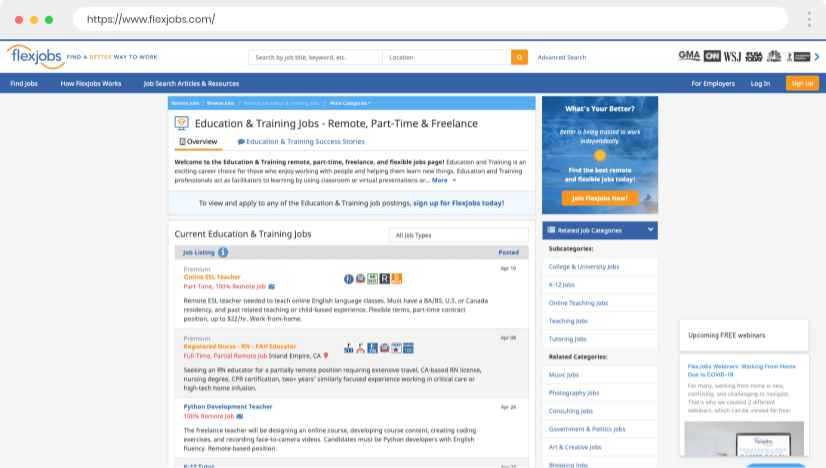
There is a myriad of platforms available that cater specifically to remote teaching jobs. Websites such as Teach Away, Teachers Pay Teachers, and K12 offer numerous opportunities for educators seeking remote positions. Additionally, generic job platforms like Indeed, LinkedIn, and Glassdoor also filter their listings based on work-from-home criteria. Start by researching these opportunities and bookmarking sites that consistently feature relevant job postings.

3. Join Networking Groups

Like any other profession, networking can be crucial in securing a remote teaching position. Join networking groups on Facebook or LinkedIn to connect with fellow educators in the field. These groups often share job postings and serve as support communities where teachers can exchange advice and best practices.

4. Customize Your Resume

Create a resume that highlights your aptitude for remote teaching by emphasizing any previous experience or relevant skills you possess within this context. Ensure you list any technological proficiencies or virtual training certifications you have obtained – these qualifications are especially attractive to employers seeking remote teachers.

5. Prepare for Virtual Interviews

Given the nature of the position, it’s likely you’ll undergo a virtual interview for a remote teaching job. Familiarize yourself with video conferencing platforms like Zoom or Skype, and practice your interview skills through mock interviews. Remember to dress professionally and ensure you have a presentable, well-lit background during the call.

6. Seek Freelance Opportunities

While not for everyone, some educators may benefit from pursuing freelance remote teaching opportunities. This route allows you to explore different institutions, subjects, or projects while maintaining greater control over your schedule and workload. Freelancing can also serve as a stepping stone to permanent remote teaching positions.

7. Stay Current with Industry Trends

Finally, keep yourself informed about the latest trends and advancements in remote education, such as new software or learning management systems. Staying up-to-date in these areas not only equips you with valuable knowledge but also instills confidence in potential employers that you are committed to providing the best possible remote learning experience for their students.

By following these tips and being proactive in your search, you’ll be well on your way to finding the perfect remote teaching job that suits your skills and preferences. Happy job hunting!


9 Ideas for Using MobyMax to Find (and Fix) Students’ Missing Skills

Introduction

MobyMax is an innovative educational technology platform that helps students master math, language, and science skills through tailored curriculum and interactive games. With the right strategies, teachers can effectively use MobyMax to identify and address gaps in students’ learning. This article discusses nine ideas for using MobyMax to find and fix missing skills in your students.

1. Diagnostics Assessments

Start with diagnostic assessments to evaluate your students’ knowledge and uncover their strengths and weaknesses. MobyMax’s diagnostic module provides personalized assessments for each student, ensuring that you have an accurate understanding of their current skill levels.

2. Individualized Learning Paths

After completing diagnostics, MobyMax creates individualized learning paths based on each student’s specific needs. This personalized approach helps students focus on improving their weak areas and maximizing their potential.

3. Progress Monitoring

Use MobyMax’s progress monitoring tools to track your students’ advancement through the curriculum. These tools allow you to monitor each student’s progress in real-time, ensuring you always have up-to-date information on their achievements.

4. Real-time Data Analysis

MobyMax offers a wealth of data analysis tools that help you identify trends within your classroom. Analyze student performance with visual reports and graphs, pinpointing any patterns or discrepancies that suggest missing skills.

5. Guided Practice

Integrate guided practice into your lesson plans to reinforce essential concepts and help students internalize new material. By making use of the platform’s varied lessons and activities, you can engage your students in active learning.

6. Collaborative Learning

Facilitate collaborative learning experiences by using MobyMax’s group activities and games. This encourages peer-to-peer support, building a sense of community within the classroom while promoting healthy competition to boost skills mastery.

7. Gamification

Tap into the power of gamification by rewarding students for their progress. MobyMax’s game-based learning encourages students to stay engaged and motivated as they achieve milestones and earn virtual rewards.

8. Parent Involvement

Use MobyMax’s parent portal to build a strong home-school connection. Share student progress reports and learning objectives with parents, keeping them informed about their child’s academic growth and areas that need improvement.

9. Ongoing Intervention

Continuously monitor your students’ achievements and adjust their learning paths as needed for ongoing skill development. Recognize when students have addressed gaps in their knowledge and recalibrate their study plan, allowing them to focus on new skills for improvement.

In Conclusion

MobyMax offers immense potential for addressing missing skills in students’ education, provided teachers employ thoughtful strategies. By implementing these nine ideas in your classroom, you can ensure that your students receive the targeted support required to bridge learning gaps, fostering a more successful academic experience.

17 Brilliant Tech Tips From the Teachers of TikTok

In recent years, TikTok has transformed from a platform primarily for dance challenges and comedy skits to an educational hub where teachers share their knowledge with the world. Among the many subjects covered, technology tips have become incredibly popular. Here, we’ll uncover 17 brilliant tech tips shared by teachers using TikTok.

1. Split-Screen Browsing

Use your computer’s split-screen functionality to display two applications side by side, making it easier to work between them.

2. Keyboard Shortcuts

Master standard keyboard shortcuts for various applications like copying (Ctrl+C), pasting (Ctrl+V), and undoing (Ctrl+Z) actions. This saves time and improves efficiency.

3. The Pomodoro Technique

Try out the Pomodoro technique, which involves setting a timer for focused work sessions followed by short breaks, increasing productivity and avoiding burnout.

4. Use Google Drive Offline

Enable offline access to your Google Drive documents in case you lose your internet connection or need to work without distractions.

5. Extend Your Desktop Background

Set your desktop background to extend across multiple monitors rather than duplicating the display, creating a seamless look and maximizing screen space.

6. Convert PDFs to Editable Documents

Upload PDFs to Google Drive and use the “Open with” feature to convert them into editable Google Docs.

7. Speed Up Video Playback

Speed up videos on YouTube or other platforms using the settings menu to save time while still comprehending content.

8. Use a VPN for Privacy

Employ a VPN while browsing online for enhanced privacy protection and encrypted browsing data.

9. Utilize Text Expanding Tools

Download text expanding tools that allow you to create shortcuts for phrases you type frequently, saving time during repetitive tasks like grading or writing emails.

10. Emergency Bypass for Important Contacts

Adjust your phone’s settings to allow emergency bypass for important contacts, ensuring their calls or messages can come through even when your device is on “Do Not Disturb.”

11. Clear Your Email Inbox

Unsubscribe from unnecessary email lists and organize your email with labels and folders to maintain a clear and efficient inbox.

12. Use Google Scholar for Research

Utilize the academic search engine Google Scholar to access scholarly articles, reports, and research papers, saving time with focused search results.

13. Locate Digital Educational Resources

Find free digital resources for teaching like Kahoot, Quizlet, and Edpuzzle to support student engagement and assessment.

14. Customize Browser Start Pages

Customize your browser start page with widgets and bookmarks to enhance productivity each time you open a new tab.

15. Enable Screen Recording on Devices

Use built-in screen recording tools on devices like smartphones, tablets, or computers to create instructional videos or tutorials.

16. Utilize Time Management Apps

Download time management apps like Todoist or Trello to help with task prioritization, reminders, and tracking progress.

17. Online Collaboration Tools

Incorporate online collaboration tools like Google Meet or Zoom for group projects and virtual team meetings that promote effective communication among students and educators.

With TikTok becoming a hub for teachers sharing valuable information, tech tips have established a strong presence on the platform. By implementing these 17 brilliant tips from TikTok educators, you can maximize your productivity both inside and outside the classroom.

The 10 Best Online Tools for Teacher Planning

In the digital age, teachers have a plethora of online tools at their disposal to help them plan lessons, manage classrooms, and engage with students. With so many options available, it can be challenging to know which ones are worth trying out. To narrow down your search, here is our list of the top 10 online tools for teacher planning:

1. Google Classroom: A popular choice for educators around the world, Google Classroom streamlines the process of assigning and collecting student work. It also offers features such as announcements, a grade book, and a calendar for easy organization.

2. Planbook: This tool allows you to create digital lesson plans that automatically sync with your calendar. The drag-and-drop interface makes it easy to schedule events, set reminders and attach resources.

3. Edmodo: A platform designed specifically for teachers, Edmodo offers many features to help manage your classroom like assignments, quizzes, and communication tools. It also allows teachers to connect with a community of fellow educators for collaboration and support.

4. ClassDojo: With ClassDojo, you can create a positive classroom culture by tracking student behavior and sharing progress with parents in real-time. Teachers can assign points or badges based on student performance or choose from a variety of pre-made templates.

5. Socrative: Engage your students with interactive quizzes or polls using Socrative. Teachers can instantly assess student understanding through various question types and receive real-time data on student performance.

6. Trello: Embrace organization with Trello’s intuitive project management tool designed for teams. Collaborate on lesson planning and tasks while clearly visualizing progress through Trello’s color-coded cards and lists.

7. Kahoot!: Bring fun into your lessons with Kahoot!’s game-based learning platform. Create quizzes or trivia games that students can access on their devices — perfect for reviewing material or introducing new concepts.

8. Evernote: Compile and organize your ideas, lesson plans, and resources with Evernote. This app helps you keep track of important notes and documents and allows for easy access across multiple devices.

9. Quizlet: Streamline your studying process with Quizlet’s digital flashcards, quizzes and learning games. Teachers can create customized study sets or choose from the vast library of pre-made content.

10. Teachertube: Much like YouTube but tailored for educators, Teachertube is a video-sharing platform that offers thousands of instructional videos covering various subjects. Teachers can use these videos to supplement their lessons or as inspiration for creating their own.

In conclusion, incorporating these online tools into your teaching routine can significantly improve your planning process and enhance student engagement in the classroom. Don’t be afraid to explore the functionalities each platform offers and find the right combination for your unique needs. Happy teaching!

We’re Loving These Activities That Teach Students Real-World Money Skills

Introduction:

As educators and parents, we strive to prepare our children for the world beyond the boundaries of our classrooms and homes. One essential area where young students often find themselves ill-equipped is real-world money skills. Financial literacy plays a crucial role in ensuring a stable and secure future for our children. Here are some engaging activities that teach students real-world money skills that we absolutely adore!

1. Playing Store:

This classic pretend play activity teaches students about various aspects of managing money. Setting up a makeshift store within the classroom or at home allows students to take on roles as shoppers and cashiers. They handle play money, participate in transactions, and learn about making change—important skills that will be valuable later in life.

2. Budgeting Activity:

Introduce students to the concept of budgeting by presenting them with fictional or real-life scenarios—be it planning a birthday party, family trip, or small school event. Students will identify what they need to purchase and formulate a budget, prioritizing expenses, while balancing needs with wants.

3. Classroom Currency:

A fun way to promote both responsibility and financial literacy is by implementing a classroom currency system. Students earn currency through good behavior, completing assignments, or participating in class activities. They can later use their earnings to purchase items from the classroom store or exchange them for special privileges.

4. Savings Goal Tracker:

Teach students the importance of saving by having them set personal savings goals for something they want to buy. Students will create trackers that visually represent their progress toward reaching their goal and update them regularly as they save up little by little.

5. Financial Board Games:

Games like Monopoly, The Game of Life, or Payday simulate real-life financial situations kids might encounter as adults. Playing such games helps provide opportunities for critical thinking and decision-making regarding financial matters in a fun yet competitive atmosphere.

6. Stock Market Simulation:

Introducing older students to the stock market through a simulated experience allows them to dip their toes into investing. They can research different companies and choose to invest fictional money while tracking their stocks’ performance. This activity emphasizes the importance of patience, diversity in investments, and understanding market trends.

Conclusion:

Financial literacy is an essential life skill that, unfortunately, isn’t always given enough attention in schools or homes. Engaging in these activities helps develop students’ real-world money skills, paving their way toward a secure financial future. By understanding concepts like budgeting, saving, and investing at a young age, our children will be better equipped to navigate their financial lives as adults—which is something we can all appreciate!

8 Private Things That Totally Aren’t Private When You’re a Teacher

Being a teacher is a rewarding and fulfilling career, but it also means that certain aspects of your life become somewhat public. While many professions face similar situations, teachers have a unique set of challenges when it comes to maintaining privacy. Here are 8 private things that totally aren’t private when you’re a teacher.

1. Personal Life: As a teacher, your students, their parents, and sometimes even fellow teachers may show interest in your personal life. Whether it’s questions about your marital status, children, or social life, teachers often find themselves in conversations where they must navigate sharing personal information carefully.

2. Social Media: Teachers need to be careful about their social media presence and what they share online. Students, parents or colleagues might come across their profiles or posts, leading to unintended consequences. For this reason, many teachers keep their social media profiles private or create separate professional accounts.

3. Emotional Reactions: Teachers are expected to be calm and composed in front of their students at all times. However, dealing with challenging classroom situations can sometimes evoke strong emotions. Unfortunately for teachers, their emotional reactions are often on display for everyone else in the room.

4. Work Schedule: A teacher’s work schedule is known by the entire school community – from the hours spent at school to after-school activities and tutoring sessions they host. Thus, finding time for personal errands or appointments during school hours is almost impossible without getting questions from colleagues or students.

5. Classroom Decorations: Even something as simple as decorating the classroom can become a public expression for teachers. Every poster or piece of artwork displayed may be seen as an extension of one’s personality or beliefs by the students and other staff members.

6. Political Beliefs: While most teachers strive to remain neutral when discussing politics in class, they might inadvertently reveal their political inclinations through lessons or class discussions. This disclosure can create a perception among students and parents about the teacher’s political beliefs.

7. Physical Appearance: Teachers must be thoughtful in their choice of attire or hair styling, as these can become talking points among students and their parents. Something as simple as changing a hairstyle or wearing an unusual accessory can unintentionally become public knowledge due to the nature of the teacher-student relationship.

8. Health Issues: Teachers who suffer from chronic health issues or have ongoing medical treatments often face challenges in maintaining privacy. From needing to take time off for appointments to discussing accommodations with colleagues, it’s difficult for teachers to keep their health issues private.

In conclusion, being a teacher means that certain aspects of one’s personal life may not be as private as one would wish. While this can be challenging, it is essential for teachers to navigate these situations with professionalism and thoughtfulness, all while continuing to provide the best education for their students.

How Teachers Can Plan & Use Virtual “Stations” Online

The digital age has brought forth several advancements in the realm of education, one of which is virtual learning. As teachers search for innovative ways to engage their students and provide meaningful learning experiences, they can turn to the concept of virtual “stations.” These online spaces create opportunities for students to explore different aspects of a topic, work collaboratively, and develop vital skills.

Planning Virtual Stations

1. Set clear learning objectives: Begin by identifying the goals of your virtual station activities. Determine what knowledge and skills you want your students to gain from these stations and select relevant content accordingly.

2. Distinguish essential resources: Select the materials needed for each station. This may include videos, articles, images, or interactive simulations. Ensure that all resources are accessible online and age-appropriate for your students.

3. Organize stations with various formats: To maintain student interest and cater to diverse learning styles, incorporate a mix of activity types in your virtual stations. These may include discussion threads, quizzes, project-based tasks, or creative art assignments.

4. Determine student groupings: Decide whether you want students to work individually, in pairs, or in small groups. Be mindful of students’ diverse abilities when grouping them together.

5. Prepare instructions and rubrics: Develop clear instructions for each station along with any necessary rubrics or evaluation criteria. This will help guide students during their activities and allow them to understand what is expected of them.

Using Virtual Stations

1. Introduce the concept: Before diving into the virtual stations, introduce the idea to your students by explaining how they work and discussing their benefits.

2. Model navigation & expectations: Demonstrate how students should navigate through the stations and review any behavioral expectations so they can focus on learning rather than addressing technical difficulties.

3. Offer choice & flexibility: To accommodate learners’ unique needs and interests, offer options within each virtual station. For example, provide a choice of topics, resources, or activity formats.

4. Monitor progress and offer support: While students navigate the virtual stations, monitor their progress, provide feedback, and offer assistance as needed. Keep track of participation and evaluate student engagement to ensure all are actively involved in the learning process.

5. Reflect on the experience: After completing the virtual stations session, encourage students to reflect on what they learned, challenges they encountered, and any suggestions for improvement.

In conclusion, virtual stations are a valuable tool that teachers can incorporate into their online classroom as they continue to adapt to the ever-evolving world of remote learning. By planning and using these interactive spaces strategically, educators can foster an engaging learning environment while empowering their students with the necessary skills for success in today’s digital age.

What is the Zone of Proximal Development? A Guide for Educators

Introduction:

The concept of the Zone of Proximal Development (ZPD) is one that has significantly impacted the field of education. First introduced by psychologist Lev Vygotsky, ZPD has gradually made its way into the educational establishment being adopted by teachers and curriculum developers alike. This article will delve into the fundamentals of this transformative concept, exploring its implications, and offering guidance to educators on incorporating ZPD principles in their teaching methods.

What is the Zone of Proximal Development?

The Zone of Proximal Development is a psychological concept that represents the range of skills and abilities that a learner is capable of mastering with the appropriate guidance and support from a more experienced or knowledgeable person. The idea behind ZPD is that an individual’s cognitive development is fostered when they are challenged just beyond their current capabilities but not to a point that they become overwhelmed or discouraged.

The ZPD consists of three primary zones:

1. The actual developmental level: This encompasses abilities and skills a learner has already acquired and can perform independently.

2. The potential developmental level: This includes skills a learner can develop with some support or guidance from more knowledgeable individuals.

3. The level of tasks or concepts: That lies beyond the reach of a learner, even with help.

The Importance of Scaffolding

Scaffolding, closely connected to the concept of ZPD, refers to an instructional method where support is provided during the learning process in order to help learners bridge the gap between their current and potential development levels. This guidance can be in various forms, including asking thought-provoking questions, providing step-by-step instruction, giving hints or cues, or assisting with specific portions of a task.

As learners work through problems within their ZPD under guided instruction, they gradually gain proficiency with new skills, and the scaffolding can be slowly removed until the learner becomes self-sufficient. This process of support and eventual independence fosters individual growth and confidence in learners, ultimately helping them advance to higher levels of cognitive development.

Implementing the Zone of Proximal Development in the Classroom

Here are some strategies for educators to incorporate ZPD in their classrooms:

1. Assess student capabilities: Understand the current developmental level of each student. This knowledge will help in planning activities that target their ZPD and ensure that they are receiving challenges appropriate for their growth.

2. Differentiated instruction: Use differentiated instruction to meet the diverse needs of individual students. Tailor lesson plans, materials, and activities to target various learning abilities present within the class.

3. Collaborative learning: Encourage group work and collaborative learning experiences, as they provide opportunities for learners to learn from each other and aid one another. Group interactions can foster a supportive environment beneficial for those working within their ZPD.

4. Gradual release of responsibility: Implement instructional methods that offer guidance initially but slowly transition responsibility onto students as they develop competence in a specific skill or concept.

5. Monitor progress: Continuously assess both formal and informal student assessment data to monitor progress within their ZPD areas. Provide feedback and make adjustments as needed.

Conclusion

Incorporating the Zone of Proximal Development into teaching practices stimulates mental functioning on optimal levels, fostering learner exploration, collaboration, and problem solving. By understanding students’ existing capabilities, providing ample challenges, and offering appropriate guidance through scaffolding techniques, educators can ensure that they are maximizing student potential and paving the way for lifelong learning success.

Introducing Our Grade-Level and Subject Area Teacher Team!

As the new academic year approaches, we are thrilled to introduce our dedicated and passionate grade-level and subject area teacher team! Our educators have been carefully selected for their expertise, creativity, and commitment to providing a dynamic learning environment for all students. They bring rich experience, diverse skillsets, and innovative teaching techniques to the classroom. Read on to learn more about these talented individuals who share a common mission – molding the leaders of tomorrow!

**Grade-Level Teams:**

*Kindergarten:*

– Ms. Johnson: With a warm heart and an infectious smile, Ms. Johnson is known for creating a nurturing and inclusive atmosphere in her classroom. Her engaging lessons ensure that every young learner feels welcome and excited on their first steps towards academic success.

– Mr. Williams: As an educator with over ten years of experience in early childhood education, Mr. Williams has an innate ability to build strong relationships with his students while fostering their curiosity in learning.

*Elementary School:*

– Mrs. Rodriguez (1st Grade): A seasoned teaching professional, Mrs. Rodriguez is committed to developing well-rounded students by incorporating project-based learning and collaboration in her curriculum.

– Mr. Smith (2nd Grade): As an advocate for hands-on educational experiences, Mr. Smith creates lessons that keep second-graders deeply immersed in the world around them.

*Middle School:*

– Ms. Patel (6th Grade): With her can-do attitude and dedication to academic excellence, Ms. Patel guides sixth graders through the challenges of transitioning into middle school life with ease.

– Mr. Kim (7th Grade): A creative problem-solver at heart, Mr. Kim instills confidence in his students with lessons that incorporate real-world scenarios so they can develop critical thinking skills.

*High School:*

– Mrs. Mayor (9th Grade): As a veteran high school teacher, Mrs. Mayor is a mentor to freshmen, helping them navigate the hurdles of high school while preparing them for future success.

– Dr. Hill (12th Grade): As a dedicated educator who prides himself on preparing students for post-secondary education, Dr. Hill’s guidance ensures that all seniors are ready to face the world beyond high school.

**Subject Area Teams:**

*Mathematics:*

– Ms. Brown: An experienced mathematician, Ms. Brown is dedicated to breaking down complex concepts into easily digestible lessons, ensuring her students not only understand but also enjoy math.

*Science:*

– Dr. Baxter: With an impressive background in chemistry, Dr. Baxter’s hands-on experiments keep her science classes full of energy, wonder, and discovery.

*English:*

– Ms. Nguyen: Through her love of literature and creative writing, Ms. Nguyen empowers students to find their literary voices and strengthen their self-expression skills.

*History:*

– Mrs. Turner: With a contagious passion for the past, Mrs. Turner brings history to life in her classroom, sparking an enthusiasm for learning about cultures and events from around the world.

*Physical Education:*

– Coach Carter: A former professional athlete turned teacher, Coach Carter inspires students to strive for physical wellness while developing teamwork and self-discipline.

We are thrilled to have these exceptional educators joining our team! We firmly believe that under their guidance, our students will thrive academically and personally this school year and beyond. Here’s to a successful year ahead for our entire educational community!

12 Clever Ways to Solve the Case of the Disappearing Pencils

Introduction:

In this modern world, even with technology at every turn, pencils remain an essential item for jotting down ideas, making quick sketches, or simply doodling through a boring meeting. But as every pencil enthusiast knows, they have an uncanny ability to disappear into thin air. Fear not! With these 12 clever solutions, you’ll be able to solve the case of the disappearing pencils once and for all.

1. Designate a Pencil Zone

Create a designated space in your work area specifically for pencils. This could be a cup or a pencil holder on your desk, making it easier to keep track of pencils and ensure they don’t get lost among the clutter.

2. Color Code Your Pencils

Make each pencil unique with some customization! Wrap colored tape around the end or attach colorful eraser caps that will make them stand out and easier to find.

3. Keep Inventory

Make a list of how many pencils you own and regularly check to ensure none have gone missing.

4. Attach Magnets

Glue small magnets to your pencils and stick them to any magnetic surface such as a whiteboard or fridge.

5. Implement a “Sign Out” System

If you share your office space with others, set up a sign-out system for borrowing pencils similar to library books. This way you can see who last used a pencil and prevent any unnecessary losses.

6. Use Pencil Leashes

Fashion pencil leashes from strings or chains that attach to your clothing or workspace so they will always stay nearby and won’t wander off.

7. Create a DIY Pencil Case

Design your own stylish pencil case that securely stores all your writing tools. Choose materials like fabric, cardboard or PVC pipes to create the perfect custom case.

8. Use Transparent Containers

Switch out opaque pencil holders for transparent ones. This makes it easier to see when your pencils are running low, and you’ll have no trouble spotting any missing ones.

9. Label Your Pencils

Take a page out of school library books and label your pencils with your name or a distinctive symbol. This helps prevent accidental theft and lets others know who the pencil belongs to.

10. Use Pencil Grips

Pencil grips not only make writing more comfortable but also add extra bulk that could make it harder for your pencils to vanish into thin air.

11. Make a Pencil Unity Log

If you find that you’re using far more pencils than expected, keep a log of when you use them, how long they last, and why they needed replacing. This can help you pinpoint problems and adapt your habits accordingly.

12. Create Pencil Art

Transform your lost-pencil frustrations into creativity by creating eye-catching pencil art installations in your workspace. The more creative and unusual the artwork, the less likely you are to lose those precious pencils.

Conclusion:

With these 12 clever strategies, no longer will you have to worry about your pencils disappearing when you need them most. Preserve your sanity (and quite possibly save a small fortune) by putting each tip into practice so you can focus on what really matters: making the most of every pencil stroke.