EdTech & Innovation

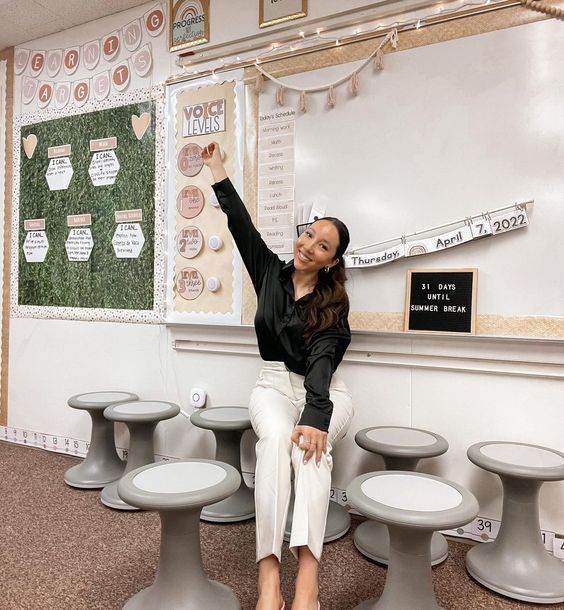
Revolutionizing the Classroom: This Teacher Swapped Her Regular Chairs for Flexible Seating

Introduction:

A bold move in educational spaces has been gaining momentum in recent years, as educators seek ways to enhance student learning experiences. One teacher has stepped up to champion this movement, swapping her regular classroom chairs for flexible seating options. This radical shift has not only created a more inviting atmosphere but also boosted engagement and collaboration among students.

The Inspiration Behind the Change:

Jane Smith, an elementary school teacher from Denver, Colorado, decided to switch things up in her classroom after attending a conference on innovative teaching practices. There, she learned about the benefits of using flexible seating arrangements in classrooms to create a more dynamic learning environment that caters to various learning styles and personal preferences.

An Array of Choices:

After doing extensive research and gathering resources such as bean bags, stability balls, rocking chairs, sofas, and low tables with cushions on the floor, Jane’s vision of a modern classroom came to life. The idea behind providing an array of seating options was to allow students to choose where they felt most comfortable, ultimately fostering a sense of ownership and autonomy over their learning experiences.

The Impact on Students:

Once Jane made the change, it was not long before she noticed significant improvements in both individual and group performance. Students who previously struggled with concentration found that selecting their preferred seating option directly impacted their focus as they became more comfortable in their adjustable surroundings.

Group work and collaboration also received an immense boost as students could easily rearrange themselves into different configurations depending on the activity or discussion. Gone were the days of stiff rows of desks making it difficult for students to move around or engage with each other.

Adjusting to Challenges:

While the transformation was overwhelmingly successful, there were some initial challenges as students adjusted to this new environment. Some required reinforcement on noise levels and appropriate behavior when using novel seating options like sofas or rocking chairs.

By setting clear ground rules and consistently enforcing appropriate behavior, Jane found that her students quickly adapted to their new environment, and the overall atmosphere remained conducive to learning.

The Bigger Picture:

The impact of Jane’s decision to swap regular chairs for flexible seating options reaches beyond her classroom. With more schools and teachers embracing innovative teaching practices, flexible seating has become a symbol of educational progress and is starting to challenge the traditional model of classroom design.

Conclusion:

Jane’s simple yet profound decision to change her students’ seating options has revolutionized the way in which her class learns and interacts. This inspiring story highlights the possibility of reimagining learning spaces to support different learning styles, improve student engagement, and boost collaboration in classrooms everywhere.

How One School Garden Transformed a Neighborhood

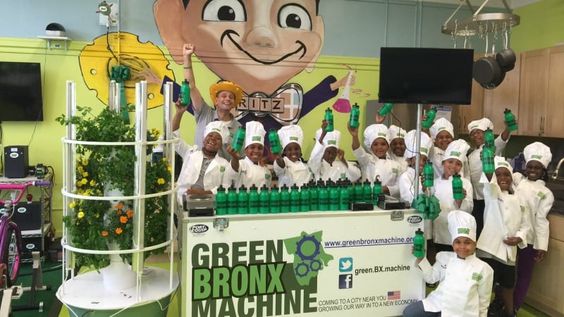
In a small, bustling neighborhood, there once was a school that stood as a beacon of hope and learning. But for all its educational virtues, the school grounds were lacking one crucial element: green space. A group of committed teachers, parents, and community members came together to change that – and in the process, they transformed not just the school, but the entire neighborhood.

The idea for the school garden started as a simple wish from a dedicated teacher who wanted to teach her students about nature, sustainable living, and healthy eating. She knew that access to green space was vital for children’s physical and mental development. When she shared her vision with fellow educators, parents, and community members, the idea quickly took root.

Together, they devised a plan to create an organic garden on the unused land of the school grounds. They sought out funding from local businesses and community organizations to help bring their vision to life. Through tireless effort and determination, they created a beautiful oasis where once there was nothing but barren soil.

The garden consisted of raised beds filled with an array of fruits, vegetables, and herbs. As the plants began to grow, so did their reach into the surrounding community. The school opened its doors to neighbors who wanted to learn how to maintain their gardens or grow their own food. Local workshops were organized on gardening techniques and composting methods.

Students at the school were given opportunities to tend the garden throughout the year, learning valuable lessons in responsibility, teamwork, and environmental stewardship. Nutrition classes were conducted on-site using produce harvested directly from the garden – cultivating healthy eating habits from an early age.

As word of this epic transformation spread throughout the area, other schools became inspired to start similar initiatives. A movement was born – leading to more gardens sprouting up in schools all around the city.

More importantly, however, was the impact felt directly within this tight-knit neighborhood. The garden became a communal space that brought people together. Neighbors who had never interacted with one another began to chat over tomato plants and swap recipes while tending their plots. Friendships blossomed between the young and old, forging bonds across generations.

Local businesses also flourished as families gathered at cafes and shops after garden workdays. Property values increased as homes in the neighborhood were beautified – their yards now lush with colorful plants and flowers inspired by the school’s success.

From one simple idea, the entire neighborhood was galvanized into creating something truly magical—a testament to the transformative power of community collaboration, commitment, and a shared desire to make a positive change.

When we look at this story, we see that it is not just about how one school garden transformed a neighborhood; it is about how an idea can create a ripple effect across an entire community. The shared passion for nurturing children, for environmental stewardship, and for strengthening bonds within families and neighbors is truly inspiring – demonstrating that with hard work, dedication, and heart, we can all be catalysts of meaningful change.

4 Teachable Moments from Middle and High School Graduation Speeches

Graduation speeches are much more than an opportunity to celebrate milestones and achievements. At their core, they often serve as insightful moments of life advice that inspire and motivate students for their future. While these speeches differ in content, certain valuable lessons stand out. Let’s explore four teachable moments from middle and high school graduation speeches.

1. The Power of Perseverance

Time and time again, speakers stress the importance of perseverance in achieving personal goals. This fundamental life lesson encourages students to keep going, even when faced with failure or a challenging situation. Many graduation speeches remind graduates that success is often built on overcoming obstacles. Perseverance stands out as an essential quality for facing the challenges of both higher education and the real world beyond school walls.

2. Embrace Change

Graduation serves as a significant transitional moment for students, making it the perfect time to acknowledge and accept change in their lives. Change can be both exciting and daunting, but the key to embracing it is adaptability and maintaining a positive outlook. Speakers often address how important it is for graduates to understand that change is constant throughout life, making flexibility an invaluable attribute.

3. Pursue Passion

Another common theme in graduations speeches is the encouragement to follow one’s passion. A successful career or life journey should not merely be based on financial stability or social status but also involve pursuing personal aspirations. When students are motivated by genuine interest in their chosen fields, they become more dedicated, persistent, and satisfied in their professional lives.

4. Importance of Community

Finally, a noteworthy teachable moment from high school graduation speeches revolves around the significance of community involvement and interpersonal relationships. Graduates often hear about how essential it is to stay engaged within their local community – be it through volunteering or pursuits that improve society’s overall well-being. Furthermore, speakers emphasize the importance of nurturing positive relationships and surrounding oneself with supportive individuals who challenge and inspire personal growth.

In conclusion, these four teachable moments from middle and high school graduation speeches serve as essential life lessons that transcend the boundaries of academics. Perseverance, adaptability, passionate pursuit of personal interests, and a strong community presence can guide graduates as they embark on their next chapter. These invaluable insights are not only relevant but can serve as guiding principles throughout students’ lives.

This New Smartpen Is All You Need to Make Flipped Classroom Videos

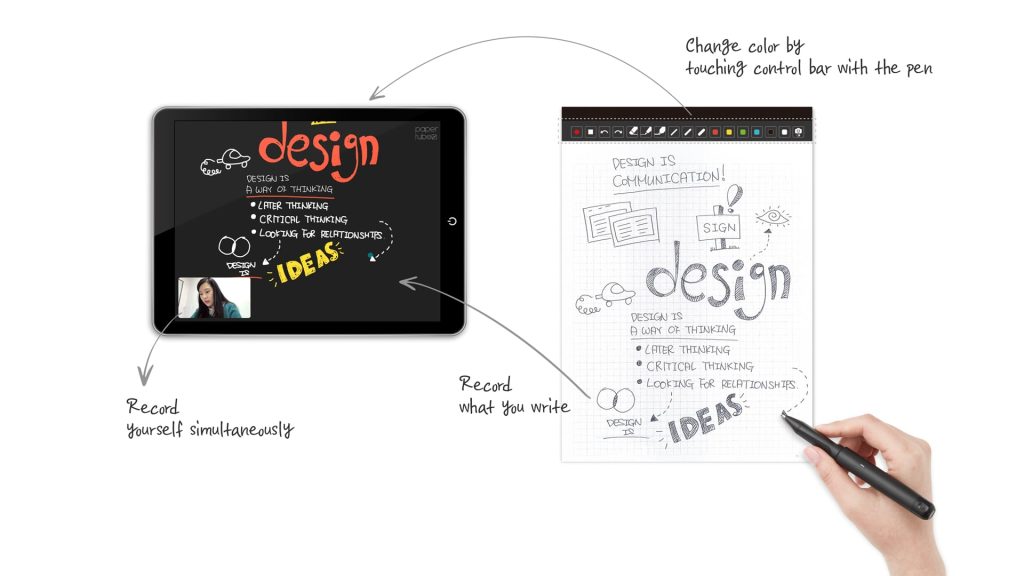
In today’s increasingly digital world, educators are always on the lookout for new and innovative ways to engage their students and improve the learning experience. One such innovation that has been gaining momentum in recent years is the flipped classroom model. This approach involves students watching lectures or instructional videos outside of class, freeing up valuable class time for more interactive, hands-on activities. To create these flipped classroom videos, teachers need the right tools at their disposal, and one such tool that’s making waves in the education sphere is this new smartpen.

The smartpen, designed with educators in mind, is a cutting-edge digital pen that takes traditional note-taking and doodling to a whole new level. Equipped with numerous features aimed at simplifying video production, this game-changing device eliminates hassle and technicalities tied to creating content for your flipped classroom.

Key Features of the Smartpen

1. Seamless connectivity: The smartpen pairs effortlessly with your smartphone, tablet, or computer via Bluetooth. This allows you to easily transmit your notes and illustrations directly onto your device’s screen in real-time, making it easier than ever to record lectures and instructional videos.

2. High-quality audio: In addition to its advanced visual capabilities, the smartpen boasts an integrated high-quality microphone designed to capture crisp, clear audio during video recordings – an essential element of any effective flipped classroom video.

3. User-friendly software: The accompanying software is specifically engineered to make video creation quick and easy for educators. With an intuitive interface that’s straightforward even for people with little tech experience, instructors can create engaging videos in a matter of minutes.

4. Easy sharing and integration: Once you’ve created your video with the smartpen, sharing the content is a breeze thanks to built-in support for various platforms such as YouTube and Google Drive. Additionally, many popular Learning Management Systems (LMS) seamlessly integrate with the smartpen software.

5. Multi-device compatibility: The smartpen’s compatibility spans various devices and operating systems, including Windows, macOS, Android, and iOS. This ensures that educators can create their flipped classroom videos with no concern about compatibility issues limiting their reach.

With these state-of-the-art features at your disposal, this new smartpen genuinely simplifies the process of creating compelling and informative flipped classroom videos. By allowing for quick and efficient creation of lectures and instructional content in visual writing format, educators can now spend more time engaging their students in active learning rather than tackling technical difficulties. As a result, education becomes more accessible to learners of all abilities, ensuring that every student has the best possible opportunity to succeed in today’s interconnected world.

9 Ways Classroom Photos Can Create Student Connection

Introduction:

Creating a sense of belonging and connection in the classroom is essential for student success. One simple, yet powerful way to foster a positive atmosphere and build relationships among students is through classroom photos. In this article, we will explore nine ways classroom photos can create stronger connections between students.

1. Memory Wall:

Create a memory wall in your classroom filled with pictures of shared experiences as a class. This could include outings or special events, as well as everyday moments. The visual reminder of fun times and teamwork will help students feel more connected to their peers.

2. Student Spotlight:

Showcase individual students by displaying their portraits alongside their work, interests, and accomplishments. This recognition not only makes them feel valued but also encourages other students to learn more about each other.

3. Group Projects Display:

Take photos of students working in groups on projects or activities, and display these images around the room. This not only encourages collaboration but also helps visualize the importance of teamwork in your class culture.

4. Cultural Celebrations Display:

Encourage students to bring in photos from their personal cultural celebrations, such as holidays or family events. By displaying these images in the classroom, you can create a richer understanding and appreciation for different cultures within your student community.

5. Class Family Tree:

Construct a class family tree by having each student contribute a photo of themselves and accompanying written description. As the tree takes shape, it will symbolize the unity and connection within the class.

6. Student Birthdays Celebrations:

Celebrate each student’s birthday by taking a group photo with birthday-themed props or accessories. This reinforces that each individual is important within the classroom community and fosters camaraderie among classmates.

7. Classroom Pets/Plant Adoption:

Assign class pets or plants to small groups or partners who are responsible for taking care of them together as part of their daily routine. Capture this collaboration through photos to promote teamwork and responsibility.

8. Before-and-After Progress Photos:

Capture student growth through before-and-after photos of completed projects, papers, or assignments. By visually representing progress, students can celebrate their achievements and feel closer to their classmates who have shared the same journey.

9. Volunteer Work/Community Activities:

Organize volunteer activities or community events as a class and take group photos during these experiences. Documenting these shared activities creates a sense of unity, as students learn to collaborate on meaningful projects outside the classroom.

Conclusion:

Classroom photos have the power to create a strong sense of connection among students, foster empathy, reinforce teamwork, and celebrate individual success. As you implement these nine strategies, watch your classroom transform into a cohesive community where every student feels supported and valued.

12 of the Best Free Grade Calculators for Teachers

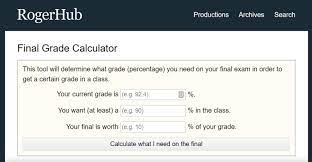
As a teacher, keeping track of your students’ grades and monitoring their progress can be a challenging task. Thankfully, there are numerous free grade calculators available online to help you quickly and efficiently calculate your students’ marks. In this article, we will highlight 12 of the best free grade calculators for teachers.

1. QuickGrade (https://quickgrade.herokuapp.com/)

QuickGrade is a user-friendly online tool that allows you to enter the total points possible and the points earned by a student, instantly providing the percentage grade.

2. TeacherVision (https://www.teachervision.com/grading-percentage-chart)

TeacherVision offers a simple grading percentage chart that allows teachers to calculate students’ grades based on the number of correct answers.

3. GradeCam (https://gradecam.com/)

GradeCam provides educators with a tool for quick grading using scan sheets and a webcam. The basic plan is free and offers instant scoring, analytics, and more.

4. A+ Grading Calculator (https://www.apluseducation.org/calculator)

A+ Grading Calculator helps you quickly determine the final letter grade for assignments or exams based on customizable grading scales.

5. CalculateStuff.com (https://www.calculatestuff.com/education/grade-calculator)

CalculateStuff.com offers a simple grade calculator that enables you to convert percentages into letter grades, making it easy to report final scores to your students.

6. Grade Calculator by Omni (https://www.omnicalculator.com/everyday-life/grade)

Omni’s Grade Calculator provides an easy-to-use interface that allows you to customize grading scales, as well as compute weighted average grades for courses.

7. Khan Academy Points Distribution Tool (https://www.khanacademy.org/coach/tools)

Khan Academy’s Points Distribution Tool assists teachers in distributing points evenly among multiple questions or assignments, ensuring fair and consistent grading.

8. EasyPercentageCalculator.com (https://www.easypercentagecalculator.com/)

This straightforward percentage calculator helps you determine the percentage for any number of points earned out of a total possible score.

9. GradeCalculate.com (https://gradecalculate.com/)

GradeCalculate.com offers a free online gradebook for teachers to track and manage students’ grades, calculate weighted averages, and generate reports for easy evaluation.

10. RAPIDTABLES Grade Calculator (https://www.rapidtables.com/calc/grade/grade-calculator.html)

RAPIDTABLES features an elementary grade calculator that factors in both total points possible and points earned by students, displaying results as percentages, letter grades, or GPA scores.

11. Good Calculators (https://goodcalculators.com/weighted-grade-calculator/)

Good Calculators provides a weighted grade calculator that computes average grades based on the assigned weight of each assignment or test in your class.

12. FreeTestPrep (https://www.freetestprep.com/)

FreeTestPrep offers an easy-to-use percentage calculator that helps determine students’ grades by inputting their scored points and total points possible.

These 12 free grade calculators for teachers are valuable tools that simplify the grading process, making it easier for educators to assess student performance accurately and efficiently. By utilizing these resources, you can save valuable time and focus on providing quality education for your students.

7 Ways To Help Students Stay Focused While Using Technology

In today’s increasingly digital world, technology plays a significant role in education. With devices such as laptops, smartphones, and tablets becoming common in the classroom, it’s crucial for students to learn how to stay focused while utilizing these tools. Here are seven ways to help students maintain concentration while using technology.

1. Establish Clear Rules and Guidelines

Set clear expectations for responsible technology use in the classroom. Outline when and how devices should be used, and make sure students understand the consequences of not following these guidelines. By establishing boundaries, you help create a structured environment that fosters focus and minimizes distractions.

2. Prioritize Essential Tasks

Encourage students to focus on essential tasks before they engage in leisure activities on their devices. Remind them to complete work-related tasks before starting non-academic pursuits such as browsing social media or playing games.

3. Use Time Management Tools

Many digital devices come with time management tools that can help students set daily goals and track their progress throughout the day. With parents’ or teachers’ guidance, students can use these tools to block certain websites, allocate specific time slots for individual tasks, or set goals for their daily screen-time usage.

4. Encourage Breaks Between Screen-Time Sessions

Advise students to take regular breaks when using technology for an extended period. Encourage them to engage in physical activities, or simply rest their eyes by looking away from screens during these breaks. This can enhance focus and reduce the chances of cognitive fatigue.

5. Foster a Supportive Learning Environment

Cultivate a learning space where educators, parents, and peers encourage one another in responsible device use. For example, teachers can collaborate with parents to monitor their children’s online activities at home and reward them for positive digital behavior.

6. Utilize Educational Apps

Incorporate educational apps into your curriculum that promote active learning through games and interactive modules. This can help students stay engaged and interested in their coursework and prevent undue distractions.

7. Teach Digital Citizenship

By fostering a strong understanding of digital citizenship, students learn the importance of responsible online behavior and the value of protecting their personal information. This encompasses online safety, etiquette, and critical thinking skills that empower them to make informed decisions while using technology.

In conclusion, incorporating technology into education has become commonplace, but it’s crucial for students to remain focused and avoid being consumed by distractions. By applying these seven strategies, teachers and parents can encourage responsible device usage while fostering a positive learning environment.

How I Use Google Forms for Formative Feedback

Introduction

As both an educator and a lifelong learner, I have always been fascinated by the potential of technology to enhance the learning process. One product that has consistently stood out to me in this regard is Google Forms. At its core, Google Forms is a simple and intuitive tool for creating customizable surveys, quizzes, and questionnaires. However, in my experience as a teacher, I have found it to be an invaluable resource for formative feedback—a key means of improving student learning.

Why Formative Feedback Matters

Formative feedback plays a critical role in helping students understand their strengths and areas of improvement while providing targeted opportunities for growth. By incorporating their understanding of the material into lessons and homework assignments, students can take active steps toward mastering both the content and skills needed for future success.

Using Google Forms for Formative Feedback

So how do I use Google Forms to provide formative feedback to my students? Here are some practical strategies that have proven effective in my classroom:

1. Pre-Assessment Surveys: Before starting a new unit or topic, I create a simple Google Form with questions related to the material we will be covering. This allows me to gauge students’ prior knowledge and make adjustments to my lesson plan accordingly.

2. Exit Tickets: After each class session, I ask students to complete a brief exit ticket via Google Forms. This usually consists of one or two open-ended questions asking them to reflect on the content discussed during class or a specific concept they find confusing. These responses help me identify common misconceptions or areas where additional reinforcement might be needed.

3. Online Quizzes: While traditional paper-and-pencil quizzes can be effective assessment tools, online quizzes created with Google Forms offer several advantages. For one, they enable instant feedback, allowing students to recognize their mistakes immediately and adjust their thinking accordingly. Additionally, teachers can easily track student progress using the platform’s data analysis features.

4. Peer Review: Encourage students to review and provide feedback on each other’s work using Google Forms. This can be particularly useful for group projects, presentations, or essay drafting. By structuring the form so that respondents must provide specific examples of both positive and constructive feedback, students can gain a more objective perspective on their work while practicing critical evaluation skills.

5. Teacher-Student Conferences: I use Google Forms to collect feedback from my students before holding one-on-one conferences, giving me a clear picture of their progress and areas where they might need additional support. Not only does this streamline the process, but it also helps foster open and honest communication about each student’s learning journey.

Conclusion

Google Forms has become an indispensable tool in my approach to teaching and formative assessment. By offering targeted, real-time feedback to my students through various methods such as pre-assessment surveys, exit tickets, online quizzes, peer review, and teacher-student conferences, I have witnessed marked improvements in both student engagement and academic achievement. While technology itself may not be the ultimate solution to all educational challenges, tools like Google Forms can undoubtedly play a significant role in fostering meaningful growth for learners at all stages of their education.

Here’s What Happened When We Created “Active Learning Classrooms” at Our School

Introduction:

In recent years, there has been a growing interest in innovative teaching methods that aim to improve student engagement and academic success. One of these techniques is the Active Learning Classroom (ALC), a model designed to promote collaboration, problem-solving, and critical thinking. In this article, we will share the experiences of our school when we created ALCs and the transformation it brought about in our teaching and student learning.

Implementing the Active Learning Classrooms:

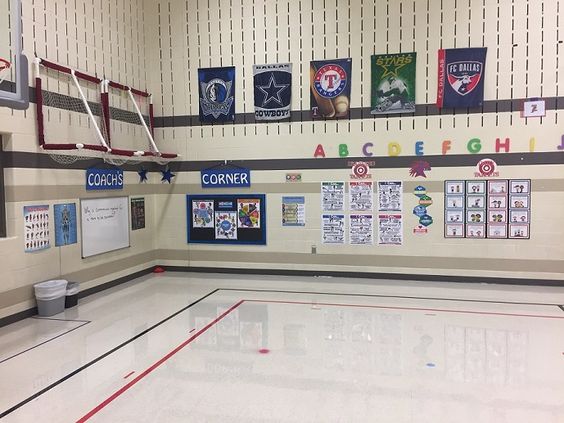
The initial steps in implementing active learning classrooms included identifying suitable spaces within the school, investing in flexible furniture, and installing technology designed to facilitate collaboration. Teachers were trained on how to use the available tools effectively and restructured their lesson plans to incorporate active learning strategies.

Key Features of Active Learning Classrooms:

1. Flexible Layout: ALCs are characterized by movable furniture that can be rearranged easily to create a variety of seating arrangements. This flexibility allows teachers to customize the layout based on different learning activities.

2. Technology Integration: ALCs feature technological tools such as interactive whiteboards, document cameras, and display screens that foster engagement and real-time feedback.

3. Collaborative Focus: Instead of traditional teacher-centered instruction, ALCs place emphasis on student collaboration, which empowers learners to take ownership of their education.

Outcomes Observed:

After implementing active learning classrooms in our school, we observed several positive outcomes:

– Increased Student Engagement: The social nature of ALCs encouraged students to take an active role in discussions and problem-solving tasks.

– Development of Collaboration Skills: Students were able to develop their communication and teamwork abilities by working with their peers.

– Improved Critical Thinking Skills: The shift from passive listening to active participation pushed students to sharpen their analytical skills as they grappled with complex topics.

– Enhanced Teaching Practices: With the option to utilize various teaching strategies, educators were able to cater to a wide range of learning styles.

Challenges Faced:

Despite the notable benefits, introducing active learning classrooms was not without challenges. For instance, initial resistance from teachers and students required time and training to overcome. Additionally, maintaining the level of technology provided proved costly. However, the positive outcomes outweighed these challenges, making the investment in ALCs worth it.

Conclusion:

Creating active learning classrooms in our school has proven to be a transformative experience. These learning environments have fostered collaboration, critical thinking, and increased engagement among our students. While there are undoubtedly challenges associated with implementing innovative teaching practices such as ALCs, we believe that our extensive planning and commitment to nurturing 21st-century learners will continue to have lasting positive effects on our school community.

Graphic Organizers 101: Why and How To Use Them

Introduction:

Visual learning has gained significant attention over the past few years, especially in the education sector. One such visual learning tool is a “graphic organizer.” This article will explore what graphic organizers are, why they are an essential learning tool, and how to use them effectively.

What are Graphic Organizers?

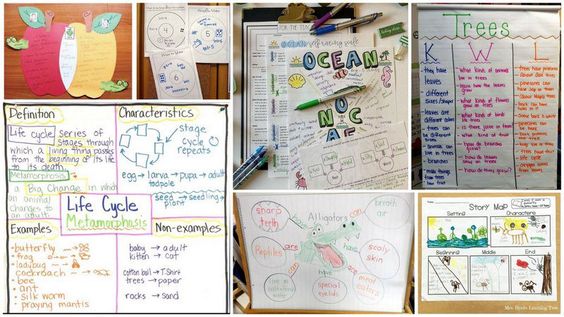
Simply put, graphic organizers are visual aids that help learners organize and present information visibly. They make use of diagrams, charts, mind maps, or other graphical elements to represent concepts and ideas in a structured manner. By doing so, graphic organizers enable learners to gain a deeper understanding of the subject matter by uncovering connections and relationships between various pieces of information.

Why Use Graphic Organizers?

1. Enhance Understanding: The human brain can process visual content more efficiently than textual data. Graphic organizers capitalize on this by visually representing complex ideas or concepts that might be difficult to understand through text alone.

2. Foster Critical Thinking: By breaking down complex ideas into smaller components, graphic organizers encourage learners to analyze each aspect individually and identify connections between them.

3. Improve Memory Retention: Studies show that information presented visually is retained better than verbal-only material. Thus, using graphic organizers can significantly improve memory retention and recall.

4. Aid in Organization and Planning: Graphic organizers offer an excellent way for students to structure their thoughts and ideas as they plan out essays, projects, or presentations.

5. Facilitate Differentiated Instruction: Since students learn at different paces and with varied styles, graphic organizers serve as a versatile learning tool that can be adapted to suit individual needs.

How To Use Graphic Organizers:

1. Choose the Right Organizer: Begin by selecting a graphic organizer suitable for your specific learning objectives. Some common types include Venn diagrams for comparing/contrasting ideas, timelines for chronological events, or flowcharts for processes.

2. Gather Your Material: Collect the necessary information related to your topic. This might include relevant facts, figures, quotes, or other critical pieces of data.

3. Break Down the Information: Analyze the gathered material and divide it into smaller components or subtopics. These will correspond to individual sections or elements of your graphic organizer.

4. Organize and Represent: Start building your graphic organizer by placing key ideas within their designated sections or boxes. Next, create connections and relationships using arrows, lines, or other visual aids.

5. Simplify and Refine: Finally, review your graphic organizer and simplify or refine the content wherever possible. Ensure that your final result is visually appealing and easy to read.

Conclusion:

Graphic organizers are a powerful tool that can enhance both teaching and learning. By incorporating these aids into classrooms, students can efficiently process information, improve critical thinking skills, memory retention, organizational skills, and cater to different learning styles. Start harnessing the power of these versatile tools today, and witness the positive impact they can have on your educational journey.