EdTech & Innovation

Make Your Own Document Camera (Plus 10 Other Online Teaching Hacks!)

Introduction:

The shift to online teaching has presented numerous challenges for both teachers and students alike. However, it has also opened the door for creative and innovative solutions to make distance learning more engaging and effective. From making your own document camera to other handy hacks, this article will introduce you to 11 online teaching tips that could revolutionize the way you conduct your virtual classes.

1. DIY Document Camera:

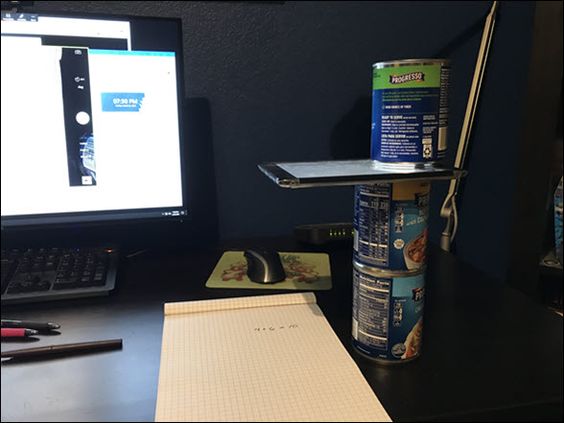
By using a smartphone or tablet with a decent camera, you can create your own makeshift document camera. Simply position your device above a flat surface in a way that its camera can capture whatever is placed below it. You can then mirror or share your screen in your video conferencing software to display live handwriting, drawing, or demonstrations.

2. Virtual Backgrounds:

Customize your online classroom with virtual backgrounds. Many video conferencing platforms offer this feature, allowing you to change the background image during video calls for a more immersive and professional experience.

3. Interactive Teaching Tools:

Incorporate interactive teaching tools like Nearpod, Kahoot!, Quizlet, or Google Classroom into your lessons for increased engagement and interaction among students.

4. Video Speed Controls:

Encourage students to use video speed controls when watching pre-recorded lectures or educational videos to enable them to learn at their own pace.

5. Breakout Rooms:

Utilize breakout rooms available in various video conferencing platforms for group discussions and collaborative activities without leaving the main virtual classroom.

6. Green Screen Magic:

A green screen can be an inexpensive and fun tool for online teaching. Bring lessons to life by placing yourself in various environments or give presentations in front of custom-made virtual backgrounds.

7. Adopt Hybrid Learning Strategies:

Combine traditional educational techniques with digital technology by using a mix of live online classes, recorded lectures, discussion boards, and supplementary resources.

8. Check-In Surveys:

Keep track of your students’ progress and wellbeing by periodically sending out check-in surveys that cover both academic and emotional aspects. This helps identify potential issues early and allows you to adapt accordingly.

9. Gamify the Learning Process:

Turn learning into a game by incorporating competitive elements, such as leaderboards, points, or badges, to increase student motivation and involvement.

10. Time Management Techniques:

Employ time management techniques like the Pomodoro Technique within your online lessons to help students maintain focus and reduce burnout.

11. Encourage Peer Collaboration:

Foster a sense of community within your online classroom by encouraging peer collaboration through group assignments, discussion boards, or shared documents.

Conclusion:

As online teaching becomes more commonplace, it is crucial for educators to adapt their strategies and find new ways to engage students in this digital environment. By incorporating these hacks into your virtual classes, you can enhance the overall learning experience and make online teaching more enjoyable for both you and your students.

How to Change Grade Levels Without Losing Your Mind

Transitioning between grade levels as an educator can be a daunting experience. Although it may feel overwhelming at times, there are strategies educators can use to ensure a smooth and successful transition. In this article, we will explore ways to change grade levels without losing your mind.

1. Embrace change and keep a positive mindset: The first step in any significant life change is to maintain a positive attitude and remind yourself that growth comes from stepping out of your comfort zone. Keep an open mind and approach this new chapter with excitement.

2. Prepare early: As the saying goes, “fail to plan, plan to fail.” Start gathering necessary resources, such as textbooks, curriculum guides, and lesson plans well before the school year begins. Familiarize yourself with the academic expectations and standards required at the new grade level.

3. Reach out for support: Don’t hesitate to connect with colleagues who have experience in the grade level you are moving to. They can provide valuable insights, tips, and advice on how to navigate this transition successfully. Join online forums or social media groups specifically for educators of that grade level for additional support and resources.

4. Attend professional development opportunities: This is an excellent time to seek workshops or conferences on strategies related to teaching at your new grade level. Doing so can increase your understanding of the age group and provide you with specific teaching methodologies suited for their needs.

5. Observe experienced teachers: Ask if you can observe a few classes taught by experienced teachers at your new grade level. This will give you an idea of what effective instruction looks like in that setting and help you identify teaching techniques that resonate with you.

6. Establish routines early: One key component of a successful classroom is having consistent routines in place. Establishing new routines for yourself and students will help create a sense of stability during this transition period.

7. Be flexible: Recognize that students and expectations will differ in your new grade level. Be willing to adapt and refine your existing teaching strategies to best suit the age group you are working with.

8. Reflect on your experiences: Continually refine your practices by regularly reflecting on your teaching experiences – both successes and challenges. This ongoing practice will help you grow as an educator in your new role.

9. Stay organized: Keeping an organized workspace and consistently updating your lesson plans, assessments, and graded work will make it easier for you to adjust to the changes in curriculum and student needs.

10. Don’t be too hard on yourself: Remember that change is challenging, and there may be bumps along the way. Give yourself grace as you navigate this transition and acknowledge the progress you make throughout the process.

In conclusion, changing grade levels can be a challenging yet rewarding experience. By implementing these tips, you can make the process smoother, stay focused on your students’ needs, and ultimately excel in your new role as an educator at a different grade level.

This Free Internet Safety Game from Google Gets Rave Reviews from Teachers

Introduction

In today’s digital age, ensuring the safety of children online has become a top priority for parents and educators alike. That’s why Google’s innovative free internet safety game has become an indispensable tool in teaching young minds how to navigate the World Wide Web responsibly. This powerful application has garnered nothing but praise from teachers all over the globe.

Google’s Internet Safety Game: “Interland”

Interland is an interactive and educational game created by Google that teaches internet safety through a fun, virtual world experience. Players explore four different areas, representing key aspects of online safety:

1. Reality River – Aims to teach players about phishing emails, scams, and how to evaluate information found online.

2. Mindful Mountain – Focuses on building good online habits, sharing information wisely and thinking critically before posting or sharing anything.

3. Tower of Treasure – Teaches players about creating strong passwords and protecting their personal information.

4. Kind Kingdom – Encourages empathy and positivity in online interaction, helping kids learn about cyberbullying prevention.

Rave Reviews from Teachers

Educators have embraced Interland as a highly effective tool for teaching youngsters essential internet safety concepts. Here are some reasons why teachers are giving it rave reviews:

Engaging & Interactive Learning: The game’s playful design captures students’ attention while allowing them to learn critical safety skills in an engaging environment, fostering long-term retention of important concepts.

Easy Integration into Curriculum: Teachers have found that integrating Interland into their lesson plans has been incredibly seamless. The comprehensive resources provided by Google alongside Interland, such as lesson plans and activity sheets, make it adaptable for various age groups and educational settings.

Relevant & Timely Topics: Interland addresses real-world internet issues that children face daily when browsing the web or using social media platforms. This real-time relevance makes it indispensable in preparing students for the online world.

Conclusion

Google’s free Internet Safety game, Interland, has captured the hearts of teachers and students alike. With its engaging design, ability to tackle essential internet safety lessons, and compatibility with various educational settings, it’s no wonder educators are singing its praises. Interland serves as an exceptional tool to promote a safer online experience for children in an increasingly digital era.

How To Use Newsela To Teach Every Age and Subject

Introduction:

Newsela is an innovative online platform that offers engaging, standards-aligned content designed to captivate learners of all ages. This powerful tool can be used across various subjects, opening up a world of possibilities for educators to create interactive, age-appropriate lessons. This article will explore the ways in which Newsela can be utilized to teach students at every age and across a multitude of subject areas.

1. Start with understanding your target age group & subject area:

In order to effectively use Newsela, you must first understand the needs and interests of the students in your target age group, as well as the subject area you are teaching. Take the time to explore the various content categories and levels available on Newsela, which range from elementary to high school, and ensure you select materials that will resonate with your students while aligning with your curriculum objectives.

2. Familiarize yourself with the platform:

Before introducing Newsela to your students, take some time to familiarize yourself with its features and functionalities. This includes learning how to search for articles by topic, grade level, or Lexile reading level; assigning articles to students; tracking progress through quizzes and assessments; and exploring supplementary resources such as videos, primary sources, and more.

3. Personalize student learning experiences:

One of the main benefits of Newsela is its ability to provide a personalized learning experience for each student. The platform adapts reading levels according to student performance, ensuring every learner has access to appropriately challenging content. When assigning articles or activities on Newsela, consider setting different Lexile levels for different students so that they can engage with texts at their own pace and comfort level.

4. Integrate Newsela into existing lesson plans:

Rather than using Newsela as a standalone resource, consider integrating it into your existing lesson plans and curricula. Create thematic units where Newsela articles align with topics being covered in your classroom, or use the platform to supplement your teaching materials with high-quality, engaging content that expands on what students are learning.

5. Utilize Newsela across various subjects:

Newsela is not solely limited to language arts and social studies; it can also be used throughout other areas of the curriculum. For science lessons, you can explore articles related to climate change, space exploration, or biotechnology. In history, explore primary sources and secondary accounts of significant events. Newsela’s vast library of content ensures that you will be able to find relevant and engaging materials for any subject.

6. Encourage critical thinking & collaboration:

By incorporating Newsela in your classroom, you can challenge your students to develop their critical thinking skills and collaborate with classmates. Assign group projects based on articles from Newsela and ask students to work together to complete research assignments, debate current events, or engage in creative writing activities inspired by the content they’ve read.

7. Assess progress & provide feedback:

Utilize Newsela’s built-in assessment tools, such as quizzes and writing prompts, to monitor student progress and understanding. By offering timely feedback on their performance, you’ll help reinforce learning concepts and support students in their development of essential reading and comprehension skills.

Conclusion:

Newsela is an incredibly versatile resource that can be effectively used across a wide range of age groups and subject areas. By tailoring the platform to meet your students’ needs and incorporating it into your existing teaching strategies, you can create a dynamic learning environment that fosters engagement, critical thinking, and academic success.

Help! My Students’ Brutal Course Evaluations Make Me Want to Quit

Introduction:

As an educator, receiving negative course evaluations from students can be particularly disheartening and demoralizing. Knowing that your teaching style or methods are not meeting the needs of your students can make you question if you’re even in the right profession. In this article, we will discuss how to cope with brutal course evaluations and determine whether it’s time to reconsider your career path.

1. Reflect on the Feedback

The first step in dealing with negative course evaluations is to reflect on the feedback provided by your students. While it may be difficult to accept criticism, try to consider their comments constructively rather than defensively. Identify areas where you can improve and develop strategies for addressing these issues. This may involve seeking professional development opportunities, updating your teaching materials, or reconsidering your approach to classroom engagement.

2. Seek Support

Dealing with harsh criticism can be emotionally challenging, so don’t hesitate to seek support from colleagues, friends, or family members. Sharing your experience and getting different perspectives on the situation can help you gain a better understanding of what may have led to these negative evaluations.

3. Take Appropriate Action

Once you have processed the feedback and identified areas for improvement, take appropriate action to address the concerns raised by your students. Implement changes in your teaching methods or course content and create an environment that facilitates active learning and student engagement.

4. Be Open with Your Students

Being transparent about the changes you are making as a result of their feedback is essential for building trust with students and creating an open line of communication. Share your goals for improvement and invite them to share their thoughts on progress throughout the semester.

5. Keep Perspective

It’s important to remember that not all student evaluations are completely accurate or fair assessments of your teaching journey. Teaching can be a complex process influenced by various factors beyond your control such as class size, student backgrounds, and even the time of day the class is held. While it is crucial to take student feedback seriously, don’t let negative evaluations discourage or define you as an educator.

6. Consider Alternative Career Paths

If, after implementation of feedback and self-reflection, you still feel disillusioned or unmotivated in your teaching role, it might be time to consider alternative career paths. Keep in mind that a career change doesn’t necessarily signify failure but can represent growth and the pursuit of new opportunities that align with your values and strengths.

Conclusion:

Receiving brutal course evaluations can be a challenging experience for any educator. However, by reflecting on feedback, seeking support, taking appropriate action, and being open with your students, you can turn this experience into an opportunity for growth and improvement. If despite these efforts you still find your passion for teaching waning, exploring alternative career paths may lead you towards new opportunities that better align with your professional goals.

Should Educators Be Compensating Each Other? Exploring the Concept of Peer-to-Peer Compensation

Introduction:

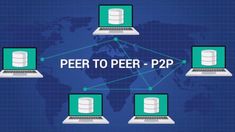
The world of education is constantly evolving, and so is the debate around educators’ compensation. While traditional payment structures have focused on governmental systems providing salaries, some educators and institutions have begun exploring alternative financial models. One such idea is peer-to-peer compensation, where educators compensate and support each other financially for their hard work. Is this a viable model? In this article, we examine the benefits and drawbacks of the concept and whether it could work in reality.

Pros of Peer-to-Peer Compensation:

1. Greater Autonomy:

One of the main benefits of peer-to-peer compensation is that it empowers educators to determine their own value and potentially earn more for their skills, knowledge, and experience. When salaries are dictated by bureaucratic systems, exceptional educators may be undervalued or limited in career progression.

2. Recognition of Unique Skills:

Peer-to-peer compensation allows educators to highlight their unique skills and expertise, increasing their earning potential accordingly. For example, teachers who specialize in areas such as special needs education or language acquisition could earn more from colleagues who seek their mentorship or collaboration.

3. Enhanced Collaboration:

In a peer-to-peer compensation system, educators would have a clear incentive to collaborate with one another. This collaboration can lead to improved teaching practices, resource sharing, and overall better educational outcomes for students.

4. Innovation Support:

Educators driven by entrepreneurship can benefit from a peer-to-peer compensation system. They could invest in innovative educational tools or methods developed by colleagues making the education landscape diverse and ever-evolving.

Cons of Peer-to-Peer Compensation:

1. Competitive Environment:

The primary concern with peer-to-peer compensation is that it may inadvertently create unhealthy competition among educators as they strive to maximize revenue instead of focusing on student learning outcomes.

2. Financial Instability:

The unpredictability of income generated through peer-to-peer compensation could lead to financial instability for some educators. This factor may cause teachers to leave the profession or deter new candidates from pursuing a teaching career.

3. Inequities:

There is a risk that peer-to-peer compensation could perpetuate existing inequities within the education system. Educators in affluent areas or with higher levels of achievement may be able to command higher fees, while those in lower socioeconomic areas might suffer financially.

4. Administrative Burden:

A peer-to-peer compensation system would likely require additional administrative resources and procedures to ensure accurate tracking and distribution of payments between educators. This added bureaucratic layer might detract from the time and energy they could spend on teaching.

Conclusion:

The concept of peer-to-peer compensation among educators is intriguing, but it is not a one-size-fits-all solution. It carries several benefits, including increased autonomy and collaboration among teachers. However, there are significant concerns such as potential competition, increased inequity, and additional administrative burdens. To implement such a system effectively, it will be crucial to address these drawbacks and carefully consider how this financial model may impact the education community as a whole. In any case, ensuring that educators receive fair remuneration for their skills and expertise should always remain a high priority.

Free Resources for Fire Prevention Week: Essential Tools for In-Person or Remote Learning

Fire Prevention Week is an opportunity for educators to impart valuable knowledge and skills that can save lives. With in-person, remote, and hybrid learning becoming the new normal, it is important to have resources that cater to every student’s needs. In this article, we’ll explore free resources for Fire Prevention Week that can be utilized in any learning environment.

1. National Fire Protection Association (NFPA) – One of the leading sources of fire safety information and resources, the NFPA offers a comprehensive selection of free materials for Fire Prevention Week. These resources include lesson plans, videos, tip sheets, activities, and more. Visit their website at www.nfpa.org/fpw for access to all these valuable materials.

2. U.S. Fire Administration (USFA) – The USFA plays a crucial role in promoting fire prevention across the nation. Their educational materials cover an array of topics such as smoke alarms, home escape planning, and cooking safety tailored for children and adults alike. Get started by visiting www.usfa.fema.gov/prevention/outreach/.

3. Sparky.org – A fun and engaging website created by the NFPA catered to kids’ interests in fire safety. Sparky.org features interactive games, videos, activities, and printable coloring pages that teach fire prevention essentials to children in an enjoyable way. Visit www.sparky.org to access these kid-friendly resources.

4. Safe Kids Worldwide – This global organization focuses on preventing injuries in children from various hazards like fires or burns. They offer a wide range of educational materials and tools aimed at teaching fire safety skills to children of different age groups. Check out their website at www.safekids.org/fire for everything you need.

5. National Institutes of Health (NIH) – The NIH provides a wealth of information on various health topics including fire safety and prevention education. The “We Can! Prevent Fires” program offers easy-to-understand fire and burn prevention materials specifically designed for children. Access these resources at www.nih.gov/wecanpreventfires.

6. YouTube – Many fire departments and safety organizations have created videos that can be easily accessed through YouTube for free. These videos cover topics such as fire escape planning, fire extinguisher use, cooking safety, and smoke alarm maintenance. A simple keyword search for “fire prevention week videos” will yield an ample selection of educational content.

The above resources are just some of the many that are available and easily accessible to educators planning Fire Prevention Week activities for in-person or remote learning settings. Take advantage of these free materials and help your students learn essential skills that could save their lives and the lives of those around them.

Rally Your Class to Recycle With Our Free Recycle Bingo Game

Are you ready to inspire your students and make learning about recycling fun and engaging? Introducing our Free Recycle Bingo Game, an interactive and educational activity that encourages a spirit of healthy competition while promoting waste reduction and recycling habits. This game is suitable for various age groups and can easily be adapted to different learning levels.

Recycling is one of the vital steps towards creating a sustainable environment, avoiding pollution, conserving natural resources, and reducing greenhouse gas emissions. As future stewards of the planet, children must develop solid habits for waste management and environmental responsibility. The right educational tools can help spark that enthusiasm in our students.

The Free Recycle Bingo Game is designed to challenge students to actively seek out recyclable items both at school and home. As participants collect various recyclable materials such as paper, plastic, glass, or aluminum cans, their understanding of the importance of recycling will grow while they have a blast playing the game.

To play Recycle Bingo, simply download and print our free bingo cards which include facts about recycling alongside images representing different materials. Start by discussing the facts with your class, highlighting essential recycling information to reinforce the concepts. Next, distribute one bingo card per student and designate a responsible person to be the “caller.”

Set up bins or boxes around the classroom, each assigned for a specific type of recyclable material. When ready to begin playing, have your students walk around the room depositing their recyclables in the correct bins as they mark corresponding squares off their card. To make it extra fun, consider establishing prize tiers for students who complete lines or stamps on their bingo cards first.

The Free Recycle Bingo Game offers your students an enjoyable way of becoming environmentally conscious citizens while reinforcing good recycling habits. Encourage teamwork by forming small groups that work together or alter gameplay for older pupils with challenging questions about types of waste or materials. The possibilities are endless!

Remember, education is key when it comes to promoting sustainable living practices. Rally your class, dive into the free Recycle Bingo Game, and watch your students learn and grow as they contribute to a greener planet. A fun and wholesome game experience awaits!

A Teacher’s Guide to Working With Paraprofessionals

Introduction:

In today’s diverse educational landscape, paraprofessionals play a crucial role in ensuring that students with disabilities receive the support and accommodations necessary for success. Paraprofessionals, often referred to as teacher aides or assistants, work closely with general and special education teachers to assist in classroom management and implementation of individualized educational plans (IEPs). As a teacher, you may find yourself working alongside a paraprofessional in your classroom. Here’s a guide on how to create effective collaboration to benefit your students.

1. Establish Clear Expectations:

To build strong working relationships with paraprofessionals, it’s essential to establish clear expectations from the outset. Begin by holding an initial meeting to discuss roles and responsibilities. Outline the daily schedule, provide training materials, clarify communication methods, and outline any specific tasks that need attention. This will help promote efficiency and recognize the unique skills each professional brings to the table.

2. Develop Open Communication:

Open communication is critical for ensuring smooth collaboration between teachers and paraprofessionals. Foster open communication channels through regular meetings, email updates, and collaborative planning sessions. These opportunities allow both parties to share insights on student progress, suggest new ideas, and address any concerns.

3. Provide Professional Development Opportunities:

Paraprofessionals bring diverse skills and competencies to the classroom setting. To maximize their impact on student learning, provide access to ongoing professional development opportunities. Encourage paraprofessionals to attend workshops, conferences, or take additional courses relevant to their work in the classroom. A supportive learning environment empowers paraprofessionals to grow professionally while enhancing their skills.

4. Promote Collaborative Planning:

Successful implementation of IEPs requires teamwork among all stakeholders involved in a student’s education journey. Encourage collaborative planning that includes both general and special education teachers as well as paraprofessionals to ensure everyone is aligned in executing effective and engaging instruction. Joint planning sessions can help identify potential challenges, clarify responsibilities, and refine instructional strategies.

5. Foster Respect and Appreciation:

Paraprofessionals contribute immensely to creating inclusive classrooms and supporting students with diverse needs. Recognizing their efforts and contributions goes a long way in fostering a positive work environment. Regularly express your appreciation for their hard work, creativity, and dedication to students.

6. Monitor Progress and Adjust:

Collaboration between teachers and paraprofessionals is an ongoing process that requires monitoring and adjusting as needed. Continuously assess the effectiveness of your working relationship, address concerns, make adjustments when necessary, and be open to refining the partnership based on new information or changing needs.

Conclusion:

By implementing these strategies, you can forge strong working relationships with paraprofessionals in your classroom that ultimately benefit the students you both serve. Effective collaboration between teachers and paraprofessionals provides the foundation for successful inclusive education experiences for all learners. Remember to communicate openly, appreciate their contributions, foster professional growth opportunities, and continuously refine your working relationship to promote student success.

I Tried Allbirds Shoes, and Here’s How They Held Up In the Classroom

As a teacher, I was on the hunt for a pair of shoes that could keep up with my busy days. I needed something comfortable, durable, and presentable; after researching and comparing various brands, I decided to test out Allbirds shoes in the classroom. So, was this woolen miracle shoe up to the task? Here’s my experience.

**Comfort: A Teacher’s Best Friend**

One of the main reasons I turned to Allbirds was their reputation for comfort. The soft merino wool upper, breathable fabric, and cushioned sole were exactly what I needed to survive the day on my feet. From endless pacing while teaching to supervising extracurricular activities, Allbirds supported me every step of the way.

The moisture-wicking capabilities and odor resistance of the Merino wool were lifesavers during those hot summer days and kept my feet feeling fresh throughout the school year.

**Durability: Up for The Challenge**

Teaching isn’t always an easy job – long hours on my feet and running around requires shoes that don’t fall apart easily. Thankfully, Allbirds proved their resilience in the face of heavy usage. The light soles remained grippy even after months of wear, and the materials survived spontaneous playground duty with ease.

Yes, there was an occasional scuff or loose thread along the way, but overall they held up impressively well considering their vigorous daily use. Plus, they are easy to clean – just toss them in a gentle wash cycle (removing insoles first) – and they’ll be as good as new!

**Style & Presentability: Professional Yet Stylish**

Maintaining a professional appearance is critical as a teacher, so my shoes couldn’t look overly casual or worn out. The sleek minimalist design of Allbirds made it possible to combine comfort with style effortlessly.

Considering the wide variety of available colors, I chose a neutral shade that would easily blend with my teaching wardrobe. The silhouette remained sophisticated enough for meetings with parents and administrators, while still looking stylish and modern.

**Conclusion: Allbirds – A Teacher’s Dream Shoe**

It’s not always easy to find that perfect balance between comfort, durability, and style when it comes to teaching footwear. However, Allbirds managed to hit all the right marks. They accompanied me throughout the school year, offering cloud-like comfort during long hours on my feet while maintaining presentability and durability.

If you’re a teacher searching for a versatile and comfortable pair of shoes fit for the classroom, look no further than Allbirds. These shoes won’t disappoint you in supporting you through your daily challenges in school.